WhisperForce TDC487S - Ventilateur Lasko - Notice d'utilisation et mode d'emploi gratuit
Retrouvez gratuitement la notice de l'appareil WhisperForce TDC487S Lasko au format PDF.


| Type de produit | Ventilateur sur pied |
| Marque | Lasko |
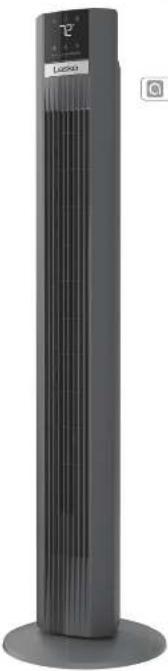
| Modèle | WhisperForce TDC487S |
| Dimensions (H x L x P) | 96.5 x 30.5 x 30.5 cm |
| Poids | 5.4 kg |
| Alimentation | 120 V, 60 Hz |
| Puissance | 45 W |
| Nombre de vitesses | 3 |
| Oscillation | Oui, 90° |
| Minuterie | 1 à 7 heures |
| Télécommande | Oui, incluse |
| Fonction silence | Oui, mode WhisperForce |
| Entretien et nettoyage | Nettoyer avec un chiffon doux et sec. Ne pas immerger dans l'eau. |
| Sécurité | Base stable, arrêt automatique en cas de basculement |
| Pièces détachées et réparabilité | Disponibles auprès du fabricant. Réparation par un professionnel recommandée. |
| Garantie | 1 an |
| Couleur | Noir |
| Usage | Intérieur uniquement |
FOIRE AUX QUESTIONS - WhisperForce TDC487S Lasko
Questions des utilisateurs sur WhisperForce TDC487S Lasko
0 question sur cet appareil. Repondez a celles que vous connaissez ou posez la votre.
Poser une nouvelle question sur cet appareil
Téléchargez la notice de votre Ventilateur au format PDF gratuitement ! Retrouvez votre notice WhisperForce TDC487S - Lasko et reprennez votre appareil électronique en main. Sur cette page sont publiés tous les documents nécessaires à l'utilisation de votre appareil WhisperForce TDC487S de la marque Lasko.
MODE D'EMPLOI WhisperForce TDC487S Lasko
ADVERTENCIA
PARA REDUCIR EL RIESGO DE INCENDIOS, DESCARGAS ELÉCTRICAS SIEMPRE SIGA LAS SIGUIENTES INSTRUCCIONES Y ADVERTENCIAS:
Lasko
48" DC Smart Tower Fan with Remote Control Instruction Manual
MANTENIMIENTO
- Desconecto siempre al cable antes de mover, reparar o limpiar el equipo.
- Nunca coloque el ventilador dentro del agua o cerca del agua.
- Para quitar más fácilmente la pelusa y suciedad acumulada dentro del ventilador, use una aspiradora con espillo.
• Limpie la estructura del ventilador solo con paños suaves.
- Nunca use alcohol o solventes como gasolina, benoeno, diluyente de pintura u otros limpiadores abrasivos.
CONSEJOS PARA SOLUCIONAR PROBLEMAS
Si el ventilador no funciones, consulte a continuación una lista de posibles causas y sus soluciones:
- Intente apagar el ventilador y desenchularlo de la loma de corriente. Deje que el ventilador reposo durante 10-15 minutos o intente enchutarlo de nuevo.
- Cuando enchufe el ventilador, asegúrese de que este enchufado directamente a una tema de corriente que funcione.
¿El control remoto no funciona? Asagúrosa de que está utilizando balerías nuevas y que están instaladas correctamente. Si encuentra que esto todavía no funciona, consulte este lutorial: https://yotu.be/NjcbYIDgnAk.
ALMACENAMIENTO: Guarde el ventilador, junto con estas instrucciones, en su caja original y en un lugar fresco y seco. LUBRICACIÓN: El motor está permanentemente lubricado. No se requiera mantenimiento.
DISPOSICIÓN: Los materiales de embalaje corrugados son reciclables. Para una eliminación ambientalmente responsable de este producto, póngase en contacto con el provandar de servicios de gestión de desechos de su localidad o visite www.1800recycling.coma.
LASKO PRODUCTS, LLC. GARANTÍA LIMITADA (VÁLIDA SOLO EN LOS ESTADOS UNIDOS Y CANADÁ)
Alcance de la garantía: Este producto tiene garantía por defectos de fabricación o de materiales.
Duración de la garantía: Esta garantía se aplica solo al comprador original del producto y tiene una duración de dos (2) anos desde la fecha de compra original o hasta que al comprador original venda o transfera el producto, lo que ocursa primero.
Acionar de Lasko: Durante el periodo de garantía, Lasko reparará a sustitura, a su entera discreción, cualquier pieza que resulta deteriora o sustitura todo el producto por un modo igual o de características silentores. Para todos los racíamos de garantía, el producto debe ser devuelte a Lasko Producte, LLC, con los gastos pagados por el cientre, junto con la prueba de compra y dentro del periodo de la garantía. Conáctese con el departamento de atención el cliente de Lasko para obtener una autorización de devolución. No devuelte productos sin dicha autorización puasto que no se procesará la garantía si así la hiciera.
Exenciones de la garantía: Esta garantía no aplica si el producto subrió danos o fallas a causa de un accidento, manipulación o usa inadocuados, daños de transporte, avuso, mal manrejo, reparaciones no autorizadas que se hicieran o se mientrasan hacer. Esta garantía no cubre los gastos de envío de devolución de los productos a Lasko para su reparación o sustitución. Lasko pagará los gastos de envío desde sus instalaciones. Luego de haber reparado o sustituido el producto.
Todas y cada una de las garantías, expressas o implicales (incuyendo, sin limitación, cualquier garantía implicita de comercialización), llenen una duración de dos años desde la fecha de compra original o hasta que el compredior original vende a transfere el producto, lo que ocura primero. En ningún caso, Lasaka será responsable bajo ninguna garantía expresa o implicita de ¡y danos incidentales y consecuentes por cualquier causa y (i) la sustitución o dispersión de cualquier fusible, disyuntor o receptor de la casa. Sin perúdio de cualquier disposición contreras, la responsabilidad de Lasaka, bajo ninguna garantía expresa o implicita, execuera el precio de compra del producto. Cuquialer responsabilidad terminará al vencer el período de garantía.
Algunos estados y condadas no permiten limitar la duración de una garantía implícita, ni excluir o limitar los danos incidentales a consecuentes, por lo que estas exclusiones o limitaciones no serían válidas. Esta garantía le otorga a usted derechos legales específicos. También puede tener otros darramos que varían de un estado o condado a otro.
Sa requiere un comprobante de compra entre de que se acepte un reclamo da garantía.
SERVICIO AL CLIENTE:
E-mail: producthelp@lassco.com Site web: www.lassco.com
Nuestro equipo de atencion al cliente esta disponible para brindzte ayuda con el producto y respondar preguntas de mantenimiento y repuestos. Chates con roctice en www.iseko.com de lunes a viernes de 8am a 9pm EST(Valida solo en EE, UU, Y Canadá). Tenga el número de modelo a mano, así como el tipo y estilo de dispositivo. Encontrará este información en la parte Inferior del producto.
Departamento de Atención al Cliente,
120 LHSOH Ave., Was: Chester. PA TEODS
[No envle productos a este dirección]
NEW 8/24 12 TDC487SES

- Efficient and enhanced support - Future product updates
Have a Question? Need a Part?
Chat with us at www.anko.com Monday-Friday 8am - 5pm E9T (Valid in U.S. and Canada only)
READ AND SAVE THESE INSTRUCTIONS
Read carefully before attempting to assemble, install, operate or maintain the product described. Protect yourself and others by observing all safety information. Failure to comply with instructions could result in personal injury and/or property damage!
NEW 8/24 1 TDC487SES

READ ALL INSTRUCTIONS BEFORE USING THIS FAN.
WARNING
IMPORTANT SAFETY INSTRUCTIONS
When using electrical appliances, these instructions and warnings should always be
followed to reduce the risk of fire, electrical shock and injury to persons:
TO REDUCE THE RISK OF FIRE, ELECTRICAL SHOCK OR PERSONAL INJURY, ALWAYS FOLLOW
THESE IMPORTANT SAFETY INSTRUCTIONS AND WARNINGS:

Do not use this Fan to ventilate areas where flammable liquids or vapors are used, stored or are present, including paints, gasoline,
varnishes, floor refinishing products or solvents. ALWAYS read and follow all warnings and instructions on the containers (for these products).

Always be sure the plug fills lightly into the outlet. When plugs fit loosely into outlets, they may slip partially out of the outlet and create a poor
connection. This may cause outlets to overheat and create a potential fire hazard. Outlets in this condition should be replaced

Always unplug the power cord when servicing, cleaning or moving the Fan. Do not use the ON/OFF switch as the sole means of disconnecting
power. Never leave children unattended when the Fan is on or plugged in. Always turn off and unplug the

I'll own the power source for the Fan is 120V AC. Do not plug the Fan into 240V or other power source.

The Blue Plug™ on your Leako Fan is a safety feature. It contains a non-replacable safety device (fluse) that should not be removed or tampered
with. To reduce the risk of fire, electric shock and personal injury, do not attempt to remove, replace, repair or lamper with the originally supplied
plug. If the Fan has stopped functioning, it may be due to the safety device incorporated in this plug.

This fan has a polarized plug (one blade is wider than the other). This plug is designed to fit into the outlet only one way. Match the wide blade
to wide slot in outlet and fully insert. Do not attempt to bypass or defeat this safety feature. If the plug does not fit in the outlet, consult a qualified

electrician. The outlet may need to be replaced.
WARNING: To reduce the risk of life, electric shock, 3° injury to persons, co-hat loss replacement parts that have not been recommended by the manufacturer (e.g. cards made at home, using a 3D printer).
CAUTION
- Avoid the use of extension cords, power strips, power taps, outlet style air fresheners or other cord connected device, as these devices may overheat and cause a fire hazard.
• Do not operate any fan with a damaged cord or plug. Discard fan or return to an authorized service facility for examination
and/or repair.
• Do not route power cord under rugs, carpets, runners or furniture. This may damage the cord or cause it to overheat creating
a fi re hazard.
- Always place the fan on a stable, flat, level surface while in operation to prevent the fan from overturning.
• Never insert or allow fingers or objects to enter grill openings while fan is in operation or injury and/or damage to the fan may occur
• Do not block cover or obstruct air flow to or from the fan while in operation.
• Do not run cord under carpeting. Do not cover cord with throw rugs, runners, or similar coverings. Do not route cord under furniture
or appliances. Arrange cord away from traffic area and where it will not be tripped over.
- Never use a single extension card to operate more than one fan or other
- Do not use this fan if it has been damaged or is not functioning properly.
- Remote controls for other appliances or electronic equipment can sometimes interfere with the operation of this fan. If this occurs, move the fan to another location.
- Keep fan remote control until away from chairs and your bed where it may be sat or laid upon and inadvertently turn on the fan.
• THIS FAN DOES NOT MEET THE REQUIREMENTS OF NEC ARTICLE 547-7 (2008). This fan is not suitable for use in agricultural
facilities including areas where livestock, poultry or other animals are confined. Please refer to national electric code (NEC) Article 547-7
(2008), or applicable state or local codes or standards relating to electrical requirements for agricultural buildings.
• THIS FAN DOES NOT MEET THE REQUIREMENTS OF NEC ARTICLE 500 (2008). This fan is not suitable for use in hazardous
locations. Please refer to national electric code (NEC) article 500 or applicable state or local codes or standards relating to electrical
requirements for hazardous locations.
Modal TDC487S
Laseko Products, LLC
820 Lincoln Avenue
West Chester, PA 19300
www.isake.com
This device complies with Part 16 of the FCC Rules. Operation is subject to the following two conditions: (1) This device may not cause harmful interference, and
(2) this device must accept any interference received, including interference that may cause undesired operation. The user is cautioned that changes and modifications made to the agent without the amount of maintenance could ask the users' authority to operate this equipment.
NOTE: This semi-closed box based sent feed and to remote with the limits for Class B limited choice, current in cost 15 of the FCO Rules. Those limits are
NOTE: The equipment has been removed and found to comply with the same for all of the original control portion of part to be the first dose. These units are described in provide reasonable protection and harmful interference in a residential institution. This instrument operates once and can radiate radio
frequency energy and, if not installed and used in accordance with the instructions, may cause harmful interference to radio or television reception, which can be
determined by turning the equipment off and on, the user is encouraged to try to correct the interference by one or more of the following measures:
- Виротені от релосіні (и ресивого жілень).
- Increase the separation between the equipment and the receiver
- Current the equivalent input can be (that an a circuit difference from that in which the receiver is connected
- Consult the desks or an experienced radio-TV technician for help
Comandos de voz más comunes
COMANDOS DE VOZ DE GOOGLE VOICE:
• HEY GOOGLE, TURN MY TOWER FAN ON OR OFF (OYE, GOOGLE, APAGA/ENCIENDE EL VENTILADOR).
• HEY GOOGLE, SET TOWER FAN SPEED TO LOW (OYE, GOOGLE, PON LA VELOCIDAD DEL VENTILADOR AL MÍNIMO).
• HEY GOOGLE, TURN ON/OFF OSCILLATION FOR TOWER FAN
(OYE, GOOGLE, APAGA/ENCIENDE LA OSCILACIÓN DEL VENTILADOR DE TORRE).
COMANDOS DE VOZ DE ALEXA:
• HEY ALEXA. TURN MY TOWER FAN ON OR OFF (ALEXA, ENCIENDE/APAGA EL VENTILADOR).
• HEY ALEXA, SET TOWER FAN SPEED TO LOW (ALEXA, PON LA VELOCIDAD DEL VENTILADOR AL MÍNIMO).
• HEY ALEXA, TURN ON/OFF OSCILLATION FOR TOWER FAN
(ALEXA, APAGA/ENCIENDE LA OSCILACIÓN DEL VENTILADOR DE TORRE).

Resolución de problemas:
Descarga de la aplicación
¿No encuentra la aplicación?
- Busque Aria for Home en la tienda de aplicaciones. Com-
patibilidad con el sistema operativo: Android 4.4 o superior.
iOs 10.0 o superior
Creación de cuenta
No recibi el correo electrónico.
- Verifi que la carpeta de correo no deseado.
- Si no encuentra el correo allí, una otra cuarto de
correo, si viene.
- Oligque acceso a la aplicación para acceder a su Blue-
tooth, ubicación y almacenamiento.
- Esta configuración solo se utiliza para que el producto
funcione tal y como fue diseñado.
Conexión al wifi
No encuentro mi red de 2,4 GHz o 2G.
Si tu router sólo aparece con un nombre, conéctate a él. Esto
suete signir car que bienes un router de bixcle banda que puede conectar el dispositivo a la banda adecuada.
Modo de emparejamiento: El indicador de wifi no parpadea.
Presione y mantenga presionado el bolón de encendido
durante tres segundos o hasta que el indicador de wifi
comience a parpadear
El indicador de wifi parpadea con dos destellos rápidos y
una pausa entre medio
Esto signifi ca que el dispositivo ya no detecta su red o que
estada previamente conectado a bira roja. Intente acercar el dispositivo al muter. Si se co resuplus el problema, rotatabozca
dispositivo al router. Si no se resuende el problema, testablezca el diapostivo y vuelva a emparejarto con su rad según las
instrucciones de la página 4.
Agregar dispositivo
- Si el dispositivo no aparece en la lista de dispositivos disponibles para obtener credenciales en la pantalla "Add Device" (Agregar dispositivo), revise que el dispositivo se haya restablecido y que el indicador de vifi esté parpadeando. Si pudo confi rmar que el dispositivo se restableció y que está en modo de credenciales, intente agregar el dispositivo de forma manual; para ello, seleccione el dispositivo en la sección "Add Manually" (Agregar de forma manual).
- Si el indicador de wifi sigue parpadeando luego de que intentó llevar adelante el proceso de emparejamiento más de tres veces, podría haber un problema con el cortafuegos del router o con la confi guración de seguridad. Contactese con su proceder de internet para obtener información detallada sobre cómo ajustar su confi guración de red para productos conectados.
Otros problemas
Anulación de las funciones inteligentes (lleve a cabo alguno de los pasos que aparecen a continuación)
- Presione el botón deseado en el producto para anular todas las confi guraciones remolas.
- Reinicie el dispositivo para olvidar los dispositivos conectados (retablecimiento de fábrica: presione y mantenga presonado el botón de encendido durante 3 segundos).
- Desenchute la unidad de la pared para evitar el acceso remoto inteligente.
- Escanee el código QR ubicado en la página 1 para ir a la versión más reciente del manual de instrucciones y de la página de resolución de problemas.
- También encontrará los consejos y resoluciones de problemas más recientes en el centro de ayuda de la aplicación Aria que se encuentra en la página "ME".
Cómo usar el control remoto

CONTROL REMOTO:
• Conque dos adds AAA (no incidas)
- No mezio pilas nuevas con usadas. No mezio pilas alcinas con plas
salvates (carbono-zinc) o plas recognibles [miquel-cadinia].
- No desache las plas en el fuego. Las plas podrían expistar o filter.
- Siempre contrran el tamaño y gracia de plas correcta más subestando para el uso previsto.
- Al carbier pilas, reemparse todas las utilizadas para el depenivo a la vec
- Limplo los contactos de las plas y de los dispositivos antes de colocarias.
- Vortique que los plos (+ y -) de las pilas están colocaciones correctamente.
- Oste as plas de os equipos que no se utilizarse durante
periodos prolongados. - Oulle las plas gastadas apenas dejen de funcionar.
Emparejamiento con la app QNQ™ y controles inteligentes
Descargue la aplicación Arla™ for Home
Para descargar la aplicación, escenen el código OF a busque "Arla for Home" en la App Store de Apple o en la Google Play Store.
Luego de desorgar la aplicación, este una cuerta. Oreguste permies a la aplicación para que ofiles en Bluetooth, otherwise y smueramiento. Esto es necesario para que fundiera correctamente.
Control de parlante inteligente
Confi gure el TDC4879 con el parlante inteligente.
En los corti funciones de la aplicación, prescrue los lucre de
Asseñó o de Gorgañó Asesorant y sigla las indicaciones para activar los
funciones de comondos de voz.
Para atencion la lista más reactido de los commandos, verifi que el centro de ayuda de la aplicación que aparece en a ségria de ajuste del dispositivo. También encontrará el manual de instrucciones más reutería y una guía de ajuste rapide con información adicionales sobre el dispositivo
Anulación de las funciones inteligentes (lleve a cabo alguno de los pasos que aparecen a continuación)
- Presione el bolón desado en el producto para anular todas las configuraciones remotas.
- Reinicie el dispositivo para clívidar los dispositivos conectados (restablecimiento de fábrica: presione y mantenga presionado el botón de encendido durante 3 segundos).
- Desenchufe la unidad de la pared para evitar el acceso remoto inteligente,
Emparejamiento sencillo
Verifi que que el ventilador esté encendido antes de avanzar.
① Presione y mantenga presionado el baron de encordica durano 3 segundos para ingresar en el modo de credondiales. El indicador de will comenzará a percollear
② Abra la aplicación Ara lo l'ome y presione "Add Device" o el como "+ en la secuina superior dancha.
③ Señoróre a ventilador de la re TDC4878 y siga la Instrucciones dentro de la aplicación para completar el encanciamiento.
El indicador MÍ-Fí se luminada, cuando este conectado.
Rosa: Desiccios las conelaciones actualizaciones y mejoras, la solución y a
Thomaz evolvadora para cumplir comas necesidades del consumidor.
Resolución de problemas
Estanse el todo que QR ubicado en la pagina 1 para ir a la versión más reciente del manual de instrucciones y de la página de resolución de problemas.
Tambiet se continuió los recajlos y realizaciones de problemas más recientes en el centro de ayuda de la aplicación Arla que se encuentra en la página "ME".
Parts Included
1

2

3
C
Body
6
② Remote Control
6
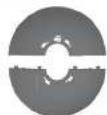
Support Base A
④
Support Base B
Assembly
Base A


sc B
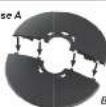
- Align the slots on Base A with tabs on Base B. Snap Together.

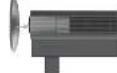
- Lay the unit on a sturdy table for easier base assembly. Align the locator pin and hooks on the Body of unit with the corresponding slots on the Base.

- Hold the Body in place while turning the Support Base Assembly clock-wise until it no longer turns and locks in place.
How to Use your Tower Fan
Controls
Power/WI-Fl - Press to Turn Fan ON/OFF.
ch
Wi-Fi - To enter pairing mode, press and hold the power button for 3 seconds. The Wi-Fi indicator (under numerical display) will begin to blink. Refer to app pairing and smart control section on page 4.
C
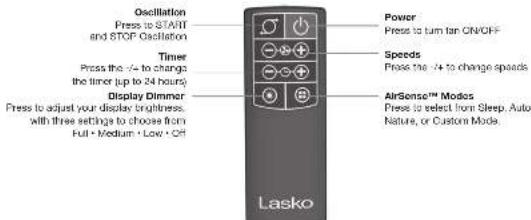
* Oscillation - Press to START and STOP Oscillation.
T
Timer - Set timer up to 24 hours. First two hours will increase in 30-minute increments. Continue pressing the button until desired time setting is reached.
①
Fan Speeds - Set speed from 1-12. Continue pressing the button until desired speed is reached. Remote has (+) (-) button which will allow you to increase and decrease speed.
①
AirSense™ Modes- You can choose between Sleep, Auto, Nature, Custom Mode.
C
Display Dimmer - Press to dim your display.
Choose between three brightness settings
Full · mod · low · off

Display
Lasko AirSense™ - Using sensor technology integrated with smart AI capabilities, AirSense tracks your patterns and preferences to create the ideal temperature-controlled environment.
Nature Mode - The fan replicates natural wind patterns by adjusting its speed randomly.
Sleep Mode - The display will shut off and the speed will gradually decrease as you sleep.
(A) Auto Mode - Fan speed adapts to the ambient air temperature of the room.
Custom Mode - Choose your desired speed, oscillation, and display settings.
Timer - The timer icon will illuminate when it's active.
WI-FI - Will flash in pairing mode. When connected light will stay steady on.
- Numerical Display - The two digits will display the ambient temperature, fan speed, and timer settings.
How to Use your Remote Control
REMOTE CONTROL:
• local two AAA batteries [not included].
- Do not mix oil and new batteries. Do not mix a 10x line, standard (carbon-rich)
or rechargeable (inchel-cast mi um) batteries
• On not disposes of batteries in fire. Batteries may episode or leak.
- Always purchase the correct size and grade of battery most suitable
for the interested Des.
• Explanee all batches of a set at the same time.
- Clean the ballers contracts and also those of the device price
to battery installation.
- Ensure the batteries are installed correctly with regards to points (- and -1).
- Remove batteries from equipment that is not in use for so
extended period of time.
• Demote use battery promptly
ORIO™ App Pairing and Smart Controls
Download the Aria for Home App
To Download the App, scan the QR code or search "Arts for Home" in the Apple App or Google Play Store.
Once the App is downloaded, creates an account. Give the App permission to use your Bluetooth, location, and storage. It needs this to function correctly.
Smart Speaker Control
Set Up Your TDC4875 with your Smart Speaker.
Within the app settings. Press Novate or Googel Assistant Icon and follow prompts to activate various command functions
For the latest list of commands, check the App help center located at the settings page of your device. You will also find the latest instruction manual and quick setup guide with additional information about your device.
Easy Pairing
Make sure that the Ian is ON before proceeding.
① Press and hand the power in turn for 3 seconds to enter undertaking mode. The M-H-Linkator will begin to blink.
② Open the Area for home Apo & tap the "Add Devices" or "+" Icon in the top right corner.
③ Be set TDC487S lower fan and follow the In-app instructions to complete pairing.
W-F indicator will turn sold when connected.
Note: Due to ongoing updates and improvements, the app and Interface will evolve to meet consumer needs.
Troubleshooting
Scan the OR code located on Page 1 to take you to the latest user manual and troubleshooting page.
You can also find the latest tips and troubleshooting help in the Asia/Asia help center located on the "Me" page.
Overriding Smart Functions (Perform one of the steps below)
- Press desired button on the product to override any smart remote setting.
- Reset the device to forget any connected devices (Factory Reset - Press and Hold Power Button for 3 seconds.)
- Unplug the unit from the wall to prevent smart remote access.
Partes Incluidas
1

2

3


Cuerpo

∴ m = 3/11

Base de Soporte A

Base de Soporte B
Ensamblaje
Base A

Base B
- Ainee las ranuras de la base A con las englistas de la base B. Encájelas.


- Coloque la unidad en una superficie realista para un montaje más sencillo de la base. Aince el pasador de ubicación y los ganchos en el cuarto de la unidad con las ranuras correspondientes de la base.

- Sostanga la Cuerpo en su lugar mientras gra la Montura de la Base de Apoyo en el sentido de las agujas del rejo, hasta que deje de girar y encaja en su lugar.
Cómo usar el ventilador de torre
Controles
Encendido - Presione este bolón para spagar o croenador el vantilador.
WI-FI - TPara Ingresar en al modo de emparejamiento, presione y sastenga el botón durante 3 segundos. El indicador de WI-FI (debajo de la pantalla numéricaj comenzará a serpedesir. Consulta la sección de emparejamiento de aplicaciones y controles inteligentes en la página 4.
Oscillación - Presione START para iniciar la oscilación y STOP para detenerla.
Temporizador - Ajuste el temporizador hasta 24 horas. Las dos primeras horas aumentarán en incrementos de 30 minutos. Siga presionando el botón hasta alcanzar el ajuste de temperatura desgojo.
Velocidades del ventilador - Ajuste la velocidad de 1 a 12. Siga prosionando el botón hasta elcenzer al ajuste de velocked descado. El control remoto tiene los botres (I) (-) que le permitirá aumentar o reducir la velocidad.
Modos AirSense™- Elja entre los
modos Nacho, Automático, Naturaleza y
Personalizado.
Regulador de pantalla - Presione para regular el brillo de la pantalla. Elija entre las tres opciones de brillo. Máximo • Medio • Bajo • Aposado
Pantalla
AirSense™ de Lasko - on tecnología de sensor integrada con funciones de IA, AirSense registra sus patrones y preferencias para crear un ambiente idea con la temperatura controlada.
Modo Naturaleza - El ventilador ajusta su velocidad de forma alestoria para replicar los patrones del viento naturales.
Modo Noche - La pantalla se apaga y la velocidad se recupe oraguamente mientras duerme.
(A) Modo Automático - La velocidad del ventilador se adapta a la temperatura de aire ambiente de la habitación.
Modo Personalizado - Elja los ajustos descadas de velocidad, oecilación y pantalla.
Temporizador - El cono del temporizador se
luminará cuando está activo.
Wi-Fi - Parpadesará en el modo de emcarejamiento. Cuando este conectado, la luz permanacará encendida.
- Pantalla numérica - Los dos dígitos mostrarán la temperatura ambiente, la velocidad del ventilador y los ajustos del torportador.

LEA TODAS LAS INSTRUCCIONES ANTES DE USAR ESTE VENTILADOR.
ADVERTENCIA
INSTRUCCIONES IMPORTANTES DE SEGURIDAD
Cuando use este ventilador, se deben de seguir las siguientes advertencias y precauciones para reducir el riesgo de incendio, descargas eléctricas y lesiones:
PARA REDUCIR EL RIESGO DE INCENDIOS, DESCARGAS ELÉCTRICAS SIEMPRE SIGA
LAS SIGUIENTES INSTRUCCIONES Y ADVERTENCIAS:

No use este ventilador para refresher áreas donde se wasn, almacenan o están presentes líquidos o vapores inflamables, incluidos pinturas, gasolina, barnicos. productos de acabado para suclos a solventas. ¡SIEMPRE Iza y siga todas las adveriencias o instrucciones en los envases de estos productos!

Siempre asogúrese de que el enchule se ajuste firmamente en el tomacorriente. Cuando las enchules quedan fijos en los tomacorrientes, pueden salirse parcialmente y crear una mala conexión. Esto puede causar que los tomacorrientes se sobrecalienten y crear un potencial peligro de Incendio. Un electricista calificado ciebe resmalazar los tomacorrientes que están en esta condición.

Siempre desenchule el cable de alimentación antes del mantenimiento, limpieza o traslado del ventilador. No utilice el interruptor de encondición/espagado como único medio para desconocitar la energía. NUNCA deje a los niños dasatandidas cuando al ventilador está encendido o conectado. Siempre opaque y desenchule el ventilador cuando no este utilizando.

Verifique que la fuente de alimentacion del ventilador sea de 120 VAC. No enchute al ventilador a 240 V o otra fuente de alimentacion. El enchute Blue Plug™ es una característica, de seguridad de su ventilador Lasko. Viene con un dispositivo de seguridad (fusible) no remplazable que no se debe guitar ni manipular o modificar. Para reducir el riesgo de incandia, enque elotrico y licón personal, no intiene guitar, reemplazar, reparar, modificar o alterar el enchute original. Si el ventilador dejó de funcionar, puede ser por el dispositivo da seguridad incorporado en este enchute.

Este ventilador tiene un enchufe polarizado (una haja es mas ancha que la otra). Este enchufe esta disenado para encastrar en el tomacorriente de una sola manera. Haga coincidir la hoja amplia con la renera amplia en el tomacorriente e inértelo por completo. No intento pasar por alto o suprimir esta característica de seguridad. Si el enchufe no encaja en el tomacorrienta, consulta a un electricista certificado. Podla ser necesario resemplezar el tomacorriente.
ADVERTENCIA: Para reducir el risqu de inendía, choque electrico o licencia a persona, no case piezas de remplazo que no susen recomendados por el fabricante (por ejemplo, piezas hechas en casa con una impresora 3D).
PRECAUCIÓN
Este el uso de cables de extorsión, enchultos, tomazomientos, ambientadores de enchute u otros dispositivos conectados con cables, ya que estos dispositivos pueden entretadentes y causar un margo de inero de
- No mítico ning un verónica que benga el cable o el enchule daños. Descarte el ventilador o desolvado a un centro de servicio autorizado para su modalán a reparación. - No pase el cable de alimentación debajo de afombras, tapelas, camnos de mesos e muebles. Exo puede darir el cable o causar que se sobrecaliente esando un peligro de inosando.
- Siempre colloque el ventilador en una superficie estable, plans y nivelesa mientras este en funcionamiento, para evitar que el ventilador no ucho.
- Nuncas introduzos o permita que los dechos u objetos entren en las abertura de la rejilla mientras el ventilador estis en funcionamiento, ya que pueden encuent lesiones o dañica al ventilador.
- No bloqueo, cubra ni obstruya el flujo de aire hasta el ventilador o desde 61 mientras ostó en funcionamiento.
- No pase el cicle debajo de las alfombasa. No extra el cabre con tapas, alfombasa de paola o elementos simberes. No coloque el cable debajo de muebles a capostitvas. - Coloque al cable kilos del área de tráfica y donde nado se pueda tropezar.
- Nancos sus a sola cable de extensión para upsetar más de un ventilador u otra dispositivo eléctrico.
- No uso este ventilador si esta danada e no funciona corredamente.
Los controlas remittos: para otros desportivos a equipot electrointros y plazem interne el con la conforme en los motor 94-100% - 50 mm obste, para que al ventilador en otra ubicación.
- No coloque el control remoto del ventilador en silas o camas en donde pacífia sentarse o recostarse y, sin querendo, encender al ventilador.
- ESTE VENTILADOR NO CUMPLE CON LOS REQUISITOS DEL ARTÍCULO 647-7 (2009) DEL NEC. Este ventilador no es adecuado para su uso en instalaciones agrícolas, incluidas las zonas donde se encuentra continuidos el gensada, las avos de comer otros animales. Consulte el Código Eléctrico Nacional (National Electric Code, NEC) Artículo 647-7 (2009), o los códigos e normes estatales o locales aplicables en relación con los requisitos eléctricos para los editios agrícolas.
- ESTE VENTILADOR NO CUMPLE CON LOS REQUISITOS DEL ARTICULO 600 (2008) DEL NEC. Este ventilador no es apto para uso en zonas peligresas. Censulo el artículo 500 del Codejo Eléctrico Nacional (NEC) o las normativas o estándarios estatales o locales en relación con los recursos eléctricos para ubicaciones peligresas. - En el expediente que se ha asiento 16 del Departamento del ECP: La comunicación ante a suja a los sus tenueros amelaciones. 13. Centro dimensional sustina en una
interferencia carline, y (2) esta dispositivo clobe aceptar cualquier interferencia recidida, incluias las interferencias que pueden acionizar un funcionamiento no desado. El usuario clobe fonter en cuenta que los cambios y modifi celones que se hagan al equipo en la aprobación del fabricante pueden anular la subordad del usuario para oparse el equipo.
Model TDC/875
Lasco Modules, LLC
WestClaver, PA 12760
WWW.BEC.COM
NOTA. Esta que se ha sido a la decañada preudaje y los canadado cumplir con los límulos para los clupeónales días de los Ches. El, el descobar a la parte 15 de los requiertos más del Comisión. Fisilario del Comunicaciones (FCP). Estos límios han se a la decañada para o ofor protocolo remunerable contra la inactivación del día en instaladas residenciales. Enz. cuipo porcentaje, una y sujando una energía de medicamentarios y las reas de la decañada, y sus de la decañada y las reas de la decañada, que protocolar interrálico dar es la manaparidad de los erapienales dar el decañada, lo road praseo del armírea de apagyar y anconocen manecional de cuajo. Se beccupar cada o detruejo intenta campele extra inflancrea a agua unión o una várrez de los protocolísticos argentíficos.
- Forderar a realizar la salida de recepción
- Instrumentar la distancia que consiste entre el equipo y el apoyo receptor.
- Conector al equipo a un símbomente en un circulo eléctrico diferido a que esta concentrado al depotiva receptor. - Consultar al concesionario o a un Metric de radio TV experto para recibir ayuda".
Popular voice commands
GOOGLE VOICE COMMANDS:
• HEY GOOGLE, TURN MY TOWER FAN ON/OFF.
• HEY GOOGLE, SET TOWER FAN SPEED TO LOW.
• HEY GOOGLE, TURN ON/OFF OSCILLATION FOR TOWER FAN.
ALEXA VOICE COMMANDS:
• HEY ALEXA, TURN MY TOWER FAN ON/OFF.
• HEY ALEXA, SET TOWER FAN SPEED TO LOW.
- HEY ALEXA, TURN ON/OFF OSCILLATION FOR TOWER FAN.

Troubleshooting
Downloading the App
Can't find the App?
• Search Aris for Home in your App store. OS compatibility. Android 4.4 or higher IOS 10.0 or higher
Creating an Account
I did not receive the email.
- Check your spam or junk folder.
• If it is not there, use an alternative e-mail if you have one. - Make sure to give the app access to Bluetooth, Location,and Storage.
- The settings are only used to ensure the product works as designed.
Connecting to WI-FI
I can't find my 2.4 GHz or 2G network.
If your router only shows up with one name, connect to it. It usually means that you have a dual band router that can connect the device to the proper band.
Pairing Mode, the Wi-Fi Indicator is not blinking.
Press and hold the Power button for three seconds or until the WI-FI indicator starts to blink.
The Wi-Fi indicator is blinking two rapid blinks with a short pause in between
This means that the device is no longer detecting your network or was previously connected to another network. Try bringing your device closer to your router. If this does not address the issue, reset the device and re-pair to your network per instructions on page 4.
Add Device
- If you are not seeing your device pop up on the list of available devices to credential on the Add Device screen, make sure that the device is reset, and that the Wi-Fi indicator is blinking. If you have confirmed that your device is reset and in credentialing mode, try adding the device manually by selecting the device in the "Add Manually section".
- If the Wi-Fi indicator continues to blink after you tried credentialing the unit more than three times, it may be your router firewall and security configuration. Contact your internet provider to get detailed instructions on how to adjust your network settings for connected products.
Other Issues
Overriding Smart Functions (Perform one of the steps below)
- Press desired button on the product to override any smart remote setting.
- Reset the device to forget any connected devices (Factory Reset - Press and Hold Power Button for 3 seconds.)
• Unplug the unit from the wall to prevent smart remote access. - Scan the QR code located on Page 1 to take you to the latest user manual and troubleshooting page.
- You can also find the latest tips and troubleshooting help in the Aria App help center located on the "Me" page.
WARNING
TO REDUCE THE RISK OF FIRE, ELECTRICAL SHOCK OR PERSONAL INJURY, ALWAYS FOLLOW THESE IMPORTANT SAFETY INSTRUCTIONS AND WARNINGS:
Lasko
Ventilador de torre con control
remoto inteligente DC de 48"
Manual de Instrucciones
MAINTENANCE
• Always unplug the cord before moving, servicing or cleaning.
- Never place the fan in or near water.
- To help remove lint and dirt from inside the fan, use a vacuum equipped with a brush attachment.
- Clean the body of the fan with a soft cloth only.
- Never use alcohol or solvents such as gasoline, benzene, paint thinner, or other harsh cleaners.
TROUBLE SHOOTING TIPS
If your Fan fails to operate, see below for a list of probable causes and solutions.
- Try powering the fan off and unplugging it from the wall outlet. Allow the fan to sit for 10-15 minutes and try plugging it in again.
- When plugging the fan in, be sure it is plugged directly into a working outlet.
- Remote not working? Be sure you are using brand new batteries, and they are installed correctly. If you find this is still not working, check out this tutorial: https://youtu.be/NjdbYIDgrAk
STORAGE: Store the fan with these instructions, in the original carton in a cool, dry place.
LUBRICATION: Motor is permanently lubricated. No maintenance is required.
DISPOSITION: Corrugated packaging materials are recyclable. For environmentally responsible disposal of this product, contact your local waste service provider or visit www.1800recycling.com 4 .
LASKO PRODUCTS, LLC LIMITED WARRANTY (VALID IN U.S. AND CANADA ONLY)
What this warranty covers: This product is warranted against defects in workmanship and/or materials.
How long this warranty lasts: This warranty extends only to the original purchaser of the product and lasts for two (2) years from the date of original purchase or until the original purchaser of the product sells or transfers the product, whichever first occurs.
What Lasko will do: During the warranty period, Lasko will, at its sole option, repair or replace any part or parts that prove to be defective or replace the whole product with the same or comparable model. For all warranty claims, the product must be returned to Lasko Products, LLC at customer's expense with proof of purchase within the warranty period. Contact the Lasko customer service department to obtain a Return Authorization ("RA") Do not return products without an RA or the warranty claim will not be processed.
What this warranty does not cover: This warranty does not apply if the product was damaged or failed because of accident, improper handling or operation, shipping damage, abuse, misuse, or unauthorized repairs made or attempted. This warranty does not cover shipping costs for the return of products to Laska for repair or replacement. Laska will pay return shipping charges from Laska following warranty repairs or replacement.
Any and all warranties, expressed or implied (including, without limitation, any implied warranty of merchantability), just two years from the date of original purchase or until the original purchaser of the product sells or transfers the product, whichever first occurs and in no event shall leako's liability under any express or implied warranty include (i) notential or consequential damages from any cause whatsoever, or (ii) replacement or repair of any house fuses, circuit breakers or secretacles. Notwithstanding anything to the contrary, in no event shall leako's liability under any express or implied warranty exceed the purchase price of the product and any such liability shall terminate upon the expiration of
Some states and provinces do not allow limitations on how long an implied warranty lasts, or the exclusion or limitation of incidental or consequential damages, so these exclusions or limitations may not apply to you. This warranty gives you specific legal rights. You may also have other rights which vary from state to state and province to province.
Proof of purchase is required before a warranty claim will be accepted.
CUSTOMER SERVICE:
Email: producthelp@lasko.com. Web: www.lasko.com
Our Customer Service team is available to assist you with product service questions and replacement parts. Chat with us at www.lasko.com Monday-Friday 8am - 9pm EST (Valid in U.S. and Canada only). Please have your model number available, as well as the type and style located on the underside of your product).
Customer Service Dept.
820 Lincoln Ave., West Chester, PA 19380
(Please do not send product to this location)
NEW 8/24 6 TDC487SES


Registre su producto hoy Podrás disfrutar de los siguientes beneficios: - Soporte elíente y avanzado - Actualizaciones aceros del producto en el túur o Escanee con un teléfono inteligente
WHISPERFORCE™ DC TECHNOLOGY
AirSense™


Descargue la aplicación
Aria for Home

Conéctelo con la aplicación Arla para control remoto del ventilador y obtener características avanzadas

Buscar las últimas guías, consejos y soluciones de problemas
Tiene Preguntas? Necesita una Parte? Por favor no regrese el producto a la tenda? Chelsea con manestros en www.lanico.com de lunes a viernes de form a 3pm E9T (Vilida ocho en EE, UI), Y Canadi)
LEA Y GUARDE ESTAS INSTRUCCIONES
La oxidadosamente las instrucciones antes de intentar armar, instular, usar o dar mantenimiento al producto descrito. Protaje a el mismo y a los demás cumpliendo con toda la información de seguides. El no seguir una instrucciones podría resultar en lesiones personales y/o daños a la propiedad. Este Verdorado es sólo para uso re consideral. No está destinado para ser usado en instalaciones comerciales, industinales o agricultura.
NEW 8/24 7 TDC487SES
- LASKO
- MANTENIMIENTO
- CONSEJOS PARA SOLUCIONAR PROBLEMAS
- LASKO PRODUCTS, LLC. GARANTÍA LIMITADA (VÁLIDA SOLO EN LOS ESTADOS UNIDOS Y CANADÁ)
- SERVICIO AL CLIENTE
- READ ALL INSTRUCTIONS BEFORE USING THIS FAN
- WARNING
- IMPORTANT SAFETY INSTRUCTIONS
- CAUTION
- COMANDOS DE VOZ MÁS COMUNES
- COMANDOS DE VOZ DE GOOGLE VOICE
- COMANDOS DE VOZ DE ALEXA
- RESOLUCIÓN DE PROBLEMAS
- DESCARGA DE LA APLICACIÓN
- ¿NO ENCUENTRA LA APLICACIÓN
- CREACIÓN DE CUENTA
- NO RECIBI EL CORREO ELECTRÓNICO
- CONEXIÓN AL WIFI
- NO ENCUENTRO MI RED DE 2,4 GHZ O 2G
- UNA PAUSA ENTRE MEDIO
- AGREGAR DISPOSITIVO
- OTROS PROBLEMAS
- CÓMO USAR EL CONTROL REMOTO
- EMPAREJAMIENTO CON LA APP QNQ™ Y CONTROLES INTELIGENTES
- DESCARGUE LA APLICACIÓN ARLA™ FOR HOME
- CONTROL DE PARLANTE INTELIGENTE
- EMPAREJAMIENTO SENCILLO
- PARTS INCLUDED
- ASSEMBLY
- HOW TO USE YOUR TOWER FAN
- CONTROLS
- DISPLAY
- REMOTE CONTROL
- ORIO™ APP PAIRING AND SMART CONTROLS
- SMART SPEAKER CONTROL
- EASY PAIRING
- TROUBLESHOOTING
- OVERRIDING SMART FUNCTIONS (PERFORM ONE OF THE STEPS BELOW)
- CÓMO USAR EL VENTILADOR DE TORRE
- CONTROLES
- PANTALLA
- LEA TODAS LAS INSTRUCCIONES ANTES DE USAR ESTE VENTILADOR
- ADVERTENCIA
- INSTRUCCIONES IMPORTANTES DE SEGURIDAD
- PRECAUCIÓN
- GOOGLE VOICE COMMANDS
- ALEXA VOICE COMMANDS
- DOWNLOADING THE APP
- CAN'T FIND THE APP
- CREATING AN ACCOUNT
- CONNECTING TO WI-FI
- PAIRING MODE, THE WI-FI INDICATOR IS NOT BLINKING
- ADD DEVICE
- OTHER ISSUES
- MAINTENANCE
- TROUBLE SHOOTING TIPS
- LASKO PRODUCTS, LLC LIMITED WARRANTY (VALID IN U.S. AND CANADA ONLY)
- CUSTOMER SERVICE
- LEA Y GUARDE ESTAS INSTRUCCIONES
Marque : Lasko
Modèle : WhisperForce TDC487S
Catégorie : Ventilateur