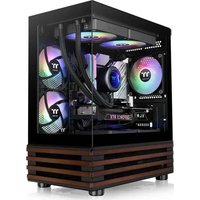
View 170 WS ARGB - Boîtier PC THERMALTAKE - Notice d'utilisation et mode d'emploi gratuit
Retrouvez gratuitement la notice de l'appareil View 170 WS ARGB THERMALTAKE au format PDF.


| Type de produit | Boîtier PC |
| Marque | Thermaltake |
| Modèle | View 170 WS ARGB |
| Format compatible | ATX, Micro-ATX, Mini-ITX |
| Dimensions (L x H x P) | 210 x 440 x 480 mm |
| Poids | 6,0 kg |
| Matériau principal | Acier, verre trempé |
| Éclairage ARGB | Oui, ventilateurs préinstallés |
| Emplacements ventilateurs (avant) | 3 x 120 mm ou 2 x 140 mm |
| Emplacements ventilateurs (arrière) | 1 x 120 mm |
| Emplacements radiateurs | Avant : 360/280 mm, Arrière : 120 mm |
| Baies de stockage | 2 x 3.5", 2 x 2.5" |
| Alimentation | Non incluse, format ATX |
| Prise en charge carte graphique max | 330 mm |
| Prise en charge ventilateur CPU max | 155 mm |
| Connectivité | 2x USB 3.0, 1x USB 2.0, Jack audio |
| Entretien et nettoyage | Nettoyer avec un chiffon doux et sec. Éviter produits abrasifs. |
| Sécurité | Arrêt de l'appareil avant intervention. Tenir hors de portée des enfants. |
| Pièces détachées et réparabilité | Contacter Thermaltake ou revendeur agréé pour pièces. |
FOIRE AUX QUESTIONS - View 170 WS ARGB THERMALTAKE
Questions des utilisateurs sur View 170 WS ARGB THERMALTAKE
0 question sur cet appareil. Repondez a celles que vous connaissez ou posez la votre.
Poser une nouvelle question sur cet appareil
Téléchargez la notice de votre Boîtier PC au format PDF gratuitement ! Retrouvez votre notice View 170 WS ARGB - THERMALTAKE et reprennez votre appareil électronique en main. Sur cette page sont publiés tous les documents nécessaires à l'utilisation de votre appareil View 170 WS ARGB de la marque THERMALTAKE.
MODE D'EMPLOI View 170 WS ARGB THERMALTAKE

thermaltake
© 2025 Thermaltake Technology Co., Ltd. All Rights Reserved. 2025.08
All other registered trademarks belong to their respective companies. www.thermaitake.com
BC Tested To Comply With AEC Expressants
FOR HOME OR OFFICE USE
RoHS
COMPLIANT
UK CAC


thermaltake

View 170 WS ARGB
User's Manual
Benutzerhandbuch
Mode d'emploi
Manual del usuario
Manuale dell'utente
Manual do Utilizador
安裝說明書
用戶手冊ユーザーズマニュアル
Руководство пользователя
kullanıcı elkitabı
(EEE Yönetmeliğine Uygundur)
คุณีอาการไซ์
TT Premium

TT Premium
To continue achieving the corporate mission of delivering the perfect user experience, Thermaltake developed "TT Premium" with the essence of combining supreme quality products with a new logo design. TT Premium is far more than just a guarantee of quality. Behind the name, it represents the passion in DIY, Modding and Thermaltake's desire to be the most innovative brand in the PC hardware market. To satisfy the demand of the high-end PC users, TT Premium follows its core values of Excellent Quality, Unique Design, Diverse Combinations and Boundless Creativity to provide a high performance PC product for every enthusiast. http://ttppremium.com
Tt LCS-Liquid Cooling Support Certification

Tt LCS Certified is a Thermaltake exclusive certification applied to only products that pass the design and hardcore enthusiasts standards that a true LCS chassis should be held to. The Tt LCS certification was created so that we at Thermaltake can designate to all power users which chassis have been tested to be best compatible with extreme liquid cooling configurations to ensure you get the best performance from the best features and fitment.
Join Tt Community To Receive Benefits

Dear Valued Customer,
Thank you for choosing Thermaltake.
As a new user we value your thoughts and opinions and your feedback is important to us. We at Thermaltake would like to use this opportunity to invite you to join our Community Forums. Register today to start enjoying the full benefits of our community.

Benefits of being a member:
- Quick and responsive user support
● Receive help and advice with new builds - Keep up to date with new product releases
- Share your thoughts and builds with the community
- Enter monthly contests and giveaways
Brand official website
http://www.thermaltake.com/
Global Facebook
https://www.facebook.com/Thermaltakelnc
Taiwan Facebook
http://www.facebook.com/ThermaltakeTW
Global community forums
http://community.thermaltake.com
CONTENTS
Chapter 1. Product Introduction
1.0 Specification 01
1.1 Accessory 02
1.2 Dimension & Clearance 03
Chapter 2. Installation Guide
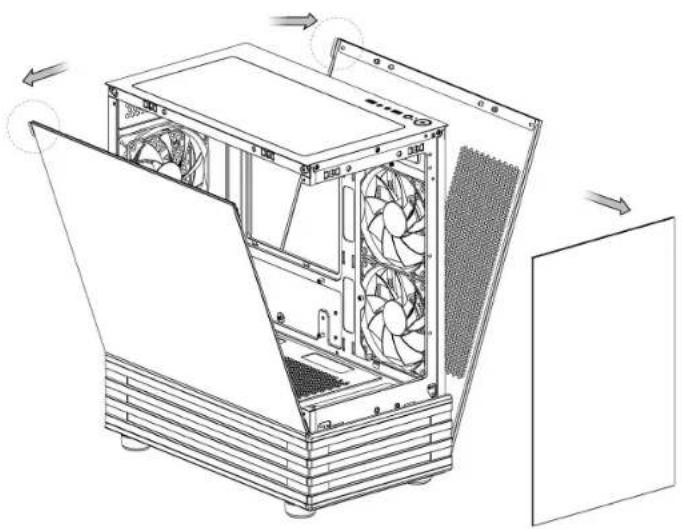
2.0 Remove Components 06
2.1 Power Supply Unit (PSU) Installation 07
2.2 Motherboard Installation 08
2.3 HDD Installation 09
2.4 VGA Installation 10
2.5 Air Cooling Installation 11
2.6 AIO Liquid Cooling Installation 12
2.7 I/O Connection 13
2.8 ARGB Control Instruction 14
2.9 Remove Filters 15
View 170 WS ARGB
Specification
Accessory
View 170 WS ARGB
| Case Type | Micro Case | ||
| Dimension (H*W*D) | 438 x 214 x 381.4 mm (17.24 x 8.43 x 15.02 inch) | ||
| Panel | Tempered Glass x 2 | ||
| Material | SPCC | ||
| Cooling System | Right (intake):120 x 120 x 25 mm ARGB Lite Reverse fan (1000rpm, 21.9 dBA) x 2Rear (exhaust):120 x 120 x 25 mm ARGB Lite fan (1000rpm, 22.3 dBA) x 1 | ||
| Drive Bays | 1 x 3.5", 2 x 2.5" | ||
| Expansion Slots | 4 | ||
| Motherboards | 6.7" x 6.7" (Mini iTX), 9.6" x 9.6" (Micro ATX) | ||
| I/O Port | USB 3.0 x 2, HD Audio x 1 | ||
| PSU | Standard PS2 PSU (optional) | ||
| Fan Support | Top | 2 x 120 mm, 1 x 120 mm | 2 x 140 mm, 1 x 140 mm |
| Right | 2 x 120 mm, 1 x 120 mm | ||
| Rear | 1 x 120 mm | ||
| Power Cover | 2 x 120 mm, 1 x 120 mm | ||
| Radiator Support | Top | 1 x 240 mm, 1 x 120 mm | 1 x 280 mm, 1 x 140 mm |
| Rear | 1 x 120 mm | ||
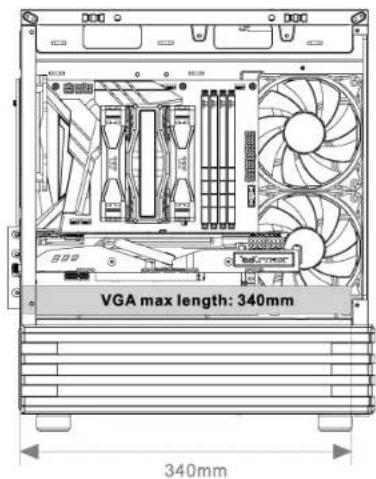
| Clearances | CPU coolermax height | 160 mm | |
| VGA max length | 340 mm | ||
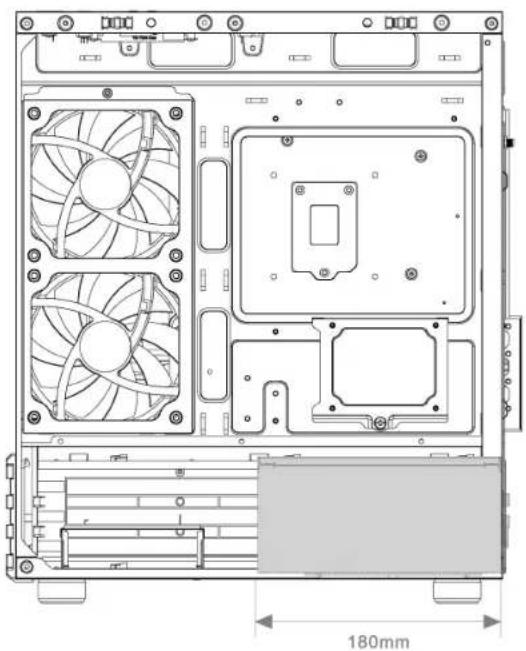
| PSU max length | 180 mm | ||
| Figure | Parts Name | Q'ty | Used for |
| Stand #6-32 x 6mm | 6 | Power Supply | |
| Screw M3 x 5mm | 18 | Motherboard / 2.5" HDD / SSD | |
| Screw #6-32 x 6mm | 8 | 3.5" HDD | |
| Stand-off #6-32 x 6.5mm | 3 | Backup | |
| Screw #6-32 x 28mm | 8 | Case Fan | |
| Clip | 2 | Backup | |
| Zip Ties | 5 | Cable Management |
View 170 WS ARGB
Dimension & Clearance
Dimension & Clearance
View 170 WS ARGB
Chassis dimension

Motherboard Compatibility: ITX / mATX
(Up to 244mm wide)

CPU cooler max height: 160mm

VGA max length: 340mm
View 170 WS ARGB
Dimension & Clearance
Remove Components
View 170 WS ARGB
PSU max length: 180mm
View 170 WS ARGB
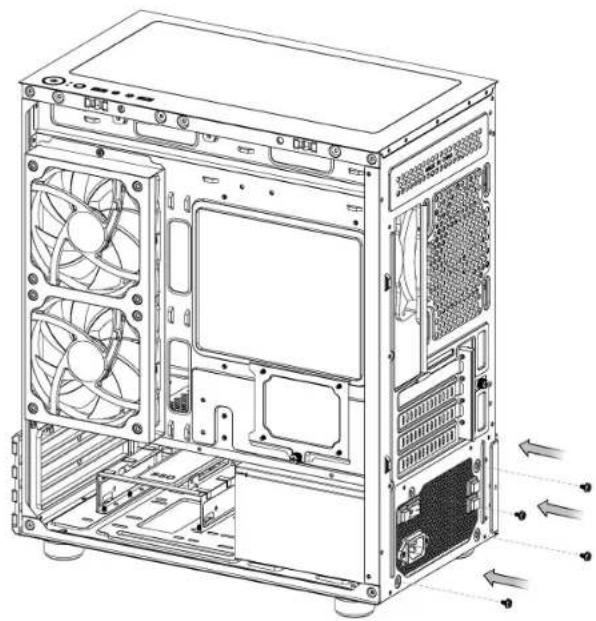
PSU Installation
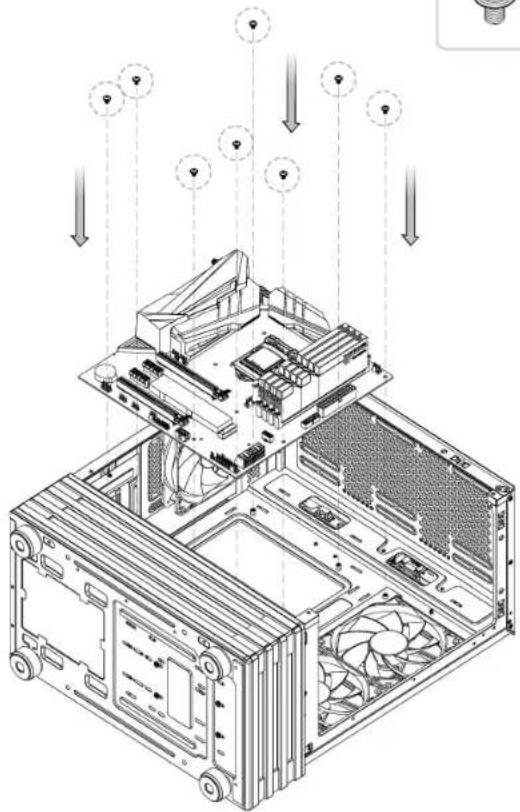
Motherboard Installation
View 170 WS ARGB

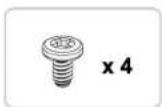
x4

x8
View 170 WS ARGB
HDD Installation
VGA Installation
View 170 WS ARGB
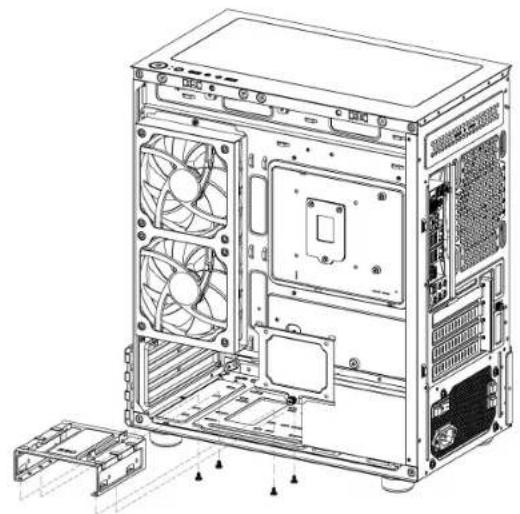
3.5" HDD
SSD/2.5" HDD

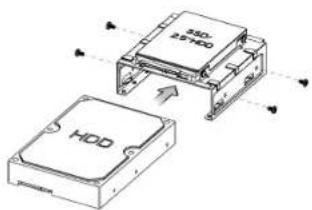


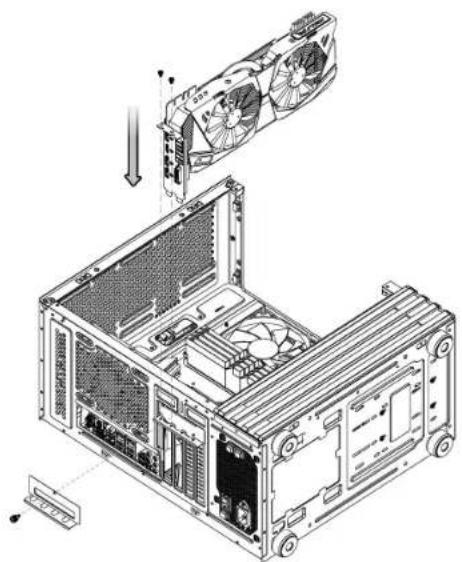
View 170 WS ARGB
Air Cooling Installation
AIO Liquid Cooling Installation
View 170 WS ARGB
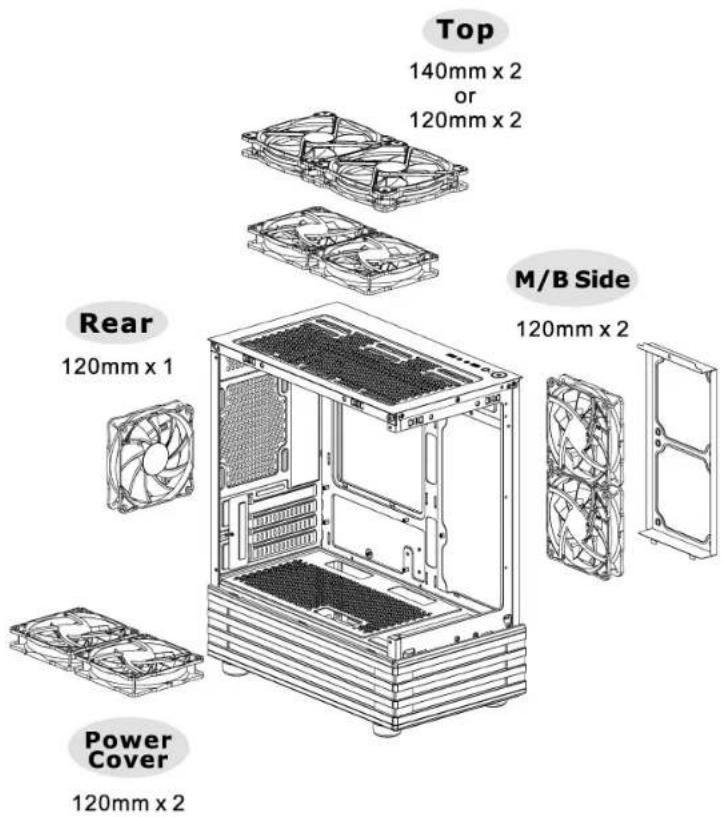
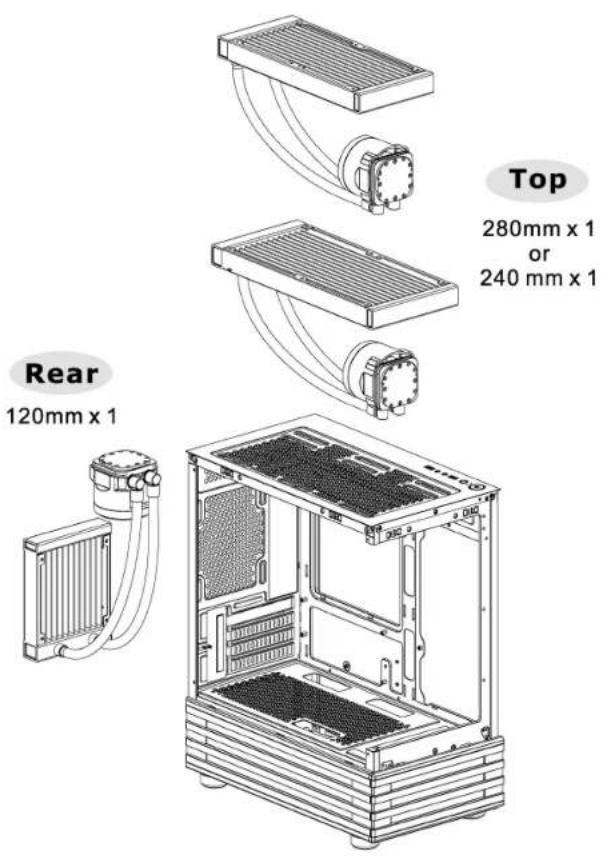
View 170 WS ARGB
I/O Connection
I/O Port
![graph TD A["Circle"] --> B["Pin 1"] C["Sun"] --> D["Pin 2"] E["Circle"] --> F["Pin 3"] G["Square"] --> H["Pin 4"] I["Circle"] --> J["Pin 5"] K["Circle"] --> L["Pin 6"] M["Circle"] --> N["Pin 7"] O["Circle"] --> P["Pin 8"] Q["Circle"] --> R["Pin 9"] S["Circle"] --> T["Pin 10"] U["Circle"] --> V["Pin…](/content/2026/07/1468882/images/86c3cdcdbbfadf37e6af8d22f68cc250def757fb2d43178a4790ea5bcfa490f8.jpg)
Power SW / Power LED / Reset / HDD LED
Motherboard Header Diagram

ARGB Control Instruction
View 170 WS ARGB
ARGB Control Instruction – How to connect MB
ASUS/ASRock/BIOSTAR
Aura Addressable Strip Header(s)
MSI
JRGB-strip Header(S)
GIGABYTE
AOURS RGB Fusion with Digital LEDs
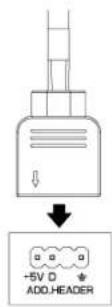


View 170 WS ARGB
Remove Filters
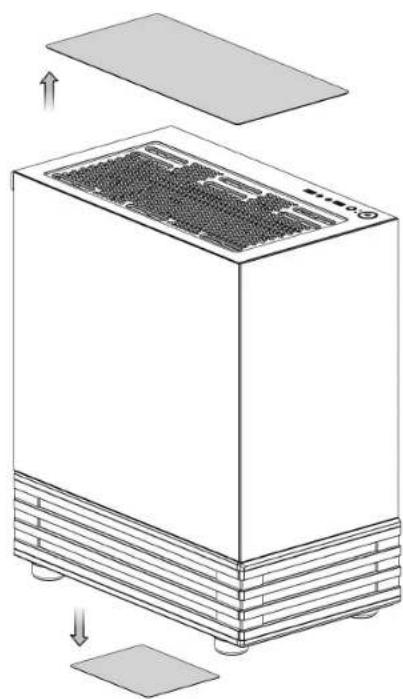

- VIEW 170 WS ARGB
- TT PREMIUM
- TT LCS-LIQUID COOLING SUPPORT CERTIFICATION
- JOIN TT COMMUNITY TO RECEIVE BENEFITS
- CONTENTS
- CHAPTER 1. PRODUCT INTRODUCTION
- CHAPTER 2. INSTALLATION GUIDE
- SPECIFICATION
- ACCESSORY
- DIMENSION & CLEARANCE
- PSU INSTALLATION
- MOTHERBOARD INSTALLATION
- HDD INSTALLATION
- VGA INSTALLATION
- I/O CONNECTION
- ARGB CONTROL INSTRUCTION
- ARGB CONTROL INSTRUCTION – HOW TO CONNECT MB
- REMOVE FILTERS
Marque : THERMALTAKE
Modèle : View 170 WS ARGB
Catégorie : Boîtier PC