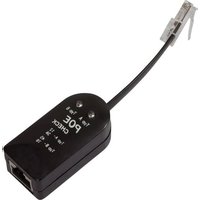
WZ0028 - équipements de mesure LOGILINK - Notice d'utilisation et mode d'emploi gratuit
Retrouvez gratuitement la notice de l'appareil WZ0028 LOGILINK au format PDF.


| Type de produit | Multimètre numérique |
| Marque | LogiLink |
| Modèle | WZ0028 |
| Dimensions (L x l x h) | 150 x 70 x 30 mm |
| Poids | 200 g |
| Alimentation | Pile 9V (type 6LR61) |
| Affichage | LCD, 1999 points |
| Fonctions principales | Mesure de tension continue/alternatif, courant, résistance, test de continuité, test de diode |
| Gammes de mesure tension DC | 200 mV, 2000 mV, 20 V, 200 V, 600 V |
| Gammes de mesure tension AC | 200 V, 600 V |
| Gammes de mesure courant DC | 200 µA, 2000 µA, 20 mA, 200 mA, 10 A |
| Gammes de mesure résistance | 200 Ω, 2000 Ω, 20 kΩ, 200 kΩ, 2000 kΩ |
| Catégorie de sécurité | CAT II 600 V |
| Entretien et nettoyage | Nettoyer avec un chiffon doux et sec. Ne pas utiliser de solvants. Éviter l'humidité et les chocs. |
| Sécurité | Respecter les tensions maximales indiquées. Utiliser les cordons de mesure appropriés. Débrancher avant de changer la pile. |
| Pièces détachées et réparabilité | Pile 9V, fusible 10A/250V, cordons de mesure. Réparation par un professionnel recommandée. |
| Informations générales | Appareil de mesure portable pour usage domestique et professionnel léger. Livré avec cordons de mesure et pile. |
FOIRE AUX QUESTIONS - WZ0028 LOGILINK
Questions des utilisateurs sur WZ0028 LOGILINK
0 question sur cet appareil. Repondez a celles que vous connaissez ou posez la votre.
Poser une nouvelle question sur cet appareil
Téléchargez la notice de votre équipements de mesure au format PDF gratuitement ! Retrouvez votre notice WZ0028 - LOGILINK et reprennez votre appareil électronique en main. Sur cette page sont publiés tous les documents nécessaires à l'utilisation de votre appareil WZ0028 de la marque LOGILINK.
MODE D'EMPLOI WZ0028 LOGILINK

User Guide
Instructions
According to the European WEEE directive, electrical and electronic equipment must be disposed with consumers waste. Its components must be recycled or disposed apart from each other. Otherwise contaminative and hazardous substances can pollute our environment.
You as consumer are committed by law to dispose electrical and electronic devices to producer, the dealer, or public collecting points at the end of the devices lifetime for free.
Particulars are regulated in national right. The symbol on the product, in the user's manual, or at the packaging alludes to these terms. With this kind of waste separation, application, and waste disposal of used devices you achieve an important share to environment protection.
1.0 Safety Instruction
Put the Devices always on a stable and straight Surface. In case of falling it can be damaged. Don't place the Device into direct Sunlight or in Places with high Temperature. This can damage the Device or shorten his average useful life. Don't place it in the near of Heat Sources, like Radiators or other heat producing Devices. Don't expose the Device to Rain, Water, Wetness or high Humidity.
Don't place it in the Bathroom or the Kitchen in the near of a Sink.
Avoid the direct Contact with Water.
Don't try to open the Device.
Congratulations to the Purchase of POE Test! Please read the Manual and Safety Instruction before using the product for the first time. Otherwise damage can be the result.
2.0 Introduction
POE Test is made for measuring the power mode of the POE equipment.
There are two connections: A class connection (End-span) and B class connection (Middle-span). Both can be displayed through the LED lights accurately and safely with the help of POE Test. In short, it can efficiently avoid the damage of the equipments caused by the type of power mode with the POE Test.
2.1 Specification
POE Test is applied to the standard equipment of IEEE 802.3af and IEEE 802.3at (POE Plus). Operating Voltage 24V AC/DC^60V AC/DC Operating Current <10mA Insulation Voltage >1500VAC
2.2 Package Contents
1x Main Tester Unit
1x Test Cable
2x User Manual
2.3 Product Profile

3.0 Operation
3.1 RJ45 Cable Test
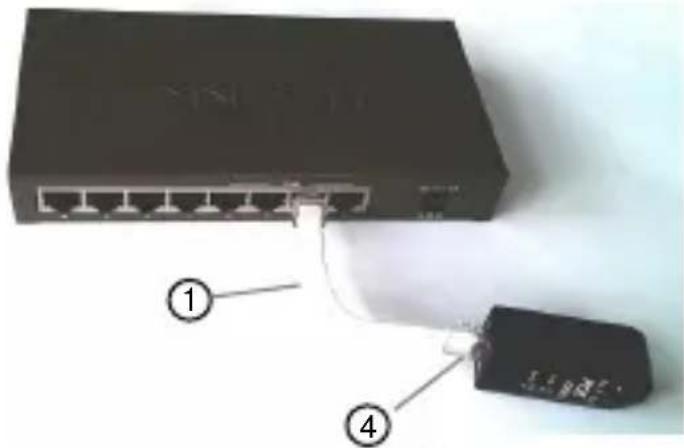
1 Connect one end of RJ45 Cable with RJ45 Jack ① POE Test. Inset another end into the port of POE equipment.
2 Power the POE equipment and switch on the device.
3 Confirm whether the POE equipment works.
4 Wait for 5 seconds' introspection.
5 The lights of Typ A ② or Typ B ③ lighting up or flashing means ok.
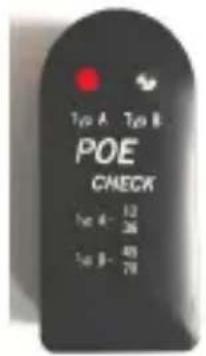
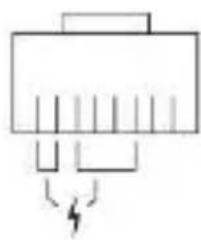
Alternative A
A class connection (End-Span). Pin 1,2,3,6 powers.


Alternative B
B class connection (Mid-Span). Pin 4,5,7,8 powers.
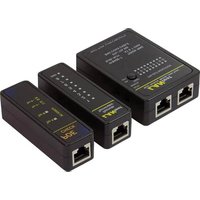
Marque : LOGILINK
Modèle : WZ0028
Catégorie : équipements de mesure