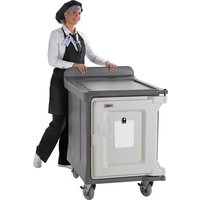
MDC1520S10HD - Chariot de transport alimentaire Cambro - Notice d'utilisation et mode d'emploi gratuit
Retrouvez gratuitement la notice de l'appareil MDC1520S10HD Cambro au format PDF.


| Type de produit | Armoire de maintien au chaud |
| Marque | Cambro |
| Modèle | MDC1520S10HD |
| Dimensions (L x P x H) | 1520 x 750 x 1850 mm |
| Poids | environ 120 kg |
| Alimentation | 230V / 50 Hz / 1800 W |
| Plage de température | 65°C à 95°C |
| Capacité | Jusqu'à 20 plaques gastro GN 1/1 |
| Matériau | Acier inoxydable |
| Porte | Pleine hauteur, vitrée ou pleine selon configuration |
| Roulettes | Oui, avec freins |
| Réglage de température | Thermostat réglable |
| Ventilation | Naturelle ou forcée selon modèle |
| Humidité | Contrôle passif (bain-marie intégré possible) |
| Utilisation | Maintien au chaud des plats cuisinés |
| Entretien | Nettoyage régulier au détergent doux, pas d'abrasifs |
| Sécurité | Thermostat de sécurité, voyant de chauffe |
| Pièces détachées | Disponibles via service après-vente Cambro |
| Réparabilité | Réparation possible par un professionnel agréé |
| Garantie | 2 ans pièces et main-d'œuvre |
| Normes | Conforme aux normes CE |
FOIRE AUX QUESTIONS - MDC1520S10HD Cambro
Questions des utilisateurs sur MDC1520S10HD Cambro
0 question sur cet appareil. Repondez a celles que vous connaissez ou posez la votre.
Poser une nouvelle question sur cet appareil
Téléchargez la notice de votre Chariot de transport alimentaire au format PDF gratuitement ! Retrouvez votre notice MDC1520S10HD - Cambro et reprennez votre appareil électronique en main. Sur cette page sont publiés tous les documents nécessaires à l'utilisation de votre appareil MDC1520S10HD de la marque Cambro.
MODE D'EMPLOI MDC1520S10HD Cambro
OWNER'S MANUAL
CAMBRO® MEAL DELIVERY CARTS
This manual applies to the following Cambro products:
Short Profile Meal Delivery Carts:
MDC1520S10
MDC1520S10HD
MDC1520S20
MDC1418S20
Tall Profile Meal Delivery Carts:
MDC1520T16
MDC1418T16
MDC1520T30
MDC1418T30
MDC1411T60
Congratulations on the purchase of your Cambro® Meal Delivery Cart. This Owner's Manual provides you with a step-by-step guide to cleaning and maintaining your Meal Delivery Cart. If you have further questions, please contact your Cambro Sales Representative, visit our website www.cambro.com, or call our Customer Service Department at USA 800 833 3003, 714 848 1555, N. Ireland & UK 0800 587 0057, Ireland 1800 509 046.
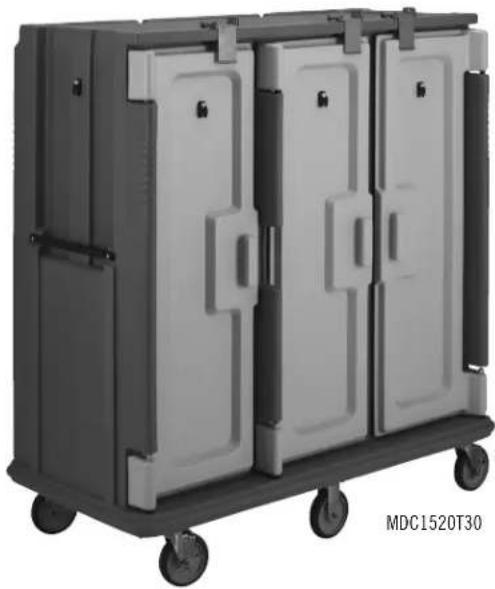
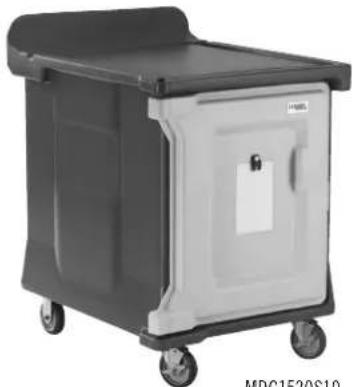
MDC1520S10
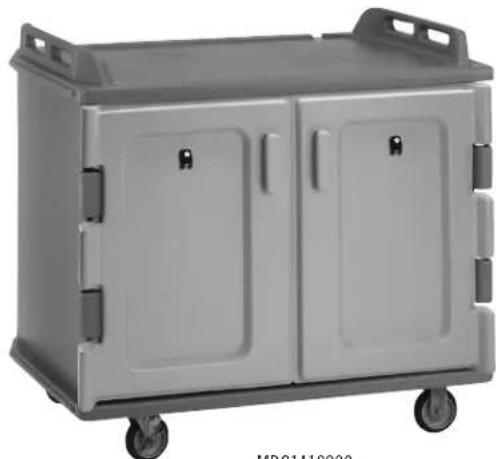
MDC1418S20


CAMBRO
TRUSTED FOR GENERATIONS™
I. Cleaning and Maintenance
A. Cleaning Instructions
Cart Body and Louvered Vent Panel(s)
- Clean with mild commercial detergent.
- Hand wash using a soft cloth or plastic or bristle brush to clean all interior and exterior surfaces.
- Remove louvered vent panel(s) using a Phillips type screwdriver, clean thoroughly on both sides as well as within each louver slot.
- Rinse with hot water.
- Air dry or use a soft cloth to dry the cart interior and exterior thoroughly.
- Once cart and louvered vent panel(s) are dry reinstall louvered vent panel(s).
WARNING: Do not use detergents or cleaners containing ammonia, bleach or harsh chemicals.
WARNING: Do not use steel wool or abrasive scrub pads or brushes.
WARNING: Do not tip cart forward and lean on its open doors to drain or air dry.
WARNING: When cleaning all edges of each louvered vent panel(s) use caution not to cause injury.
- Effective solutions for removing lingering scents and stains:
I. Use a standard destainer or
II. An odor removing soap or
III. Sanitizer or
IV. A diluted solution of 2-3 tablespoons of baking soda per 4 liters of hot water or
V. 1 part lemon juice to 4 parts hot water or
VI. 1 part white vinegar to 4 parts hot water.
- After cleaning rinse thoroughly with hot water and dry thoroughly.
Doors
- When possible remove the doors and clean around the hinges and/or pins.
- Clean with mild commercial detergent.
- Hand wash using a soft cloth or plastic or bristle brush to clean all interior and exterior surfaces.
- Rinse with hot water.
- Air dry or use a soft cloth to dry the cart interior and exterior thoroughly.
NOTE: MDC1520S20, MDC1418S20, MDC1520T30*, MDC1418T30*, MDC1411T60* — To remove doors, swing door(s) out until the door knuckle is clear from top of cart. Lift and remove door from hinge pins. To re-install, hold door outward from the compartment and engage door onto hinge pins. *These models require the door lock stops to be removed first.
II. Cambro Warranty
Cambro warrants to the original buyer that if a product proves defective:
- Within 1 year from the date of manufacture, Cambro will replace the product free of charge; or,
- After 1 year and up to 2 years from the date of manufacture, Cambro will grant a credit of 2/3 off replacement product; or,
- After 2 years and up to 3 years from the date of manufacture, Cambro will grant a credit of 1/3 of the original price towards a replacement product.
III. Replacement Parts
Please visit www.cambro.com for a complete list of replacement parts. The model number of the Cambro cart is required to determine the correct replacement part. The cart model number can be found on the end of the cart above the bumper for all carts except the MDC1520S10 and MDC1520S10HD. These cart model numbers can be found at the bottom, center of the cart under the louvered vent panel.
MDC1520T16, MDC1418T16, MDC1520S10, MDC1520S10HD—
Remove lock clip from top hinge pin- between the top door knuckle and the body top knuckle. Use a screw driver or needle nose pliers to remove the clip. Pull the clip out from between the two allowing the hinge pin to be pulled upward and release the door. The door can then be tipped outward to come up and out of position. To re-install put door on base pin align door with top hinge and slide in top pin. Re-install lock clip.
B. Door Maintenance
- Latch adjustment - if too tight and hard to close:
I. Loosen screws.
II. Slide latch inward towards the middle of the compartment.
III. Tighten screws when adjustment is complete.
- Latch adjustment - if too loose and not engaging securely:
I. Loosen screws.
II. Slide latch towards the middle latch strike plate.
III. Tighten screws when adjustment is complete.
C. Caster Maintenance
Caster maintenance should be performed after every cleaning.
- Grease swivel raceway of caster using a lubricant such as Lubriplate #930-AA, Keystone #84EPXLT multi-purpose grease or equivalent. Apply grease using a grease gun with a needle nose adapter or a tube-type applicator such as Sta-lube Moly-graph Assembly Lube (Fig.6). These can be obtained at most auto parts stores.
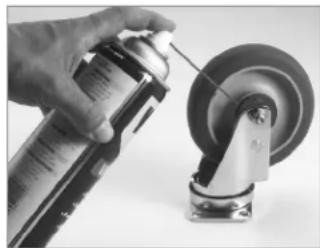
- Use a light oil such as WD-40 on the hub (Fig.7).
- Check caster for damage and test caster spin and swivel rotation before returning to service.
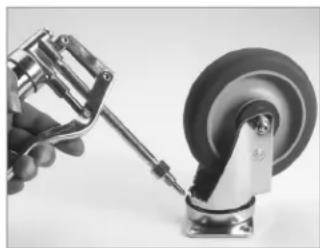
Fig. 6 Fig. 7
ABUSE OR MISUSE WILL VOID THIS WARRANTY
In the event of a defective product, your Cambro Sales Representative will collect appropriate information, such as date of manufacture and invoice information for warranty process. With proof of purchase to the original owner, Cambro Manufacturing will replace the product to the original owner.
NOTE: Your Cambro Sales Representative will determine if the product should be returned for inspection before issuing credit.
TO ORDER REPLACEMENT PARTS:
- Call Cambro Customer Service at 800.854.7631 or
• Fax your order to 714.842.3430 or - Call your local Cambro Representative or Distributor


- OWNER'S MANUAL
- CAMBRO® MEAL DELIVERY CARTS
- CLEANING AND MAINTENANCE
- CLEANING INSTRUCTIONS
- CART BODY AND LOUVERED VENT PANEL(S)
- DOORS
- CAMBRO WARRANTY
- CAMBRO WARRANTS TO THE ORIGINAL BUYER THAT IF A PRODUCT PROVES DEFECTIVE
- REPLACEMENT PARTS
- MDC1520T16, MDC1418T16, MDC1520S10, MDC1520S10HD
- DOOR MAINTENANCE
- CASTER MAINTENANCE
- ABUSE OR MISUSE WILL VOID THIS WARRANTY
- TO ORDER REPLACEMENT PARTS
Marque : Cambro
Modèle : MDC1520S10HD
Catégorie : Chariot de transport alimentaire