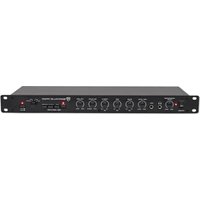
PPA20 - Recepteur Rockville - Notice d'utilisation et mode d'emploi gratuit
Retrouvez gratuitement la notice de l'appareil PPA20 Rockville au format PDF.


| Type de produit | Récepteur audio |
| Marque | Rockville |
| Modèle | PPA20 |
| Dimensions (L x H x P) | 430 x 100 x 300 mm |
| Poids | 5 kg |
| Alimentation | 220-240 V AC, 50/60 Hz |
| Puissance de sortie | 100 W par canal (4 ohms) |
| Entrées audio | RCA, optique, HDMI, Bluetooth |
| Sorties | Enceintes (2 ch), caisson de basses, casque |
| Tuner | FM/AM avec RDS |
| Fonctions principales | Amplification, réception radio, lecture Bluetooth, égaliseur |
| Entretien et nettoyage | Nettoyer avec un chiffon doux et sec. Ne pas utiliser de solvants. |
| Sécurité | Ne pas exposer à l'humidité, éviter les surcharges, respecter la polarité des enceintes. |
| Pièces détachées et réparabilité | Contacter le service client Rockville pour les pièces détachées et réparations. |
| Accessoires inclus | Télécommande, antenne FM, câble d'alimentation |
FOIRE AUX QUESTIONS - PPA20 Rockville
Questions des utilisateurs sur PPA20 Rockville
0 question sur cet appareil. Repondez a celles que vous connaissez ou posez la votre.
Poser une nouvelle question sur cet appareil
Téléchargez la notice de votre Recepteur au format PDF gratuitement ! Retrouvez votre notice PPA20 - Rockville et reprennez votre appareil électronique en main. Sur cette page sont publiés tous les documents nécessaires à l'utilisation de votre appareil PPA20 de la marque Rockville.
MODE D'EMPLOI PPA20 Rockville
ROCKVILLE
PPA20
PROFESSIONAL 1U RACK MOUNT
PRE-AMPLIFIER w/CROSSOVER and EQ
OWNER'S MANUAL
ATTENTION: WATCH THIS VIDEO BEFORE FIRST USE!

Who reads manuals?
Scan the QR code or go to rockvillesupport.com/ppa20 to access how-to video(s), the owner's manual, and other important information you may need to get the most out of your item.
If you prefer written instructions, please read ahead!
With Rockville you get many options.
Missing items? If you ordered a bundle that includes more than one product and you are missing part of your bundle then it just means your order shipped from two different warehouses. You will receive the remaining items very soon. If you have any concerns or inquiries, feel free to call our customer support center at 1-646-758-0144, 24 hours a day/7 days a week.
Thank you for purchasing this Rockville PPA20 Rack Mount Pre-Amplifier. Please read this installation guide carefully for proper use of your Rockville PPA20. Should you need assistance, please call our technical help line at 1-646-758-0144, 24 hours a day/7 days a week.
IMPORTANT SAFETY INSTRUCTIONS

- To reduce risk of electric shock, never open the unit. There are no user serviceable parts, refer service to the Rockville service center.
- Do not expose this unit to any kind of moisture.
- Please ensure that the unit is situated in a properly ventilated area.
- Make sure the unit is placed on a level and stable surface.
Functions

- Power switch
- Headphone level control
- 1/4 " Headphone output
- 1/4 " Microphone input
- Microphone level control: adjusts volume of microphone input.
- 3 band EQ: used to adjust the relative level of low, mid, and high frequencies.
- Balance: adjusts the level of the left and right channels. The 12 o'clock position is the point of equal balance.
- Master volume: controls the overall volume of the unit.
- Mono / Stereo switch: when the unit is in Mono mode (LED will be lit) the two stereo channels are blended together to produce monophonic sound. This blend minimizes rumble and surface noise in old monophonic records. Push the button a second time (LED goes out) to get back to stereo.
- Mute switch: Pushing this button reduces the volume of the amplifier output signal by approximately 20 dB. Please note that muting has no effect on the microphone volume.
- Low Cut Switch: when engaged, it will cut off frequencies below 40Hz, which comes in handy when using turntables, subs, etc. This function will allow you to play your music louder, with lower distortion and make your speakers last longer.
- Loudness switch: controls the loudness compensation circuit which at low-to-medium volume boosts the bass and treble response. This setting is especially useful if you plan on listening to music at a lower volume.
Functions (continued)
- Input selector switch: allows user to select between PHONO, AUX1, AUX2, and AUX3 RCA inputs.
- AUX4/AUX5 selector switch: press to select AUX4 RCA input, depress to select AUX5 RCA input.
- Rack ears: allows for unit rack mount using four attaching screws and washers (not included).

- RCA PHONO input
- RCA AUXinputs
- RCA REC output: Used to connect a recording device.
- RCA LINE output: Can be used with a mixer or any device with RCA inputs.
- L/R XLR balanced master outputs.
- DC 12V power input
Features
• Rockville PPA20 Rack Mount Pre-Amplifier
- 1U Rack Size
- 1/4'' microphone input
- RCA PHONO input
- 5x RCA AUX inputs
- 1/4 "headphone output
• RCA REC / LINE outputs
• XLR master output (left, right)
• Headphone volume & Microphone volume controls
• 3 band EQ (Treble/Mid/Bass)
- Master volume
- L/R balance
- Input source switch
- AUX4/AUX5 selector switch
- Mono/Stereo switch
- Mute/Pad
- 100 – 240V worldwide voltage power adaptor
- Unit dimensions: 18.89" x 6.49" x 1.73" inches
• Unit weight: 5.73 lbs
- Low cut crossover control allows you to cut off certain frequencies which comes in handy when using turntables, subs, and other gear. This function will allow you to play your music louder, with lower distortion and make your speakers last longer.
- Loudness compensation circuit which at low-to-medium volume boosts the bass and treble response
SPECIFICATIONS
General
• Frequency Response: 5Hz . 30kHz +0, -3dB
• Bass: 12dB at 100Hz
• Midrange: 9dB at 1Hz
• Treble: 12dB at 10kHz
• Loudness: +9dB at 100Hz, +9db at 10kHz
- Mute: -20dB
• Power: DC 12 Volt
• Power Consumption: 15W
Input Sensitivity / Impedance
• Mic: 1mV/3k ohms
• PHONO: 3mV/47k ohms
• AUX1, 2, 3, 4, and 5: 150mV/22k ohms
Output Sensitivity / Impedance
• REC: 150mV/3k ohms
• Line: max. 11V/1k ohms
Total Harmonic Distortion
- Mic: < 0.02%
- PHONO: < 0.04%
• AUX 1, 2, 3, 4, and 5: < 0.01%
Signal to Noise Ratio
- Mic: > 70dB
- PHONO: > 90dB
• AUX 1, 2, 3, 4, and 5: > 100dB
本次股东大会采用现场会议和网络投票相结合的方式进行。
Troubleshooting
| PROBLEM | SOLUTION |
| No power | 1. Make sure the unit is plugged in and the power switch is in the ON position.2. Check that the power cable is plugged in tightly to the unit. |
| No sound | 1. Check that all appropriate cables are plugged in correctly.2. Check the unit's volume settings as well as those of the signal source device.3. Check that the input selector is set to the correct source.4. If using AUX4/AUX5, ensure that the selector button is set to the proper position.5. Make sure your microphone is on.6. Make sure the MUTE button is depressed. |
| Noise | 1. Unplug input device(s) to see if the sound disappears.2. Check the EQ settings. Make sure they are not set too high as this will cause distortion.3. If the Ludness setting is on, check the bass evel and ensure it is not too high as this may cause distortion.4. Make sure you are using the proper cables. For 1/4 " cables, there are 3 types: instrument, TS (unbalanced), and TRS (balanced).Check the requirements of the connected gear and make sure you are using the appropriate cable. |
| Buzzing sound | Make sure you are using a proper cable. For 1/4 " cables, there are 3 types: instrument, TS (unbalanced), and TRS (balanced). Check the requirements of the connected gear and make sure you are using the appropriate cable. |

RockvilleAudio.com
© 2024 ROCKVILLE // Features and specifications are subject to change and/or improvement without notice.
Marque : Rockville
Modèle : PPA20
Catégorie : Recepteur