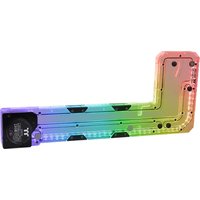
THERMALTAKE Pacific Core P5 DP-D5 Plus - Refroidissement informatique

Pacific Core P5 DP-D5 Plus - Refroidissement informatique THERMALTAKE - Notice d'utilisation et mode d'emploi gratuit

Retrouvez gratuitement la notice de l'appareil Pacific Core P5 DP-D5 Plus THERMALTAKE au format PDF.

📄 2 pages Français FR Télécharger 💬 Question IA 10 questions ⚙️ Specs
Notice THERMALTAKE Pacific Core P5 DP-D5 Plus - page 1
Choisissez votre langue et indiquez votre email : nous vous enverrons une version traduite specifiquement.
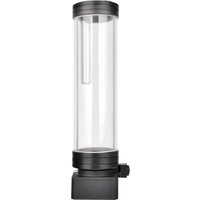
Type de produit Pompe et reservoir de refroidissement liquide
Marque Thermaltake
Modèle Pacific Core P5 DP-D5 Plus
Dimensions (L x l x h) 200 x 150 x 100 mm
Poids 1,5 kg
Alimentation électrique 12 V DC via connecteur Molex
Puissance absorbée 18 W
Type de pompe D5 à rotor magnétique
Débit maximal 600 L/h
Hauteur manométrique maximale 3,5 m
Capacité du réservoir 200 ml
Matériaux Corps en acrylique, base en cuivre
Raccordement Entrée et sortie G1/4"
Fonctions principales Circulation et stockage du liquide de refroidissement
Entretien et nettoyage Nettoyer le réservoir tous les 6 mois avec de l'eau distillée
Sécurité Utiliser uniquement du liquide non conducteur ; éviter les fuites
Pièces détachées et réparabilité Joints toriques et roue à aubes disponibles séparément
Informations générales Pompe et reservoir intégrés pour refroidissement liquide PC

FOIRE AUX QUESTIONS - Pacific Core P5 DP-D5 Plus THERMALTAKE

Comment installer la pompe Pacific Core P5 DP-D5 Plus ?
Fixez la pompe dans votre boîtier à l'aide des vis fournies. Raccordez les tuyaux aux entrées/sorties G1/4. Branchez l'alimentation Molex.
Quel type de liquide de refroidissement utiliser ?
Utilisez de l'eau distillée avec un additif anticorrosion ou un liquide de refroidissement prêt à l'emploi pour PC.
Comment purger l'air du circuit après remplissage ?
Faites fonctionner la pompe à pleine vitesse pendant 30 minutes. Inclinez doucement le boîtier pour libérer les bulles d'air.
Quel est le niveau sonore de cette pompe ?
La pompe D5 est silencieuse, environ 20 dB(A) à basse vitesse.
Puis-je utiliser cette pompe avec un radiateur double ?
Oui, le débit de 600 L/h est suffisant pour un radiateur double. Vérifiez la hauteur manométrique pour votre configuration.
Comment régler la vitesse de la pompe ?
Certains modèles disposent d'un potentiomètre intégré. Sinon, utilisez un contrôleur PWM externe 12V.
Que faire si la pompe ne démarre pas ?
Vérifiez que l'alimentation Molex est bien branchée et que le circuit n'est pas bloqué. Remplissez complètement le réservoir.
Faut-il remplacer les joints toriques régulièrement ?
Inspectez les joints tous les ans. Remplacez-les en cas de fuite ou de dessèchement.
Cette pompe est-elle compatible avec du liquide coloré ?
Oui, mais évitez les colorants à base de particules qui pourraient obstruer la roue.
Comment nettoyer le réservoir ?
Videz le circuit, démontez le réservoir si possible, et nettoyez-le avec un chiffon doux et de l'eau distillée.

Questions des utilisateurs sur Pacific Core P5 DP-D5 Plus THERMALTAKE

0 question sur cet appareil. Repondez a celles que vous connaissez ou posez la votre.

Poser une nouvelle question sur cet appareil

L'email reste privé : il sert seulement à vous prévenir si quelqu'un répond à votre question.

Aucune question pour l'instant. Soyez le premier à en poser une.

Téléchargez la notice de votre Refroidissement informatique au format PDF gratuitement ! Retrouvez votre notice Pacific Core P5 DP-D5 Plus - THERMALTAKE et reprennez votre appareil électronique en main. Sur cette page sont publiés tous les documents nécessaires à l'utilisation de votre appareil Pacific Core P5 DP-D5 Plus de la marque THERMALTAKE.

MODE D'EMPLOI Pacific Core P5 DP-D5 Plus THERMALTAKE

This product is intended for installation only by expert users. Please consult with a qualified technician for installation. Improper installation may result in damage to your equipment.

  1. Please carefully read the manual before beginning the installation process!
  2. It is strongly recommended to use market proven pre-mix coolant, such as Thermaltake Coolant 1000.

  3. DO NOT USE any kind of alcohol or alcohol derivatives with this reservoir or the acrylic tube may crack and fail! Do not clean it using alcohol either

Parts List

Technical line drawing of a mechanical bracket assembly (no text or symbols)

THERMALTAKE Pacific Core P5 DP-D5 Plus - Parts List - 2
© x 8
Washer

Ax 1
Distro Plate
THERMALTAKE Pacific Core P5 DP-D5 Plus - Parts List - 3
D x 8
Screw

THERMALTAKE Pacific Core P5 DP-D5 Plus - Parts List - 4
B x 1
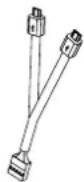
LED Y-Cable

THERMALTAKE Pacific Core P5 DP-D5 Plus - Parts List - 5
E x 3
G1/4 Stop Plug

THERMALTAKE Pacific Core P5 DP-D5 Plus - Parts List - 6
F x 1
Wrench

THERMALTAKE Pacific Core P5 DP-D5 Plus - Parts List - 7
G x 1
Controller

THERMALTAKE Pacific Core P5 DP-D5 Plus - Parts List - 8
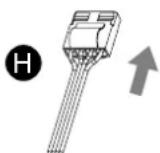
H x 1
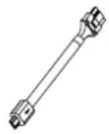
Power Cable

THERMALTAKE Pacific Core P5 DP-D5 Plus - Parts List - 9
① x 1
Controller Cable

THERMALTAKE Pacific Core P5 DP-D5 Plus - Parts List - 10
J x 1
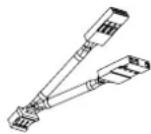
Bridge Cable

THERMALTAKE Pacific Core P5 DP-D5 Plus - Parts List - 11
K x 1
MB SYNC Cable

THERMALTAKE Pacific Core P5 DP-D5 Plus - Parts List - 12
L x 1
Velcro

Installation Guide

1
Pure electrical circuit lines without any symbols

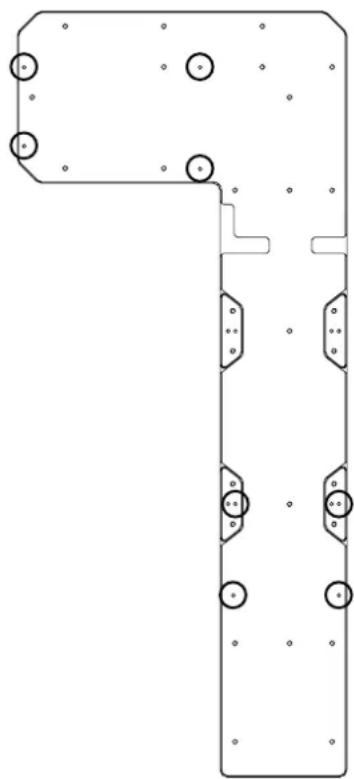
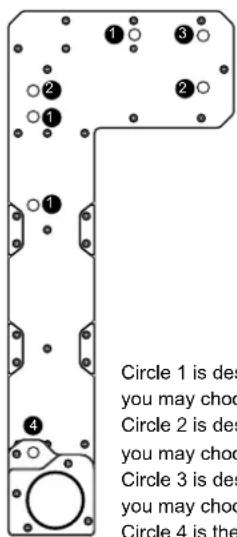
To install the DP-D5 in your chassis, placing a screw and washer that comes with the DP-D5 on every screw hole that matches the circles in below picture.

2
Circle 1 is des you may choo Circle 2 is des you may choo Circle 3 is des you may choo Circle 4 is the

Circle 1 is designed for liquid outlet, you may choose one of the ports to use. Circle 2 is designed for liquid inlet, you may choose one of the ports to use. Circle 3 is designed for liquid fill, you may choose one of the ports to use. Circle 4 is the drain port.

3
Technical diagram of an electronic device showing internal components including fans, switches, and motors (no text or labels)

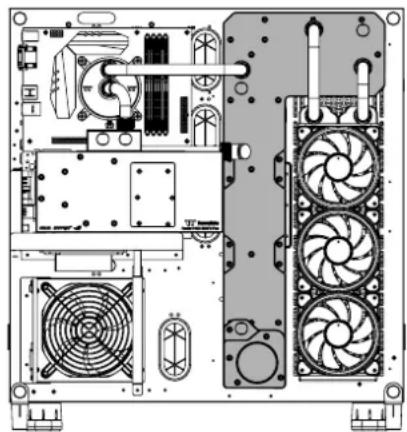
Assembly example can refer to the following figure.

4
To avoid during li system t fill the re coolant (Normal

To avoid air bubble during liquid cooling system working, please fill the reservoir with coolant to the line (Normal coolant level)

5
Technical diagram of a mechanical assembly with labeled components A and B, showing part B as a tool and section view A as a bracket.

Connect the LED Y-Cable onto the Distro Plate.

Installation Guide

6
G thermetsale 3 2 1 B
G
THERMALTAKE Pacific Core P5 DP-D5 Plus - Installation Guide - 2
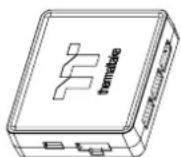
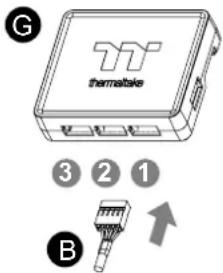
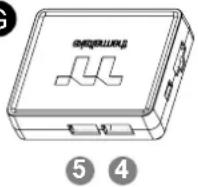
Connect the reservoir cable onto the controller.

8
thermoclase

Diagram showing a tool pressing down on a block with a magnified view, labeled with a numbered circle and downward arrow.

Connect the controller cable onto the mainboard (USB 2.0 9 pin) and controller.

7
ON 1 2 3 4

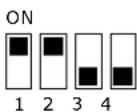
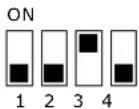
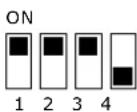
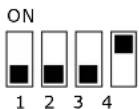
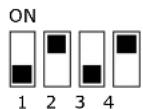
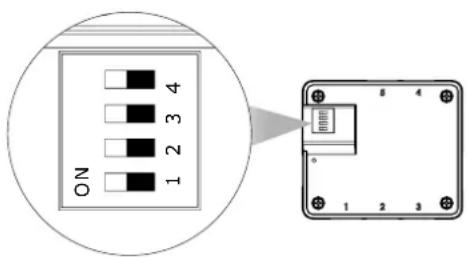
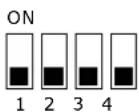
Set the DIP switch on the back side of the controller to assign the number of the controller

9
THERMALTAKE Pacific Core P5 DP-D5 Plus - Installation Guide - 6

THERMALTAKE Pacific Core P5 DP-D5 Plus - Installation Guide - 7

THERMALTAKE Pacific Core P5 DP-D5 Plus - Installation Guide - 8

THERMALTAKE Pacific Core P5 DP-D5 Plus - Installation Guide - 9
Connect the power cable to the 4pin Molex connector and controller.

NO.1
THERMALTAKE Pacific Core P5 DP-D5 Plus - Installation Guide - 10

NO.2
THERMALTAKE Pacific Core P5 DP-D5 Plus - Installation Guide - 11

NO .3
THERMALTAKE Pacific Core P5 DP-D5 Plus - Installation Guide - 12

NO.4
THERMALTAKE Pacific Core P5 DP-D5 Plus - Installation Guide - 13

NO .5
THERMALTAKE Pacific Core P5 DP-D5 Plus - Installation Guide - 14

NO.6
THERMALTAKE Pacific Core P5 DP-D5 Plus - Installation Guide - 15

NO .7
THERMALTAKE Pacific Core P5 DP-D5 Plus - Installation Guide - 16

NO.8
THERMALTAKE Pacific Core P5 DP-D5 Plus - Installation Guide - 17

NO .9
THERMALTAKE Pacific Core P5 DP-D5 Plus - Installation Guide - 18

NO.10
THERMALTAKE Pacific Core P5 DP-D5 Plus - Installation Guide - 19

NO.1 1
THERMALTAKE Pacific Core P5 DP-D5 Plus - Installation Guide - 20

NO.12
THERMALTAKE Pacific Core P5 DP-D5 Plus - Installation Guide - 21

NO.13
THERMALTAKE Pacific Core P5 DP-D5 Plus - Installation Guide - 22

NO.14
THERMALTAKE Pacific Core P5 DP-D5 Plus - Installation Guide - 23

NO.15
THERMALTAKE Pacific Core P5 DP-D5 Plus - Installation Guide - 24

NO.16
THERMALTAKE Pacific Core P5 DP-D5 Plus - Installation Guide - 25

10
THERMALTAKE Pacific Core P5 DP-D5 Plus - Installation Guide - 26

THERMALTAKE Pacific Core P5 DP-D5 Plus - Installation Guide - 27

THERMALTAKE Pacific Core P5 DP-D5 Plus - Installation Guide - 28

THERMALTAKE Pacific Core P5 DP-D5 Plus - Installation Guide - 29
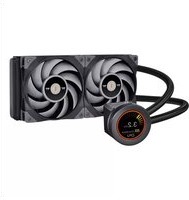
If you want to connect two or more connectors, you can use the bridge cable to connect the controllers.
Sommaire Cliquez un titre pour y accéder
Assistant notice
Powered by Anthropic
En attente de votre message
Informations produit

Marque : THERMALTAKE

Modèle : Pacific Core P5 DP-D5 Plus

Catégorie : Refroidissement informatique