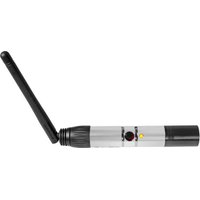
DMX-WTR - Éclairage professionnel Rockville - Notice d'utilisation et mode d'emploi gratuit
Retrouvez gratuitement la notice de l'appareil DMX-WTR Rockville au format PDF.


| Type de produit | Émetteur-récepteur DMX sans fil |
| Dimensions | 150 x 100 x 40 mm |
| Poids | 200 g |
| Alimentation | 5 V DC via câble USB (adaptateur secteur non inclus) |
| Portée sans fil | Jusqu'à 100 m en visibilité directe |
| Fréquence de fonctionnement | 2,4 GHz |
| Protocole DMX | DMX512-A |
| Nombre de canaux | 512 canaux (univers complet) |
| Fonctions principales | Transmission sans fil de signaux DMX, modes émetteur et récepteur, fonctions de test et de configuration |
| Entretien et nettoyage | Nettoyer avec un chiffon doux et sec. Éviter les liquides et les solvants. |
| Sécurité | Ne pas exposer à l'humidité ou à des températures extrêmes. Débrancher avant tout entretien. |
| Pièces détachées et réparabilité | Contacter le service après-vente Rockville pour toute pièce détachée ou réparation. |
| Informations générales | Appareil conçu pour les applications d'éclairage professionnel et événementiel. |
FOIRE AUX QUESTIONS - DMX-WTR Rockville
Questions des utilisateurs sur DMX-WTR Rockville
0 question sur cet appareil. Repondez a celles que vous connaissez ou posez la votre.
Poser une nouvelle question sur cet appareil
Téléchargez la notice de votre Éclairage professionnel au format PDF gratuitement ! Retrouvez votre notice DMX-WTR - Rockville et reprennez votre appareil électronique en main. Sur cette page sont publiés tous les documents nécessaires à l'utilisation de votre appareil DMX-WTR de la marque Rockville.
MODE D'EMPLOI DMX-WTR Rockville
ROCKVILLE
OWNER'S MANUAL
DMX-WTR (Transmitter) DMX-WRE (Receiver)
2.4GHZ WIRELESS DJ DMX LIGHTING TRANSMITTER or RECEIVER
Who reads manuals?
Instead, go to URLs or scan the QR codes below and watch a short video, which shows you how to set this item up and how to use it.

vimeo.com/461140940

vimeo.com/331122159
Please read the owner's manual carefully for proper use of your DMX-WTR or DMX-WRE wireless DMX modules. Should you need technical assistance please call our technical help line at 1-646-758-0144, Monday through Friday, 9am to 5pm EST.
IMPORTANT SAFETY INSTRUCTIONS

NO USER SERVICEABLE PARTS INSIDE. WE RECOMMEND TAKING THE UNIT TO A QUALIFIED SERVICE TECHNICIAN FOR ANY REPAIRS.
- For indoor use only. Do not expose units to moisture.
- Only use the included power adapters. Do not use the adapters if the cord is damaged in any way. Do not break off the ground prong as this increases the risk of electric shock.
- Working temperature range is -4° - 113° F ( -20° - 45° C), 10% - 90% relative humidity.
- Make sure there are no obstructions between the transmitter and the receiver(s).
Functions
DMX-WTR transmitter
- XLR 3 pin male connector
2.5 volt power input - ID key LED indicator
- ID key button
- Removable antenna

DMX-WRE receiver
- XLR 3 pin female connector
2.5 volt power input - ID key/power button
- Antenna/ID key LED indicator

Operation
- Power up the DMX-WRE unit(s) by connecting the power supply and pressing the Power button once (press twice quickly to turn it off).
- Now power up the DMX-WTR unit by connecting the power supply.
- Connect the DMX-WTR to the DMX source. If using a fixture with a built-in transmitter, turn it on at this time.
- Connect the DMX-WRE unit(s) to the desired fixture(s).
- Press the ID key on the DMX-WTR to indicate the ID setting. Press again to set the ID. To change the ID value, press the key button until the desired value is found. To set the ID for the DMX-WRE, follow the procedure above. Please note that the ID needs to match on both the DMX-WTR and DMX-WRE. If your fixture has a built in transmitter and you are only using a DMX-WRE unit, it's ID should match the fixture's ID. When the units are used in the future, they will remember the previously used ID.
ID Code and Corresponding LED Indicator Color:
- RED
- GREEN
- YELLOW
- BLUE
- PURPLE
- TURQUOISE
- WHITE
Operation (continued)
- The DMX-WTR will automatically look for and choose an interference free channel which it will also assign to the DMX-WRE. If there is over 10% interference, the DMX-WTR will switch to another channel and set the DMX-WRE to that same channel. If the whole frequency is occupied, the DMX-WTR will switch to frequency hopping mode.
- The LED on the DMX-WTR will blink RED slowly until communication is established with the receiver. The status LED on the DMX-WRE unit(s) will flash GREEN slowly until communication is established.
Pairing the DMX-WTR Transmitter to a DMX-QR Receiver
The DMX-WTR uses a color coded system for syncing and the DMX-QR uses a number ID system. Follow the steps below to sync the transmitter to the receiver.
- Power up the DMX-WRT unit by connecting the power supply and pressing the Power button once.
- Now power up the DMX-QR unit by connecting the power supply.
- Connect the DMX-WTR to the DMX source.
- Connect the DMX-QR unit to the desired fixture.
- Press the ID key on the DMX-WTR to indicate the ID setting. Press again to set the ID color. To change the ID color, press the key button until the desired color is found.
- Press the ID key on the DMX-QR to indicate the ID setting. Press again to set the ID value. To change the ID value, press the key button until the desired value is found.
DMX-WTR ID Color and Corresponding DMX-QR ID Value:
- RED = ID 1
- GREEN = ID 2
- YELLOW = ID 3
- BLUE = ID 4
- PURPLE = ID 5
- TURQUOISE = ID 6
- WHITE = ID 7
Please note: The DMX-WTR has 7 ID channels and the DMX-QR has 16 ID channels. Only the first 7 channels on the DMX-QR are used. If you go past the 7th channel, your DMX-QR will cease communicating with the DMX-WTR. In order to reestablish communication, you must cycle through the additional 9 channels until you reach channel 1.
Features and Specifications
• Built in 650mAh rechargeable battery (DMX-WRE only. DMX-WTR unit must be plugged in)
- Battery power: working time: 9 hours (only takes 2 hours to fully charge)
- You can use the DMX-WRE while its plugged in and charging.
- Daisy chain multiple lights and use one receiver for all the lights. This setup requires one transmitter and one receiver.
- Connect a transmitter to your DMX controller and a receiver to each light. Each light will have its own channels on the controller so they can all be controlled independently (can be done with up to 7 lights groups).
- Makes it easy to set up all your lights without a ton of wires everywhere
- Controls are extremely reliable and work without any delay
• The product uses 2.4Ghz frequency band
- Efficient GFSK modulation with 126 channel high-speed frequency hopping (FHSS). Hops 1100 times per second for interference free operation.
• Tri-color LED displays status and parameters
- One-touch operation
- 7 selectable groups of lights can be controlled independently
- You can connect up to 25 receivers to each transmitter
- Requires you to hold the button to change linking – this ensures no accidental un-linking happens
• CPU: 32-bit ARM Core
• Distance: 1,968 feet (600 meters)
- Modulation (GFSK maximum transmit power): 23dBm
- Receiver sensitivity: -94dBm
- Unit dimensions: 4.7" long and antenna is 3.5" tall
- Weight: 0.4Lbs
Applications
- Stage lighting
- Up lighting (wall washing)
- DJ lighting
- Clubs/Bars
- Party halls
• Theatrical performances - Stadium lights
Troubleshooting
| PROBLEM | SOLUTION |
| No power | 1. Make sure the power adapter is properly plugged in at the wall and to the DMX-WTR unit.2. Make sure the DMX-WRE unit is fully charged. Please note, the unit can be used while charging. Charge time is 2 hours.3. Make sure the power adapters are not damaged. |
| Units not responding to DMX | 1. Check that the DMX-WTR and DMX-WRE(s) are powered on.2. Check that the receiver and transmitter ID keys match.3. Check that the transmitter is connected to the DMX OUT port of the controller and that the receiver is connected to the DMX IN port of the fixture. |
FEDERAL COMMUNICATIONS COMMISSION COMPLIANCE INFORMATION
Responsible party name: Rockville
Address: 600 Bayview Ave.
Entrance A
Inwood, NY 11096
Hereby declares that the products DMX-WTR Transmitter and DMX-WRE Receiver comply with FCC rules as mentioned in the following paragraph:
This device complies with Part 15 of the FCC rules. Operation is subject to the following two conditions: (1) this device may not cause harmful interference, and (2) this device must accept any interference received, including interference that may cause undesired operation.
Note: This equipment has been tested and found to comply with the limits for a Class B digital device, pursuant to Part 15 of the FCC rules. These limits are designed to provide reasonable protection against harmful interference in a residential installation. This equipment generates, uses and can radiate radio frequency energy and, if not installed and used in accordance with the instructions, may cause harmful interference to radio communications. However, there is no guarantee that interference will not occur in a particular installation. If this equipment does cause harmful interference to radio or television reception, which can be determined by turning the equipment off and on, the user is encouraged to try to correct the interference by one or more of the following measures:
- Reorient or relocate the receiving antenna.
- Increase the separation between the equipment and receiver.
- Connect the equipment to an outlet on a circuit different from that to which the receiver is connected.
- Consult the dealer or an experienced radio/TV technician for help.
ROCKVILLE

- ROCKVILLE
- DMX-WTR (TRANSMITTER) DMX-WRE (RECEIVER)
- NO USER SERVICEABLE PARTS INSIDE. WE RECOMMEND TAKING THE UNIT TO A QUALIFIED SERVICE TECHNICIAN FOR ANY REPAIRS
- FUNCTIONS
- DMX-WTR TRANSMITTER
- DMX-WRE RECEIVER
- OPERATION
- ID CODE AND CORRESPONDING LED INDICATOR COLOR
- OPERATION (CONTINUED)
- PAIRING THE DMX-WTR TRANSMITTER TO A DMX-QR RECEIVER
- DMX-WTR ID COLOR AND CORRESPONDING DMX-QR ID VALUE
- FEATURES AND SPECIFICATIONS
- APPLICATIONS
- FEDERAL COMMUNICATIONS COMMISSION COMPLIANCE INFORMATION
Marque : Rockville
Modèle : DMX-WTR
Catégorie : Éclairage professionnel