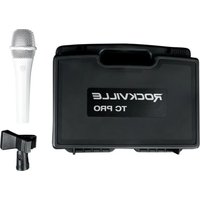
TC PRO - Microphone Rockville - Notice d'utilisation et mode d'emploi gratuit
Retrouvez gratuitement la notice de l'appareil TC PRO Rockville au format PDF.


| Type de produit | Microphone dynamique |
| Marque | Rockville |
| Modèle | TC PRO |
| Catégorie | Microphone |
| Dimensions | Environ 15 x 5 cm (longueur x diamètre) |
| Poids | Environ 300 g |
| Alimentation | Alimentation fantôme 48V ou pile 9V (selon version) |
| Réponse en fréquence | 50 Hz - 15 kHz |
| Directivité | Cardioïde |
| Connectique | XLR 3 broches |
| Fonctions principales | Enregistrement vocal, sonorisation, diffusion en direct |
| Entretien et nettoyage | Nettoyer la grille avec un chiffon doux et sec ; éviter les liquides |
| Sécurité | Ne pas exposer à l'humidité ou à des températures extrêmes |
| Pièces détachées et réparabilité | Grille de rechange, capsule, câble XLR ; réparation possible par professionnel |
| Informations générales | Microphone professionnel adapté aux chanteurs et orateurs |
FOIRE AUX QUESTIONS - TC PRO Rockville
Questions des utilisateurs sur TC PRO Rockville
0 question sur cet appareil. Repondez a celles que vous connaissez ou posez la votre.
Poser une nouvelle question sur cet appareil
Téléchargez la notice de votre Microphone au format PDF gratuitement ! Retrouvez votre notice TC PRO - Rockville et reprennez votre appareil électronique en main. Sur cette page sont publiés tous les documents nécessaires à l'utilisation de votre appareil TC PRO de la marque Rockville.
MODE D'EMPLOI TC PRO Rockville
ROCKVILLE

TC PRO Series
High Performance Electro-Plated Handheld Wired Microphone
OWNER'S MANUAL
ROCKVILLE
Thank you for purchasing the Rockville TC PRO Electro-Plated Wired Microphone.
Please read this guide carefully for proper use of your Rockville TC PRO Series microphone. Should you need technical assistance please call our technical help line at 1-646-758-0144, Monday through Friday, 9am to 5pm EST.
Handling Instructions
- Do not cover any part of the microphone grill with your hand, as this will adversely affect microphone performance.
- Aim the microphone toward the desired sound source (such as the talker, singer, or instrument) and away from unwanted sources.
- Place the microphone as close as practical to the desired sound source.
- Use only one microphone to pick up a single sound source.
- For better gain before feedback, use fewer microphones.
- Keep the distance between microphones at least three times the distance from each microphone to its source ("three to one rule").
- Place microphones as far as possible from reflective surfaces.
- Add a windscreen when using the microphone outdoors.
- Avoid excessive handling to minimize pickup of mechanical noise and vibration.
What's Inside
• Fully electro-plated metal wired mic
• 20 AWG Mic cable, XLR to XLR, 100% OFC Copper
- Mic clip
- Plastic carry case
- Owner's manual
- Warranty
The TC PRO microphone connects via a 3-pin balanced XLR connector.

This microphone can be used for balanced and unbalanced applications. For balanced XLR connections use an XLR cable (included). For unbalanced connections use a 1/4" TS jack plug to a female XLR cable (not included). Be aware that when using a run longer than 16ft you may encounter humming caused by stray magnetic fields from power cables, lighting cables, and other electric appliances.
Proper Microphone Usage
The closer you are to the microphone, the deeper and richer your voice will sound. When your mouth is two inches or less from the microphone there is a significant increase to low frequencies giving your voice a bass heavy sound. This is known as the proximity effect.
Singing directly into the microphone will pick-up on your breathing as well as overemphasize certain sounds when speaking or singing. To achieve a well balanced sound, sing or talk to one side of or above and across the microphone's top. This will give your voice a well-balanced, natural sound.
Feedback means that the sound from a speaker is picked up by the microphone, sent back to the amplifier and then out through the speakers. At certain volume levels the system will make undesired noises. In order to increase gain before feedback, this microphone has a supercardioid pattern. This means that its sensitivity to sound is at its highest when the sound comes from the front of the microphone (facing you). This also minimizes pick-up of sounds from the sides or rear.
Tip:
To minimize feedback avoid operating the microphones in close proximity of or in front of speakers.


Feedback can also be caused by the acoustics of the venue. In these instances the proximity effect may cause feedback. In most cases, simply moving a little away from the microphone may resolve the issue.
Avoid having more than two people sharing a microphone. Singing into the microphone at an angle wider than 30° may require bringing up the microphone fader level high enough to cause feedback.
Microphone
• High quality Cartridge made in Taiwan
• High sensitivity
• Full frequency range
- Distortion free
• No unwanted pop noises
• Full metal mic body
- Withstands drops and any other abuse
- Beautiful, scratch resistant electro-plated finish
- Type: dynamic
- Neodymium magnet is stronger and more efficient
- Polar Pattern: uni-directional
• Frequency Response: 50Hz – 15KHz
• Impedance: 450Ω ±15% at 1KHz
- Sensitivity: -54 ±2dB (0dB = 1v/ubar at 1KHz)
• Weight: 0.57 Lbs
• Dimensions: 7.52" (H)/2.13" (Max Diameter)
Cables
- XLR to XLR Cable
- 20 Feet
• 100% OFC (oxygen free copper)
• Cables deliver crystal clear distortion free signal
• Cables are 6mm thick with cover (20 AWG standard mic cable)
• Solid metal XLR cable connectors with silver plating - Cable connectors are very solid and durable
• Cables fit snug with no shaking when plugged in
Mic Clip
• Heavy duty standard size microphone clip
• Fits on any standard mic stand
• Solid plastic construction with copper inside
- Black color
Case
• High quality plastic carry case
• Comfortably holds microphone and mic cable during transport
PROBLEM
SOLUTION
| No sound | 1. Ensure power mixer or amplifier is on.2. Check that the master volume is not set to 0.3. Check all connections to ensure everything is properly connected.4. Check cables for cuts, nicks, or any other defects. |
| Distortion | 1. Gains not set properly.2. Mixer input sensitivity is too high. |
| Dull sound | 1. Clean internal and external windscreens. |
Visit us at:
RockvilleAudio.com
Marque : Rockville
Modèle : TC PRO
Catégorie : Microphone