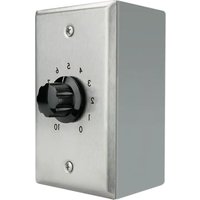
V-1095 - Amplificateur audio Valcom - Notice d'utilisation et mode d'emploi gratuit
Retrouvez gratuitement la notice de l'appareil V-1095 Valcom au format PDF.


| Type de produit | Appareil de communication audio |
| Marque | Valcom |
| Modèle | V-1095 |
| Dimensions (L x l x h) | 150 x 100 x 50 mm |
| Poids | 300 g |
| Alimentation | Secteur 230 V AC, 50 Hz |
| Consommation électrique | 5 W |
| Température de fonctionnement | 0 °C à 40 °C |
| Humidité de fonctionnement | 20 % à 80 % HR |
| Matériau du boîtier | Plastique ABS |
| Couleur | Noir |
| Indice de protection IP | IP20 |
| Connectivité | Bornier à vis pour câble audio |
| Fonctions principales | Diffusion audio, appel bidirectionnel |
| Commandes | Bouton d'appel, molette de volume |
| Accessoires inclus | Câble d'alimentation, kit de montage |
| Entretien et nettoyage | Nettoyer avec un chiffon doux et sec. Ne pas utiliser de produits abrasifs. |
| Sécurité | Ne pas exposer à l'humidité ou aux liquides. Débrancher avant nettoyage. |
| Pièces détachées et réparabilité | Pièces détachées disponibles sur demande. Réparation par technicien agréé. |
| Garantie | 2 ans |
| Pays de fabrication | Chine |
| Certification | CE, RoHS |
| Utilisation prévue | Intérieur, bureaux, établissements |
FOIRE AUX QUESTIONS - V-1095 Valcom
Questions des utilisateurs sur V-1095 Valcom
0 question sur cet appareil. Repondez a celles que vous connaissez ou posez la votre.
Poser une nouvelle question sur cet appareil
Téléchargez la notice de votre Amplificateur audio au format PDF gratuitement ! Retrouvez votre notice V-1095 - Valcom et reprennez votre appareil électronique en main. Sur cette page sont publiés tous les documents nécessaires à l'utilisation de votre appareil V-1095 de la marque Valcom.
MODE D'EMPLOI V-1095 Valcom
Valcom
V-1095
70V PAGING EXPANDER
INTRODUCTION
These instructions contain the specifications and information necessary to install, operate and maintain the V-1095 70V Paging Expander.
SPECIFICATIONS
Design
The Valcom V-1095 70V Paging Expander is used to expand 8 Ohm, 25V, 70V or 100V systems into amplified speaker assemblies. The unit comes with its own surface mount box which provides 1/2" conduit access. The unit will accept input signal from a 8 Ohm, 25V, 70V or 100V paging system and reduce it to a low impedance reduced level output.
Applications
- To expand existing 8 Ohm/25/70/100V paging systems without replacing the main amplifier. A V-1094A preamp expander may also be required depending on the number of speakers added.
- To provide master volume control convenience to all or a portion of a paging zone.
Dimensions/Weight
• 4.44"H x 2.75"W x 2.88"D
(11.28cm H x 6.99cm W x 7.32cm D)
• 0.9 lbs. (0.41 kg)
Nominal Specifications
| Input Impedance: | |
| 100V | 20 K Ohm |
| 70V | 10 K Ohm |
| 25V | 1.25 K Ohm |
| Output Impedance: | 8 Ohms |
| Frequency Response: | 50Hz to 20KHz ±3dB |
INSTALLATION
These instructions cover only the installation of the Valcom V-1095. Consult the practices of other equipment if other equipment is being used.
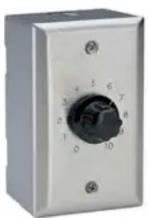
Audio and Power Connections
Expanding a 25/70/100V Amplifier
![graph LR A["Paging Amplifier Output"] --> B["V-1095 70V Paging Expander"] B --> C["Valcom One-Way Speaker/Amplifier Assemblies"] A --> D["COM 25V 70V 100V OR OR"] D --> E["24VDC Regulated * Power Supply or "A" Battery"] E --> B B --> F["Output"] F --> G["1"] G --> H["150"] style A fill:#f9…](/content/2026/07/1439099/images/8a5d85d97ebcae8e06d2108149f385e6b30f02d9021c70b8a76a687044cda72d.jpg)
* The V-1095 does not require a power supply. The power supply is required for speaker/amplifier assemblies.
Figure 1
Expanding an 8 Ohm Amplifier Output
![graph LR A["8 Ohm"] --> B["COM"] B --> C["V-1095 70V Paging Expander"] C --> D["1"] D --> E["Valcom One-Way Speaker/Amplifier Assemblies"] F["Paging Amplifier Output"] --> G["COM"] G --> H["25V"] G --> I["70V"] G --> J["100V"] C --> K["Output"] L["24VDC Regulated * Power Supply or "A" Batt…](/content/2026/07/1439099/images/f6bff0152f0716aa79a7af305dff5c912ba04cec29575efab6653c92742f75f3.jpg)
* The V-1095 does not require a power supply. The power supply is required for speaker/amplifier assemblies.
Figure 2
Expanding an 8 Ohm Stereo Output
![graph TD A["Stereo Amplifier"] --> B["Left Channel COM 8 Ohm"] A --> C["Right Channel COM 8 Ohm"] B --> D["COM 25V 70V 100V"] C --> E["COM 25V 70V 100V"] D --> F["V-1095 70V Paging Expander"] E --> G["V-1095 70V Paging Expander"] F --> H["Output 1 150"] G --> I["Output 1 150"] H --> J["Valcom One-Wa…](/content/2026/07/1439099/images/c2d32b165772de5de09d058bed4228d79c136481b11d030ba9fd3bad174ffb63.jpg)
* The V-1095 does not require a power supply. The power supply is required for speaker/amplifier assemblies.
Figure 3
Refer to the figures above for connections. Cabling "D" type station wire or other suitable pairs may be used for audio output connection.
Connections
a. Connect 25V, 70V or 100V input leads to respective amplifier.
b. Connect V-1095 output leads to speaker/amplifier assemblies or V-1094A.
Mounting
Install Romex connector and closure plugs in appropriate access holes on supplied single gang weather-resistant electrical box. Attach mounting lugs to the box with the two screws provided. Mount the box to suitable surface with appropriate hardware. Feed audio cable through access hole in installed surface mount electrical box. After making required cable connections, attach faceplate to box with screws provided.
TECHNICAL ASSISTANCE
When trouble is reported, verify there are no broken connections leading to this unit. Assistance in troubleshooting is available from the factory. When calling, have a VOM available and call from the job site. Call (540) 563-2000 and press 1 for Technical Support or visit our website at http://www.valcom.com.
Valcom equipment is not field repairable. Valcom, Inc. maintains service facilities in Roanoke, VA. Should repairs be necessary, attach a tag to the unit clearly stating your company name, address, phone number, contact person and the nature of the problem. Send the unit to:
Valcom, Inc.
Repair and Return Dept.
5614 Hollins Road
Roanoke, VA 24019-5056
| TROUBLESHOOTING CHART | |||
| PROBLEM | POSSIBLE CAUSES VERIFICATION | POSSIBLE SOLUTION | |
| No audio output to added speaker | Open input path | Monitor audio at input terminals with lineman's test set. No audio input. | Check cabling and cross-connections. |
| Open output path | Monitor audio at output terminals with lineman's test set. No audio output. | Check cabling and cross-connections. | |
WARRANTY
Warranty information may be found on our website at www.valcom.com/warranty.
Marque : Valcom
Modèle : V-1095
Catégorie : Amplificateur audio