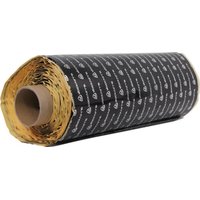
RM50RT-B - Matériel d'insonorisation sonore Rockville - Notice d'utilisation et mode d'emploi gratuit
Retrouvez gratuitement la notice de l'appareil RM50RT-B Rockville au format PDF.


| Type de produit | Enceinte active pour sono |
| Marque | Rockville |
| Modèle | RM50RT-B |
| Dimensions (approx.) | 40 x 30 x 50 cm |
| Poids | 12 kg |
| Alimentation | Secteur 220-240V, 50/60 Hz |
| Puissance RMS | 200 W |
| Réponse en fréquence | 50 Hz - 20 kHz |
| Connectivité | Entrée XLR, Jack 6,35 mm, Bluetooth |
| Fonctions principales | Lecteur USB, tuner FM, égaliseur intégré |
| Entretien et nettoyage | Nettoyer avec un chiffon doux et sec. Éviter l'humidité. |
| Sécurité | Débrancher avant nettoyage. Ne pas exposer à l'eau. |
| Pièces détachées et réparabilité | Contactez le service client Rockville pour les pièces. |
| Informations générales | Notice disponible en téléchargement PDF gratuit. |
FOIRE AUX QUESTIONS - RM50RT-B Rockville
Questions des utilisateurs sur RM50RT-B Rockville
0 question sur cet appareil. Repondez a celles que vous connaissez ou posez la votre.
Poser une nouvelle question sur cet appareil
Téléchargez la notice de votre Matériel d'insonorisation sonore au format PDF gratuitement ! Retrouvez votre notice RM50RT-B - Rockville et reprennez votre appareil électronique en main. Sur cette page sont publiés tous les documents nécessaires à l'utilisation de votre appareil RM50RT-B de la marque Rockville.
MODE D'EMPLOI RM50RT-B Rockville
RM Series SOUND DAMPENING MATERIAL
ROCKVILLE
Scan the QR codes or visit the URLs below to access how-to video(s), the owner's manual, and other important information you may need to get the most out of your item.

rockvillesupport.com/rm3

rockvillesupport.com/rm12-b

rockvillesupport.com/rm12-s

rockvillesupport.com/rm36-b

rockvillesupport.com/rm36-s

rockvillesupport.com/rm50rt-b

rockvillesupport.com/rm50rt-s
Installation Instructions
- Begin by laying out the sound dampening material in the sun and allowing it to "bake" so that the glue becomes adhesive. Do this an hour prior to installation. In the meantime, remove all carpet and panels from the area where material will be applied. Be sure to refer to your vehicle's manual for directions on how to properly remove panels.
- Thoroughly clean the area with the included degreaser. The area must be cleaned properly in order for the material to adhere. Allow time for the degreaser to dry completely before continuing with the installation.
- Now you are ready to install. Remove the backing from the sheet of Rockmat. We recommend that the installation take place in a relatively warm environment. This will allow for better adhesion of the material to the chosen surface. Using the provided roller, carefully apply the material ensuring that the are no bumps or air pockets.
- If you are also applying Rockmat to the speaker baffle, begin by applying the material. Once you've done this, cut out the speaker hole using a box cutter or other cutting tool.
- Use the material left over from the baffle cut out to apply to the door surface directly behind the speaker to improve noise reduction.
- Replace all carpet and panels. Now you are ready to rock!
RockvilleAudio.com
©2024 ROCKVILLE // The information presented is subject to change and/or improvement without notice.
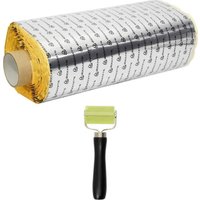
Marque : Rockville
Modèle : RM50RT-B
Catégorie : Matériel d'insonorisation sonore