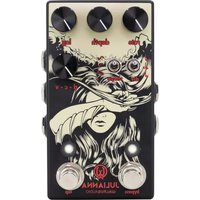
Julianna - Amplificateur guitare Walrus Audio - Notice d'utilisation et mode d'emploi gratuit
Retrouvez gratuitement la notice de l'appareil Julianna Walrus Audio au format PDF.


| Type de produit | Pédale d'effets pour guitare |
| Modèle | Julianna |
| Marque | Walrus Audio |
| Fonction principale | Chorus/Vibrato stéréo avec contrôle de forme d'onde |
| Alimentation | 9V DC, centre négatif, 100 mA minimum |
| Dimensions | Environ 121 x 66 x 35 mm |
| Poids | Environ 340 g |
| Entrées/Sorties | Entrée mono (jack 6,35 mm), sorties stéréo L/R (jack 6,35 mm) |
| Commandes | Rate, Depth, Mix, D-C-V (degré de chorus/vibrato), Wave (forme d'onde), Tap Tempo |
| Bypass | True bypass avec relais |
| Matériau du boîtier | Aluminium moulé sous pression |
| Entretien et nettoyage | Essuyer avec un chiffon sec et doux. Éviter l'humidité et les solvants. |
| Sécurité | Utiliser uniquement l'adaptateur recommandé. Ne pas ouvrir le boîtier. |
| Pièces détachées et réparabilité | Pas de pièces réparables par l'utilisateur. Contacter Walrus Audio pour service. |
| Informations générales | Pédale conçue pour guitare électrique et autres instruments. Fonctionne en mono ou stéréo. |
FOIRE AUX QUESTIONS - Julianna Walrus Audio
Questions des utilisateurs sur Julianna Walrus Audio
0 question sur cet appareil. Repondez a celles que vous connaissez ou posez la votre.
Poser une nouvelle question sur cet appareil
Téléchargez la notice de votre Amplificateur guitare au format PDF gratuitement ! Retrouvez votre notice Julianna - Walrus Audio et reprennez votre appareil électronique en main. Sur cette page sont publiés tous les documents nécessaires à l'utilisation de votre appareil Julianna de la marque Walrus Audio.
MODE D'EMPLOI Julianna Walrus Audio

*The use of an isolated power supply is recommended for powering all Walrus Audio Pedals. Daisy chain power supplies are not recommended.
MOMENTARY FEATURES
BYPASS SWITCH - Holding down the Bypass switch, when the pedal is engaged, allows you to set the secondary LFO rate and control the amount of drift added to the LFO by turning the Rate and Depth knobs.
TAP SWITCH - Hold down the tap switch to ramp to the secondary LFO rate. If the secondary LFO rate is faster than the current rate, the pedal will ramp up to it. If the secondary rate is set slower, it will ramp down.
TAP / EXPRESSIONJACK
The Tap/EXP jack can serve as either an external tap input or an expression pedal input. Before using this jack, be sure to set the internal dip switches to the position that corresponds to the intended use. If connecting an external tap, make sure it is a normally open source with a latch time of less than 250ms.
To assign an expression pedal, enter assignment mode by holding down both the Bypass and Tap switches until the bypass LED blinks rapidly. While continuing to hold the switches, turn either the Depth knob, Rate knob, or both to assign them to be controlled by the expression pedal. To clear an assignment, enter the assignment mode and exit the mode by releasing both stomp switched without turning any knobs. Make sure to use a TRS cable to connect the expression pedal, and that the pedal you are using is configured to send the control signal on the tip conductor of the cable.
Got questions or need a repair or want to mail us some cookies? Email help@walrusaudio.com All our pedals come with a limited lifetime warranty. walrusaudio.com/pages/warranty-and-repair for more info.

Julianna
企风
STEREO CHORUS/VIBRATO
Building off of the lush tonal landscapes that the Julia created, Julianna is an all analog, digital LFO, stereo chorus/vibrato with new expanded features. Julianna is able to produce mild smooth chorus, to seasick Brato and everywhere in between. The familiar controls like Lag. Dry-Chorus-Vibrato Blend, and selectable LFO wave shapes are all still here; but Julianna employs some new tricks. Secondary LFO speed, modulation drift, tap/expression control and momentary features will have you commanding all new kinds of sounds not found in traditional chorus pedals.
CONTROLS
RATE - The Rate knob allows you to control the speed of the main LFO.
SECONDARY FUNCTION: MOMENTARY LFO RATE - The Rate knob also allows you to set the momentary LFO rate. While the pedal is engaged, hold down the bypass switch and turn the Rate knob. The Bypass LED will blink at the momentary LFO rate and will turn solid once you release the Bypass switch, storing your momentary LFO rate setting. See Momentary Features section to learn more.
DEPTH - The Depth knob controls the strength of the chorus and vibrato effect by setting the amplitude of the LFO.
SECONDARY FUNCTION: DRIFT - The secondary function of the Depth knob sets the amount of 'Drift' applied to the LEO. The Drift feature on the Julianna gently speeds up and slows down the current rate of the LEO based on the amount of Drift applied. It's like a little robot is inside your pedal moving the Rate knob up and down. Lower settings offer a small amount of Drift while higher settings are more dramatic. To introduce Drift, hold down the Bypass switch, with the pedal engaged and turn the Depth knob to the desired setting. To turn Drift off, follow the same procedure and set the Depth knob to zero.
LAG - The Lag knob lets you set the center delay time that the LFO modulates around. From smooth, tight modulation at lower settings, to noisy and nauseating detune at maximum.
D-C-V BLEND - The DCV knob sets the ratio of dry to wet signal through the mono channel of the Julianna. Traditional mono chorus sounds can be heard with the knob set around noon. Pitch vibrato is found in the full clockwise position. The ground in between offers unique blends of chorus and vibrato not commonly found on other chorus pedals.
When both outputs are connected, set the DCV knob to full counterclockwise to send your dry signal to the mono output and vibrato signal to the stereo output for a traditional stereo chorus sound. Explore other variations by turning the DCV knob up slightly to add some vibrato signal to the dry output changing the stereo image.
DIV SWITCH - The Div switch lets you select a quarter note, quarter note triplet, or eighth note multiplier to scale a tapped in tempo.
NOTE: the div switch only operates on a tapped tempo, not the Rate knob.
SHAPE SWITCH - The Shape toggle lets you select a sine, triangle, or random LFO wave to modulate the pitch of your signal. There are no rules here. Sine is traditionally used for vibrato tones and triangle for chorus, but feel free to change it up! The random wave is a true random LFO and is awesome for creating unpredictable pitch vibrato effects. The random wave combined with the drift effect makes for seasick unpredictability. Take some Dramamine and give it a try.
BYPASS LED - Illuminated when the effect is engaged and blinks the secondary LFO rate when holding down the Bypass switch when the pedal is engaged. Note the Julianna remembers its last known bypass state. If you turn your pedalboard off with the Julianna engaged, the next time you power it up. It will automatically power up engaged. This is great for players who use a bypass looper to avoid having to turn the pedal on manually each time they power on their pedalboard.
TAP LED - The Tap LED pulses at the rate of the LFO set by the Rate knob or the rate of a tapped in tempo.

Marque : Walrus Audio
Modèle : Julianna
Catégorie : Amplificateur guitare