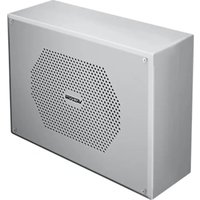
V-9890 - Interphone Valcom - Notice d'utilisation et mode d'emploi gratuit
Retrouvez gratuitement la notice de l'appareil V-9890 Valcom au format PDF.


| Type de produit | Interphone mural filaire |
| Marque | Valcom |
| Modèle | V-9890 |
| Dimensions (L x H x P) | 120 x 80 x 30 mm |
| Poids | 250 g |
| Alimentation | 24 V CC via adaptateur secteur (inclus) |
| Consommation électrique | 2 W max |
| Type de connexion | Filaire RJ11 / bornier à vis |
| Nombre de postes supportés | Jusqu'à 4 postes |
| Fonctions principales | Appel, conversation mains-libres, sonnerie réglable, voyant lumineux d'appel |
| Portée maximale | 100 m en câblage standard |
| Matériau du boîtier | Plastique ABS blanc |
| Fixation | Montage mural, vis fournies |
| Entretien et nettoyage | Nettoyer avec un chiffon doux et sec. Ne pas utiliser de produits abrasifs. |
| Sécurité | Conforme aux normes CE. Utiliser uniquement l'adaptateur fourni. |
| Pièces détachées et réparabilité | Adaptateur secteur et câble de liaison disponibles en option. Réparation par centre agréé. |
| Informations générales | Garantie 2 ans. Température de fonctionnement : 0°C à 40°C. |
| Contenu de la boîte | Interphone, adaptateur secteur, kit de fixation, notice d'utilisation |
FOIRE AUX QUESTIONS - V-9890 Valcom
Questions des utilisateurs sur V-9890 Valcom
0 question sur cet appareil. Repondez a celles que vous connaissez ou posez la votre.
Poser une nouvelle question sur cet appareil
Téléchargez la notice de votre Interphone au format PDF gratuitement ! Retrouvez votre notice V-9890 - Valcom et reprennez votre appareil électronique en main. Sur cette page sont publiés tous les documents nécessaires à l'utilisation de votre appareil V-9890 de la marque Valcom.
MODE D'EMPLOI V-9890 Valcom
V-9809 Vandal-Resistant Wall Enclosure Flexhorn V-9880 Vandal-Resistant Flexhorn One-Way V-9890 Vandal-Resistant Flexhorn Talkback INSTALLATION GUIDE
DIMENSIONS/WEIGHT
• 10.00"H x 12.25"W x 4.00"D
• (25.4cm H x 31.12cm W x 10.16cm D)
• 7.0 lbs. (3.2 kg) without Flexhorn (V-9809)
• 8.35 lbs. (3.8 kg) with Flexhorn (V-9880 and V-9890)
INSTALLATION
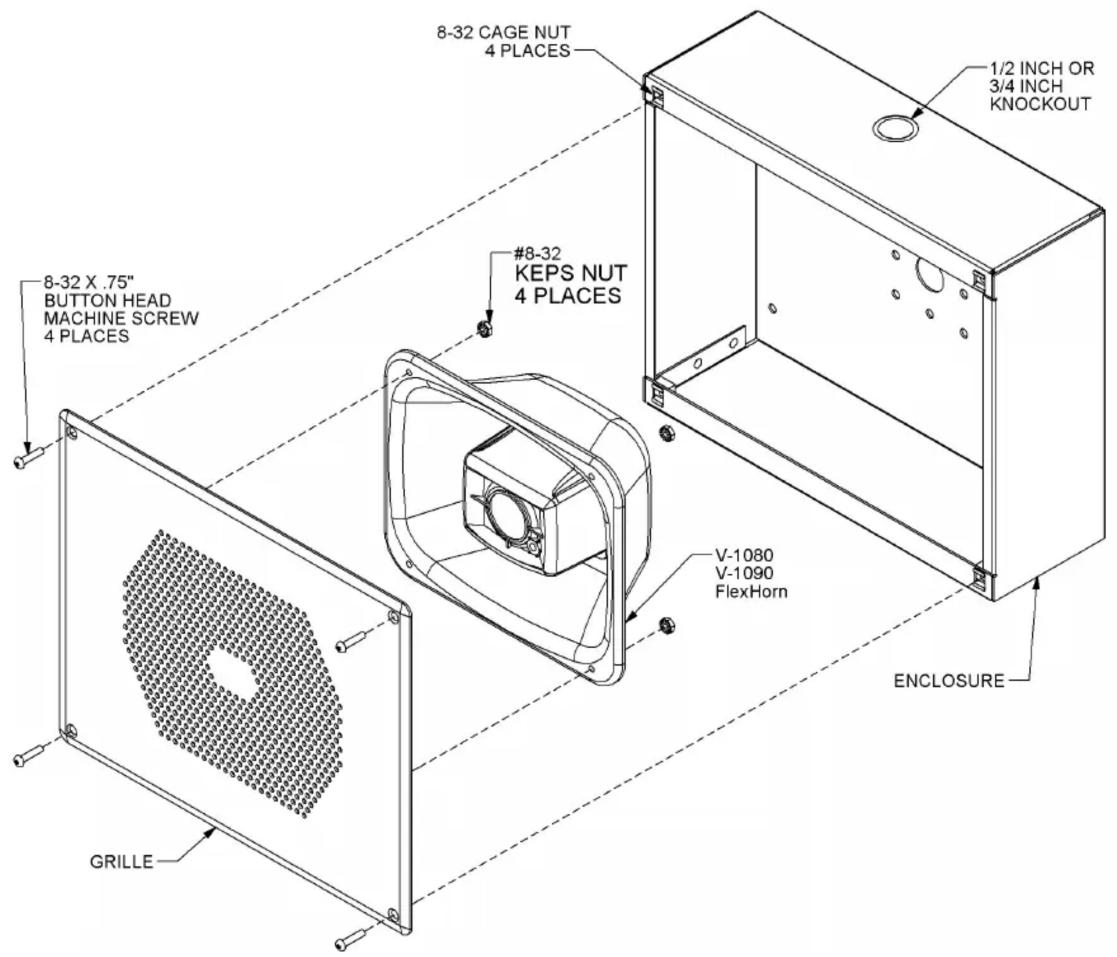
Remove the wall speaker enclosure from the packing container. Using a Phillips screwdriver, remove the two screws securing the grille to the enclosure. Remove the grille and remove any hardware packed inside the enclosure. Pre-drilled 13/64" mounting holes in the back of the enclosure are designed to fit a single gang, double gang or octagon outlet box. If not attaching to an outlet box, use the enclosure as a template. Hold the enclosure in the desired position on the wall and mark the location of mounting holes. Depending on wall construction type, prepare the mounting hole locations on the wall to securely attach the enclosure.
Wiring may be inserted through the large hole in the back of the enclosure, or through the knockout hole in the top of the enclosure. Insert audio wires and power wires (if needed) through desired hole. Use mounting hardware (not included) appropriate for the wall type to securely mount the enclosure to the wall.
Model V-9809 does not include a speaker. Mounting studs and nuts are provided on the back of the grille assembly to securely attach any Valcom V-1080 or V-1090 Flexhorn speaker. Mounting holes must be drilled through the Flexhorn housing before mounting to the grille. Flexhorn speakers have a mounting boss molded into the back of the speaker flange at each corner. Drill a 7/32" hole through the mounting boss. Remove the four nuts from the studs, align speaker mounting holes on the studs, then install and securely tighten the nuts. NOTE: Volume control will need to be set on the V-1080 before attaching the Flexhorn to the grille assembly.
For model V-9880, connect the audio wires to the Green (Tip/A) and Red (Ring/B) leads on the Flexhorn speaker. Connect the power wires to the White (-24VDC) and Black (GND) leads on the Flexhorn speaker. The Flexhorn will have to be removed from the grille assembly (remove the four #8-32 KEPS nuts) to adjust the volume. The volume control is accessible on the front of the cone on the Flexhorn. After the volume is adjusted, attach the Flexhorn to the grille assembly.
For model V-9890, connect the audio wires to the White (Tip/A) and Black (Ring/B) leads on the Flexhorn speaker.
For model V-9809, make audio and power connections as necessary for the type of speaker used.
Align the grille/speaker assembly with the enclosure. Install the four supplied tamper-resistant screws through the grille into the enclosure. Use the supplied security hex bit to tighten the screws securely.
TECHNICAL ASSISTANCE
Assistance is available from the factory when problems are encountered. Call (540) 563-2000 and press 1 for Technical Support or visit our website at http://www.valcom.com.
Valcom equipment is not field repairable. Valcom, Inc. maintains service facilities in Roanoke, VA. Should repairs be necessary, attach a tag to the unit clearly stating company name, address, phone number, contact person and the nature of the problem. Send the unit to:
Valcom, Inc.
Repair and Return Dept.
5614 Hollins Road
Roanoke, VA 24019-5056
VALCOM LIMITED WARRANTY
Valcom, Inc. warrants its products only to the original purchaser, for its own use, to be free from defects in materials and workmanship under conditions of normal use and service for a period of one year from the date of shipment. This Limited Warranty obligation shall be limited to the replacement, repair or refund of any such defective device within the warranty period, provided that:
- inspection by Valcom, Inc. indicates the validity of the claim;
- the defect is not the result of damage, misuse or negligence after the original shipment;
- the product has not been altered in any way or repaired by others and that factory sealed units are unopened (a service charge plus parts and labor will be applied to units defaced or physically damaged);
- freight charges for the return of products to Valcom are prepaid;
- all units 'out of warranty' are subject to a service charge. The service charge will cover minor repairs (major repairs will be subject to additional charges for parts and labor).
This Limited Warranty is in lieu of and excludes all other warranties, expressed or implied and in no event shall Valcom, Inc. be liable for any anticipated profits, consequential damages, loss of time or other losses incurred by the buyer in connection with the purchase, operation, maintenance, installation, removal or use of the product. The maximum liability of Valcom under this warranty is limited to the purchase price of the specific Product covered by the warranty.
Disclaimer. Except for the Limited Warranty provided herein, the product is provided "as-is" without any warranty of any kind whatsoever including, without limitation, any WARRANTY OF MERCHANTABILITY, FITNESS FOR A PARTICULAR PURPOSE OR NON-INFRINGEMENT.
This warranty specifically excludes damage incurred in shipment. In the event a product is received in damaged condition, the carrier should be notified immediately. Claims for such damage should be filed with the carrier involved in accordance with the F.O.B. point.
Headquarters:
Valcom, Inc.
5614 Hollins Road Roanoke, VA 24019-5056
Phone: (540) 563-2000 FAX: (540) 362-9800

Marque : Valcom
Modèle : V-9890
Catégorie : Interphone