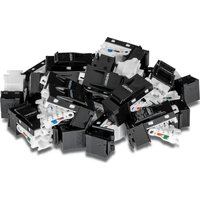
TC-K25C6 - Câble informatique TRENDNET - Notice d'utilisation et mode d'emploi gratuit
Retrouvez gratuitement la notice de l'appareil TC-K25C6 TRENDNET au format PDF.


| Type de produit | Câble réseau Ethernet |
| Marque | TRENDnet |
| Modèle | TC-K25C6 |
| Catégorie | Catégorie 6 (Cat6) |
| Longueur | 7,6 mètres (25 pieds) |
| Connecteurs | 2 x RJ45 mâle |
| Blindage | U/UTP (non blindé) |
| Débit supporté | Jusqu'à 1 Gbps (Gigabit Ethernet) |
| Fréquence maximale | 250 MHz |
| Compatibilité | PC, routeurs, commutateurs, consoles de jeux, etc. |
| Poids | Environ 220 g |
| Alimentation | Aucune (passif) |
| Matériau du conducteur | Cuivre sans oxygène (OFC) |
| Gaine extérieure | PVC |
| Température de fonctionnement | -20 °C à 60 °C |
| Garantie | Limitée à vie |
| Entretien et nettoyage | Nettoyer avec un chiffon sec et non pelucheux. Ne pas utiliser de produits chimiques. |
| Sécurité | Éviter les pliures excessives et les tensions mécaniques. |
| Pièces détachées et réparabilité | Non réparable. Aucune pièce détachée disponible. |
FOIRE AUX QUESTIONS - TC-K25C6 TRENDNET
Questions des utilisateurs sur TC-K25C6 TRENDNET
0 question sur cet appareil. Repondez a celles que vous connaissez ou posez la votre.
Poser une nouvelle question sur cet appareil
Téléchargez la notice de votre Câble informatique au format PDF gratuitement ! Retrouvez votre notice TC-K25C6 - TRENDNET et reprennez votre appareil électronique en main. Sur cette page sont publiés tous les documents nécessaires à l'utilisation de votre appareil TC-K25C6 de la marque TRENDNET.
MODE D'EMPLOI TC-K25C6 TRENDNET
TRENDNET®
Quick Installation Guide
Cat6 Keystone Jack
TC-K25C6/TC-K50C6
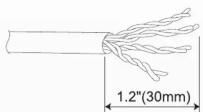
- Strip approximately 30mm (1.2 in.) of jacket from the twisted pair cable.
- Insert the cable into the termination cap and fan out all four twisted pairs. Using the T568A or T568B color labeling, position each wire appropriately into the color labeled slots. Cut excess wires.
- Clip the termination cap onto the keystone jack hinge.
- Press the termination cap down until flush with the keystone jack. Ensure each wire is firmly anchored in each slot.
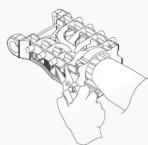


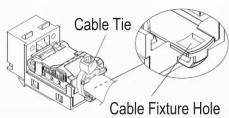
- Feed the included cable tie through the cable fixture hole and tighten to secure the termination cap and keystone jack together.
Unloading the cable
- Cut the cable tie.
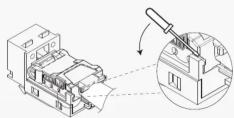
- Using a flathead screwdriver, gently pry each side of the termination cap until released.
T568B Pinout
- White Orange
- Orange
- White Green
-
Blue
-
White Blue
- Green
- White Brown
- Brown
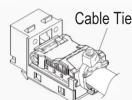
Cut off cable tie


Marque : TRENDNET
Modèle : TC-K25C6
Catégorie : Câble informatique