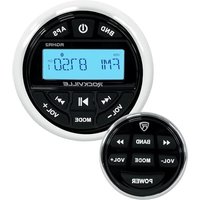
RGHR2 - Radio numérique Rockville - Notice d'utilisation et mode d'emploi gratuit
Retrouvez gratuitement la notice de l'appareil RGHR2 Rockville au format PDF.


| Type de produit | Subwoofer actif |
| Dimensions (L x l x H) | 35 x 30 x 30 cm |
| Poids | 12 kg |
| Alimentation | 120 V AC, 50/60 Hz |
| Puissance RMS | 400 W |
| Puissance crête | 800 W |
| Réponse en fréquence | 20 Hz – 200 Hz |
| Impédance | 4 ohms |
| Haut-parleur | 12 pouces (30 cm) |
| Fonctions principales | Volume variable, crossover réglable, phase 0-180°, entrée ligne |
| Matériau du caisson | MDF avec revêtement en tapis |
| Connectique | Entrées RCA, borniers à vis haut niveau |
| Protection intégrée | Protection contre les courts-circuits et la surchauffe |
| Entretien et nettoyage | Débrancher l’alimentation, nettoyer avec un chiffon doux et sec |
| Sécurité | Ne pas exposer à l’eau ou à l’humidité ; utiliser sur une surface stable |
| Pièces détachées et réparabilité | Contactez le service client Rockville pour les pièces et réparations |
| Informations générales | Garantie 1 an ; fabrication : Chine |
FOIRE AUX QUESTIONS - RGHR2 Rockville
Questions des utilisateurs sur RGHR2 Rockville
0 question sur cet appareil. Repondez a celles que vous connaissez ou posez la votre.
Poser une nouvelle question sur cet appareil
Téléchargez la notice de votre Radio numérique au format PDF gratuitement ! Retrouvez votre notice RGHR2 - Rockville et reprennez votre appareil électronique en main. Sur cette page sont publiés tous les documents nécessaires à l'utilisation de votre appareil RGHR2 de la marque Rockville.
MODE D'EMPLOI RGHR2 Rockville
ROCKVILLE
RGHR2
WATER-RESISTANT GAUGE-HOLE DIGITAL MEDIA RECEIVER w/BLUETOOTH, USB, and AM/FM RADIO
OWNER'S MANUAL
ATTENTION: VISIT THE ROCKVILLE SUPPORT SITE FIRST!
Who reads manuals?
Scan the QR code or go to rockvillesupport.com/ rghr2 to access how-to video(s), the owner's manual, and other important information you may need to get the most out of your item.
If you prefer written instructions, please read ahead!
With Rockville you get many options.

Missing items? If you ordered a bundle that includes more than one product and you are missing part of your bundle, then it just means your order shipped from two different warehouses. You will receive the remaining items very soon. If you have any concerns or inquiries, feel free to call our customer support center at 1-646-758-0144, Monday through Thursday, 9am to 10pm EST, and Fridays, 9am to 3pm EST.
Thank you for purchasing this Rockville RGHR2 water-resistant gauge-hole digital media receiver with Bluetooth, USB, and AM/FM radio. Please read this guide carefully for proper use of your Rockville RGHR2. Should you need technical assistance, please call our technical help line at 1-646-758-0144, Monday through Thursday, 9am to 10pm EST, and Fridays, 9am to 3pm EST.
IMPORTANT SAFETY INSTRUCTIONS

- To reduce risk of electric shock, never open the unit. There are no user-serviceable parts; refer service to Rockville.
INCLUDED
• Marine digital media receiver
• Wired remote with 32.8ft wire
• 40-inch USB extension cable
- Mounting bracket
- Screws
- ISO wiring
- Owner's manual and warranty
DIMENSIONS
REMOTE

RECEIVER

WIRING DIAGRAM
![graph TD A["REAR LEFT"] -->|+ GREEN| B["AUX IN"] C["FRONT LEFT"] -->|+ WHITE| B D["L RED"] -->|AUX IN| B E["ANTENNA"] -->|BLACK| B F["RED: ACC"] --> B G["BLACK: GND"] --> B H["YELLOW: BATTERY +12V"] --> I["FUSE 10A"] J["BLUE: AUTO ANTENNA"] --> I K["PURPLE +"] --> L["REAR RIGHT"] M["PURPLE/BLACK -"]…](/content/2026/07/1423765/images/9d40179176bc78b3db640c8f69115bc7a2e15c972c2ebd8c6b43c4ac0c54eef8.jpg)
Attention:
Most boats run on two batteries, each 12 volts, combined in series to provide 24 volts of power. In the diagram below, the battery on the left is the ENGINE BATTERY. Its positive lead goes to the engine and its negative lead is tied to the positive lead of the HOUSE BATTERY on the right. The HOUSE BATTERY'S negative terminal provides the common ground for the boat's electrical system. The RGHR2 runs on 12 volts. Hence, for trouble-free performance, connect the BLACK GROUND WIRE and the YELLOW POWER WIRE of the RGHR2 to the corresponding terminals on the HOUSE BATTERY only. If the BLACK GROUND WIRE does not reach the battery, it can be connected elsewhere, but it may cause intermittent issues. The safest bet is to connect the ground wire directly to the negative (black) terminal of the HOUSE BATTERY. Be sure to connect the RED (ACC) WIRE from the harness to the vessels ignition. This will allow the RGHR2 to power on when the vessel starts up.

FUNCTIONS

RECEIVER
- BND: Switch between AM and FM bands.
- POWER: Press to turn unit on. Press and hold for 2 seconds to turn the unit off. While the unit is on, press the power button to activate/deactivate mute function.
- APS: Press and hold the APS button to automatically program AM/FM stations. While in AM or FM mode, press the APS button to search forward through the stations. In USB mode, press the APS button once to repeat one track, press again to repeat all tracks.
- LCD screen
- PREVIOUS button: Press to move backwards through tracks. Press and hold to rewind.
- VOL -: Decrease volume
- MODE: Use the mode button to reach the desired mode setting (BT/USB/RADIO). The mode button can also be used to enter the unit settings menu.
- VOL+: Increase volume
- NEXT button: Press to move forwards through tracks. Press and hold to fast forward.
- Play/Pause: Press once to play current track; press again to pause.

REMOTE
- PREVIOUS button: Press to move backwards through tracks. Press and hold to rewind.
- BAND: Switch between AM and FM bands.
- NEXT button: Press to move forwards through tracks. Press and hold to fast forward.
- VOL -: Decrease volume
- VOL+: Increase volume
- MODE: Use the mode button to reach the desired mode setting (BT/USB/RADIO). The mode button can also be used to enter the unit settings menu.
- POWER: Press to turn unit on. Press and hold for 2 seconds to turn the unit off. While the unit is on, press the power button to activate/deactivate mute function.
OPERATION BLUETOOTH
Pairing:
- When "BT MUSIC" is flashing on the screen, the unit is in pairing mode.
- Ensure your device is in Bluetooth mode and discoverable.
- Under list of available devices, search for and select ROCKVILLE.
- To disconnect paired device, simply press the APS button.
Bluetooth Music:
- Press the Play/Pause buttons to start and stop music playback.
- Press the Previous/Next buttons to navigate through tracks.
- Press and hold the Previous/Next buttons to rewind or fast forward.
- Press VOL-/VOL+ to decrease or increase the volume.
USB
- Press the Play/Pause buttons to start and stop music playback.
- Press the Previous/Next buttons to navigate through tracks.
- Press and hold the Previous/Next buttons to rewind or fast forward.
- Press VOL-/VOL+ to decrease or increase the volume.
- Press the APS button once to repeat the current track. Press again to repeat all tracks.
- Press and hold APS to search for a specific track number, then press VOL+ or VOL- to change to the desired track.
AM/FM RADIO
- To scan through stations, press the APS button once.
- To manually move backwards through stations, hold the Previous button for 1 second, release, then press again.
- To manually move forwards through stations, hold the Next button for 1 second, release, then press again.
- To mute radio mode, press the power button.
- To program presets, press and hold the APS button. Pressing the Previous/Next buttons will change the preset stations. To set a custom preset, press the Next button to reach the desired preset. Once you've reached the desired preset, use the Previous/Next buttons to change the station. Press Play/Pause to set the new preset.
SETTINGS
- Press and hold the MODE button to enter the Settings Menu.
- Press and the release MODE button to change Menu items.
- Adjustable settings are: Bass, Treble, Balance, Fader, Beep, EQ, Loud, and Tuner region.
- To adjust the settings, use the VOL-/VOL+ buttons.
FEATURES
- Fits into a standard gauge-hole (tachometer) opening
• Built-in 72 x 4 watt peak high-powered amplifier (28 x 4 RMS)
• Built-in EQ with preset EQ curves (pop, classic, rock, flat) - IP66 waterproof certification (tested to withstand the elements)
• USB input supports 16GB max - RCA Aux input
• AM/FM radio built-in with 18 FM and 12 AM presets + US and European tuning - Bluetooth built-in to stream audio from any Bluetooth enabled device
- Two sets of RCA outputs (front and rear) allow you to connect external amplifiers
• Dedicated RCA subwoofer output - Big easy-to-use buttons
- Backlit LCD display
- Wired remote control included
• USB is 500mA and 5V, supports charging
AMP SPECS
• TDA7851L quad bridge power amplifier
- 4 x 72 watts peak @ 2 ohms
- 4 x 48 watts peak @ 4 ohms
- 4 x 28 watts RMS @ 4 ohms
DIMENSIONS
Receiver
- 2.96" cutout mounting diameter
- 4.45" diameter top plate
- 3.90" mounting depth (not including top plate)
- 5.00" depth including the top plate
Remote
- 2.00" cutout mounting diameter
- 2.40" diameter top plate
- 1.02" mounting depth (not including top plate)
- 1.75" depth including the top plate
Troubleshooting
| PROBLEM | SOLUTION |
| No power | 1. Check power connections: Yellow wire goes to the house battery; Black wire must be grounded securely. The Red wire goes to the vessel's ignition. |
| Poor or no radio reception | 1. Make sure antenna cables are properly connected. |
| Bluetooth pairing fails | 1. Check to see that both devices are turned on and that your Bluetooth device is discoverable.2. Turn both devices off and then on again.3. Make sure you've selected the proper source.4. Make sure that the Bluetooth device is within 5 feet of the unit.5. Move both devices away from other Bluetooth devices and/or other electronics.6. Make sure that the unit is not paired to a previously paired device. |
| Files on USB memory device will not play back | 1. Make sure you've selected the proper source.2. Make sure that the audio files are properly formatted.3. Make sure that the USB drive is properly plugged in.4. Check USB drive for damage. |
FEDERAL COMMUNICATIONS COMMISSION COMPLIANCE INFORMATION
Responsible party name: Rockville
Address: 600 Bayview Ave,
Entrance A,
Inwood, NY 11096
Hereby declares that the product Rockville RGHR2 Water-Resistant Gauge-Hole Digital Media Receiver complies with FCC rules as mentioned in the following paragraph:
This device complies with Part 15 of the FCC rules. Operation is subject to the following two conditions: (1) this device may not cause harmful interference, and (2) this device must accept any interference received, including interference that may cause undesired operation.
Note: This equipment has been tested and found to comply with the limits for a Class B digital device, pursuant to Part 15 of the FCC rules. These limits are designed to provide reasonable protection against harmful interference in a residential installation. This equipment generates, uses, and can radiate radio frequency energy and, if not installed and used in accordance with the instructions, may cause harmful interference to radio communications. However, there is no guarantee that interference will not occur in a particular installation. If this equipment does cause harmful interference to radio or television reception, which can be determined by turning the equipment off and on, the user is encouraged to try to correct the interference by one or more of the following measures:
- Reorient or relocate the receiving antenna.
- Increase the separation between the equipment and receiver.
- Consult the dealer or an experienced technician for help.
ROCKVILLE

- ROCKVILLE
- RGHR2
- OWNER'S MANUAL
- ATTENTION: VISIT THE ROCKVILLE SUPPORT SITE FIRST
- WHO READS MANUALS
- IMPORTANT SAFETY INSTRUCTIONS
- INCLUDED
- DIMENSIONS
- WIRING DIAGRAM
- ATTENTION
- FUNCTIONS
- RECEIVER
- REMOTE
- OPERATION BLUETOOTH
- PAIRING
- BLUETOOTH MUSIC
- USB
- AM/FM RADIO
- SETTINGS
- FEATURES
- AMP SPECS
- FEDERAL COMMUNICATIONS COMMISSION COMPLIANCE INFORMATION
Marque : Rockville
Modèle : RGHR2
Catégorie : Radio numérique