UC-CAM10PRO-MA1 - Webcam IIYAMA - Notice d'utilisation et mode d'emploi gratuit
Retrouvez gratuitement la notice de l'appareil UC-CAM10PRO-MA1 IIYAMA au format PDF.


| Type de produit | Webcam |
| Marque | IIYAMA |
| Modèle | UC-CAM10PRO-MA1 |
| Résolution vidéo maximale | Full HD 1080p (1920 x 1080) |
| Fréquence d'images maximale | 30 images par seconde |
| Capteur | CMOS |
| Microphone intégré | Oui, stéréo |
| Angle de vue | 90° |
| Mise au point | Automatique |
| Connexion | USB 2.0 |
| Longueur du câble | 1,5 mètre |
| Fixation | Clip réglable pour écran ou trépied (pas inclus) |
| Dimensions (L x H x P) | 10 x 4 x 4 cm |
| Poids | 100 grammes |
| Alimentation | Via port USB |
| Consommation électrique | 2,5 W (max) |
| Systèmes d'exploitation compatibles | Windows, macOS, Chrome OS, Linux |
| Entretien et nettoyage | Nettoyer l'objectif avec un chiffon microfibre sec. Débrancher avant nettoyage. |
| Sécurité | Ne pas exposer à l'humidité ou à des températures extrêmes. Utiliser dans un environnement sec. |
| Pièces détachées et réparabilité | Câble USB non remplaçable. Pas de pièces réparables par l'utilisateur. |
| Garantie | 2 ans |
FOIRE AUX QUESTIONS - UC-CAM10PRO-MA1 IIYAMA
Questions des utilisateurs sur UC-CAM10PRO-MA1 IIYAMA
0 question sur cet appareil. Repondez a celles que vous connaissez ou posez la votre.
Poser une nouvelle question sur cet appareil
Téléchargez la notice de votre Webcam au format PDF gratuitement ! Retrouvez votre notice UC-CAM10PRO-MA1 - IIYAMA et reprennez votre appareil électronique en main. Sur cette page sont publiés tous les documents nécessaires à l'utilisation de votre appareil UC-CAM10PRO-MA1 de la marque IIYAMA.
MODE D'EMPLOI UC-CAM10PRO-MA1 IIYAMA



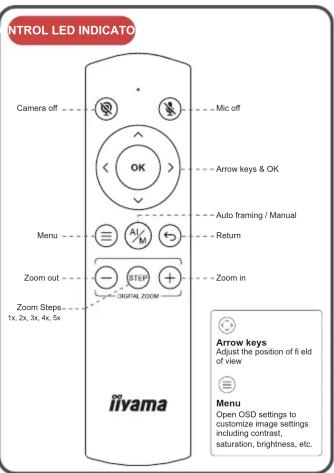
| Event Camera response LED Status | |||
| 1 | Plug-in power / | Red light & orange light fl ashing | |
| 2 | Camera is in use / Green light | ||
| 3 | Camera is not in use / Red light | ||
| 4 | Single press the switch button | Switch to 1x-2x-3x -4x-5x-auto framing by each press | Red light blink |
| 5 | Long press (>2 sec) the function button | Enter / Exit auto framing mode | Red light blink |
| 6 | Long press (>5 sec) the function button | Reboot the C570 Red light | light blink |
| 7 | Use remote and turn off mic | Mic is mute, mute icon pop up | Orange light blink |
| 8 | Use remote and turn off camera | Camera is off , pop up a black image with camera off icon | Red light blink |
| 9 | Use remote and turn off both mic and camera | Mic is mute and camera is off, pop up a black image with mic off icon and camera off icon | Red light & orange light blink alternately |

M314A17
GETTING START WITH UC-CAM10PRO-MA1
Oliv Moutet
Cnp Mount
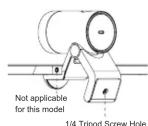
Easily mount onto any displays such as laptop monitor, television or interactive display using its built-in clip mount.
7.1.10
Tripod Mount Tripod screw hole is located at the bottom of the clip mount for tripod mounting.
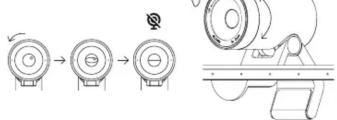
Privacy Cover
On the side of the camera lens, rotate the privacy shutter adjuster counterclockwise to cover the camera lens.
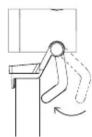
Manually adjust the webcam tilt up / down to the best shooting angle.
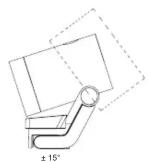
Connecting the cameraSwivel & Tilt
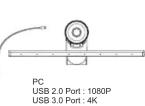
1) Connect the type C end of the bundled USB 3.0 cable to the Type C port at the back of the UC-CAM10PRO-MA1. 2) Connect the Type A end of the same cable to a laptop or workstation. If connecting to USB 2.0 port of PC, the maximum available resolution will be 1080R. If connecting to USB 3.0 port of PC, the maximum available resolution will be 4K.

How to prevent flicker in your video
The default camera frequency setting is 50Hz, if you encounter the flicker problem, simply use the remote control, get into Menu to adjust camera frequency that match the electrical frequency of your region.
Important Safety, Compliance and Warranty Information
*Read Manual Before Product Use*
Safe Usage Guidelines for Products
- Do not open or modify the product except for battery removal and replacement.
- Do not disassemble or attempt to service this product. - This product is safe under normal and reasonably foreseeable misuse operating conditions. - If product is operating improperly, contact the authorized reseller. - Product must be returned to the authorized reseller for any service or repair. - This is not a Children's Product and is not intended for use by children under 14 years old.
CE MARKING DECLARATION OF CONFORMITY
This USB Camera complies with the requirements of the EC/EU Directive 2014/30/EU "EMC Directive", 2014/35/EU "Low Voltage Directive", and 2011/65/EU "RoHS Directive". The electro-magnetic susceptibility has been chosen at a level that gives correct operation in residential areas, business and light industrial premises and small-scale enterprises, inside as well as outside of the buildings. All places of operation are characterized by their connection to the public low voltage power supply system.
IIYAMA CORPORATION: Wijkermeerstraat 8, 2131 HA Hoofddorp, The Netherlands
We recommend recycling of used product. Please contact your dealer or iiyama service center. Recycle information is obtained via the Internet, using the address: https://iyama.com You can access the Web page of different countries from there.

Marque : IIYAMA
Modèle : UC-CAM10PRO-MA1
Catégorie : Webcam