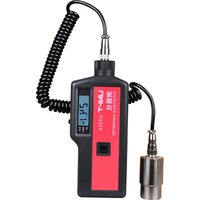
UT315A - équipements de mesure Uni-T - Notice d'utilisation et mode d'emploi gratuit
Retrouvez gratuitement la notice de l'appareil UT315A Uni-T au format PDF.


| Type de produit | Multimètre numérique |
| Marque | Uni-T |
| Modèle | UT315A |
| Dimensions (L x l x h) | 180 x 80 x 50 mm |
| Poids | 350 g (avec piles) |
| Alimentation | 2 piles AAA 1,5 V |
| Affichage | Écran LCD rétroéclairé, 6000 points |
| Fonctions principales | Mesure de tension AC/DC, courant AC/DC, résistance, capacité, diode, continuité, température |
| Plage de tension DC | 600 mV à 600 V |
| Plage de tension AC | 6 V à 600 V |
| Courant AC/DC | 600 µA à 10 A |
| Résistance | 600 Ω à 60 MΩ |
| Capacité | 10 nF à 100 mF |
| Sécurité | Conforme CAT II 600 V, double isolation |
| Entretien et nettoyage | Nettoyer avec un chiffon humide, ne pas utiliser de solvants. Retirer les piles si inutilisé longtemps. |
| Pièces détachées et réparabilité | Piles et fusibles remplaçables. Pour réparation, contacter le SAV Uni-T. |
| Informations générales | Garantie 2 ans. Température d'utilisation : 0°C à 40°C. |
FOIRE AUX QUESTIONS - UT315A Uni-T
Questions des utilisateurs sur UT315A Uni-T
0 question sur cet appareil. Repondez a celles que vous connaissez ou posez la votre.
Poser une nouvelle question sur cet appareil
Téléchargez la notice de votre équipements de mesure au format PDF gratuitement ! Retrouvez votre notice UT315A - Uni-T et reprennez votre appareil électronique en main. Sur cette page sont publiés tous les documents nécessaires à l'utilisation de votre appareil UT315A de la marque Uni-T.
MODE D'EMPLOI UT315A Uni-T


P/N:110401108737X
UNI-T®


UT315A Vibration Tester User Manual
UNI-T
UT315A User Manual
Preface
Thank you for purchasing the new vibration tester. In order to use this product safely and correctly, please read this manual thoroughly.
After reading this manual, it is recommended to keep the manual at an easily accessible place, preferably close to the device, for future reference.
Limited Warranty and Liability
Uni-Trend guarantees that the product is free from any defect in material and workmanship within one year from the purchase date. This warranty does not apply to damages caused by accident, negligence, misuse, modification, contamination or improper handling. The dealer shall not be entitled to give any other warranty on behalf of Uni-Trend. If you need
warranty service within the warranty period, please contact your seller directly. Uni-Trend will not be responsible for any special, indirect, incidental or subsequent damage or loss caused by using this device.
UNI-T
UTDISA User Manual
Table of Contents
| I. Introduction | 2 |
| II. Features | 2 |
| III. Configuration | 3 |
| IV. External Structure | 3 |
| V. LCO Description | 5 |
| VI. Text Method Selection | 7 |
| VII. Battery Installation | 9 |
| VIII. Power On/Off and Battery Status Check | 11 |
| IX. Operating Instructions | 12 |
| X. USB Communication | 19 |
| XI. Specifications | 20 |
| XII. Maintenance | 22 |
UNI-T
L/T315A User Manual
1. Introduction
The UT315A vibration tester is used for vibration measurement of mechanical equipment, especially of rotating and reciprocating machinery. It is widely applied to mechanical manufacturing, electric power, metallurgy, and other industrial measurement. The tester is an ideal tool for equipment condition monitoring.
II. Features
- Large LCD for visual display of measured values and measurement status
- Acceleration, velocity and displacement measurement
• Auto switch of vibration frequency characteristics - High-efficiency problems accurate metalloemers
- Enlarged with a large nimble and a short-pimble
- charged with a long probe and a short probe, for measurement in various places
- Equipped with a magnetic chuck, for testing when it is not conveyed to hold
- Equipped with a magnetic contact, for testing where it is not convenient to help
- Low battery indication
• Auto power off - LCD backlight
• Max value display - USB communication
• Delta hold - Data storage
2
1
1 - - 1
i
UNI-T
UT315A User Manual
III. Configuration
| Tester | 1 pc |
| IV battery | 1 pc |
| User manual | 1 pc |
| Long probe | 1 pc |
| Short probe | 1 pc |
| Magnetic chuck | 1 pc |
IV. External Structure

UNI-T
L/T315A User Manual
| Item | Description | |
| 1 | LCD | |
| 2 | Sensor cable | |
| 3 | Probe (pluggable long probe, short probe and magnetic switch) | |
| 4 | Power output | |
| 5 | Power output | |
| 6 | Acceleration measurement | |
| 7 | Velocity measurement | |
| 8 | Displacement measurement | |
| 9 | Hold data | |
| 10 | Display max value | |
| 11 | Turn on/off backlight | |
| 12 | Vere recorded data | |
| 13 | Clear recorded data, data up, USB communication, auto power off and automotive interval setting | |
| 14 | Data storage | |
| 15 | Menu function setting | |
| 16 | Data down, USB communication, auto power off and automotive interval setting | |
| 17 | Enter button | Confins |
UNI-T
UT315A User Manual
V. LCD Description
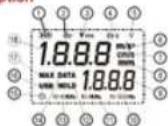
- Battery symbol: Indicates the current remaining battery level (4 levels)
Level 3: Sufficient power
(II) Level 2: Relatively sufficient power
X3 Level 1: The battery is almost exhausted and needs to be replaced
Level 0: The battery is exhausted and must be replaced. The battery symbol
flashes.
5
UNI-T.
UT315A User Manual
-
ap: Acceleration indicator
-
Vrms: Velocity indicator
-
dp-p: Displacement indicator
-
Backlight indicator
-
m2/s2 Accumulation unit
-
amb (work-in)
-
EMEA: Voluntary line
-
an: Disinforcement
-
Mio: Displacement, unit
-
Data record number display area
10.10-500Hz 10Hz-500Hz indicator
11.10-1kHz 10Hz-1kHz index
12 HOLD: Data hold indicator
13.10-10kHz 10Hz-10kHz indicator
14 DATA: Data situation indicator
- (6) Autopower-off indicators
10 USD 1USD communicating indicator
17 MAY. Alternative infections
- MAX. MAX value indicator
(1) Metalized varial decay axis
1 - - 1
6
1
UNI-T
UT315A User Manual
VI. Test Method Selection
Please select a proper test method from the following according to the actual situation. 1) Use short (S) probe to measure: The probe is mounted on the lesser. This method is applicable to vibration measurement in wide areas to acquire good response values, as shown below.

2) Use Long (L.) probe to measure: The probe is an accessory in the packaging box, which is mainly used in narrow or special object areas with quick response, as shown below.

Note: The long (L) probe is only suitable for low frequency measurement. When the frequency exceeds 1kHz in acceleration measurement, please replace it with the short (S) probe.
UNI-T.
U/T315A User Manual
3) Use magnetic chuck to measure: The chuck is an accessory in the packaging box, which is closed and is more of fating chucks as if any disolve, so it is in place.
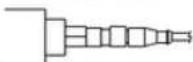
Note: When using magnetic chuck to measure, attachment position and
limness of attachment may cause differences in measurement results
4) Remove hardware probe to measure. This method is applicable to vibration measurement of the tool or reference.

是
UNI-T.
UTRISA Uber Manual
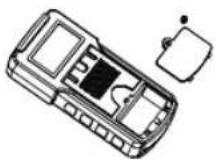
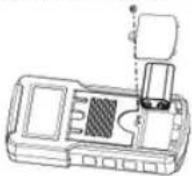
VII. Battery Installation
To install the battery: 1) Urscrew and remove the battery cover, as shown below.
UNI-T.
L/T315A User Manual
2) Put the 9V battery into the battery compartment, observing the polarity. Secure the battery cover and tighten the screw, as shown below.
10
UNI-T
UT315A Uber Manual
VIII. Power On/Off and Battery Status Check
Long press the POWER button to turn on the tester. It defaults to acceleration measurement and the auto power off function is on. If the LCD displays the “☐” or “☐” symbol, please replace the battery timely as shown below:

2) Short press the POWER button to turn off the tester.
11
UNI-T.
UTS15A User Manual
IX. Operating Instructions
- Acceleration Measurement 1) Short press the A button to enter the acceleration measurement mode (by default), and the LCD will display the "Ap", "10-10kHz" and "m/s" indicators. 2) Measure the object under test with the selected test method, and the LCD will display the measurement result in the measured value display area as shown below.

12
1 - - 1
UNI-T
UT315A User Manual
- Velocity Measurement
1) Short press the Voutton to enter the velocity measurement mode, and the LCD will
display for "Wms", "10-1kHz" and "cim/s" indicators.
2) Measure the object under test with the selected test method, and the LCD will display
the measurement result in the measured value display area, as shown below:

UNI-T
UTS15A User Manual
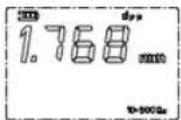
- Displacement Measurement
1) Short press the D button to enter the displacement measurement mode, and the LCD
will display the 'dp-p', '10-50Hz' and 'mm' indicators.
2) Measure the object under test with the selected test method, and the LCD will display
the measurement result in the measured value display area, as shown below.
13
14
1 - - 1
UNI-T
UT315A Uber Manual
4. Max Value Display
Short press the MAX button during measurement. The LCD will display the "MAX" indicator and display the max measured value in the data record number display area. Short press the MAX button again to exit max value display.
5. Data Hold
Short press the HOLD button during measurement. The LCD will display the "HOLD" indicator and hold the current measured value in the measured value display area. Short press the HOLD button again to exit data hold
6. Backlight On/Off
Short press the button during measurement. The LCD will display the indicator, and the backlight will be on. Short press the button again to turn off the backlight.
7. Data Storage
1) Manual data storage. Short press the REC button during measurement. The LCD will display the "DATA" indicator; and the current measured value will be stored in the latest unrecorded location. The "DATA" indicator disappears after about 0.5s. Short press the REC button again to enter the data storage for next location.
15
UNI-T.
UT315A User Manual
2) Auto data storage: Long press the REC button during measurement. The "DATA" indicator on the LCD will flash continuously and the measured values will be stored at the set intervals (refer to MBnu Function Setting). If the count of stored data exceeds the max record count (1999) of the tester, it will exit data storage automatically.
Note:
If 1000 sets of data are stored, the data needs to be cleared before continuing storage. Manual data storage shares the record count with auto-data storage:
8. View Recorded Data
Short press the READ button to view recorded data
1) If there is no recorded data, the LCD will display “--” both in the measured value display area and data record number display area. The tester returns to the measurement interface automatically after about 0.5s.
2) If there is recorded data, the last recorded data and record number will be displayed automatically. At this time, the tester can only return to the measurement interface by manual.
a. Use the ▲ or ▼ button to view the record number and its corresponding recorded data. Short press to view slowly and long press to view quickly.
b. Short press the REC button to make the display record increase by 100. If the record count is less than 100 or exceeds the max record count (1999), the first record number and its corresponding recorded data will be returned, for quick viewing of the data.
信
UNI-T
UT315A Uber Manual
c. Long press the REC button until the first record number and its corresponding recorded data is returned to quickly return to view the data. Short press the READ button again to exit.
9. Clear Recorded Data
Method 1: Press and hold the CLEAR and POWER buttons simultaneously to turn on the tester, release the POWER button after the full display, and release the CLEAR button after the LCD displays "CLR". Method 2: Restore factory settings (refer to Menu Function Setting)
10. Menu Function Setting
Short press the MENU button to enter the menu function setting, and short press the ENTER button to switch between the menu setting interfaces. If the tester is turned off in setting menu, the menu state will be served automatically. 1) Short press the MENU button to enter the USB function setting interface. The default state is USB 0, which indicates USB communication is off (refer to USB Communication). Use the ▲ or ▼ button to turn off off the USB communication. USB 1 indicates the USB communication is on.
17
UNI-T
UTS15A Liver Manual
a. If the USB-1 is set in the USB function setting interface, the READ button can be short pressed to send the stored data to the PC. Buttons can only be operated after the completion of the transmission.
b. If the USB 1 is set, the LCD will display the "USB" indicator in the measurement interface and the data will be sent to the PC in real time.
When the Uso communication is on, the auto-power of function e. of
2) In the auto power off function setting interface, use the ▲ or ▼ button to turn on/off the auto power off function. APO 0 indicates the function is off while APO 1 indicates the function is on. If the function is on, the tester will automatically power off after about 10 minutes of no operation.
3) In the autosave interval setting interface, the LCD displays the setting time. "DATA" indicator and YEC". Use the ▲ or ▼ button to set the autosave interval. Short press to adjust it by 1s and long press to adjust it quickly. The interval can be set from 0.5s to 255s.
4) In the factory reset interface, the LCD displays "DEF 7". Short press the MENU button to restore factory settings and return to the measurement interface, or short press the ENTER button to exit the menu function setting and enter the measurement interface.
Default execution for factory reset: USB 0, APO 1, autosave interval of 60s, clearing all recorded data
无指
UNI-T
UT315A User Manual
X. USB Communication
1) Download the PC software of UT315A Vibration Tester from the official website of Uni-Trend (refer to UNI-T Documents Download Operation Guide), and install it according to the installation instructions.
2) Run the PC software and connect the USB cable to the PC.
3)/Data can be viewed and analyzed by the PC software. Regarding the use of the PC software, users can retrieve the Software User Manual from the Help option of the operation interface.
UNI-T
U/T315A User Manual
XI. Specifications
| Item | Description |
| Acceleration measurement | 0.1~199 MHz (peak value) |
| Velocity measurement | 0.01~19.90Hz (true RMS) |
| Displacement measurement | 0.021~1.999mm (peak-to-peak value) |
| Measurement error | ± 5% -2kHz |
| Frequency range (acceleration) | 1kHz~10kHz |
| Frequency range (velocity) | 1kHz~1kHz |
| Frequency range (displacement) | 1kHz~500Hz |
| LCD display | 2000-count display |
| Refresh cycle | 1s |
| Data storage | 1999 sets |
| Power supply | 9V 6F/22 |
10
20
1 - - 1
UNI-T
UT315A User Manual
| LCD backlight off | Press the backlight button to turn off |
| Auto power off | Auto power off after about 10 minutes of no operation |
| Battery life | Zn-rem battery: About 3 hours of continuous use |
| Alkaline battery: About 8 hours of continuous use | |
| Operating temperature | 0~50°C |
| Operating humidity | 80%RH (no condensation) |
| Storage temperature | .20°C~60°C |
| Battery level indication | 4-level battery indication |
| Dimensions | 160mm*30mm*30mm |
| Weight | 396g |
| Altitude | 2000m |
| Safety standard | CE certification: EN61326-12013 |
UNI-T.
UT315A User Manual
XII. Maintenance
1) The UT315A vibration tester is precision apparatus required to avoid collision, impact, moisture, strong electricity, magnetic field, oil and dust.
2) If the tester is not in use for a long time, please remove the battery to avoid battery leakage and damage to the tester.
3) Do not disassemble the tester or change the interior. 4) Alcohol and diluent have a corrosive effect on the housing, especially on the LCD. So just wipe the housing gently with some clear water.
The contents of this manual are subject to change without notice.
UNI-T
UNI-TREND TECHNOLOGY (CHINA) CO., LTD.
No. 5, Gong Ya Bei 1st Road, Songzhan Lake National High-Tech Industrial Development Zone, Dongguan City, Guangdong Province, China

21
22
- UNI-T®
- UNI-T
- PREFACE
- LIMITED WARRANTY AND LIABILITY
- INTRODUCTION
- FEATURES
- TEST METHOD SELECTION
- BATTERY INSTALLATION
- POWER ON/OFF AND BATTERY STATUS CHECK
- OPERATING INSTRUCTIONS
- MAX VALUE DISPLAY
- DATA HOLD
- BACKLIGHT ON/OFF
- DATA STORAGE
- NOTE
- VIEW RECORDED DATA
- CLEAR RECORDED DATA
- MENU FUNCTION SETTING
- USB COMMUNICATION
- MAINTENANCE
Marque : Uni-T
Modèle : UT315A
Catégorie : équipements de mesure