
LIFECAM HD-6000 FOR NOTEBOOKS - Webcam MICROSOFT - Notice d'utilisation et mode d'emploi gratuit
Retrouvez gratuitement la notice de l'appareil LIFECAM HD-6000 FOR NOTEBOOKS MICROSOFT au format PDF.


| Type de produit | Webcam pour ordinateur portable |
| Marque | Microsoft |
| Modèle | LifeCam HD-6000 pour notebooks |
| Dimensions (L x l x H) | 28,0 x 28,0 x 61,9 mm |
| Poids | 45,9 g |
| Longueur de câble | 736 mm |
| Interface | USB 2.0 haute vitesse |
| Alimentation | Via port USB |
| Résolution vidéo | 1280 x 720 pixels (HD 720p) |
| Résolution photo | 1280 x 800 pixels |
| Cadence d'images | Jusqu'à 30 images par seconde |
| Champ de vision | 66° diagonale |
| Fonctions d'image | Mise au point automatique, panoramique numérique, inclinaison numérique, zoom numérique 4x |
| Microphone | Microphone unidirectionnel avec réduction de bruit |
| Plage de fréquence microphone | 200 Hz – 7,5 kHz |
| Fixation | Sur écran d'ordinateur portable |
| Systèmes d'exploitation compatibles | Windows 7, Vista, XP SP2 (sauf XP Pro 64 bits) |
| Logiciel inclus | Microsoft LifeCam version 3.2 |
| Capteur | Technologie CMOS |
| Température de fonctionnement | 0°C à 40°C |
| Humidité de fonctionnement | 5% à 80% sans condensation |
| Entretien | Nettoyer avec un chiffon doux et sec. Éviter les solvants. |
| Sécurité et conformité | Conforme aux réglementations FCC, CE, UL, etc. |
| Pays de fabrication | Chine |
FOIRE AUX QUESTIONS - LIFECAM HD-6000 FOR NOTEBOOKS MICROSOFT
Questions des utilisateurs sur LIFECAM HD-6000 FOR NOTEBOOKS MICROSOFT
0 question sur cet appareil. Repondez a celles que vous connaissez ou posez la votre.
Poser une nouvelle question sur cet appareil
Téléchargez la notice de votre Webcam au format PDF gratuitement ! Retrouvez votre notice LIFECAM HD-6000 FOR NOTEBOOKS - MICROSOFT et reprennez votre appareil électronique en main. Sur cette page sont publiés tous les documents nécessaires à l'utilisation de votre appareil LIFECAM HD-6000 FOR NOTEBOOKS de la marque MICROSOFT.
MODE D'EMPLOI LIFECAM HD-6000 FOR NOTEBOOKS MICROSOFT
| Version Information | |
| Product Name | Microsoft® LifeCam HD-6000 for Notebooks |
| Product Version | Microsoft LifeCam HD-6000 for Notebooks |
| Webcam Version | Microsoft LifeCam HD-6000 for Notebooks |
| Product Dimensions | |
| Webcam Length | 1.10 inches (28.0 millimeters) |
| Webcam Width | 1.10 inches (28.0 millimeters) |
| Webcam Depth/Height | 2.44 inches (61.9 millimeters) |
| Webcam Weight | 1.62 ounces (45.9 grams) |
| Webcam Cable Length | 29 inches (736 millimeters) |
| Compatibility and Localization | |
| Interface | High-speed USB compatible with the USB 2.0 specification |
| Operating Systems | Microsoft Windows™ 7, Windows Vista®, and Windows XP with Service Pack 2 (SP2) excluding Windows XP Pro 64-bit |
| Top-line System Requirements | Requires a PC that meets the requirements for and has installed one of these operating systems: • Microsoft Windows 7, Windows Vista, or Windows XP with Service Pack 2 (SP2) excluding Windows XP Pro 64-bit • Intel Dual Core 1.6 GHz (Intel Dual Core 3.0 GHz recommended) • 1 GB of RAM (2 GB recommended) • 1.5 GB of hard drive space • Windows-compatible speakers or headphones • CD-ROM drive • Broadband internet access may be required; access fees may apply • Microsoft LifeCam software, version 3.2 Internet functions (post to Windows Live™ Spaces, send in e-mail, video calls), also require: Internet Explorer® 6/7/8 browser software required for installation; 25 MB hard drive space typically required (users can maintain other default Web browsers after installation) |
| Compatibility Logos | • Compatible with Microsoft Windows 7 • Certified High-Speed USB logo |
| Software Localization | Microsoft LifeCam software version 3.2 may be installed in Simplified Chinese, Traditional Chinese, English, French, German, Italian, Japanese, Korean, Brazilian Portuguese, Iberian Portuguese, Russian, or Spanish. If available, standard setup will install the software in the default OS language. Otherwise, the English language version will be installed. |
| Windows Live™ Integration Features | |
| Video Conversation Feature | Windows Live Call button delivers one touch access to video conversation. |
| Call Button Life | 10,000 actuations |
| Webcam Controls & Effects | LifeCam Dashboard provides access to animated video special effect features and webcam controls. Windows Live Photo Gallery allows you to easily edit and share photos online. Windows Live Movie Maker allows you to start a video project with the click of a button and easily upload your videos. Note: Photo Gallery and Movie Maker integrations are not part of the dashboard itself but part of the actual LifeCam application. |
| Imaging Features | |
| Sensor | CMOS sensor technology |
| Resolution | • Motion Video: 1280 X 720 pixel resolution* • Still Image: 1280 X 800 pixel resolution |
| Imaging Rate | Up to 30 frames per second |
| Field of View | 66° diagonal field of view |
| Imaging Features | • Digital pan, digital tilt, vertical tilt, swivel pan, and 4x digital zoom** • Auto focus, range from 0.14m to ≥ 10m • Automatic image adjustment with manual override • 16:9 widenscreen |
| Product Feature Performance | |
| Audio Features | Integrated microphone and noise cancellation |
| Microphone Technology | Unidirectional noise cancelling microphone |
| Frequency Range | Frequency range 200Hz – 7.5kHz |
| Mounting Features | Notebook display mounting hardware |
| Storage Temperature & Humidity | -40 °F (-40 °C) to 140 °F (60 °C) at <5% to 65% relative humidity (non-condensing) |
| Operating Temperature & Humidity | 32°F (0°C) to 104°F (40°C) at <5% to 80% relative humidity (non-condensing) |
| Certification Information | |
| Country of Manufacture | People's Republic of China |
| ISO 9001 Qualified Manufacturer | Yes |
| ISO 14001 Qualified Manufacturer | Yes |
| Restriction on Hazardous Substances | This device complies with all applicable worldwide regulations and restrictions including, but not limited to: EU directive 2002/95/EC on the Restriction of the Use of Certain Hazardous Substances in Electrical and Electronic Equipment and EU Registration Evaluation and Authorization of Chemicals (REACH) regulation regarding Substances of Very High Concern. |
| FCC ID | This device complies with part 15 of the FCC Rules and Industry Canada ICES-003. Operation is subject to the following two conditions: (1) This device may not cause harmful interference, and (2) this device must accept any interference received, including interference that may cause undesired operation. Tested to comply with FCC standards. For home and office use. Model number: 1424, LifeCam HD-6000 for Notebooks. |
| Agency and Regulatory Marks | • FCC Declaration of Conformity (USA) • UL and cUL Listed Accessory (USA and Canada) • ICES-003 data on file (Canada) • CE Declaration of Conformity, Safety and EMC (European Union) • VCCI Certificate (Japan) • ACA/MED Declaration of Conformity (Australia and New Zealand) • KCC Certificate (Korea) • CITC Approval (Kingdom of Saudi Arabia) • WEEE (European Union) • EIP Pollution Control Mark, EPUP (China) • CB Scheme Certificate (International) |
| Windows Hardware Quality Labs (WHQL) | ID: PENDING Microsoft Windows 7 |
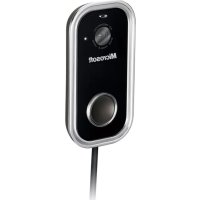
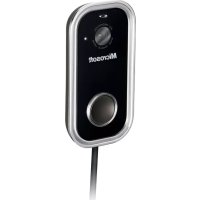
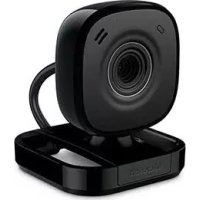
Marque : MICROSOFT
Modèle : LIFECAM HD-6000 FOR NOTEBOOKS
Catégorie : Webcam