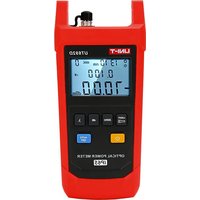
UT693D - équipements de mesure Uni-T - Notice d'utilisation et mode d'emploi gratuit
Retrouvez gratuitement la notice de l'appareil UT693D Uni-T au format PDF.


| Type de produit | Multimètre numérique |
| Marque | Uni-T |
| Modèle | UT693D |
| Dimensions (L x l x h) | 180 x 85 x 55 mm |
| Poids | 350 g (avec piles) |
| Alimentation | 1 pile 9V (type 6F22) |
| Affichage | LCD 3 1/2 digits (max 1999) |
| Tension continue (DC) | 200 mV / 2 V / 20 V / 200 V / 600 V |
| Tension alternative (AC) | 200 V / 600 V |
| Courant continu (DC) | 200 μA / 2 mA / 20 mA / 200 mA / 10 A |
| Résistance | 200 Ω / 2 kΩ / 20 kΩ / 200 kΩ / 2 MΩ / 20 MΩ |
| Test de continuité | Oui (seuil < 30 Ω) |
| Test de diode | Oui |
| Sécurité | CAT II 600 V |
| Fonctions spéciales | Data Hold, indication de batterie faible |
| Entretien et nettoyage | Nettoyer avec un chiffon doux et sec. Ne pas utiliser de solvants. |
| Pièces détachées et réparabilité | Pile 9V, fusible de rechange (F 250mA/250V) ; réparation par centre agréé. |
| Informations générales | Notice d'utilisation disponible en téléchargement PDF gratuit. |
FOIRE AUX QUESTIONS - UT693D Uni-T
Questions des utilisateurs sur UT693D Uni-T
0 question sur cet appareil. Repondez a celles que vous connaissez ou posez la votre.
Poser une nouvelle question sur cet appareil
Téléchargez la notice de votre équipements de mesure au format PDF gratuitement ! Retrouvez votre notice UT693D - Uni-T et reprennez votre appareil électronique en main. Sur cette page sont publiés tous les documents nécessaires à l'utilisation de votre appareil UT693D de la marque Uni-T.
MODE D'EMPLOI UT693D Uni-T
UT690
Series Optical Products User Manual
Preface
Thank you for purchasing the new UT690 series optical products. In order to use these products safely and correctly, please read this manual thoroughly, especially the Safety Warning part.
After reading this manual, it is recommended to keep the manual at an easily accessible place, preferably close to the device, for future reference.
Limited warranty and liability
Uni-Trend guarantees that the product is free from any defect in material and workmanship within one year from the purchase date. This warranty does not apply to damages caused by accident, negligence, misuse, modification, contamination or improper handling. The dealer shall not be entitled to give any other warranty on behalf of Uni-Trend. If you need warranty service within the warranty period, please contact your seller directly.
Uni-Trend will not be responsible for any special, indirect, incidental or subsequent damage or loss caused by using this device. As some countries or regions do not allow limitations on implied warranties and incidental or subsequent damages, the above limitation of liability may not apply to you.
1. Safety Warning
This manual contains the necessary operation instructions and equipment maintenance methods. Please read each part of it carefully before using the equipment.
If the manual is not read or the operating instructions are not understood, the operation may cause inaccurate test results or damage the equipment, or even endanger personal safety.
Mini-USB charging port is reserved for charging lithium battery, which is not applicable currently. This version of the manual is subject to change without prior notice.
Symbol Description:
| Double insulated | Conforms to EU standards | ||
| Warning | Please read the instructions before use. | ||
| Do not discard the battery as unsorted municipal waste. Please place it in a fixed battery recycling station for disposal. | |||
2. Introduction
UT690 series optical products include optical power meters, light sources, optical multimeters, etc. They are mainly used for optical signal power measurement, optical fiber line loss test, optical device insertion loss test, optical fiber fault detection, optical fiber breakpoint location, end-to-end optical fiber identification and so on. These products are designed to meet the ergonomic requirements and advanced cold molding technology is adopted to make them beautiful and durable. Provided with IP65 dust and water prevention function, UT690 series can be widely applied to optical cable construction and maintenance, optical fiber communication, optical fiber sensing, optical CATV and other fields.
2.1 Models
| Models | UT692D/UT692G | UT693D | UT696 | UT697 |
| Name | OPTICAL POWER METER | OPTICAL MULTIMETER | OPTICAL LIGHT SOURCE | OPTICAL MULTIMETER |
| Main function | Power meter | Power meter + visual fault locator | Light source | Power meter + light source |
2.2 Features
• IP65 dust and water prevention
• Auto power off
- Low battery indication
- Backlight on/off
- Flashlight function (UT692D, UT692G, UT696)
• Optical power meter:
o User self-calibration function
o Simultaneous display of linear mW and non-linear dBm
o Wavelength memory
o Reference power memory function
o Eight calibrated wavelengths (850, 980, 1300, 1310, 1490, 1550, 1625 and 1650 nm)
- Visual fault locator:
o Optical fiber fault detection
o Optical fiber breakpoint/bend location
o End-to-end optical fiber identification
o Two operating modes (pulse/continuous red light)
• Light source:
o CW and multiple modulated light output
o Adjustable output power (adjusting range: 4dB; stepping: 2dB)
o Dual wavelength (1310nm, 1550nm)
- Conforms to EN61326-1:2013 and EN61326-2-2: 2013 standards
3. Structure
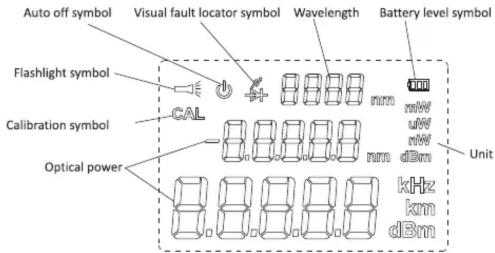
3.1 Structure Diagram

3.2 Key Description
3.2.1 UT692D/UT692G
| No. | Key | Description |
| 1 | Power key:Power the meter on by pressing this key within 1s and off by long press. | |
| 2 | This key enables the auto power off function (The top left corner of the LCD will display a reminder), which will power off the unit when no keys have been pressed for 10 minutes. | |
| 3 | 1. Press this key for 2s in the power on state to turn the flashlight on or off. The flashlight symbol will be displayed in the top left corner of the LCD.2. Press the "LIGHT" key once in the power on state to turn the LCD backlight on or off. If no keys have been pressed within 2 minutes, the LCD backlight will be automatically turned off. The backlight can be turned on again by pressing the "LIGHT" key once under this condition. The LCD backlight is turned on and the flashlight is turned off by default. | |
| 4 | Long press this key to automatically zero the optical power meter. At this time, the LCD is fully displayed to indicate the success. | |
| 5 | Press the "dB" key to toggle the meter's measurement mode between relative power (dB) and absolute power (dBm) to measure the optical power at the corresponding wavelength. | |
| 6 | Eight calibrated wavelengths (850, 980, 1300, 1310, 1490, 1550, 1625 and 1650 nm) can be selected by this key and displayed on the LCD simultaneously. | |
| 7 | Self-calibration mode: Press "ZERO" + "LIGHT" simultaneously (press again to exit the calibration mode) to enter the calibration mode. At this time, the character "CAL" is displayed in the top left corner of the LCD. Press the "LIGHT" key to add 0.05dB and "dB" key to decrease by 0.05dB at a time. This is used to calibrate the measurement error. After adjusting, press the power key to save the calibration data. | |
| 8 | Factory reset: Press "ZERO" + "AUTO OFF" simultaneously to restore factory settings. |
3.2.2 UT693D
| No. | Key | Description |
| 1 | Power (AUTO OFF) key1. Short press to power on, and long press to power off.2. Short press this key in the power on state to turn the auto power off function on or off (on by default). The device automatically powers off after 10 minutes of no use. | |
| 2 | Short press to turn the red light on, short press in the red light state to flash it, and short press in the flash state to turn it off. | |
| 3 | Press the "LIGHT" key once in the power on state to turn the LCD backlight on or off (on by default). If no keys have been pressed within 2 minutes, the LCD backlight will be automatically turned off. The backlight can be turned on again by pressing the "LIGHT" key once under this condition. | |
| 4 | Long press this key to automatically zero the optical power meter. At this time, the LCD displays "CLR" to indicate the success. | |
| 5 | Press the "dB" key to toggle the measurement mode between relative power (dB) and absolute power (dBm) to measure the optical power at the corresponding wavelength. | |
| 6 | Eight calibrated wavelengths (850, 980, 1300, 1310, 1490, 1550, 1625 and 1650 nm) can be selected by this key. | |
| 7 | Self-calibration mode: Press "ZERO" + "LIGHT" simultaneously (press again to exit the calibration mode) to enter the calibration mode. At this time, "CAL" is displayed on the LCD. Press the "LIGHT" key to add 0.05dB and "dB" key to decrease by 0.05dB at a time. This is used to calibrate the measurement error. After adjusting, press the power key to save the calibration data. | |
| 8 | Factory reset: Press "ZERO" + " " simultaneously to restore factory settings. |
3.2.3 UT696
| No. | Key | Description |
| 1 | Power (AUTO OFF) key1. Short press to power on, and long press to power off.2. Short press this key in the power on state to turn the auto power off function on or off (on by default). The LCD prompts → " when the function is on. | |
| 2 | LIGHT " | Press the "LIGHT" key for 2s in the power on state to turn the flashlight on or off. |
| Press the "LIGHT" key once in the power on state to turn the LCD backlight on or off.If no keys have been pressed within 2 minutes, the LCD backlight will be automatically turned off. | ||
| 3 | Short press to attenuate the light source by 2dB (-4dBm → -6dBm → -8dBm → -10dBm) | |
| 4 | Short press to increase the light source by 2dB(-10dBm → -8dBm → -6dBm → -4dBm | |
| 5 | Select and turn on the corresponding wavelength light source (1310nm → 1550nm → 1310nm cycle by default). | |
| 6 | Short press to switch the frequency (0Hz → 270 Hz → 1000 Hz → 2000 Hz → 0 Hz cycle by default) | |
| 7 | + mm | Factory reset: Press " " + "MODE" simultaneously to restore factory settings. |
Marque : Uni-T
Modèle : UT693D
Catégorie : équipements de mesure