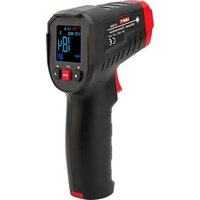
UT306C - Thermomètre Uni-T - Notice d'utilisation et mode d'emploi gratuit
Retrouvez gratuitement la notice de l'appareil UT306C Uni-T au format PDF.


| Type de produit | Thermomètre infrarouge |
| Marque | Uni-T |
| Modèle | UT306C |
| Plage de mesure | -50 °C à 380 °C (-58 °F à 716 °F) |
| Précision | ±1,5 °C ou ±1,5 % (valeur la plus grande) |
| Résolution | 0,1 °C / 0,1 °F |
| Distance au spot (D:S) | 12:1 |
| Temps de réponse | 500 ms |
| Longueur d'onde | 8 à 14 µm |
| Émissivité | 0,95 fixe |
| Affichage | Écran LCD avec rétroéclairage |
| Fonctions | Mesure ponctuelle, verrouillage, indicateur de batterie faible, arrêt automatique |
| Alimentation | 2 piles AAA (1,5 V) |
| Autonomie | Environ 12 heures (avec piles alcalines) |
| Dimensions | 155 × 105 × 45 mm |
| Poids | 160 g (avec piles) |
| Matière du boîtier | Plastique ABS |
| Température de fonctionnement | 0 °C à 50 °C |
| Température de stockage | -20 °C à 60 °C |
| Entretien et nettoyage | Nettoyer la lentille avec un chiffon doux et sec. Ne pas utiliser de solvants. |
| Sécurité | Ne pas regarder directement le laser. Ne pas utiliser sur des surfaces brillantes. |
| Pièces détachées et réparabilité | Aucune pièce détachée disponible. L'appareil n'est pas réparable par l'utilisateur. |
| Informations générales | Conforme à la norme EN 60825-1 pour la sécurité laser de classe 2. |
FOIRE AUX QUESTIONS - UT306C Uni-T
Questions des utilisateurs sur UT306C Uni-T
0 question sur cet appareil. Repondez a celles que vous connaissez ou posez la votre.
Poser une nouvelle question sur cet appareil
Téléchargez la notice de votre Thermomètre au format PDF gratuitement ! Retrouvez votre notice UT306C - Uni-T et reprennez votre appareil électronique en main. Sur cette page sont publiés tous les documents nécessaires à l'utilisation de votre appareil UT306C de la marque Uni-T.
MODE D'EMPLOI UT306C Uni-T
UT306C
Infrared Thermometer User Manual
Overview
UT306C infrared thermometer (hereinafter referred to as the thermometer) can quickly and accurately determine the surface temperature of the target by measuring the infrared energy radiated by the target surface, which is suitable for non-contact temperature measurement. UT306C is a thermometer with a D: S ratio of 12:1.
Safety Instructions
Warning:
In order to prevent eye damage or personal injury, please read the following safety instructions before using the product:
- Do not point the laser of
- Do not look directly at the laser or with optical tools (binoculars, microscopes, etc.).
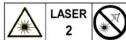
LASER RADIATION DO NOT STARE INTO BEAM CLASS 2 LASER PRODUCT λ=630-670nm, <1mW, EN60825-1:2014
Cautions:
- If the laser irradiates the user's eyes, please close the eyes immediately and turn the head away. - Do not disassemble benefit the product and leave without permission.
- Do not disassemble or refit the product and laser without permission.
- To ensure its safety and accuracy, this product should only be repaired by professional maintenance personnel using original replacement parts.
- Replace the batteries when the low battery
- Replace the batteries when the low battery indicator shows to prevent incorrect measurements. - Please check the product before using it. If it is damaged, cracked on the surface or missing plastic.
- Please check the product before using it. If it is damaged, cracked on the surface or missing plastic parts, do not use it.
● Please refer to the emissivity information for the actual temperature. Highly reflective objects or
transparent materials will make the actual temperature higher than the measured temperature.
When measuring these objects, pay attention to the risk of burns.
- Do not use the product in an environment with flammable and explosive liquid, gas or dust.
- Do not use the product around the environment with steam, dust, or large temperature fluctuations.
It may bring inaccurate results and risks.
- Put the product in the current environment for more than 30 minutes before using it to ensure
measurement accuracy.
- Do not leave the thermometer on or near objects of high temperature
Technical Indexes
| Model | UT306C |
| Optical resolution | 12:1 (calculated at 95% energy) |
| Measurement range | -50°C~500°C (-58°F~932°F) |
| LCD size | 25*26mm |
| LCD display | Color EBTN |
| Accuracy | -50°C-0°C: ±(2°C-0.1°C/°C)0°C~500°C: ±2°C or ±2% (whichever is greater) |
| -58°F~32°F: ±(4.0°F+0.1°F/°F)32°F~932°F: ±4.0°F or ±2% (whichever is greater) | |
| Temperature index | ±0.1°C or ±0.11⁄2°C whichever is greater(±0.1°F/F or ±0.11⁄2°F whichever is greater) |
| Repeatability | ±0.5°C or ±0.5% whichever is greater (1°F or 0.5% whichever is greater) |
| Emissivity | 0.1~1.0 (adjustable, 0.95 by default) |
| Response time | ≤250ms (95% of reading) |
| Spectral response | 8μm~14μm |
| Auto power off | 15s |
| Low battery indication | √ |
| High/low temperature sound alarm | √ |
| Data hold | √ |
| Unit conversion (°C/F) | √ |
| MAX/MIN/AVG/DIF | √ |
| Lock measurement | √ |
| Laser | Ring laser, wavelength: 630nm~670nm, output power<1mW, type: class 2 |
| Operating temperature | 0°C~50°C (32°F~122°F) |
| Storage temperature | -20°C~60°C (-4°F~140°F) |
| Operating humidity | <90%RH (non-condensing) |
| Drop proof | 1m |
| Battery type | 2"AAA (zinc-manganese batteries) |
| Battery life | ≥6h (continuous measurement mode with laser and backlight on) |
| Product color | Red + grey |
| Product weight | 161.5g |
| Product size | 146×94.5×46mm |
Safety Standards
CE certification: EN61326-1:2013; Safety standards of laser products: EN60825-1:2014
Reference Standard
JJG 856-2015
Characteristics
1) With ring laser, making the measurement indication area more accurate
2) Bright, easy-to-read and high-contrast color EBTN display
3) MAX/MIN/AVG/DIF hold
4) With buzzer sound alarm, can quickly find abnormalities
5) Trigger lock, suitable for processes that require temperature monitoring
6) Short press the "■" button in shutdown mode to take a measurement
Appearance
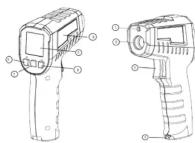
| 1 | Laser |
| 2 | Infrared receiving window |
| 3 | Trigger |
| 4 | Battery door |
| 5 | LCD display |
| 6 | LOCK button |
| 7 | MODE button |
| 8 | LASER button |
| 9 | Laser warning label |
LCD Indicators
| Trigger lock | |
| Buzzer | |
| HOLD | Temperature hold |
| Low battery | |
| · 0.88 | Emissivity |
| MAX MINAVG DIF | Measurement mode |
| HI LO | Temperature alarm |
| Laser | |
| SCAN | Temperature measurement |
| °C F | Temperature unit |
| 8888 | Temperature main display |
| 8888 | Temperature secondary display |

Operating Instructions
Startup
Short press (less than 0.5s) the trigger to turn on the thermometer, and the measured value before the last shutdown will be displayed. Pressing MODE button can view MAX/MIN/AVG/DIF.
Shutdown
The thermometer will automatically shut down after 15 seconds without any operation in the HOLD mode, and save the current measured value.
Manual Measurement
1) After aiming at the measured object, press the trigger and hold it. When the SCAN symbol is flashing, it means that the temperature is being measured, and the measurement result will be updated on the LCD.
2) Release the trigger, the SCAN symbol will disappear while the HOLD symbol will be displayed. The thermometer will stop measuring the temperature and keep the last measured value.
Lock Measurement
1) Short press the LOCK button to enter the lock measurement mode. The 🔒 symbol will be displayed on the LCD and the SCAN symbol will flash. The thermometer will measure the target temperature continuously without pressing the trigger all the time.
2) Press the trigger or short press the LOCK button again, the 🔒 and SCAN symbols will disappear while the HOLD symbol will appear. The thermometer will stop measuring and keep the last measured temperature.
3) Short press the LOCK button in the shutdown state to wake up the thermometer and enter the lock measurement mode.
4) If the LOCK button is pressed and not released for more than 3 seconds, it will be regarded as a misoperation.
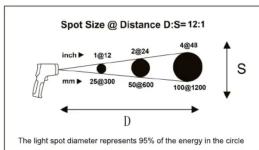
Note: The measured target should be greater than 2 times the thermometer light spot diameter (S), and then the test distance (D) can be determined according to the D: S relationship diagram.
For example: when the user uses UT306C to measure the temperature of an object with a diameter of about 4" (10cm), the most accurate spot diameter (S) of the thermometer is about 2" (5cm), and then it can be estimated based on the D:S relationship diagram that the measuring distance (D) is about 24" (60cm).
MAX/MIN/AVG/DIF Value
Short press the "MODE" button to switch among "MAX→MIN→AVG→DIF" measurement modes in sequence, and the temperature of the corresponding mode will be displayed in the secondary display position (as shown below).

Laser Indicator
Pressing the 🔒 button can turn on/off the laser indication function. When it is turned on, the laser symbol 🔒 will show on the LCD, and the laser will accurately indicate the measured position.
Note: Please follow the cautions when turning on the laser to avoid eyes injury.
High and Low Temperature Alarm
If the measured temperature is higher than the set high alarm limit, the HI symbol on the display will flash. If the sound alarm is turned on, the buzzer will beep.
If the measured temperature is lower than the set low alarm limit, the LO symbol will flash. If the sound alarm is turned on, the buzzer will beep.
If the measured temperature value is within the range of high and low alarm limit, the HI/LO symbol will not show on the display.
Function Settings
In the HOLD interface, long press the "MODE" button for more than 2s to enter the high alarm limit → low alarm limit → emissivity → temperature unit → sound alarm and other function settings. Under these setting interfaces, the user can return to the HOLD interface by pressing the trigger or no operation for 10s.
High Alarm Limit Setting
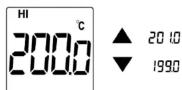
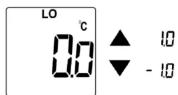
In the HOLD interface, long press the "MODE" button to enter the high alarm limit setting interface. The user can use "▼" or "▲" to adjust. Short pressing will add or subtract 1 to the value each time, and long pressing will add or subtract 10 each second.
Low Alarm Limit Setting
In the HOLD interface, long press and then short press the "MODE" button once to enter the low alarm limit setting interface. The user can use "▼" or "▲" to adjust. Short pressing will add or subtract 1 to the value each time, and long pressing will add or subtract 10 each second.
Emissivity Setting
In the HOLD interface, long press the "MODE" button once and then short press the "MODE" button twice to enter the emissivity setting interface. The user can use "▼" or "▲" to adjust. Short pressing will add or subtract 0.01 to the value each time, and long pressing will add or subtract 0.1 each second.

Temperature Unit Setting
In the HOLD interface, long press the "MODE" button once and then short press the "MODE" button three times to enter the temperature unit setting interface. The user can use "▼" or "▲" to convert the unit °C/°F.
Sound Alarm Setting
In the HOLD interface, long press the "MODE" button once and then short press the "MODE" button four times to enter the sound alarm setting interface. The user can use "▼" or "▲" to turn on/off this function.
D: S (Distance to Spot Ratio)
As the distance (D) between the thermometer and the measured target increases, the light spot diameter (S) of the measured area also increases.
The relationship between measurement distance and light spot diameter is shown in the figure below.
Field of View
When measuring, make sure that the measured target is larger than the light spot diameter. The smaller the target, the closer the test distance should be (refer to D: S for the detailed light spot diameter). It is recommended that the measured target be larger than twice the light spot diameter of the thermometer.

Emissivity
Emissivity represents the material energy radiation. The emissivity of most organic materials, painted or oxidized surfaces is about 0.95. The user can use masking tapes or flat paints to cover the metal surface, use the high emissivity setting, and then wait for a period of time to make the surface temperatures of the tapes/flat paints and the covered object the same. At this point, the surface temperature of the tapes/flat paints is equal to the metal surface temperature. The following table shows the total emissivity of some metals and non-metals.| Measured surface | Emissivity |
| Metals | |
| Aluminum | |
| Oxide | 0.2-0.4 |
| A3003 Alloy | |
| Oxide | 0.3 |
| Crude | 0.1-0.3 |
| Brass | |
| Polishing | 0.3 |
| Oxide | 0.5 |
| Cuprum | |
| Oxide | 0.4-0.8 |
| Electrical terminal board | 0.6 |
| Hastelloy | |
| Alloy | 0.3-0.8 |
| Inconel | |
| Oxide | 0.7-0.95 |
| Abrasive blasting | 0.3-0.6 |
| Electropolishing | 0.15 |
| Ferrum | |
| Oxide | 0.5-0.9 |
| Rusting | 0.5-0.7 |
| Ferrum (casting) | |
| Oxide | 0.6-0.95 |
| Non-Oxide | 0.2 |
| Casting | 0.2-0.3 |
| Ferrum (forging) | |
| Passivaling | 0.9 |
| Plumbum | |
| Crude | 0.4 |
| Oxide | 0.2-0.6 |
| Molybdenum | |
| Oxide | 0.2-0.6 |
| Nickel | |
| Oxide | 0.2-0.5 |
| Platinum | |
| Black | 0.9 |
| Steel | |
| Cold rolling | 0.7-0.9 |
| Burnishing | 0.4-0.6 |
| Polishing | 0.1 |
| Zinc | |
| Oxide | 0.1 |
| Non-Metals | |
| Asbestos | |
| Asphalt | 0.95 |
| Basalt | 0.95 |
| Carbon | |
| Non-Oxide | 0.8-0.9 |
| Graphite | 0.7-0.8 |
| Carborundum | 0.9 |
| Ceramic | |
| Clay | 0.95 |
| Concrete | 0.95 |
| Cloth | 0.9 |
| Glass | |
| Convex glass | 0.76-0.8 |
| Smooth glass | 0.92-0.94 |
| Nonex | 0.78-0.82 |
| Sheet material | 0.96 |
| Gypsum | 0.8-0.95 |
| Ice | 0.98 |
| Limestone | 0.98 |
| Paper | 0.95 |
| Plastic | 0.95 |
| Water | 0.93 |
| Soil | 0.9-0.98 |
| Wood | 0.9-0.95 |
Maintenance
Cleaning
Blow away the fallen particles with clean compressed air, carefully wipe the lens surface with a moist swab, and clean the shell with a moist sponge or soft cloth. Be careful not to rinse with water or immerse it in water.Replace Batteries
Install or replace two 1.5V batteries according to the following steps: 1. Remove the battery door 1. Remove the battery door 2. Install the batteries (pay attention to the polarity) 3. Close the battery door  Troubleshooting| Phenomenon | Cause | Measure |
| Display OL | Measured value>maximum range | Stop measuring |
| Display -OL | Measured value<minimum range | Stop measuring |
| Display Err (startup) | Exceed the minimum or maximum operating temperature | Place the thermometer at 0°C-50°C (32°F-122°F) for 30 minutes |
| Battery symbol flashes | Low battery | Replace batteries |
| Laser is not working or dark | Low battery | Replace batteries |
| Inaccurate measurement | Unmatched emissivity, too far measurement distance, diameter of the measurement target<20mm | Refer to Field of View, D:S and other instructions in this manual |
UNI-T.
UNI-TREND TECHNOLOGY (CHINA) CO., LTD. No. 6, Gong Ye Bei 1st Road, Songshan Lake National High-Tech Industrial Development Zone, Dongguan City Development Zone, Donggu Guangdong Province, China - UT306C
- INFRARED THERMOMETER USER MANUAL
- OVERVIEW
- SAFETY INSTRUCTIONS
- CAUTIONS
- SAFETY STANDARDS
- REFERENCE STANDARD
- JJG 856-2015
- CHARACTERISTICS
- OPERATING INSTRUCTIONS
- STARTUP
- SHUTDOWN
- MANUAL MEASUREMENT
- LOCK MEASUREMENT
- MAX/MIN/AVG/DIF VALUE
- LASER INDICATOR
- HIGH AND LOW TEMPERATURE ALARM
- FUNCTION SETTINGS
- HIGH ALARM LIMIT SETTING
- LOW ALARM LIMIT SETTING
- EMISSIVITY SETTING
- TEMPERATURE UNIT SETTING
- SOUND ALARM SETTING
- D: S (DISTANCE TO SPOT RATIO)
- FIELD OF VIEW
- EMISSIVITY
- MAINTENANCE
- CLEANING
- REPLACE BATTERIES
- UNI-T
Marque : Uni-T
Modèle : UT306C
Catégorie : Thermomètre