EUR7702KE0 - Système Hi-Fi PANASONIC - Notice d'utilisation et mode d'emploi gratuit
Retrouvez gratuitement la notice de l'appareil EUR7702KE0 PANASONIC au format PDF.


| Type de produit | Système Hi-Fi |
| Marque | Panasonic |
| Modèle | EUR7702KE0 |
| Dimensions (HxLxP) | 350 x 200 x 300 mm (estimation) |
| Poids | 5 kg (estimation) |
| Alimentation | 220-240 V, 50/60 Hz |
| Puissance de sortie | 2 x 50 W RMS (estimation) |
| Fonctions principales | Lecteur CD, radio FM/AM, entrée auxiliaire, port USB, Bluetooth |
| Entretien et nettoyage | Nettoyer avec un chiffon doux et sec. Éviter les produits abrasifs. |
| Sécurité | Ne pas exposer à l'humidité. Débrancher en cas d'orage. |
| Pièces détachées et réparabilité | Contactez le service après-vente Panasonic pour les pièces détachées. |
| Informations générales | Notice d'utilisation disponible en téléchargement gratuit sur notice-facile.com |
FOIRE AUX QUESTIONS - EUR7702KE0 PANASONIC
Questions des utilisateurs sur EUR7702KE0 PANASONIC
0 question sur cet appareil. Repondez a celles que vous connaissez ou posez la votre.
Poser une nouvelle question sur cet appareil
Téléchargez la notice de votre Système Hi-Fi au format PDF gratuitement ! Retrouvez votre notice EUR7702KE0 - PANASONIC et reprennez votre appareil électronique en main. Sur cette page sont publiés tous les documents nécessaires à l'utilisation de votre appareil EUR7702KE0 de la marque PANASONIC.
MODE D'EMPLOI EUR7702KE0 PANASONIC
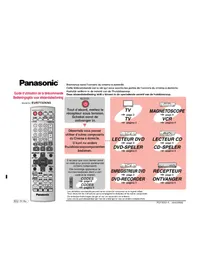
Guide d'utilisation de la télécommande
©2001 Matsushita Electric Industrial Co., Ltd. Imprimé en Malaisie RQT6201-P H1101HM0
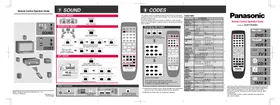
⑦ SON
MODE STÉRÉO MODE SURROUND
![graph TD A["Start a test signal"] --> B["Select the speaker channel and adjust its output level"] B --> C["Stop the test signal"] D["When you select Dolby Pre Logic ≡ MUSIC or PANorama"] --> E["Change the sound effect"] F["Start a test signal"] --> G["Select the speaker channel and adjust its output…](/content/2026/07/1409223/images/8d25cd670703ded7ee131806b32543da0d595dd09c7c85d7b3e963bb90cbd362.jpg)
MODE SFC
![graph TD A["SFC"] --> B["Select Hall, Club, Live, Theater, SIM SURR or Party"] B --> C["LEVEL"] C --> D["Select the speaker channel and adjust its output level"] D --> E["EFFECT"] E --> F["Change the delay time"]](/content/2026/07/1409223/images/42a9368b5d31e0546a0c8a50804b53f0cef9c94e377b55245cc10d5616f720c1.jpg)

Autres fonctions
⑧ CODES
Cette télécommande peut commander les appareils audiovisuels Panasonic et Technics équipés de capteurs de télécommande. Vous devrez peut-être modifier le code de la télécommande. Elle peut également commander certaines autres marques de téléviseurs, de magnétoscopes et de lecteurs DVD. Consultez le tableau pour connaître la marque et saisissez le code comme suit.
Modification des codes![graph TD A["Press and hold the button corresponding to the equipment"] --> B["Enter the first digit"] B --> C["Panasonic Remote Control"]](/content/2026/07/1409223/images/18f00ac0f95d2945c08c10800913103569feacea567ffac0859b4ed371379c12.jpg)
Saisissez le deuxième chiffre La télécommande émet le signal marche/arrêt. Si le code est correct, l'appareil s'allume ou s'éteint. Sinon, essayez un autre code.
- Notez que cette télécommande ne peut pas commander certains appareils et qu'elle peut ne pas être en mesure d'effectuer certaines opérations.
- Saisissez à nouveau les codes après avoir changé les piles.
Tableau des codes
| TV VCR DVD | |||
| Panasonic 0 | 02,26 01,02,09,33 01 | ||
| Donon – | 17 | – | 0 |
| Ferguson – | – | 0 | 2 |
| Fisher 14,13 | 14,15 | – | – |
| Funai | 08,30 | 18,34 | – |
| G.E. 02,03,07 | 09,02 03,11 | – | – |
| GoldStar | 07,15 | 27 | – |
| Hitachi | 05,27 | 08,10,11 11 | 09 |
| JVC | 12 19,25,31 | 38,39,40 | – |
| Konwood | – | – | 1 |
| LXI | 03,06,0710,14,15 | 10,13,1415,18,27,30 | – |
| Magnavok | 06,07,1115,22 | 02,09,12 – 15,22 | – |
| Mitsubishi | 07,15,16,21 | 21,22,28,29 06 | – |
| NÉC 07,15 | 19,25,31,38 | – | – |
| Nordmende | – | 0 | – |
| Philco 06,07 | 02,09,12,30 | – | – |
| Philips | 06 02,09,12 | 04,16 | – |
| Pioneer | 02,10,19 09 03 | – | – |
| Quasar | 02 01,02,09 | 03,43 | – |
| Raite | – | – | 1 |
| RCA | 03,07,0913,23,24,25 | 02,03,0409,10,1112,23,24,26 | 02 |
| Saba | – | – | 0 |
| Sampo | – | – | 1 |
| Samsung | – | – | 1 |
| Sanyo | 14 14,18,34 | – | – |
| Sharp | 08,21 | 16,17 | 08 |
| Shintom | – | 3 | 2 |
| Sony | 04 05,06,07 | 35,36,37 | 05 |
| Sylvania | 06,07 15 02 | 09,12,30 | – |
| Symphonic | 17 30 | – | – |
| Thomson | – | – | 0 |
| Toshiba | 10,21 | 23,24 | 04 |
| Yamaha | – | – | 0 |
| Zenith 18,20 | 20 07,12 | ||
Panasonic
Guide d'utilisation de la télécommande
Modèle n° EUR7702KE0
Cette télécommande est la clé de votre expérience de cinéma maison. Les opérations réelles dépendent de votre équipement et de vos logiciels. Assurez-vous de lire les instructions du récepteur et de vos autres composants. Vous devrez peut-être saisir un code pour faire fonctionner certains équipements. Voir au verso pour plus de détails.
① DVD![graph TD A["Switch on"] --> B["To receive"] B --> C["Switch on the receiver"] D["VIDEO"] --> E["To receive"] E --> F["Switch on the television and select input"] G["Play"] --> H["To receive"] H --> I["Switch on the player and start play"] J["Switch off"] --> K["To receive"] K --> L["Switch on the pl…](/content/2026/07/1409223/images/e62fb0151cba2a0d819860bc0fbea7724089532b94c53e5979af950e703f41d5.jpg)

② VCR TV![graph TD A["Switch on"] --> B["Switch on the receiver"] B --> C["VD50"] C --> D["Switch on the television and select input"] D --> E["Switch on the player and start play"] E --> F["Switch off"]](/content/2026/07/1409223/images/77978c9b026375e331435c41d142e076e83e5cb9ff4f2c757be4f26f63b0c466.jpg)

3![graph TD A["Switch on"] --> B["Switch on the receiver"] C["TV"] --> D["Switch on the television and select input"] E["Switch off"] --> F["Switch off"]](/content/2026/07/1409223/images/63862001e20d9f3868c2059e8a477ceedc9619d8626dc8b192ba789ee07bff75.jpg)
④ CD RADIO![graph TD A["Switch on"] --> B["Switch on the receiver"] B --> C["Switch on the player and start play"] C --> D["Switch off"] D --> E["Operating the CD player"]](/content/2026/07/1409223/images/b5e68bd8b2850e0204de41de91872630e563d1ccdccc30c8fbda6718f063cb0f.jpg)

5![Écoute de la radio Mise sous tension Allumez le récepteur. Sélectionnez FM ou AM. Mise hors tension Utilisation de la radio Changer les stations préréglées séquentiellement Sélectionner directement les stations préréglées Par exemple, sélectionnez 4 : [4] Sélectionnez 1 : [10/ENTER]~[2]~[1] Sélectio…](/content/2026/07/1409223/images/db4aa88d3bf9a75188a2409538c46a5587919708fc57cb35ba531c12851c5050.jpg)
![graph TD A["Show disc menus"] --> B["Show disc menus"] B --> C["Select and enter menu items"] C --> D["Specify a disc (5-disc changer)"] D --> E["Start play from a selected item"] E --> F["Select channels"] F --> G["Skip items during play"] G --> H["Stop play"]](/content/2026/07/1409223/images/2564727a03bf39b4e4d12455f4c81ab7bf61d499d2566578cf48ca07ec029368.jpg)


![graph TD A["1"] --> B["2"] B --> C["3"] C --> D["4"] D --> E["Select channels directly"] style A fill:#f9f,stroke:#333 style B fill:#ccf,stroke:#333 style C fill:#cfc,stroke:#333 style D fill:#fcc,stroke:#333 style E fill:#ffc,stroke:#333](/content/2026/07/1409223/images/5258a5faf0fae3d2a3377bba494e863bf8a440584bb9a3887860c47aa210787d.jpg)
![graph TD A["Skip items during play"] --> B["Stop play"] B --> C{Specify_a_disc["3- or 5-disc changer"]} C --> D["MEGA CD changer (holds more than 50 discs)"] D --> E["Start play from a specified disc"] E --> F["Start play from a selected track"]](/content/2026/07/1409223/images/04bad13abf6afb95c8ebe31964f74d90b3347638242d64376b04a97124f4be98.jpg)

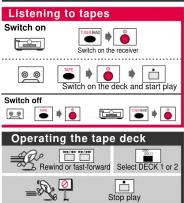
⑥ TAPE