A10 - Vélo d'appartement Schwinn - Notice d'utilisation et mode d'emploi gratuit
Retrouvez gratuitement la notice de l'appareil A10 Schwinn au format PDF.


| Type de produit | Vélo d'appartement |
| Marque | Schwinn |
| Modèle | A10 |
| Dimensions (L x l x H) | 110 x 50 x 130 cm |
| Poids | 25 kg |
| Poids maximum utilisateur | 120 kg |
| Alimentation | Piles AAA (2x) pour l'écran de contrôle |
| Résistance | Frein magnétique avec 8 niveaux réglables |
| Écran | LCD rétroéclairé : temps, distance, calories, vitesse |
| Fonctions principales | Cardio-training, renforcement musculaire des jambes, programmes préenregistrés |
| Pédales | Pédales ergonomiques avec sangles réglables |
| Selle | Réglable en hauteur et horizontalement, rembourrée |
| Guidon | Réglable en hauteur, avec capteurs de pouls intégrés |
| Entretien et nettoyage | Nettoyer avec un chiffon humide, lubrifier la chaîne tous les mois |
| Sécurité | Pieds antidérapants et frein d'urgence manuel |
| Pièces détachées et réparabilité | Disponibles auprès du fabricant ou revendeurs agréés |
| Garantie | 2 ans pièces et main-d'oeuvre |
| Informations générales | Utilisation domestique, silencieux, transport par roulettes |
FOIRE AUX QUESTIONS - A10 Schwinn
Questions des utilisateurs sur A10 Schwinn
0 question sur cet appareil. Repondez a celles que vous connaissez ou posez la votre.
Poser une nouvelle question sur cet appareil
Téléchargez la notice de votre Vélo d'appartement au format PDF gratuitement ! Retrouvez votre notice A10 - Schwinn et reprennez votre appareil électronique en main. Sur cette page sont publiés tous les documents nécessaires à l'utilisation de votre appareil A10 de la marque Schwinn.
MODE D'EMPLOI A10 Schwinn
Schwinn® A10 and A20 Exercise Bikes

Owner's Manual

natural_image
Line drawings of two stationary exercise bikes with visible branding and mechanical components (no text or symbols)
English
Ver página 2
Español Americano Latino
Nautilus®
Bowflex®
Schwinn® Fitness
Universal®
NautilusInc.(800)NAUTILUS(800)628-8458www.NautilusInc.comCustomerServiceNorthAmerica(800)605-3369customerservice@schwinnfitness.comAsiaPacific&LatinAmerica+01-360-859-5180technics-APLA@nautilus.comPatentInformationThisproductmaybecoverdbyUSandForeignPatentsandPatentsPendingSeeProductformorinformationPrintedrChina©2010NautilusInc.Allightsreserved?andIndicatetrademarkoregisteredtrademarkNautilusInc.www.NautilusInc.comtrademarksincludeNAUTILUS®BOWFLEX®SCHWINN®andUNIVERSAL®andrespectivelogos.Othertrademarksarethepropertyoftheirrespectiveowners.
To validate website support keep the original original original purchase and record the following information by Serial Numberisation: Number Date of Purchase ____ Purchase ____
ToRegister your pregister warranty od gottogy www.schwimfitness.com/register
.schwinnfitness.com/register
Or calr 1 (800) 605-3369. 605-3369.
Español Americano Latino
ParaobtenerestemanualenEspañolLatinoAmericanovayaahttp://www.schwinnfitness.com.
Table able Contents Contents
| ImportantSafetyInstructions | 3 | Operations | 9 |
| SafetyWarningLabelsandSerialNumber | 3 | ChangingUnitMeasures | 10 |
| Specifications | 4 | Maintenance | 11 |
| Features | 4 | LevelingYourBike | 13 |
| ConsoleFeatures | 5 | MovingYourBike | 13 |
| ContactHeartRateSensors | 6 | Troubleshooting | 13 |
Important Safety Statacyutions Instructions

Thisiconmeansapotentiallyhazardoussituationwhich,ifnotavoided,couldresultindeathorseriousinjury.
Before Before this equipment, equested following followings: warnings:
- ReadandunderstandthecompleteOwner'sManual.KeepOwner'sManualforfuturereference.
Read and understand all warnings this machine at any time the Warning stickers become loose unreadable dislodged contact Nautilus for replacement stickers.
ChildremustobdebroneatthismachineMovingpartandthefeaturesthemachincarbelangeroustoichildren.
Not intended house anyone under 14 years of age.
Consult physician before your start exercise program Stop exercising if fee pain tightness you chest become short breath of feet faint Contact your doctor before your the machine again Use the values calculated measured by the machine's computer reference purposes only.
Before each use examination machine follows parts assigned wearDo not found this condition Monito the Seat Pedals and Cran Arms closely. Contact Nautilus® Customer Service for repair information.
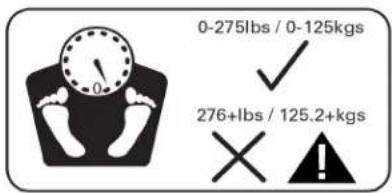
Maximumuserweightimit275bs.125kgsDonouseyouareovethisweight.
This machine is home only.
Do not we also loose clothing jewelry This machine contains moving parts Donopufingers on the objects into moving parts of the exercise equipment.
Seupandoperatethismachinensolidlevelhorizontasurface.
Mekthe PedalstablebeforeyousteporthemUsecautionwhenyousteporandofthenachine.
Disconnectal power before servicing this machine.
Do not operate this machine outdoors or moist wet locations. Keep the footed as clear and dry.
Keep least 19.7(0.5) approach the machine clear This is recommended to access and pass a round emergency dismounts from the machine keep their parties out this space when machine use.
DoobveexeryourselduringexerciseOperatethenachinerthemanneddescribedthismanual.
CorrectlyadjustandsafelyengagalPositionalAdjustmenDevicesMakesurdhatheAdjustmenDevicesdonohitheuser.
® CustomerService
Safety Safetying arabets and Seaalls Num Serial Number


| Type ype | Description Description | |
| A A | WARNING | Keepchildrenaway.PrintouseeadunderstandhOwnerManual.InjuryordeathispossibleifCautionisnotusedwhileusingthismachine.Themaximumuseweighfthismachine275b125kg).Replaceany"Caution","Warning"of"Danger"labethatsillegibledamagedremoved.Thismachinesforhomeuseonly. |
| B B Record | SerialnumberintheSerialNumberfieldintheContactssectionofthismanual. | |
Specifications Specifications

Power Requirements Requirements
4DBatteries(LR20)—notincluded
OperationalVoltage6VDC
Regulatory Approvals Approvals
OptionalACPowerAdapter:ULlisted,CSA certified(orequivalent),Rated120V60HzInput,9VDC,0.5AOutput.Class2orLPS.
Features Features
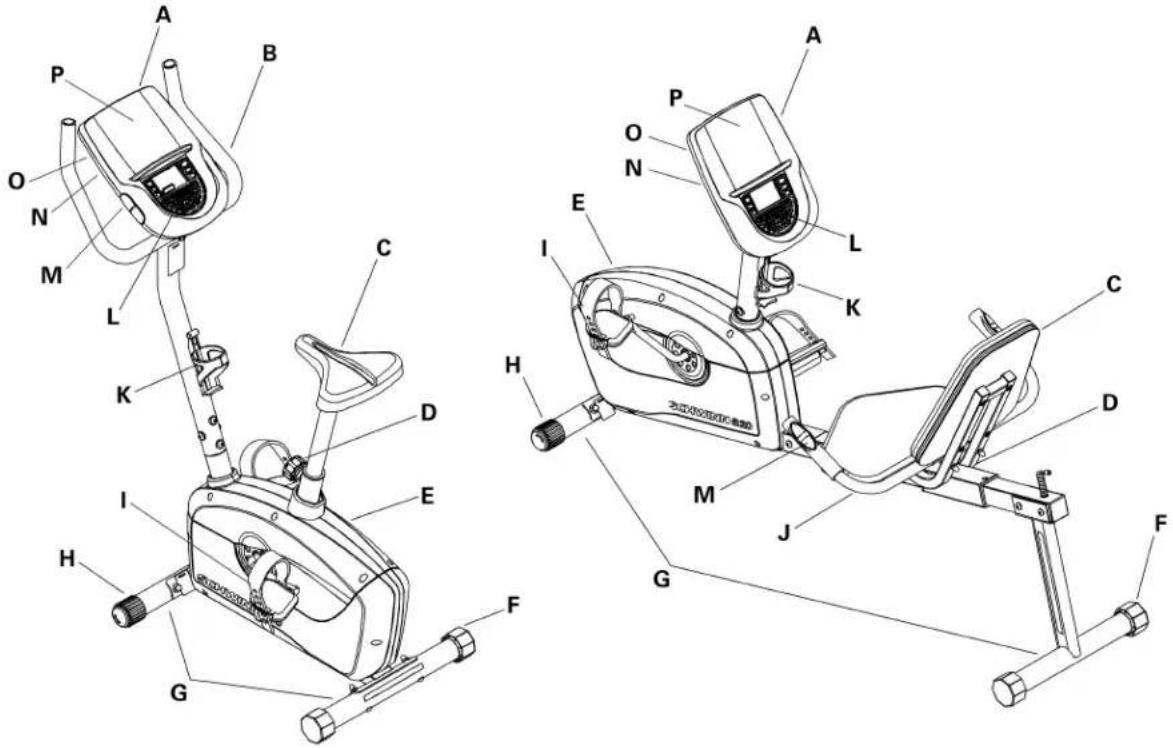
| A | Console | E | FullyShroudedFlywheel | IPedalsM | ContactHeartRate(CHR) Sensors | ||
| BHandlebars,UprightLevelersJ | Handlebars,Side | N | PowerConnector | ||||
| StableAdjustableSeat | KWaterBottleHolder | O | BatteryBay | ||||
| L TransportAdjustedKnob | |||||||
Console Features Features

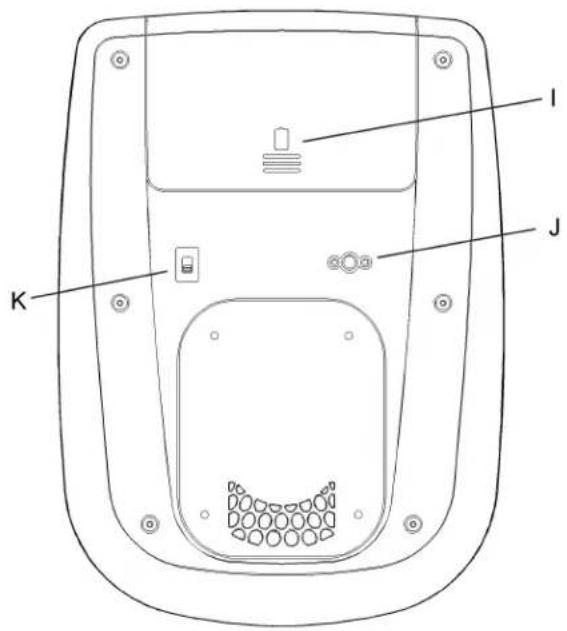
| A | LCDDisplayConsolescreen | |
| B | QUICKSTARTbuttonStartsaQuickStartworkout | |
| CIncreasebutton(▲)Increasesavalue(timeorworkoutresistancelevel) | ||
| D | CHRSensorsContactHeartRatesensors(modelA10only) | |
| E | Decreasebutton(▼)Decreasesavalue(timeorworkoutresistancelevel) | |
| FFanbutton | Pushtocontrolthefan(onoroff) | |
| G | ENTERbutton | Confirmsinformation |
| H | START/STOPbutton | ·PushtostartaProgramworkout,pauseanactiveworkout,orresumeapausedworkout. ·Pushandholdfor3secondstoendapausedworkout. |
| IBatteryBay | Opencovertoinstallbatteries. | |
| J | PowerConnector | PorttoconnectoptionalPowerAdapter |
| KMachineTypeswitch | ConsolesettingforBike/Elliptical(B/E)—presetatfactory | |
LCD Display Data
| ProgramDisplay | |
| LEVEL2 | |
| A3 | HR(HeartRate) |
| A4 | RPM(RevolutionsPerMinute) |
| A5 | KCAL(Calories) |
| A6 | SPEED |
| A7 | DISTANCE |
| TIMAB | |
| A9 | RESULTS |
| BatteryIndicator | |

Note: To Note the measurement units to English imperiab metric refer the "Changing Unit Measures" section this manual.
Program PDisplay Display
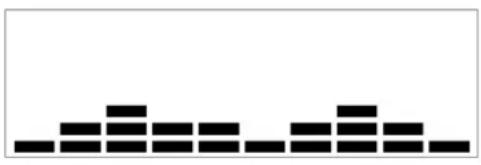
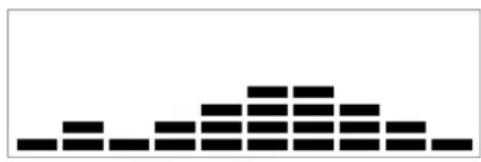
The ProgramDisplayshow the name of the program selection and the dot-matrix area shows the course profile for the program Each column in the profile shows one interval (1/10) the total program time) The highest column the higher resistance level and/or speed to that interval The flashing column shows your current interval.
Level Level
TheLeveldisplayfieldshowsthecurrentresistancelevel.Thereare8resistancelevelsavailable.
Heart Hreet Rate
The Heart Rate display field shows the heart rate beat peminute (BPM) from the contact heart rate sensor (CHR). The heart core flashes whether the consolereceiver senses the CHR signal. If the consolereceiver does not sense the CHR, the center of the heart icon is solid.

Consult physician before your start exercise program Stop exercising if you feel tightness in your chest becomes short to breath of feet. Contact your doctor before you use the machine again. Use the values calculated for measured by the machine's computer for reference purposes only.
RPM RPM
TheRPMdisplayfieldshowsthecurrentpedalrevolutionsperminute(RPM).
Calories Calories
TheCaloriesdisplayfieldshowstheestimatedcaloriesthatyouhaveburnedduringtheexercise.
Speed Speed
TheSpeeddisplayfieldshowstheestimatedspeedinkilometersperhour(KM)ormilesperhour(MPH).
Distance Distance
The DISTANCE displayfield show sthedistance count (milesorkm) in the workout.
Time ime
The time display field shows the time count the workout of preset time setup the current workout program that displays a value start at zero and counts forward until the end of the workout. Maximum time is 99:59.
ItheworkouthaspresetimethdisplaystartsthepresetvalueandcountslowteroThedisplayshowsthotatimecounfotheworkoutthenthe timecountforthecurrentinterval.
Results Redidator Indicator
TheRESULTSindicatorcomesonwhentheConsoleshowstheworkoutdataresults.
Battery Bad Ecuador Indicator
TheBatteryIndicatorshowswhenthebatterypowerislow.Itsonlyviewablewhenalowbatterylevelisdetected.
Note: NoTheConsolewillautomaticallyturnoffthefanwhenbatterylevalsarelow.
Contact Heart Batch Sensor Sensors
ContactHearRate|CHRsensors send you heart rates signals the Console The CHR sensors are the stainless steel parts or the handlebars, the sides of the Console.
Note: Note:A10bikehastheCHRsensorsontheConsole.TheA20bikehastheCHRsensorsonthehandlebars.
Touseput you hands comfortably around the sensors. Besur that you hand touch both the top and the bottom the sensors. Hold firm but not to digh loose. Both hands must make contact with the sensor for the Console detect pulse. After the Console detects four stable pulse signals you initiate a pulse rate will be shown.
On the Console your initial heart rate, not moving shift you hands for 1d seconds. The Console will validate the heart rate. Many factors influence the ability of the sensor to detect your heart rates signal:
Movement the upper body muscle including arms produces electrical signal (muscle artifact that can interfere with pulse detection Slight hand movement while in contact with the sensors can also produce interference.
Calluses and handotion may act as insulating ayetoreduce the signastrength.
Some Electrocardiogram EKG signal generated by individuals are not strong enough to be detected by the sensors.
If your heartratesignaleverseemserraticaftervalidation, wipeoffyourhandsandthesensorsandtryagain.
Heart Heart Calculations Calculations
You maximum heart rate usually decreases from 22 Beats Per minute (BPM) childhood approximately 160 BPM per 60 this all heart rate usually linear, decreasing approximately one BPM each year. There is no indication that training influences the decrease in maximum heart rate individuals so the same could
havedifferentmaximumheartrates. It is more accurate to find this value by getting a stress than by using an age-related formula.
Youatesheartate influence by endurance training. The typical adult has a heart rate of approximately 7 BPM where a highly trained runners may have readings of 40 BPM more lower.
The Hear Rate table is estimated what Hear Rate Zone (HRZ) is effective because you cardiovascular system physical conditions vary therefore your individual HRZ could be several beat higher or lower than what is shown.
Thenostefficienc procedure burnfaturing exercise start at slovpace and gradually increase you intensity until you heartate reaches between 6085% of your maximum heart rate Continue that pace keeping you heart at that target zone over 20 minutes. The tongue you maintain your large heart rate the more fat your body will burn.
The graph is brief guidelines describing the generally suggested target heart rates based on age. Anoted above your optimistic target at any higher flower. Consult your physician for your individual target heart rate zone.
Note: Note: with all exercises and fitness regimens, always use your best judgment when you increase your exercise time or intensity.
Fat Burning Burgegaltgert Rate
Heart Heart BEM BEMs
perminute)


line
| Age | 20-24 | 25-29 | 30-34 | 35-39 | 40-44 | 45-49 | 50-54 | 55-59 | 60-64 | 65-69 | 70+ | |---|---|---|---|---|---|---|---|---|---|---|---| | Value | 196 | 191 | 188 | 181 | 176 | 171 | 166 | 161 | 156 | 151 | 146 | | Value | 167 | 162 | 158 | 154 | 150 | 145 | 141 | 137 | 133 | 128 | 126 | | Value | 118 | 115 | 112 | 109 | 106 | 103 | 100 | 97 | 94 | 91 | 88 |Optional Power Optiapter Adapter
The console for your machine operator battery power A power For A power is necessary to order the optional Power Adapter batteries and the Power Adapter are installed, the console will us the Power Adapter to operate.
Note: Nofouuserechargeablebatteries, theoptionalPowerAdapterwillnotrechargethebatteries.
Afterthemachineisfullyassembled,connectthePowerAdaptortotheconsoleandthewalloutlet.
NOTICE: If you use a power adapter for your bike, makes sure that the record stays clear of the path of the pedals. Attach the record to them machine as shown:

natural_image
Technical line drawings of a stationary exercise bike with attached device and internal components (no text or symbols)
natural_image
Technical line drawings of a stationary exercise machine with attached cable and motor (no text or symbols)NOTICE: It is recommended to remove batteries when they are not used, to avoid damage from battery corrosion.
ToordertheoptionalPowerAdapter, goto:
www.schwinnfitness.com/powersupply
Orcall1(800)605-3369.
FCC FCOmpliance Compliance

Changes modification this unihot expressly approved by the party responsible for compliance could void haser' authority to operate the equipment.
Note: Note equipment has been tested and found to comply with the limits for a Class B digital device, pursuant to Part 15 of the FCC Rules. These limits are designed to provide reasonable protection against harmful interference in residential installation. This equipment generates uses and can radiate radio frequency energy and, if not installed and used in accordance with the instructions, may cause harmful interference to radiocommunications.
However there is guaranteed that interference will occur in particular installation. This equipment does cause harmful interference to radioortelevision reception, which can be determined by turning the equipment off and on, the user is encouraged to try to correct the interference by one or more of the following measures:
•Reorientorrelocatethereceivingantenna.
- Increase these separation between the equipment and receiver.
- Connecttheequipmentintoanoutletonacircuitdifferentfromthattowhichthereceiverisconnected.
Consultthedealeroranexperiencedradio/TVtechnicianforhelp.
Operations Operations
What would we wear
Wearrubber-soledathleticshoes. You will need the appropriate clothes for exercise that allow you to move freely.
How Often Should Show Exercise Exercise

Consult physician before you start an exercise program Stop exercising if you feel tightness in your chest becomes short breath of feet. Contact your doctor before you use the machine again. Use the values calculated or measured by the machine's computer for reference purposes only.
3timesaweekfor30minuteseachday.
ScheduleworkoutsadvanceTryworklouteverwheryoudonotwanto.
Seat Adjustment
Adjustment
Correctseatplacementencouragesexerciseefficiencyandcomfort,whilereducingtheriskofinjury.
With Pedal the forward position center, all by you to over the center of You should be slightly the knee.
Iyoulegsto straightbyoufootannotouchthePedalmovtheseatlownorthuprightbikeforwardontherecumbentbikelyoulegisentoo much,movetheseatupontheprightbikeorbackwardontherecumbentbike.

Stepoffthebikebeforeyouadjusttheseat.
Upright
Upright
Pulltheadjustmentknobontheseattube.Adjusttheseattothedesired height.Releasetheadjustmentknobtoengagethelockingpin.Besure thatthepinisfullyengaged.

DonotsettheSeatPostpositionhigherthanthestopmark (MAX)onthetube.

natural_image
Line drawing of a person using a handheld device with an inset showing the mechanical component labeled 'MAX' (no text or symbols on the diagram itself)Recumbent
Recumbent
Pulltheadjustmentknobontheseatbracket.Slidetheseattothedesiredposition. Theadjustmentknobwill'popIntdhenexholeTurtheknoldfullytighten andmakesuretheseatisstable.
Note: Different models can have the knob on the top or the side of these at bracket.

natural_image
Line drawing of a person using a horizontal bar to lift a seat (no text or symbols)Foot Position / /PedalPositipAdjustment
Adjustment
Footpedalswithstrapsprovidesecurefootingtotheexercisebike.
PuttheballofeachfootonthePedals.
Rotate the Pedals until lone can be reached.
Fastenthestrapovertheshoe.
Repeatfortheotherfoot.
Bsurdoes and knee point directly forward ensure maximum Pedaefficiency Pedatraps can defit position for subsequent workouts.

natural_image
Line drawing of hands using a tool to adjust or install a mechanical component (no text or symbols visible)Power-Up Modeer Mode
The Console operates 14-sized batteries. Once installed the Console will be POWER-UP mode button pushed off receives indication from the RPM sensor as a result of pedaling themachine.
Note: An optional power adapter is available from www.schwinnfitness.com/powersupplyorcall1(800)605-3369.
Auto Shut-Off (Sleep Mode Sleep Mode)
If the Consoledoesnot receive any input in approximately 5 minutes, it will automatically shutoff. The LCD display is off while in Sleep Mode.
Note: TheNote:soledoesnothaveanOn/Offswitch.
Quick Stack \$Manual Program Program
TheQuickStart/Manualprogramletyoustartaworkoutwithoutenteringanyinformation.
- Steponthemachine.
- Push the QUICK START button to start the QUICK START/MANUAL program.
BuslthdincreaseDecreasebuttonstchangethresistancedevelThedefaultQuickStartresistancedevelsThetimewillcountupfrom00:00.
Changing Resistance Resistance Levels
PushtheIncreaseorDecreasebuttonstochangetheresistancelevelatanytimeinaworkoutprogram.
Profile Profjeams Programs
Theseprogramsautomatedifferentresistancesandworkoutlevels.
Course1
natural_image
Abstract black pixelated pattern on white background (no text or symbols)Pursuit1
natural_image
Abstract black-and-white pixelated pattern resembling a stylized mountain or peak (no text or symbols)
natural_image
Abstract pattern of black rectangular blocks on white background (no text or symbols)Circuit1

natural_image
Abstract black-and-white geometric pattern with no text or symbols
natural_image
Abstract black-and-white geometric pattern with no text or symbols
natural_image
Abstract black-and-white pixelated pattern with no text or symbolsTostartaProfileProgram:
- Steponthemachine.
- Use the Increase or Decrease button to select one of the above programs.
- To adjust the time of the workout (15 minutes is the default), push ENTER. Use the Increase and Decrease button to change it, and push ENTER.
- Use the Increase and Decrease button to change the resistance level (default level is 3, maximum level is 8), and push ENTER.
5.PushSTART/STOPtobegintheworkoutYourProfileworkoutwillbegin.
Pausing or StopPaining Stopping
- Push the START/STOP button to pause your workout.
2.PushSTART/STOPtocontinuetheworkout,orpushandholdtheSTART/STOPbuttonfor3secondstoendtheworkout.
Results Results
When you complete pause, can cancel workout the Console will show your current workout value totals and average of their activity for minutes the Console will enter SleepMode.
Changing Uraingheasitres (English Mepesric/Egistic)
Imperial/Metric)
Tochangethemeasurementunits(fordistanceandspeed)toEnglishImperialormetric:
1.PushandholdtheENTERandSTART/STOPbuttonsfor3secondstogotoEngineeringMode.
The display shows the current unit measurement Pushth Increase/Decrease button to change between English Imperial (MILES) Metric KM units.
3.PushENTERtosetyourselection.
Maintenance Maintenance

Equipment must be regularly examined for damage and repairs. The owners responsible to make such a gradual maintenance of the Worr damaged components must be replaced immediately by the equipment removed from service until the repair made only manufacture supplied components can be used to maintain and repair the equipment.

This product is packaging and components contain chemicals known the State California cause cancer birth defects preproductive harm. This Notice is provided in accordance with California's Proposition 65 (you would like additional information please refer to website at www.nautilus.com/prop65
DANGER
To reduce the isloelectric shock always unplug the power cord and wait 5 minutes before cleaning maintaining repairing this machine.
| Daily Daily | Beforeeachuse,examinetheexercisemachineforloose,broken,damaged,orwornparts.Donotuseiffoundinthiscondition.Repairor replaceallpartsatthefirstsignofwearordamage.Aftereachworkout,useadampclothtowipeyourmachineandConsolefreeofsweat.Note:Note:indexcessivemoistureontheConsole. |
| Weekly eekly | Checkforsmoothseatslideroperation.Cleanthemachinetoremoveanydust,dirt,orgrimefromthesurfaces.Ifneeded,sparinglyapply athincoatingofsiliconelubetoeaseoperation.Note:Note:otusepetroleumbasedproducts. |
| Monthly Monthly | Checkpedalsandcrankarmsandtightenasnecessary.Makesureallboltsandscrewsaretight.Tightenasnecessary. |
| Yearly early | Replacetheconsolebatteriesevery1year(asnecessary). |
Maintenance MaintsePartse
| A | Console | H | DataCableO | Flywheel | |
| B | SeatSlider(A20only) | I | ConsoleMast | PBraceMagnet | |
| C | Pedals RPMI Sensor | HRCables | |||
| D | CrankArms | K | CHRSensors | R | SpeedSensorMagnet |
| EBatteryBay | HandSebars, Side(A20only) | Levelers | |||
| F | ACPowerConnector | M | Shrouds | T | SeatPost(A10only) |
| MachineTypeSwitch | N | CenterPlates | AdjustmentKnob | ||


Replacing Replangole Batteries Batteries
Ith Battery Indicatocomes on replace the batteries in the back of the console with fresh batteries. Makes sure the battery point in the battery bay.
+/=directionshownin
Note: Note: consoleusesDsizebatteries(LR20). If you use rechargeable batteries, the optional power adapter will not recharge the batteries.

Donotmixoldandnewbatteries.
Donotmixalkaline, standard(carbon-zinc), or rechargeable(Ni-Cd,Ni-MH,etc) batteries.

Machine MyTeiSwitch Switch
The Machine Type switch the Console present the factory of bikefelliptically. You replace console with possibly necessary to the switch for your machine. After you set the switch, it is necessary to turn the power off and then turn back to start the new mode of operation.
NOT Makes that Machine Type is correctly given more accurate calculations for Distance Speed and Calories values.
Leveling Leveling Bike

The develers arthepolygona end caps on the Rea Stabilizer Turnth end cap adjust devel Makes urth the bikes leve and stable before you exercise.
Moving Moving Bike
Upright Upright
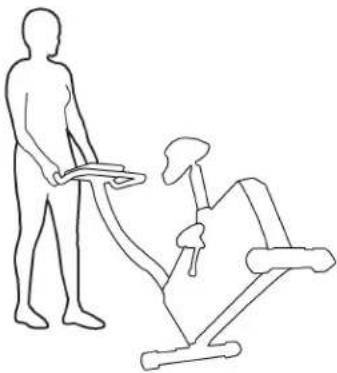
Tomovetheuprightbike, carefully pull the Handlebar stoward you while pushing the front of the bikedownward. Push the biketothedesired location.
natural_image
Line drawing of a person using an exercise machine (no text or symbols)Recumbent Recumbent
Tomovetherecumbentbike, carefully lift there are end of the bike and slowly push the biketo the desired location.

natural_image
Line drawing of a person pushing a car with a seatbelt, no text or symbols presentNOTICE: Becareful when you mov the bike. All abrupt motions can affect the computer operation.
Trøubleshooting roubleshooting
| Problem Problem | Check Check | Solution Solution |
| Nodisplay/partialdisplay/unitwillnotturnon | IfbikehasACadapter,checkelectrical(wall)outlet | Makesureunitispluggedintoafunctioningwall outlet. |
| IfbikehasACadapter,checkconnection should be secure and damage Replace adapterorconnectionatunitifeitheraredamaged. | ||
| IfikhasbatteriescheckBatteryIndicatororconsole orcheckbatteries. | Replacethebatteries.Itmaybenecessarytoreplace thebatteriesalthoughtheBatteryIndicatorisnoton. | |
| Checkdatacableintegrity | Allwiresincableshouldbeintact.Ifanyarevisibly crimpedorcut,replaceable. | |
| Checkdatacableconnections/orientation | Makesurecableisconnectedsecurelyandoriented properly.Smalllatchonconnectorshouldlineupand snapintoplace. | |
| Checkcode display is gained onsoledisplayiscracked | otherwisedamaged.ReplaceConsoleifdamaged. | |
| ConsoleDisplayIfConsoleonlyhaspartialdisplayandallconnections | refine,replacetheConsole. | |
| Iftheabovestepsdonotresolvetheproblem,contactCustomerCareforfurtherassistance. | ||
| UnitoperatesbutContactHRnotdisplayed | HRcableconnectionatConsoleMakesurecableisconnected | securelytoConsole. |
| HRcableboxconnection(recumbentonly) | MakesurecablesfromhandlebarsandcabletoConsolearesecureandundamaged.Somemodelsmayrequiretheseatbackberaisedtoaccesscablebox. | |
| Sensorgrip | MakesurehandsarecenteredonHRsensors.Handsmustbekeptstillwithrelativelyequalpressureappliedtoeachside. | |
| Dryorcallousedhands | Sensorsmayhavedifficultywithdriedoutorcallousedhands.AconductiveelectrodecreamsuchasSIGNACREME®orBuh-BumpTMcanhelpmakebetterconduct.Theseareavailableontheweboratmedicalorsomelargerfitnessstores. | |
| Handlebars(recumbentonly) | Iftestsrevealnootherissues,Handlebarsshouldbereplaced. | |
| Console(uprightonly)Iftestsrevealnootherissues,Console | shouldbereplaced. | |
| Consoledisplays"E2"errorcode | Checkdatacableintegrity | Allwiresincableshouldbeintact.Ifanyarecutorcrimped,replaceable. |
| Checkdatacableconnections/orientation | Insurecableisconnectedsecurelyandorientedproperly.Smalllatchonconnectorshouldlineupandsnapintoplace. | |
| ConsoleElectronicsIftestsrevealnootherissues,Console | shouldbereplaced. | |
| Nospeed/RPMreading,Consoledisplays"Pedal"errorcode | Checkdatacableintegrity | Allwiresincableshouldbeintact.Ifanyarecutorcrimped,replaceable. |
| Checkdatacableconnections/orientation | Insurecableisconnectedsecurelyandorientedproperly.Smalllatchonconnectorshouldlineupandsnapintoplace. | |
| Checkmagnetposition(requiresshroudremoval) | Magnetshouldbeinplaceonflywheel.Ifnomagnetispresent,replacetheflywheelortheentirebaseunit(ifunabletoreplaceflywheel). | |
| CheckRPMSensor(requiresshroudremoval) | RPMsensorshouldbealignedwithmagnetandconnectedtodatacable.Realignsensorifnecessary.Replaceifthereisanydamagetothesensorortheconnectingwire. | |
| Consoleshutsoff(enterssleepmode)whileinuse | Checkdatacableintegrity | Allwiresinthecableshouldbeintact.Ifanyarecutorcrimped,replaceable. |
| Checkdatacableconnections/orientation | Insurecableisconnectedsecurelyandorientedproperly.Smalllatchonconnectorshouldlineupandsnapintoplace. | |
| ResetMachine(ifequippedwithresetbutton) | Unplugunitfromelectricaloutletfor3minutes.Reconnecttooutlet.AftertheConsolepowersup,press"reset". | |
| Ifbikehasbatteries,checkBatteryLevelicononconsoleorcheckbatteries. | Ifthebatterylevelshowslowornopower,replacethebatteries. | |
| Checkmagnetposition(requiresshroudremoval) | Magnetshouldbeinplaceonflywheel.Ifnomagnetispresent,replaceflywheelorentirebaseunit. | |
| CheckRPMSensorContactCustomerCareforfurtherassistance. | ||
| Fan(ifequipped)willnotturnonorwillnotturnoff | Checkdatacableintegrity | Allwiresincableshouldbeintact.Ifanyarecutor crimped,replacecable. |
| Checkdatacableconnections/orientation | Insurecableisconnectedsecurelyandoriented properly.Smalllatchonconnectorshouldlineupand snapintoplace. | |
| ResetMachine(ifequippedwithresetbutton) | Unplugunitfromelectricaloutletfor3minutes.Reconnecttooutlet.AfterConsolepowersup,press "reset". | |
| Ifbikehasbatteries,checkBatteryIndicatoronconsole orcheckbatteries. | Ifthebatterylevelshowslowornopower,replace thebatteries. | |
| Fan(ifequipped)willnotturnon,butConsoleoperatesCheckforblockageoffanTurnpoweroff(removebatteriesorunplugpoweradapter).Removematerialfromfan.Ifnecessary, detachtheConsoletohelpwithremoval.Replaceethe Consoleifunabletoremoveblockage. | ||
| Unitrocks/doesnotsitlevel | Checkleveleradjustment | Levelingfeetmaybeturnedtolevelbike. |
| Checksurfaceunderunit | Adjustmentmaynotbeabletocompensatefor extremelyunevensurfaces.Movebiketolevelarea. | |
| Pedalsloose/unitdifficulttopedal | Checkpedaltocrankconnection | Pedalshouldbetightenedsecurelytocrank.Insure connectionisnotcross-threaded. |
| CheckcranktoaxleconnectionCrankshouldbetightenedsecurelytoaxle.Besure cranksareconnectedat180degreesfromeachother. | ||
| Seatpostmovement | Checklockingpin | Insureadjustmentpinislockedintooneoftheseat postadjustmentholes. |
| Checkadjustmentknob | Insureknobissecurelytightened. | |

SCHWINN FITNESS
PrintedinChina
Nautilus®
Bowflex®
Schwinn® Fitness
Universal®
- Schwinn® A10 and A20 Exercise Bikes
- Owner's Manual
- Español Americano Latino
- Important Safety Statacyutions Instructions
- Before Before this equipment, equested following followings: warnings:
- Safety Safetying arabets and Seaalls Num Serial Number
- Program PDisplay Display
- Level Level
- Heart Hreet Rate
- RPM RPM
- Calories Calories
- Speed Speed
- Distance Distance
- Time ime
- Results Redidator Indicator
- Battery Bad Ecuador Indicator
- Contact Heart Batch Sensor Sensors
- Heart Heart Calculations Calculations
- Optional Power Optiapter Adapter
- FCC FCOmpliance Compliance
- Operations Operations
- What would we wear
- How Often Should Show Exercise Exercise
- Seat Adjustment
- Adjustment
- Upright
- Recumbent
- Foot Position / /PedalPositipAdjustment
- Power-Up Modeer Mode
- Auto Shut-Off (Sleep Mode Sleep Mode)
- Quick Stack \$Manual Program Program
- Changing Resistance Resistance Levels
- Profile Profjeams Programs
- TostartaProfileProgram:
- Pausing or StopPaining Stopping
- Results Results
- Changing Uraingheasitres (English Mepesric/Egistic)
- Imperial/Metric)
- Maintenance Maintenance
- DANGER
- Replacing Replangole Batteries Batteries
- Machine MyTeiSwitch Switch
- Leveling Leveling Bike
- Moving Moving Bike
- Upright Upright
- Recumbent Recumbent
- SCHWINN FITNESS
Marque : Schwinn
Modèle : A10
Catégorie : Vélo d'appartement