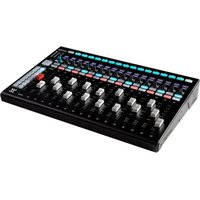
Fit - Matériel audio professionnel WAVES - Notice d'utilisation et mode d'emploi gratuit
Retrouvez gratuitement la notice de l'appareil Fit WAVES au format PDF.


| Type de produit | Montre connectée / Tracker d'activité |
| Marque | Waves |
| Modèle | Fit |
| Dimensions (boîtier) | Environ 41 x 35 x 10 mm |
| Poids | Environ 35 g (sans bracelet) |
| Matériau du boîtier | Plastique ABS et acier inoxydable |
| Type d'écran | Écran tactile LCD 1,3 pouces |
| Alimentation | Batterie lithium-ion 200 mAh, rechargeable via USB |
| Autonomie | Jusqu'à 7 jours en utilisation normale |
| Capteurs | Accéléromètre, capteur de fréquence cardiaque, oxymètre de pouls |
| Fonctions principales | Comptage de pas, mesure de la fréquence cardiaque, suivi du sommeil, notifications, chronomètre |
| Connectivité | Bluetooth 5.0 |
| Compatibilité | iOS 10.0+ et Android 6.0+ |
| Étanchéité | IP68 (résiste à l'immersion jusqu'à 1,5 m pendant 30 min) |
| Bracelet | Silicone interchangeable, taille réglable |
| Entretien et nettoyage | Nettoyer avec un chiffon doux et sec ; éviter les produits abrasifs |
| Sécurité | Ne pas exposer à des températures extrêmes ou à des chocs violents |
| Pièces détachées et réparabilité | Bracelets de rechange disponibles ; réparation par centre agréé |
| Informations générales | Garantie 1 an ; fabriqué en Chine |
FOIRE AUX QUESTIONS - Fit WAVES
Questions des utilisateurs sur Fit WAVES
0 question sur cet appareil. Repondez a celles que vous connaissez ou posez la votre.
Poser une nouvelle question sur cet appareil
Téléchargez la notice de votre Matériel audio professionnel au format PDF gratuitement ! Retrouvez votre notice Fit - WAVES et reprennez votre appareil électronique en main. Sur cette page sont publiés tous les documents nécessaires à l'utilisation de votre appareil Fit de la marque WAVES.
MODE D'EMPLOI Fit WAVES
FIT
MIXING CONTROL SURFACE
USER GUIDE
INTRODUCTION
Thank you for purchasing the MiDiPLUS FIT controller, an intuitive control surface designed to function as a fully integrated fader bank for the Waves eMotion LV1 digital mixing console.
MiDiPLUS FIT features 16+1 touch-sensitive motorized faders, 16+1 clickable rotary encoders, and tons of control buttons, it's perfect match for Waves eMotion LV1.
What's in the box:
● FIT mixing control surface
- USB cable
● Power Supply
- User guide
● Rack mounting panels
● Registration Card
SAFETY WARNINGS AND INSTRUCTIONS:
Please read the following precautions carefully before use to avoid damaging the equipment or causing personal injury. Precautions include but are not limited to the following:
- Read and understand all the illustrations.
- Always follow the instructions on the device.
- Before cleaning the device, always remove the power and the USB cable. When cleaning, use a soft and dry cloth. Do not use gasoline, alcohol, acetone, turpentine or any other organic solutions; do not use a liquid cleaner, spray or cloth that's too wet.
- Make sure to turn off and disconnect the power if not used for extended periods.
- Do not use the device near water or moisture, such as a bathtub, sink, swimming pool or similar place.
- Do not place the device in an unstable position where it might accidentally fall over.
- Do not place heavy objects on the device.
- Do not place the device near a heat vent at any location with poor air circulation.
- Do not open or insert anything into the device that may cause a fire or electrical shock.
- Do not spill any kind of liquid onto the device.
-
Do not use the device with thunder and lightning present; otherwise it may cause long distance electrical shock.
-
Do not use in environments below 0°C/32°F or above 40°C/104°F
- Do not use the device when there is a gas leak nearby.

CAUTION
RISK OF ELECTRIC SHOCK DO NOT OPEN

ATTENTION: RISQUE DE CHOC ELECTRIQUE-NE PAS OUVRIR
CAUTION: TO REDUCE THE RISK OF ELECTRIC SHOCK DO NOT REMOVE COVER (OR BACK) NO USER-SERVICEABLE PARTS INSIDE. REFER SERVICING TO QUALIFIED PERSONNEL
ATTENTION: POUR EVITER LES RISQUES DE CHOC ELECTRIQUE, NE PAS ENLEVER LE COUVERCLE. AUCUN ENTRETIEN DE PIECES INTERIEURES PAR L'USAGER. CONFIER L'ENTRETIEN AU PERSONNEL QUALIFIE.
AVIS: POUR EVITER LES RISQUES D'INCENDIE OU D'ELECTROCUTION, N'EXPOSEZ PAS CET ARTICLE A LA PLUIE OU A L'HUMIDITE

The lightning flash with arrowhead symbol within an equilateral triangle is intended to alert the user to the presence of uninsulated "dangerous voltage" within the product's enclosure, that may be of sufficient magnitude to constitute a risk of electric shock to persons.

The exclamation point within an equilateral triangle is intended to alert the user of the presence of important operating and maintenance (servicing) instructions in the literature accompanying the appliance.
WARNING: To reduce the risk of fire or electric shock, do not expose this apparatus to rain or moisture.
READY TO USE
MiDiPLUS FIT is a class-compliant USB device in both macOS ^® and Windows ^® . When connect your FIT to a free USB port on your computer and turn on the unit, its drivers are automatically installed.
CONFIGURE IN WAVES EMOTION LV1
After connecting FIT to the computer, launch LV1, select the SETUP tab, on the right column labeled 'CONTROL' select Add Device, choose MIDIPLUS FIT. Press the Gear control to open the control panel, and choose FIT in the input and output ports. Select mapping options for customization.
FRONT PANEL
The functions of the knobs and buttons on the FIT are specific to Waves eMotion Lv1.
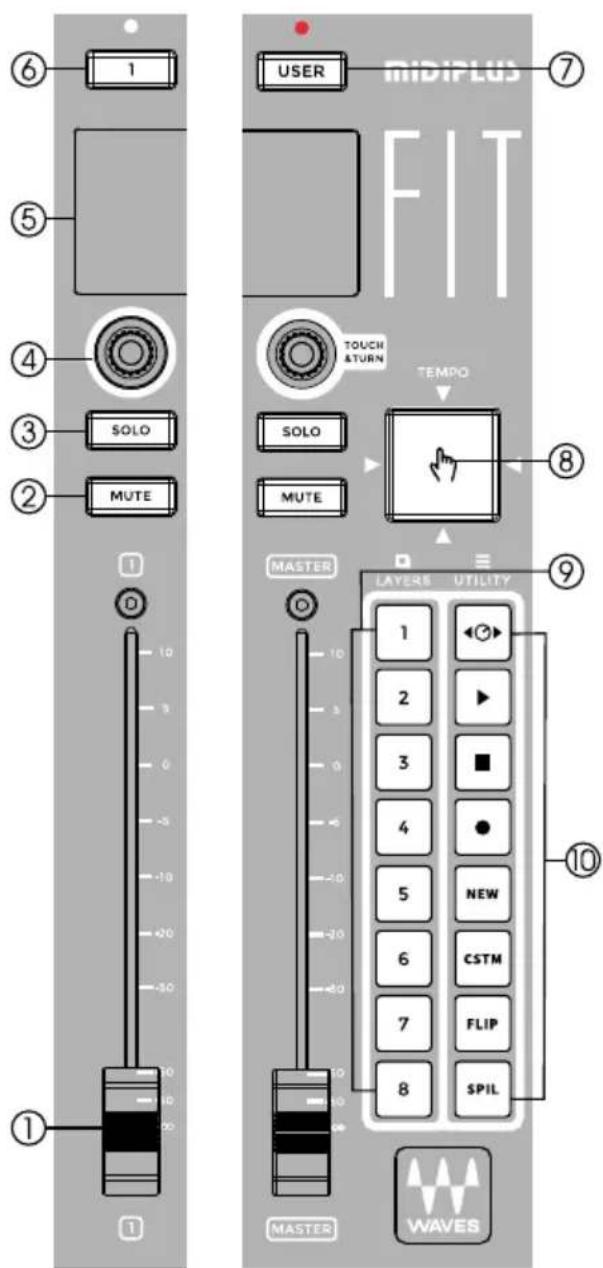
- Touch-sensitive motorized faders: Control the channel's level
- Mute: Turn off the corresponding channel's output signal.
- Solo: Activates CUE or Solo depending on LV1 mode.
- Encoders: These clickable encoders click to switch, rotary to control parameters
- Scribble strip: Displays channel and plug-in information
- Select buttons: Select the corresponding channel to adjust
- User button: Press to select the user assigned keys
- Tap tempo pad: Setting the tempo by repeatedly tapping the pad
- Layers select buttons: Select the channel layer
- Utility buttons: Access to the most frequently use functions of your session
REAR PANEL
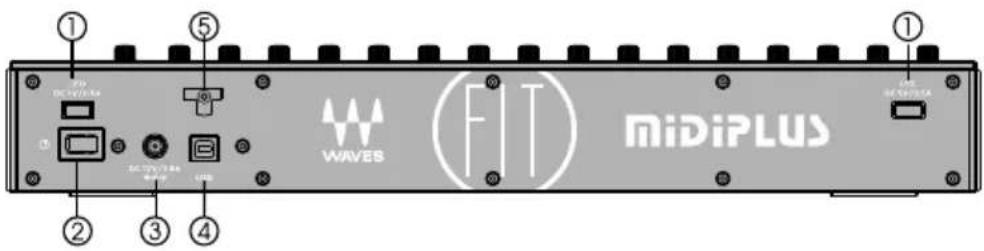
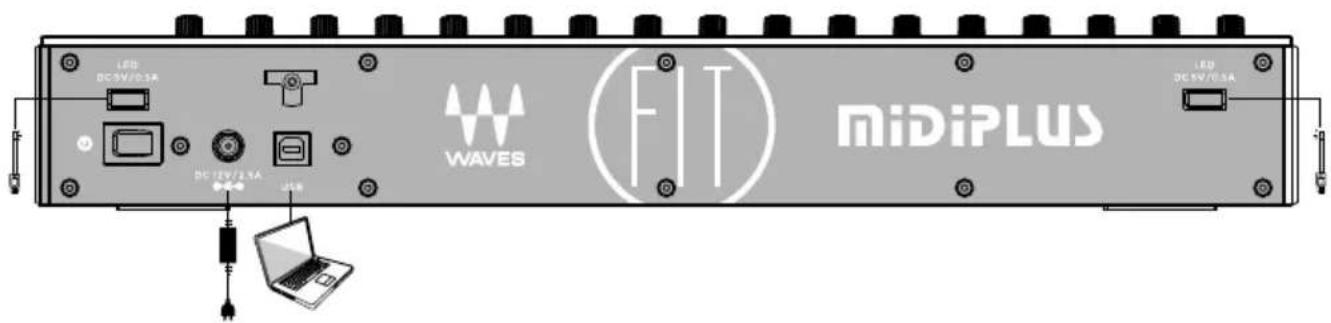
- USB LED Port: Supply DC 5V/0.5A output for USB LED light
- Power Switch: Power the unit on or off
- Power Connector: Connect to the power supply provide by MiDiPLUS (DC 12V/2.5A)
- USB Port: Connect to your computer to control your Wave eMotion LV1
- Cable Tie: Wind the power supply's cable through one or both hooks to fixed the cable.
RACK MOUNTING
Before rack mounting, you must replace the 2 side panels with the included Rack mounting side panels, then use an equipment rack that is 19-inches wide (482.6 mm) and rated for the total weight of your equipment. Use a minimum of (4) 10/32 threaded screws per rack mounted device.
Step 1: Remove the 2 side panels
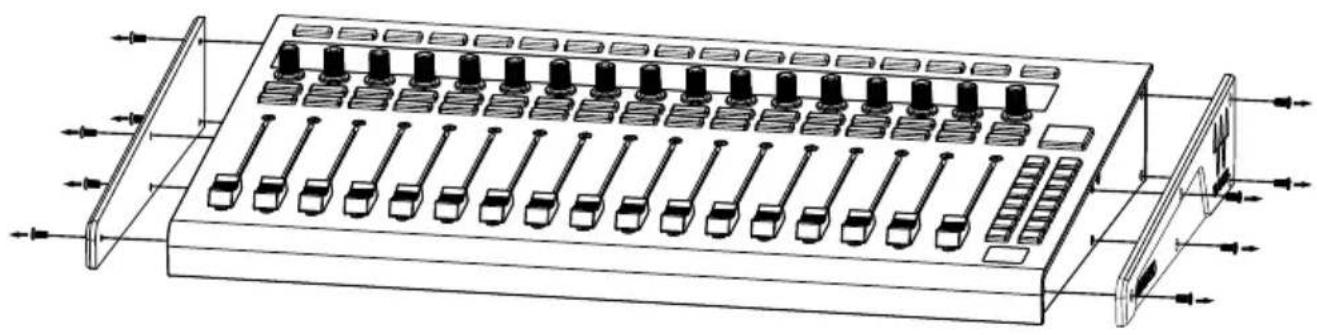
natural_image
Technical line drawing of an abacus with multiple beads and rods, no text or symbols presentStep 2: Install the 2 rack mounting side panels

natural_image
Technical line drawing of an electronic device with multiple ports and connectors (no text or symbols)Specifications
| Faders 17 touch-sensitive | 100mm motorized faders |
| Encoders 17 clickable rotary encoders | |
| Buttons | 17 RGB backlit Select buttons |
| 17 Blue backlit Solo buttons | |
| 17 Red backlit Mute buttons | |
| 16 RGB backlit Layers select and Utility buttons | |
| Pad 1 RGB backlit Tap tempo pad | |
| Display 17 1.14" TFT LCD | |
| Connectivity | 2 USB LED light ports |
| 1 USB 2.0 high speed port | |
| 1 DC input | |
| Power Supply DC Power adapter (DC 12V/2.5A, center-positive) | |
| Dimensions(W x D x H) | 44.9 cm x 28.4 cm x 6.9 cm17.6 in x 11.18 in x 2.71 in |
| Weight 4.28 kg / 9.43 lb. | |
TROUBLESHOOTING
Problem: No power.
- Make sure the AC outlet is alive, you can plug in a lamp to check it.
- Is the power supply connected to FIT correctly?
- Verify that the power switch is turned on.
Problem: Can't control Waves eMotion LV1.
- Make sure the USB cable is connected and the power is turned on.
- Make sure you have configured your LV1 as the previous chapter "Configure in Waves eMotion LV1".
If you still haven't found a solution to your problem, you may visit www.midiplus.com and contact us for technical support.

- FIT
- MIXING CONTROL SURFACE
- USER GUIDE
- INTRODUCTION
- SAFETY WARNINGS AND INSTRUCTIONS:
- CAUTION
- RISK OF ELECTRIC SHOCK DO NOT OPEN
- READY TO USE
- CONFIGURE IN WAVES EMOTION LV1
- FRONT PANEL
- REAR PANEL
- RACK MOUNTING
- Specifications
- TROUBLESHOOTING
- Problem: No power.
- Problem: Can't control Waves eMotion LV1.
Marque : WAVES
Modèle : Fit
Catégorie : Matériel audio professionnel