
DS-SD6P - Station d'accueil USB Sabrent - Notice d'utilisation et mode d'emploi gratuit
Retrouvez gratuitement la notice de l'appareil DS-SD6P Sabrent au format PDF.


| Type de produit | Hub USB-C multiport |
| Marque | Sabrent |
| Modèle | DS-SD6P |
| Dimensions (L x l x H) | 10 x 5 x 1.5 cm |
| Poids | 50 g |
| Alimentation | Bus-powered (USB-C) |
| Nombre de ports USB-A | 3 |
| Nombre de ports USB-C | 1 (pass-through) |
| Port HDMI | 1 (sortie vidéo) |
| Résolution maximale HDMI | 4K@30Hz |
| Lecteur de carte SD | Oui (SD/SDHC/SDXC) |
| Lecteur de carte microSD | Oui |
| Débit de données USB | Jusqu'à 5 Gbps (USB 3.0) |
| Compatibilité | Windows, macOS, Linux, Chrome OS |
| Fonctions principales | Extension de ports, lecture de cartes mémoire, sortie écran |
| Entretien et nettoyage | Nettoyer avec un chiffon doux non pelucheux |
| Sécurité | Ne pas exposer à l'humidité ou à des températures extrêmes |
| Pièces détachées et réparabilité | Non réparable par l'utilisateur |
| Informations générales | Garantie 1 an |
| Accessoires inclus | Câble USB-C |
FOIRE AUX QUESTIONS - DS-SD6P Sabrent
Questions des utilisateurs sur DS-SD6P Sabrent
0 question sur cet appareil. Repondez a celles que vous connaissez ou posez la votre.
Poser une nouvelle question sur cet appareil
Téléchargez la notice de votre Station d'accueil USB au format PDF gratuitement ! Retrouvez votre notice DS-SD6P - Sabrent et reprennez votre appareil électronique en main. Sur cette page sont publiés tous les documents nécessaires à l'utilisation de votre appareil DS-SD6P de la marque Sabrent.
MODE D'EMPLOI DS-SD6P Sabrent

USB TYPE-C 6-PORT DOCKING STATION WITH POWER DELIVERY

natural_image
Exterior view of a gaming controller with a black strap device (no visible text or symbols)DS-SD6P / USER MANUAL
FEATURES:
- Integrated USB Type-C connectivity for your Steam Deck and other devices
• 1x HDMI 2.0 port with HDCP 1.4 support with display output up to 4K/60Hz
• Supports PD3.0 with up to 95W charging, plenty to charge and play on your Steam Deck - 2x USB Type-C ports - one for PD input, the other for devices
• 3x USB Type-A ports for accessories and external storage - Sturdy, non-slip base with a minimalist style to fit your decor
PACKAGE CONTENT
- Docking station
- User manual
PRODUCT OVERVIEW

Front: Stand base / no ports with rubberized cradle
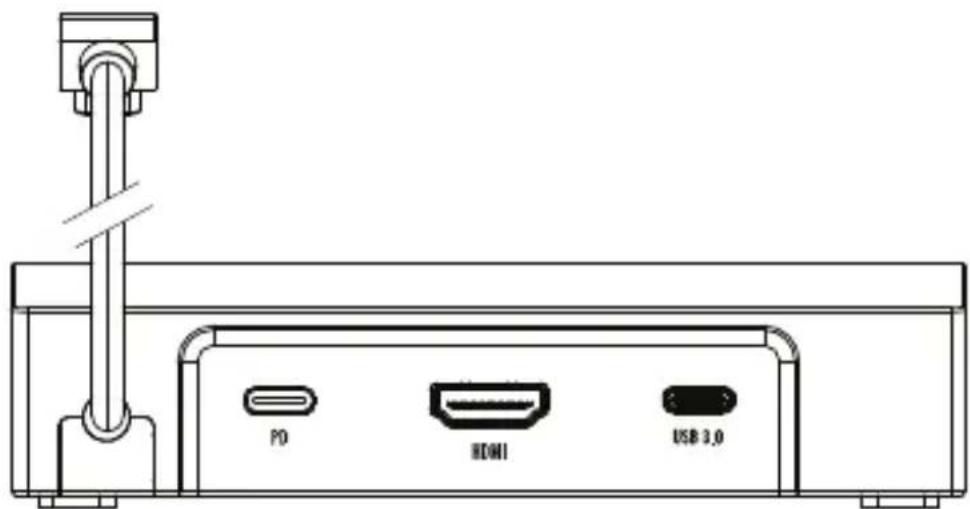
Back: Two USB Type-C ports - one for PD 3.0 input, one for connectivity | One HDMI port for display output up to 4K/60Hz

natural_image
Line drawing of two USB cable connectors with connector ports, no text or symbols presentSide Images: Three USB 3.0 Type-A ports on sides - two on left, one on right, for connectivity
SETTING UP THE SABRENT 6-PORT DOCKING STATION:

- Insert power cable from charger into the PD port, USB-C left of the HDMI port.
- Connect an HDMI cable for display output to the dock and display device.
- Connect your USB accessories to the available USB Type-A and Type-C ports.
DOCKING YOUR IPAD, TABLET PC, STEAM DECK, OR OTHER PORTABLE GAMING CONSOLE:
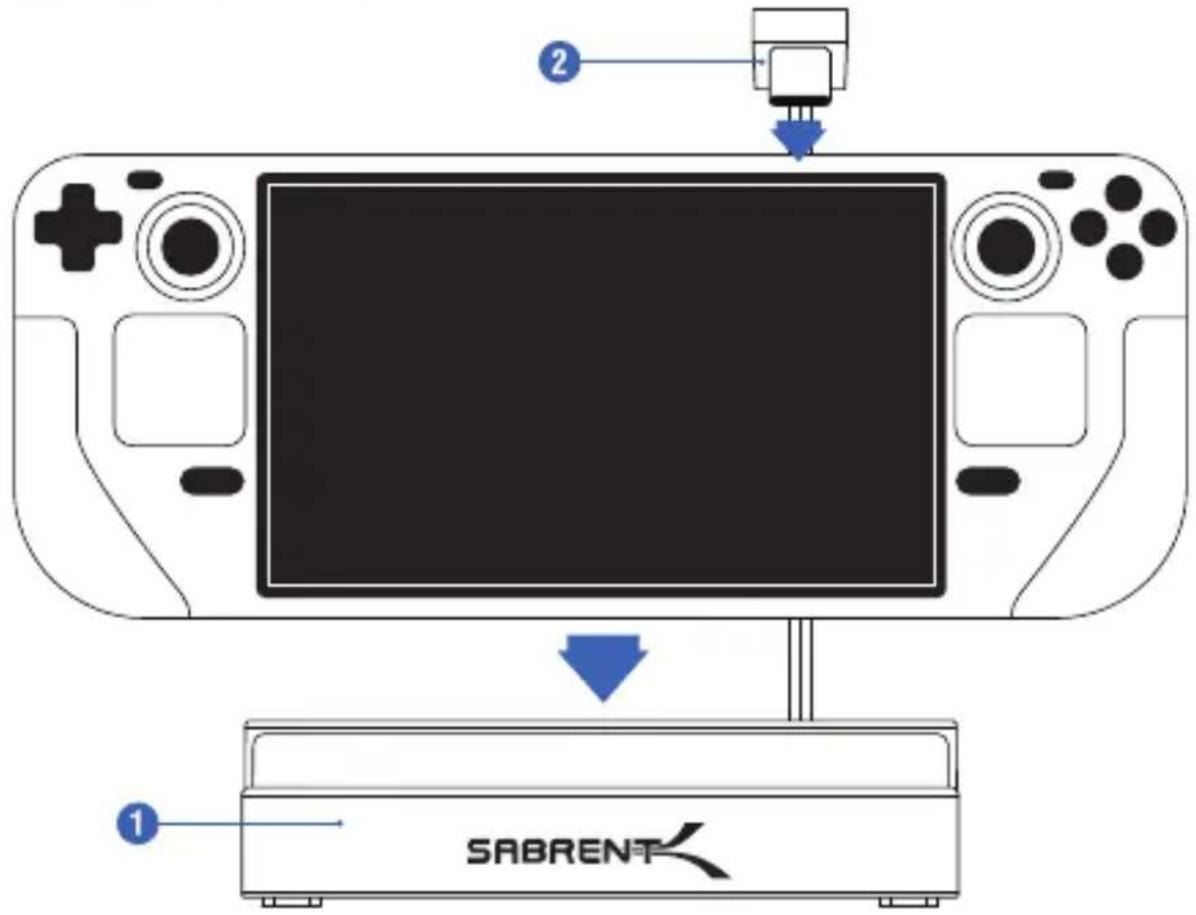
- Place your device into the base of the Sabrent 6-port Docking Station.
- Connect the integrated USB Type-C cable from the Sabrent 6-port Docking Station to the USB Type-C port on the device.
- Installation complete. Game on
SABRENT
FOR HELP, COMMENTS, QUESTIONS OR CONCERNS PLEASE CONTACT OUR TECH SUPPORT TEAM VIA OUR WEBSITE WWW.SABRENT.COM


Marque : Sabrent
Modèle : DS-SD6P
Catégorie : Station d'accueil USB