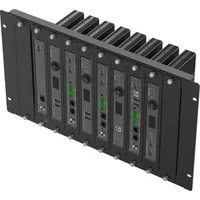
RK-10MT - Accessoire informatique Kramer - Notice d'utilisation et mode d'emploi gratuit
Retrouvez gratuitement la notice de l'appareil RK-10MT Kramer au format PDF.


| Marque | Kramer |
| Modèle | RK-10MT |
| Type de produit | Kit de montage en rack pour équipements AV |
| Matériau | Acier avec finition noire |
| Dimensions (L x H x P) | 48.3 x 4.4 x 15.0 cm (format rack 1U) |
| Poids | 0.8 kg |
| Capacité de charge | Jusqu'à 15 kg |
| Type de fixation | Vis de montage incluses |
| Compatibilité rack | Norme EIA 19 pouces |
| Accessoires inclus | Paire d'équerres, vis et écrous |
| Installation | Montage en rack standard, outillage simple requis |
| Utilisation prévue | Fixation d'équipements Kramer dans un rack 19 pouces |
| Entretien et nettoyage | Dépoussiérer avec un chiffon sec; éviter produits abrasifs |
| Sécurité | Ne pas dépasser la capacité de charge; fixer solidement |
| Pièces détachées et réparabilité | Vis de rechange disponibles; structure non réparable par l'utilisateur |
| Garantie | 2 ans (selon conditions Kramer) |
FOIRE AUX QUESTIONS - RK-10MT Kramer
Questions des utilisateurs sur RK-10MT Kramer
0 question sur cet appareil. Repondez a celles que vous connaissez ou posez la votre.
Poser une nouvelle question sur cet appareil
Téléchargez la notice de votre Accessoire informatique au format PDF gratuitement ! Retrouvez votre notice RK-10MT - Kramer et reprennez votre appareil électronique en main. Sur cette page sont publiés tous les documents nécessaires à l'utilisation de votre appareil RK-10MT de la marque Kramer.
MODE D'EMPLOI RK-10MT Kramer

Scan for full manual
PNL-BLK-10MT-5-SET Quick Start Guide
This guide helps you install and use your PNL-BLK-10MT-5-SET for the first time.
Go to www.kramerav.com/downloads/PNL-BLK-10MT-5-SET to download the latest user manual and check if firmware upgrades are available.
Step 1: Check what's in the box
√ PNL-BLK-10MT-5-SET Blank Panel Set (includes 5 blank panels)
1 Quick start guide
Step 2: Get to know your PNL-BLK-10MT-5-SET
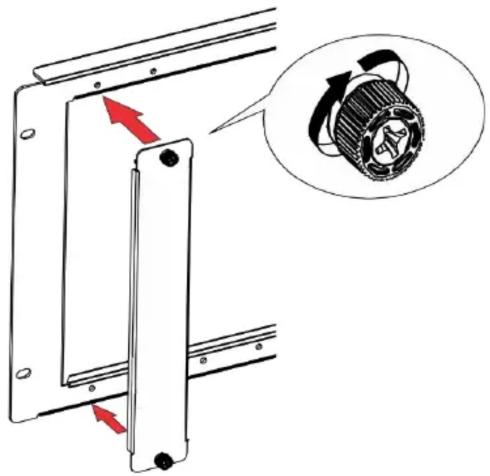
The PNL-BLK-10MT-5-SET includes 5 blank panels that can be used to cover unused openings in the RK-10MT rack adapter.

| # | Feature | Function |
| 1 | Knob | Turn to attach a panel to the rack. |
| 2 | Blank Panel | Blank panel to cover open slot. |
Step 3: Mount PNL-BLK-10MT-5-SET

- Ensure that the environment (e.g., maximum ambient temperature & air flow) is compatible for the device.
- Avoid uneven mechanical loading.
To mount a device onto the rack:
- Place the blank over the rack opening.
- Turn the knobs on both sides clockwise to secure the blank panel to the rack.
Technical Specifications
| Environmental Conditions | Operating Temperature | 0° to +40°C (32° to 104°F) |
| Storage Temperature | -40° to +70°C (-40° to 158°F) | |
| Humidity | 10% to 90%, RHL non-condensing | |
| Regulatory Compliance | Safety | CE |
| Environmental | RoHs, WEEE | |
| Enclosure | Type | SGCC |
| General | Net Dimensions (W, D, H) | 25.6cm x 4cm x 2.1cm (10.1“x 1.6” x 0.83”), per blank panel |
| Shipping Dimensions (W, D, H) | 31.2cm x 17.9cm x 7.6cm (12.3" x 7" x 3") | |
| Net Weight | 0.54kg (1.2lbs) approx. | |
| Shipping Weight | 0.78kg (1.7lbs) approx. |


Marque : Kramer
Modèle : RK-10MT
Catégorie : Accessoire informatique