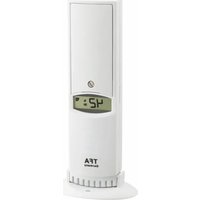
WeatherHub 30.3312.02 - Station Météo TFA - Notice d'utilisation et mode d'emploi gratuit
Retrouvez gratuitement la notice de l'appareil WeatherHub 30.3312.02 TFA au format PDF.


| Type de produit | Station météo sans fil |
| Marque | TFA |
| Modèle | WeatherHub 30.3312.02 |
| Unité intérieure | 108 x 108 x 22 mm |
| Unité extérieure | 65 x 35 x 130 mm |
| Poids total | Environ 200 g |
| Alimentation | 2 piles AAA pour l'unité intérieure, 2 piles AA pour l'unité extérieure |
| Affichage | LCD numérique avec rétroéclairage |
| Température intérieure | De 0°C à 50°C |
| Température extérieure | De -20°C à 60°C |
| Humidité intérieure | De 20% à 95% |
| Humidité extérieure | De 20% à 95% |
| Pression atmosphérique | De 700 à 1100 hPa |
| Prévisions météo | Icônes pour soleil, nuageux, pluie, neige |
| Phase lunaire | Affichage avec 8 phases |
| Fréquence de transmission | 433 MHz |
| Portée extérieure | Jusqu'à 100 m en champ libre |
| Entretien et nettoyage | Nettoyer avec un chiffon doux et sec. Ne pas utiliser de solvants. |
| Sécurité | Ne pas exposer à l'humidité excessive. Garder hors de portée des enfants. |
| Pièces détachées et réparabilité | Contacter le service client TFA pour les pièces de rechange. Réparation non recommandée par l'utilisateur. |
FOIRE AUX QUESTIONS - WeatherHub 30.3312.02 TFA
Questions des utilisateurs sur WeatherHub 30.3312.02 TFA
0 question sur cet appareil. Repondez a celles que vous connaissez ou posez la votre.
Poser une nouvelle question sur cet appareil
Téléchargez la notice de votre Station Météo au format PDF gratuitement ! Retrouvez votre notice WeatherHub 30.3312.02 - TFA et reprennez votre appareil électronique en main. Sur cette page sont publiés tous les documents nécessaires à l'utilisation de votre appareil WeatherHub 30.3312.02 de la marque TFA.
MODE D'EMPLOI WeatherHub 30.3312.02 TFA
Kurzanleitung
30.3312.02 Thermo-Hygro-Sender mit Schweizer Präzisionssensor

WeatherHub


WeatherHub-Sensor
Dies ist ein Sensor aus dem System „WeatherHub“ zum gleichzeitigen Messen der Lufttemperatur und Luftfeuchtigkeit (innen oder außen); er ist ausschließlich mit diesem System verwendbar. Zum Betrieb dieses Sensors benötigen Sie ein installiertes WeatherHub-Gateway. Dieser Sender ist mit der WeatherHub-Smartphone App (iOS & Android) und mit der browserbasierten WeatherHub-Observer Plattform verwendbar.
Lieferumfang
Profi-Thermo-Hygro-Sender (30.3312.02), Bedienungsanleitung
Bevor Sie mit dem Gerät arbeiten:
Lesen Sie sich bitte die Kurzanleitung genau durch.
Durch die Beachtung der Anleitung vermeiden Sie auch Beschädigungen des Geräts und die Gefährdung Ihrer gesetzlichen Mängelrechte durch Fehlgebrauch.
Für Schäden, die aus Nichtbeachtung dieser Anleitung verursacht werden, übernehmen wir keine Haftung.
Ebenso haften wir nicht für inkorrekte Messwerte und Folgen, die sich aus solchen ergeben können.
Beachten Sie besonders die Sicherheitshinweise!
Bewahren Sie diese Anleitung gut auf!
Zu Ihrer Sicherheit:
- Das Produkt ist ausschließlich für den oben beschriebenen Einsatzbereich geeignet. Verwenden Sie das Produkt nicht anders, als in dieser Bedienungsanleitung dargestellt wird.
• Das eigenmächtige Reparieren, Umbauen oder Verändern des Gerätes ist nicht gestattet.

Vorsicht!
gsgefahr:
• Bewahren Sie das Gerät und die Batterien außerhalb der Reichweite von Kindern auf.
- Batterien nicht ins Feuer werfen, kurzschließen, auseinander nehmen oder aufladen. Explosionsgefahr!
- Batterien enthalten gesundheitsschädliche Säuren. Um ein Auslaufen der Batterien zu vermeiden, sollten schwache Batterien möglichst schnell ausgetauscht werden. Verwenden Sie nie gleichzeitig alte und neue Batterien oder Batterien unterschiedlichen Typs.
• Entfernen Sie die Batterien, wenn Sie das Gerät längere Zeit nicht verwenden.
- Beim Hantieren mit ausgelaufenen Batterien chemikalienbeständige Schutzhandschuhe und Schutzbrille tragen!
Wichtige Hinweise zur Produktsicherheit!
- Setzen Sie das Gerät nicht extremen Temperaturen, Vibrationen und Erschütterungen aus.
- Reinigen Sie das Gerät mit einem weichen, leicht feuchten Tuch. Keine Scheuer- oder Lösungsmittel verwenden!
Anwendung
Der Sender ist ideal zur präzisen Kontrolle von Temperatur und Luftfeuchtigkeit in Lager- oder Wohnräumen, Gewächshäusem, in Server- und anderen klimatisierten Räumen oder im Außenbereich. Für die Anwendung im Freien suchen Sie sich einen schattigen, niederschlagsgeschützten Platz für den Sender aus. Direkte Sonneneinstrahlung verfälscht die Messwerte und ständige Nässe belastet die elektronischen Bauteile unnötig.
Sensor in Betrieb nehmen
Öffnen Sie das Batteriefach des Sensors und legen Sie 2 neue 1,5V AA Batterien polrichtig ein. Das Display zeigt die Temperatur und Luftfeuchtigkeit im Wechsel.
Sender hinzufügen in der WeatherHub-App
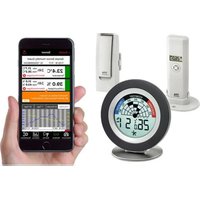
Öffnen Sie die App, es wird die Übersicht angezeigt. Tippen Sie auf „Neuen Sensor hinzufügen“ und scannen Sie den QR Code auf dem Sensor. Eine Kopie des Sendercodes liegt separat bei. Legen Sie anschließend eine Bezeichnung für den Sender fest. Jetzt können Sie jederzeit die Messwerte auf Ihrem Mobiltelefon ablesen.
Zusätzliche Funktionen in der WeatherHub App:
• Grafische Anzeige der Messwerte
- Min.-Max.-Funktion
• Export der Messwerte als CSV Datei

Kompatibilität mit WeatherHub-Observer Plattform:
Dieser Sensor ist kompatibel mit der browserbasierten WeatherHub-Observer Plattform, nutzbar sowohl über Windows, Apple und Linux-PCs als auch über Android, iOS und Windows Phone. Die WeatherHub-Observer Plattform ermöglicht Ihnen eine professionelle Überwachung und Dokumentation von Temperatur und Luftfeuchtigkeit. Dieser Service ist kostenfrei und es entstehen keine zusätzliche Nutzungsgebühren oder Abo-Kosten. Weitere Informationen zur Registrierung und Einrichtung finden Sie unter www.wh-observer.de.
Sender hinzufügen auf der WeatherHub-Observer Plattform
Öffnen Sie über einen beliebigen Internetbrowser die Seite www.wh-observer.de und legen Sie sich einen Account an, wenn Sie noch nicht angemeldet sind. Nehmen Sie den Sender in Betrieb, wie auf der Plattform beschrieben.
Batteriewechsel
Erhalten Sie in der App oder auf der WeatherHub Observer Plattform die Anzeige für den Batteriewechsel, öffnen Sie den Sensor wie beschrieben und tauschen Sie die Batterien.
Technische Daten
Batterien: 2 x Mignon 1,5V AA
Batterielebensdauer: ca. 2 Jahre (Alkaline)
Messbereich Temperatur: - 40 ... +60°C
Genauigkeit Temperatur: ± 0,5°C (-20 ... +60°C)
Messbereich Luftfeuchtigkeit: 1 ... 99% r.H.
Genauigkeit Luftfeuchtigkeit: ± 3% (bei 20°C | 20 ... 90%)
Messintervall: max. 7 Minuten, es erfolgt eine sofortige Übertragung, falls sich die Temperatur um mehr als 0,6 °C
oder die Luftfeuchtigkeit um mehr als 3% gegenüber der letzten Übertragung ändert.
Sendefrequenz: 868 Mhz
Max. Sendeleistung: < 25mW
Reichweite: 200m (Freifeld)
Abmessung: 44 (76) x 24 (56) x 160 (165)mm
Gewicht: 76g
Entsorgung
Dieses Produkt wurde unter Verwendung hochwertiger Materialien und Bestandteile hergestellt, die recycelt und wiederverwendet werden

Als Verbraucher sind Sie gesetzlich verpflichtet, gebrauchte Batterien und Akkus zur umweltgerechten Entsorgung beim Handel oder entsprechenden Sammelstellen gemäß nationaler oder lokaler Bestimmungen abzugeben. Die Bezeichnungen für enthaltene Schwermetalle sind: Cd=Cadmium, Hg=Quecksilber, Pb=Blei!
Dieses Gerät ist entsprechend der EU-Richtlinie über die Entsorgung von Elektro- und Elektronik-Altgeräten (WEEE) gekennzeichnet. Dieses Produkt darf nicht mit dem Hausmüll entsorgt werden. Der Nutzer ist verpflichtet, das Altgerät zur umweltgerechten Entsorgung bei einer ausgewiesenen Annahmestelle für die Entsorgung von Elektro- und Elektronikgeräten abzugeben.
Weitere Informationen und eine ausführliche Beschreibung finden Sie in der WeatherHub App
unter Info oder unter www.wh-observer.de. Diese Anleitung oder Auszüge daraus dürfen nur mit Zustimmung von TFA Dostmann veröffentlicht werden. Die technischen Daten entsprechen dem Stand bei Drucklegung, und können ohne vorherige Benachrichtigung geändert werden.
EU-Konformitätserklärung
Hiermit erklärt TFA Dostmann, dass der Funkanlagentyp 30.3312.02 der Richtlinie 2014/53/EU entspricht. Der vollständige Text der EU-Konformitätserklärung ist unter der folgenden Internetadresse verfügbar: www.tfa-dostmann.de/service/downloads/ce
TFA Dostmann GmbH & Co. KG | Zum Ottersberg 12
97877 Wertheim | Germany | Handelsregister-Nummer: Reg. Gericht Mannheim HRA 570186 03/2020

Quick reference
30.3312.02 Thermo-Hygro transmitter with swiss precision sensor

WeatherHub


WeatherHub Sensor
This sensor is a component of the „WeatherHub“ system for measuring air temperature and humidity (indoor or outdoor), it can be used with this system only. To use the sensor you need an installed WeatherHub gateway. This transmitter is compatible with the WeatherHub smartphone app (iOS & Android) and with the browser-based WeatherHub Observer platform.
Delivery contents
Professional Thermo-Hygro transmitter (30.3312.02), manual
Before you use it:
Please be sure to read this short-instruction manual carefully.
Following the instruction manual for use will prevent damage to the device and loss of your statutory rights arising from defects due to incorrect use.
We shall not be liable for any damage occurring as a result of not following these instructions. Likewise, we take no responsibility for any incorrect readings and for any consequences which may result from them.
Please take particular note of the safety advice!
Please look after this manual for future reference.
For your safety:
- The product is exclusively intended for the field of application described above. The product should only be used as described within these instructions.
• Unauthorised repairs, modifications or changes to the product are prohibited.

Caution!
- Keep this instrument and the batteries out of reach of children.
- Batteries must not be thrown into the fire, short-circuited, taken apart or recharged. Risk of explosion!
- Batteries contain harmful acids. Low batteries should be changed as soon as possible to prevent damage caused by a leaking battery. Never use a combination of old and new batteries together or batteries of different types.
- Remove the batteries if you do not use the product for a lengthy period.
- Wear chemical-resistant protective gloves and glasses when handling leaked batteries.
Important information on product safety!
- Do not place your device near extreme temperatures, vibrations or shocks.
- Clean the instrument with a soft damp cloth. Do not use solvents or scouring agents.
Application
The sensor is ideal for precise monitoring of temperature and humidity in storage or living rooms, greenhouses, in server and other air-conditioned rooms, or in the outdoor area. For outdoor use, choose a shady and dry position for the transmitter. Direct sunshine falsifies the measurement and continuous humidity strains the electronic components needlessly.
Sensor set up
Open the battery compartment of the sensor and put in 2 new AA 1.5V batteries with the correct polarity. The display shows temperature and humidity alternately.
Add sensor in the WeatherHub app
Open the app, the dashboard is displayed. Tap „Add“ new sensor and scan the sensor's QR code. A copy of the sensor code is attached. Then set a name for the sensor. Now you can read the measured values on your mobile phone.
Additional functions in the WeatherHub app
• Graphic view of the readings
• Minimum and maximum function
• Export of data as CSV file

Compatibility with the WeatherHub Observer platform:
This sensor is compatible with the browser-based WeatherHub Observer platform, accessible via Windows, Apple and Linux-PCs, as well as Android, iOS and Windows Phone. The WeatherHub Observer platform allows you to professionally monitor and document temperature and humidity. This service is free of charge and does not require any additional usage fee or subscription costs. For more information on registration and setup, please visit www.wh-observer.com.
Add sensor on the WeatherHub Observer platform:
Open the website www.wh-observer.de using any Internet browser and create an account, if you are not already registered. Take the transmitter into operation as described on the platform.
Battery replacement
When you receive the notification for changing the batteries in the app or on the WeatherHub Observer platform, open the battery compartment of the sensor and change the batteries.
Specifications
Batteries: 2 x mignon 1,5V AA
Battery lifetime: approx. 2 years (Alkaline)
Measuring range temperature: -40 ... +60°C (-40 ... 140°F)
Accuracy temperature: ± 0,5°C (-20 ... +60°C | -4 ... 140°F)
Measuring range humidity: 1 ... 99% r.H.
Accuracy humidity: ± 3% (at 20°C / 68°F | 20 ... 90%))
Measuring interval: max. 7 minutes, the transmission will be immediately if the changes of the temperature are more than 0.6° C ( 0.8° F) or of the humidity are more than 3% compared to the last transmission.
Frequency: 868 Mhz
Max. transmitting power: < 25mW
Transmitting range: 200m (free field)
Dimension: 44 (76) x 24 (56) x 160 (165)mm
Weight: 76g
Waste disposal
This product has been manufactured using high-grade materials and components which can be recycled and reused.

Never throw flat batteries and rechargeable batteries in household waste.
As a consumer, you are legally required to take them to your retail store or to appropriate
collection sites according to national or local regulations in order to protect the environment.
The symbols for the heavy metals contained are: Cd=cadmium, Hg=mercury, Pb=lead

This instrument is labelled in accordance with the EU Waste Electrical and Electronic Equipment Directive (WEEE).
Please do not dispose of this product with other household waste. The user is obligated to take end-of-life devices to a designated collection point for the disposal of
electrical and electronic equipment, in order to ensure environmentally-compatible disposal.
More information and detailed instructions can be found in the weatherhub app at "Info" or on www.wh-observer.de
No part of this manual may be reproduced without written consent of TFA Dostmann.
The technical data are correct at the time of going to print and may change without prior notice.
EU Declaration of conformity
Hereby, TFA Dostmann declares that the radio equipment type 30.3312.02 is in compliance with Directive 2014/53/EU. The full text of the EU declaration of conformity is available at the following internet address: www.tfa-dostmann.de/service/downloads/ce
TFA Dostmann GmbH & Co.KG, Zum Ottersberg 12, D-97877 Wertheim, Germany
Commercial registration number: Reg. Gericht Mannheim HRA 570186 03/2020

- KURZANLEITUNG
- 30.3312.02 THERMO-HYGRO-SENDER MIT SCHWEIZER PRÄZISIONSSENSOR
- WEATHERHUB
- WEATHERHUB-SENSOR
- LIEFERUMFANG
- BEVOR SIE MIT DEM GERÄT ARBEITEN
- ZU IHRER SICHERHEIT
- VORSICHT
- GSGEFAHR
- WICHTIGE HINWEISE ZUR PRODUKTSICHERHEIT
- ANWENDUNG
- SENSOR IN BETRIEB NEHMEN
- SENDER HINZUFÜGEN IN DER WEATHERHUB-APP
- ZUSÄTZLICHE FUNKTIONEN IN DER WEATHERHUB APP
- KOMPATIBILITÄT MIT WEATHERHUB-OBSERVER PLATTFORM
- SENDER HINZUFÜGEN AUF DER WEATHERHUB-OBSERVER PLATTFORM
- BATTERIEWECHSEL
- TECHNISCHE DATEN
- ENTSORGUNG
- EU-KONFORMITÄTSERKLÄRUNG
- QUICK REFERENCE
- 30.3312.02 THERMO-HYGRO TRANSMITTER WITH SWISS PRECISION SENSOR
- WEATHERHUB SENSOR
- DELIVERY CONTENTS
- BEFORE YOU USE IT
- FOR YOUR SAFETY
- CAUTION
- IMPORTANT INFORMATION ON PRODUCT SAFETY
- APPLICATION
- SENSOR SET UP
- ADD SENSOR IN THE WEATHERHUB APP
- ADDITIONAL FUNCTIONS IN THE WEATHERHUB APP
- COMPATIBILITY WITH THE WEATHERHUB OBSERVER PLATFORM
- ADD SENSOR ON THE WEATHERHUB OBSERVER PLATFORM
- BATTERY REPLACEMENT
- SPECIFICATIONS
- WASTE DISPOSAL
- EU DECLARATION OF CONFORMITY
Marque : TFA
Modèle : WeatherHub 30.3312.02
Catégorie : Station Météo