
EM-380M - Microphone TOA - Notice d'utilisation et mode d'emploi gratuit
Retrouvez gratuitement la notice de l'appareil EM-380M TOA au format PDF.


| Type de produit | Microphone dynamique |
| Marque | TOA |
| Modèle | EM-380M |
| Directivité | Cardioïde |
| Réponse en fréquence | 50 Hz - 15 kHz |
| Impédance | 600 ohms |
| Connecteur | XLR 3 broches |
| Alimentation | Aucune (microphone dynamique) |
| Poids (sans câble) | 280 g |
| Dimensions | 185 mm (longueur) x 50 mm (diamètre) |
| Corps | Métal |
| Grille | Acier inoxydable |
| Commutateur marche/arrêt | Oui (glissière) |
| Niveau de pression acoustique max | 120 dB |
| Sensibilité | -75 dB (1V/Pa) |
| Accessoires inclus | Pince de support, adaptateur fileté |
| Utilisation | Sonorisation, conférence, annonces |
| Entretien et nettoyage | Nettoyer avec un chiffon doux sec |
| Sécurité | Éviter les chocs et l'humidité |
| Pièces détachées et réparabilité | Grille de rechange, connecteur XLR |
FOIRE AUX QUESTIONS - EM-380M TOA
Questions des utilisateurs sur EM-380M TOA
0 question sur cet appareil. Repondez a celles que vous connaissez ou posez la votre.
Poser une nouvelle question sur cet appareil
Téléchargez la notice de votre Microphone au format PDF gratuitement ! Retrouvez votre notice EM-380M - TOA et reprennez votre appareil électronique en main. Sur cette page sont publiés tous les documents nécessaires à l'utilisation de votre appareil EM-380M de la marque TOA.
MODE D'EMPLOI EM-380M TOA
GOOSENECK MICROPHONE
EM-380-AS
Thank you for purchasing TOA's Gooseneck Microphone.
Please carefully follow the instructions in this manual to ensure long, trouble-free use of your equipment.
1. GENERAL DESCRIPTION
TOA's EM-380 Gooseneck Microphone is a unique shape and high quality condenser microphone designed for use in lecture halls, house of worship and paging applications. This product is equipped with an optional power that is selectable between battery or phantom power.
2. FEATURES
- By pressing the button, the microphone can be turn on or off.
- Microphone operation by selecting the battery/Phantom switch on the rear of the microphone.
- Use two pieces batteries size “ AA ”.
3. BEFORE USING THE UNIT
Prepare two AA batteries (3 VDC) or phantom power 9 - 52 VDC to operate the unit.
4. NOMENCLATURE AND FUNCTIONS
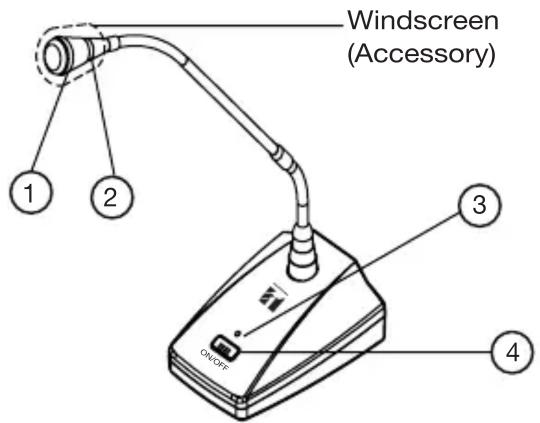
1. Microphone
Close-talk type cardioid electret condenser microphone. The gooseneck shaft facilitates positioning of the microphone for the optimum acoustic effect.
2. Gooseneck Lamp
Light blue when the microphone is turned on and it will turn off when microphone in off mode.
3. Power Lamp
Same as gooseneck lamp, power lamp will turn on when the microphone is turned on and it will turn off when microphone in off mode.
Note : if battery is low, the lamp will turn off, but the microphone still can be used. Recommended to change the battery when this happen.
![[Rear] MIC OUT [Bottom]](/content/2026/06/1391867/images/9b20005e9eddcd20c47fc3cb187042924472695eec1bfc89669b885fc832448f.jpg)
4. Microphone ON/OFF Button
Press this key to turn on or off microphone.
5. Balance Output XLR
Output impedance of the microphone is 750 ohms. Use the supplied cable to connect with an amplifier.
6. Selector switch
Selecting this switch to use battery or phantom as the power supply for this unit.
Note : Recommended to use the supplied cord or balance cable, especially if using the phantom power. Otherwise gooseneck lamp and power lamp dimly lit, although the unit can operate normally.
7. Battery Compartment
Place AA batteries (2 pcs).
5. BATTERY
5.1. Life Span
Application and use battery for speech and paging be assumed such as table below
| Application | 3 hours/week | 3 hours/day | Times* |
| Speech | 20 months | 3 months | - |
| Paging | - | - | 92,500 |
* Approximate be assumed use one time paging for 10 seconds.
5.2. Battery Insertion
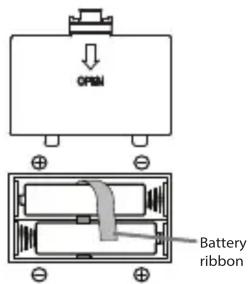
Step 1. Open the battery cover.
Step 2. Insert the battery according to battery polarity and make sure the remaining ribbon on top of the batteries. (see right below picture).
Step 3. Put back the battery cover to product.
Caution : If the microphone is not used more than 1 month, please pull out the battery from the unit in order to avoid the battery leakage. To release the batteries, please pull the remaining ribbon carefully from the battery compartment.
6. CONNECTION
Step 1. Set the amplifier's microphone volume control to the minimum position.
Step 2. Using the supplied cable to connect the mic out of microphone unit to the amplifier's microphone input.
7. OPERATION
Step 1. Press the microphone ON/OFF button.
The gooseneck lamp and the power lamp light and turning on the microphone.
Step 2. Make an announcement.
Keep your mouth 5 – 10 cm away from the microphone and speak normally for the best possible sound reproduction. Adjust the microphone orientation for the best position by turning its gooseneck shaft. If distance of mouth is too near, it cause voice distortion. Adjust the microphone by pulling away or lowering it. Because the high sensitivity's microphone.
Step 3. After announcement is completed, press the microphone ON/OFF button.
Both the unit's lamp will go off and microphone turn off.
Note : Be sure to press the ON/OFF button after announcement completion. Failure to do this, shortening the battery life.
8. USING THE SELECTOR SWITCH MODE
Selector switch have 2 modes. There are battery mode and phantom mode. If using battery as power input, select the switch to battery position. And if using phantom as power input, select to phantom position. Be sure to turn ON the phantom power from Amplifier or mixer. For reference can use phantom power from mixer amplifier A-2000 Series, A-2000D Series, A-2128, A-1724 and other TOA's mixer amplifier.
9. SPECIFICATION
| Element Condenser Microphone | |
| Polar pattern Cardioid | |
| Rated Impedance | 750 ohms, balance |
| Rated Sensitivity -41 ± 3dB (1kHz) | 0dB = 1V / Pa) |
| Power 3V DC (2 x "AA" batteries) | or Phantom Power (9 - 52 V) |
| Frequency Response | 50 - 16,000 Hz |
| Operating Temperature 0 °C to +40 °C (32 °F to 104 °F) | |
| Finish Stand = ABS Resin, Black, | PaintShaft = Copper alloy, Black, Paint |
| Dimensions 110 (w) x 145 (d) x 532 | (h) mm |
| Weight | 550 g (exclude batteries) |
| Accessory | Windscreen ..... 1XLR to Phone Jack Cable (7.5m) ....1 |
Note : The design and specifications are subject to change without notice for improvement.
Traceability Information for Europe
Manufacturer :
PT. TOA GALVA INDUSTRIES
Jl. Raya Bogor km 34-35, Tapos
Depok 16958, Indonesia
TOA Electronic Europe GmbH
Suederstrasse 282, 20537 Hamburg,
Germany
Authorized representative :
nbH
URL: http://www.toa.com.sg


- GOOSENECK MICROPHONE
- EM-380-AS
- GENERAL DESCRIPTION
- FEATURES
- BEFORE USING THE UNIT
- NOMENCLATURE AND FUNCTIONS
- Microphone
- Gooseneck Lamp
- Power Lamp
- Microphone ON/OFF Button
- Balance Output XLR
- Selector switch
- Battery Compartment
- BATTERY
- Life Span
- Battery Insertion
- CONNECTION
- OPERATION
- USING THE SELECTOR SWITCH MODE
- SPECIFICATION
- Traceability Information for Europe
Marque : TOA
Modèle : EM-380M
Catégorie : Microphone