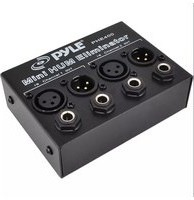
PHE400 - Processeur Pyle - Notice d'utilisation et mode d'emploi gratuit
Retrouvez gratuitement la notice de l'appareil PHE400 Pyle au format PDF.


| Type de produit | Processeur home cinéma / préamplificateur audio-vidéo |
| Marque | Pyle |
| Modèle | PHE400 |
| Dimensions (L x l x H) | 43,2 x 30,5 x 10,2 cm |
| Poids | 5,4 kg |
| Alimentation | 230 V AC, 50 Hz, consommation 50 W |
| Formats audio pris en charge | Dolby Digital, DTS, PCM stéréo |
| Entrées | 4 x HDMI, 2 x optique, 2 x coaxial, 1 x RCA stéréo, 1 x USB |
| Sorties | 1 x HDMI (ARC), 6 x RCA (5.1 canaux), 1 x casque |
| Télécommande | Infrarouge, incluse |
| Fonctions principales | Décodage audio multicanal, calibration des enceintes, modes surround |
| Entretien et nettoyage | Débrancher l'appareil avant nettoyage. Utiliser un chiffon doux et sec. Ne pas utiliser de solvants. |
| Sécurité | Ne pas exposer à l'humidité. Assurer une ventilation adéquate. Débrancher en cas d'orage. |
| Pièces détachées et réparabilité | Contacter le service après-vente Pyle. Les pièces détachées sont disponibles sur demande. |
FOIRE AUX QUESTIONS - PHE400 Pyle
Questions des utilisateurs sur PHE400 Pyle
0 question sur cet appareil. Repondez a celles que vous connaissez ou posez la votre.
Poser une nouvelle question sur cet appareil
Téléchargez la notice de votre Processeur au format PDF gratuitement ! Retrouvez votre notice PHE400 - Pyle et reprennez votre appareil électronique en main. Sur cette page sont publiés tous les documents nécessaires à l'utilisation de votre appareil PHE400 de la marque Pyle.
MODE D'EMPLOI PHE400 Pyle
IMPORTANT SAFETY INSTRUCTIONS
- Read Instructions: All the safety and operating instructions should be read before the appliance is operated.
- Retain Instructions: The safety and operating instructions should be retained for future reference.
- Heed Warnings: All warnings on the appliance and in the operating instructions should be adhered to.
- Follow Instructions: All operating and use instructions should be followed.
- Water and Moisture: The appliance should not be used near water-for example, near a bathtub, washbowl, kitchen sink, laundry tub, swimming pool, or a wet basement.
- Ventilation: The appliance should be situated so that its location or position does not interfere with its proper ventilation. For example, the appliance should not be situated on a bed, sofa, rug, or similar surface that may block the ventilation openings: or placed in a built-in installation, such as a bookcase or cabinet that may impede the flow of air through the ventilation openings.
- Heat: The appliance should be situated away from heat sources such as radiators, heat registers, stoves, or other appliances (including amplifiers) that produce heat.
- Power Sources: The appliance should be connected to a power supply only of the type described in the operating instructions or as marked on the appliance.
- Grounding or Polarization: Precaution should be taken to insure that the grounding or polarization means of an appliance is not defeated.
- Power-Cord Protection: Power supply cords should be routed so that they are not likely to be walked on or pinched by items placed upon or against them, paying particular attention to cords at plugs, convenience receptacles, and the point at which they exit from the appliance.
- Cleaning: The appliance should be cleaned only as recommended by the manufacturer.
-
Power Lines: An outside antenna system should not be located in the vicinity of overhead power lines or other electric light or power circuits, or where it can fall into such power lines or circuits. When installing an outside antenna system, extreme care should be taken to keep from touching such power lines or circuits as contact with them might be fatal.
-
Non-use Periods:
The power cord of the appliance should be unplugged from the outlet when the appliance is to be left unused for a long period of time.

- Object and Liquid Entry:
Care should be taken so that objects do not fall and liquids are not spilled into the enclosure through openings.

- Carts and Stands: If the appliance is used with a cart or stand, the cart or stand should be a type recommended by the manufacturer. An appliance and cart combination should be moved wit
Quick stops, excessive force, and uneven surfaces cause the appliance and cart combination to overturn. - Mounting: The appliance should be mounted only as recommended by the manufacturer.
- Damage Requiring Service: The appliance should be serviced by qualified service personnel when:
A. The power-supply cord or plug has been damaged.
B. Objects have fallen into, or liquid has been spilled into the appliance enclosure.
C. The appliance has been exposed to rain.
D. The appliance has been dropped, or the enclosure damaged.
E. The appliance does not appear to operate normally or exhibits a marked change in performance.
- Servicing: The user should not attempt to service the appliance beyond that described in the user's operating instructions. All other servicing should be referred to qualified personnel.
- Overloading: Do not overload wall outlets and extension cords as this can result in a risk of fire or electric shock.
- Replacement Parts: When replacement parts are required, be sure the service technician has used replacement parts specified by the manufacturer or have the same characteristics as the original part. Unauthorized substitutions may result in fire, electric shock or other hazards.
- Safety Check: Upon completion of any service or repairs to this appliance, ask the service technician to perform safety checks to determine that the appliance is in proper operating condition.
FEATURES AND CONTROLS
CONNECTION DIAGRAM

1/4" TRS Source Input jack
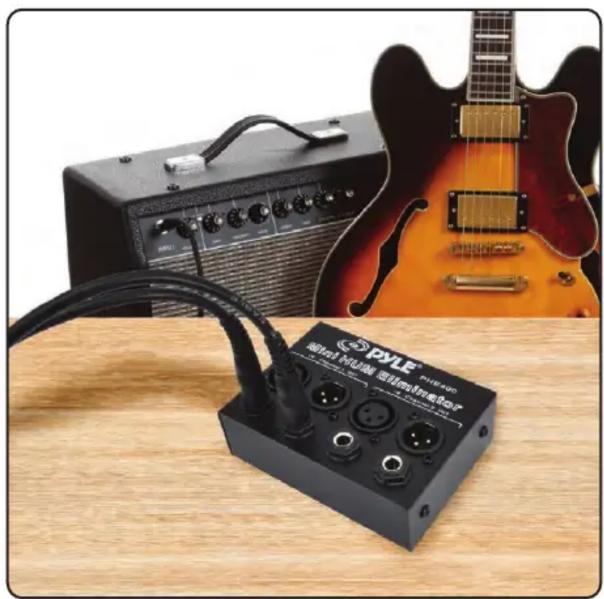
Almost all 60Hz AC hum is caused by ground loops that act like radio antenna (loop antenna).
The Hum Eliminator completely eliminates this by breaking the ground loop, making it impossible for the signal lines to pick up the AC hum and noise in the first place. Unbalanced lines are more susceptible to picking up electrical noise and RF interference than balanced lines- the longer the unbalanced cable, the greater the chance of a problem. Using this device to connect two pieces of equipment is one of the most cost-effective ways to convert between unbalanced signals and true balanced signals. Automatically Translates Signal Voltages to Match Difference in Ground Potentials.
Features and Technical Specs:
- 60 Hz Noise Removal
- Removes AC Hum Noise
- Breaks Ground Loops Safely
- Maintains Highest Sonic Quality
• Passive Device: No Power Required
• High-Performance Ultra-Compact Design
• 1/4-Inch TRS Phone and XLR Inputs and Outputs on 2-Channels - Audiophile High-Quality Components and Exceptionally Rugged Construction
- Automatically Converts Unbalanced to Balanced Signal Without Any Signal Loss
- Uses 11:1 Isolation Transformers to Break Loop Antenna and Balance Audio Lines
- Automatically Translates Signal Voltages to Match Difference in Ground Potentials
- Dimensions (W x D x H): 7" x 6" x 2.5"

WARNING:
This product can expose you to a chemical or group of chemicals, which may include "Nickel Carbonate" which is known in the state of California to cause cancer, birth defects, or other reproductive harm. For more info, go to https://www.p65warnings.ca.gov/.
Questions? Issues?
We are here to help!
Phone: (1) 718-535-1800
Email: support@pyleusa.com
Marque : Pyle
Modèle : PHE400
Catégorie : Processeur