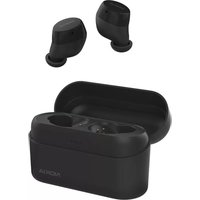
Power Earbuds BH-605 - Smartphone NOKIA - Notice d'utilisation et mode d'emploi gratuit
Retrouvez gratuitement la notice de l'appareil Power Earbuds BH-605 NOKIA au format PDF.


| Type de produit | Écouteurs sans fil intra-auriculaires |
| Dimensions (par écouteur) | 45 x 20 x 25 mm |
| Poids (par écouteur) | 5 g |
| Poids du boîtier de charge | 40 g |
| Batterie par écouteur | Lithium-ion 40 mAh |
| Batterie du boîtier | Lithium-ion 300 mAh |
| Autonomie d'écoute | 5 heures (avec boîtier jusqu'à 15 heures) |
| Recharge des écouteurs | 1 heure dans le boîtier |
| Recharge du boîtier | 2 heures via USB-C |
| Connectivité | Bluetooth 5.0 |
| Portée Bluetooth | 10 mètres |
| Codecs audio supportés | SBC, AAC |
| Commandes | Tactiles (lecture/pause, volume, appels, assistant vocal) |
| Réduction de bruit | Passive (embouts silicone) |
| Indice d'étanchéité | IPX4 (résistance aux éclaboussures) |
| Entretien et nettoyage | Essuyer avec un chiffon doux et sec ; ne pas immerger |
| Sécurité | Éviter l'exposition à la chaleur, utiliser un chargeur adapté |
| Pièces détachées disponibles | Embouts en silicone (S, M, L), câble USB-C |
| Réparabilité | Non réparable par l'utilisateur ; contacter le SAV |
| Informations générales | Marque : Nokia, Modèle : BH-605, Garantie : 1 an |
FOIRE AUX QUESTIONS - Power Earbuds BH-605 NOKIA
Questions des utilisateurs sur Power Earbuds BH-605 NOKIA
0 question sur cet appareil. Repondez a celles que vous connaissez ou posez la votre.
Poser une nouvelle question sur cet appareil
Téléchargez la notice de votre Smartphone au format PDF gratuitement ! Retrouvez votre notice Power Earbuds BH-605 - NOKIA et reprennez votre appareil électronique en main. Sur cette page sont publiés tous les documents nécessaires à l'utilisation de votre appareil Power Earbuds BH-605 de la marque NOKIA.
MODE D'EMPLOI Power Earbuds BH-605 NOKIA
What's in the box
- Charging Case
• USB Type-C cable
• Earbuds (L/R)
- Quick Start Guide
• Ear Tips (S/M/L)
Product Overview
Charging case:
| 1 | Charging contacts (R) |
| 2 | Charging contacts (L) |
| 3 | Battery status LEDs |
| 4 | USB Type-C port |

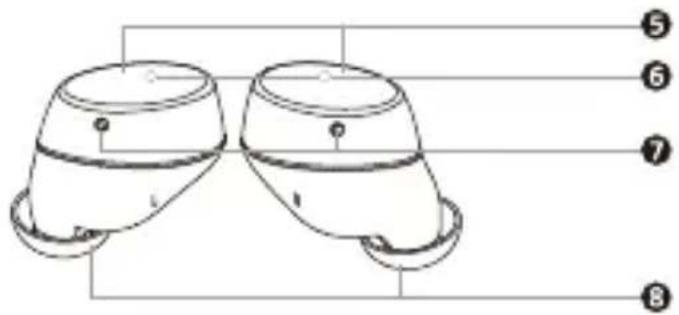
Earbuds:
| 5 | Touchpad |
| 6 | LED indicator light |
| 7 | Microphone |
| 8 | Ear tip |
Get started
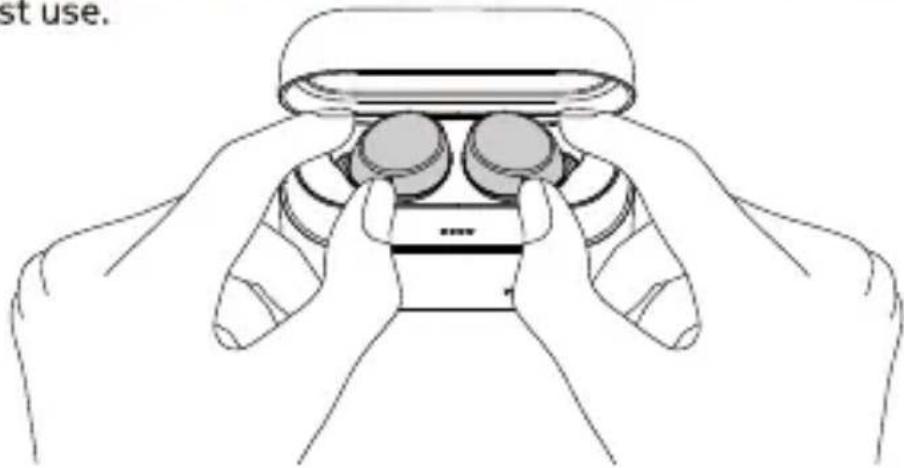
- Before using Nokia Power Earbuds, take off the film on the earbuds and place the earbuds back in the charging case. Then connect the USB Type-C cable to a power source to begin charging. Fully charge the earbuds and the charging case before the first use.
natural_image
Line drawing of a robotic hand holding a VR headset, no text or symbols presentThe battery status LEDs show the current battery status.

-
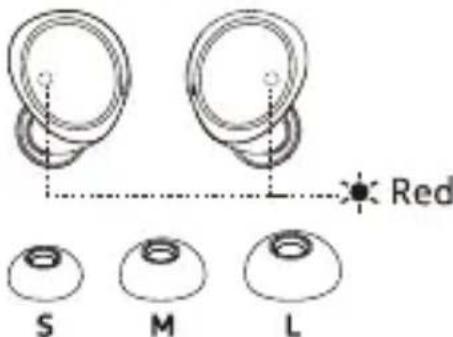
Earbuds LED indicator lights turn red when charging, and turn off when fully charged. If the earbud is low in battery power, the LED indicator light will keep flashing red.
-
For optimal fit and audio performance, replace the ear tips with the size that best suits you.
Pair and connect with Bluetooth
- Pairing with the device
a. Turning on and Pairing:
When you take the earbuds out from the charging case, the earbuds will turn on and pair with each other automatically. When they have successfully paired, the LED indicator light of the right earbud will flash blue and red alternately and the earbuds are ready to connect with your Bluetooth ® device.
b. Connecting with your Bluetooth device:
Turn on Bluetooth in your device and choose "Nokia Power Earbuds" from the Bluetooth menu to connect.
During the connection process, the LED indicator light on the right earbud will flash blue and red alternately.
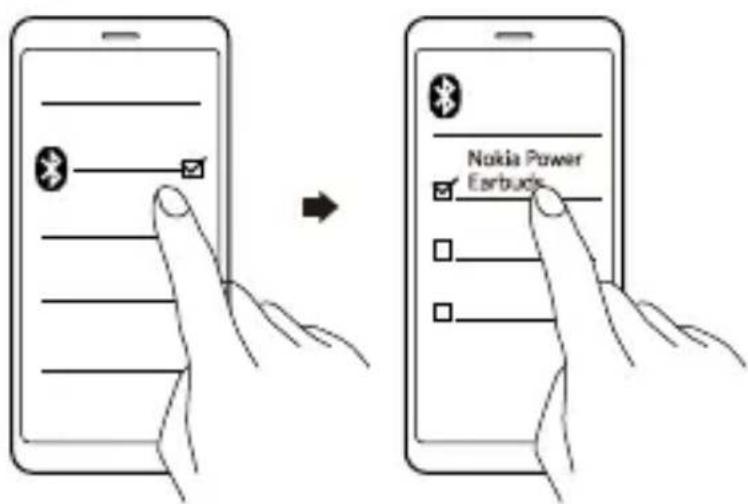
The LED indicator lights of the earbuds will flash blue every 5 seconds when they are successfully connected via Bluetooth.

-
After the initial pairing, the earbuds will automatically connect with your Bluetooth device whenever taken out of the charging case.
-
The earbuds will automatically power off if there is no Bluetooth connection within 5 minutes.
Using your earbuds
1. Touch control:

2. Additional controls:
a. Manually power on and off:
Touch the touchpad of two earbuds for 3 seconds to manually power on; touch the touchpad of one earbud for 5 seconds to manually power off.
b. Use single earbud:
You can single use the right earbud. If the earbuds have been paired with your Bluetooth device before, the right earbud will automatically connect with your device when taken out of the charging case.
c. Reset to the original settings:
Put the earbuds back in the charging case (the LEDs will turn red) > Touch the touchpad of two earbuds for 5 seconds until the LEDs flash blue and red alternately for 3 times indicating that the reset is successful.
Product and safety information
Remote control functions may vary depending on the model of your device and application. Sound track instructions do not respond to iOS devices. Since devices with Bluetooth wireless technology communicate using radio waves, they do not need to be in direct line-of-sight. Bluetooth devices must, however, be within 10 meters (33 feet) of each other, although the connection may be subject to interference from obstructions such as walls or from other electronic devices.
- Frequency Band: 2400 MHz - 2483 MHz
- Maximum Radio Frequency Power: -6\~+4dBm
For your safety
Important: Read these simple guidelines. Not following them may be dangerous or against local laws and regulations. For further info, read the complete user guide.
Switch off in restricted areas
Switch the device off when a Bluetooth headset use is not allowed or when it may cause interference or danger, for example, in aircraft, in hospitals or near medical equipment, fuel, chemicals, or blasting areas. Obey all instructions in restricted areas.
Interference
All wireless devices may be susceptible to interference, which could affect performance.
Batteries, chargers, and other accessories
Use only batteries, chargers, and other accessories approved by HMD Global Oy for use with this device. Do not connect incompatible products.
Protect your hearing
To prevent possible hearing damage, do not listen at high volume levels for long periods.
Hearing
Warning: When you use the headset, your ability to hear outside sounds may be affected. Do not use the headset where it can endanger your safety. The surface of this product is nickel-free.
Small children
Your device and its accessories are not toys. They may contain small parts. Keep them out of the reach of small children.
Take care of your device
Handle your device with care. The following suggestions help you keep your device operational.
- Keep the device dry. Precipitation, humidity, and all types of liquids or moisture can contain minerals that corrode electronic circuits.
- Do not use or store the device in dusty or dirty areas.
- Do not store the device in high temperatures. High temperatures may damage the device or battery.
- Do not store the device in cold temperatures. When the device warms to its normal temperature, moisture can form inside the device and damage it.
- Do not open the device other than as instructed in the user guide.
- Do not drop, knock, or shake the device or the battery. Rough handling can break it.
- Only use a soft, clean, dry cloth to clean the surface of the device.
- Do not paint the device. Paint can prevent proper operation.
- The earbuds are featured with water protection level IPX7. Water protection level is not a permanent condition and can decrease over time.
- The charging case is not water resistant.

natural_image
Two identical circular objects with handles, no text or symbols present
Water Protection

No Water Protection
Recycle
Always return your used electronic products, batteries, and packaging materials to dedicated collection points. This way you help prevent uncontrolled waste disposal and promote the recycling of materials. Electrical and electronic products contain a lot of valuable materials, including metals (such as copper, aluminium, steel, and magnesium) and precious metals (such as gold, silver, and palladium). All materials of the device can be recovered as materials and energy.
Crossed-out wheelie bin symbol

The crossed-out wheeled bin symbol on your product, battery, literature, or packaging reminds you that all electrical and electronic products and batteries must be taken to separate collection at the end of their working life.
Do not dispose of these products as unsorted municipal waste: take them for recycling. For info on your nearest recycling point, check with your local waste authority.
Battery info
Your device has an internal, non-removable, rechargeable battery. Do not attempt to remove the battery, as you may damage the device. The battery can be charged and discharged hundreds of times, but it will eventually wear out. Charging time can vary depending on device capability.
Battery safety
If left unused, a fully charged battery will lose its charge over time. Always keep the battery between 15°C and 25°C (59°F and 77°F) for optimal performance. Extreme temperatures reduce the capacity and lifetime of the battery. A device may temporarily stop working if its battery is too hot or too cold.
Do not dispose of batteries in a fire as they may explode. Obey local regulations. Recycle when possible. Do not dispose as household waste. Use the battery for its intended purpose only. Improper use of, or use of unapproved or incompatible, batteries may present a risk of fire, explosion, or other hazard, and may invalidate any approval or warranty. If you believe the battery is damaged, take it to a service centre or your local shop before continuing to use it. Never use a damaged battery. Do not charge your device during a lightning storm.
Implanted medical devices
To avoid potential interference, manufacturers of implanted medical devices recommend a minimum separation of 15.3 centimetres (6 inches) between a wireless device and the implanted medical device. Persons who have such devices should:
- Always keep the wireless device more than 15.3 centimetres (6 inches) from the medical device.
- Not carry the wireless device in a breast pocket.
- Switch the wireless device off if there is any reason to suspect that interference is taking place.
- Follow the manufacturer directions for the implanted medical device.
If you have any questions about using your wireless device with an implanted medical device, consult your health care provider.
Copyrights and other notices
The availability of products, features, apps, and services may vary by region. For more info, contact your dealer or your service provider. This device may contain commodities, technology or software subject to export laws and regulations from the US and other countries. Diversion contrary to law is prohibited.
The contents of this document are provided "as is". Except as required by applicable law, no warranties of any kind, either express or implied, including, but not limited to, the implied warranties of merchantability and fitness for a particular purpose, are made in relation to the accuracy, reliability or contents of this document. HMD Global reserves the right to revise this document or withdraw it at any time without prior notice.
Reproduction, transfer or distribution of part or all of the contents in this document in any form without the prior written permission of HMD Global is prohibited. HMD Global operates a policy of continuous development. HMD Global reserves the right to make changes and improvements to any of the products described in this document without prior notice.
Manufacturer and importer in EU: HMD Global Oy, Bertel Jungin aukio 9, 02600 Espoo, Finland. HMD Global Privacy Policy, available at http://www.nokia.com/phones/privacy, applies to your use of the device.
In the unlikely event that this product is faulty, please return it to the store where you purchased it with your proof of purchase. For more information on this or other products please visit http://www.nokia.com/phones/support.
© 2019 HMD Global. All rights reserved. HMD Global Oy is the exclusive licensee of the Nokia brand for phones & tablets. Nokia is a registered trademark of Nokia Corporation.
The Bluetooth word mark and logos are owned by the Bluetooth SIG, Inc. and any use of such marks by HMD Global is under license.
Declaration of Conformity

Hereby, HMD Global Oy declares that this product is in compliance with the essential requirements and other relevant provisions of Directive 2014/53/EU. A copy of the Declaration of Conformity can be found at :
www.nokia.com/mobile-declaration-of-conformity.
- What's in the box
- Product Overview
- Get started
- Pair and connect with Bluetooth
- Using your earbuds
- Touch control:
- Additional controls:
- Product and safety information
- For your safety
- Hearing
- Small children
- Take care of your device
- Recycle
- Crossed-out wheelie bin symbol
- Battery info
- Battery safety
- Implanted medical devices
- Copyrights and other notices
- Declaration of Conformity
Marque : NOKIA
Modèle : Power Earbuds BH-605
Catégorie : Smartphone