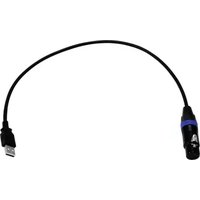
USB DMX512 PRO - Contrôleur DMX Eurolite - Notice d'utilisation et mode d'emploi gratuit
Retrouvez gratuitement la notice de l'appareil USB DMX512 PRO Eurolite au format PDF.


| Type de produit | Interface DMX USB |
| Marque | Eurolite |
| Modèle | USB DMX512 PRO |
| Catégorie | Contrôleur DMX |
| Interface | USB 2.0 |
| Protocole DMX | DMX512-A |
| Nombre de canaux | 512 (1 univers) |
| Connecteur DMX | XLR 5 broches mâle |
| Alimentation | Bus USB (5V, 500 mA max) |
| Dimensions (L x l x h) | 85 mm x 30 mm x 25 mm |
| Poids | 50 g |
| Compatibilité logicielle | Windows, macOS, Linux ; logiciels DMX courants |
| Fonctions principales | Conversion USB-DMX, contrôle d'éclairage scénique, pilotage de projecteurs DMX |
| Usage recommandé | Événements, spectacle, théâtre, discothèque |
| Indicateur LED | LED de statut (alimentation et activité DMX) |
| Matériau du boîtier | Plastique ABS |
| Température de fonctionnement | 0 °C à 40 °C |
| Humidité de fonctionnement | 10 % à 90 % (sans condensation) |
| Entretien | Nettoyer avec un chiffon sec et doux ; éviter les liquides |
| Sécurité | Ne pas exposer à l'eau ou à l'humidité ; utiliser avec une charge limitée |
| Pièces détachées et réparabilité | Aucune pièce détachable ; en cas de panne, remplacer l'appareil |
| Garantie | 2 ans (selon législation en vigueur) |
FOIRE AUX QUESTIONS - USB DMX512 PRO Eurolite
Questions des utilisateurs sur USB DMX512 PRO Eurolite
0 question sur cet appareil. Repondez a celles que vous connaissez ou posez la votre.
Poser une nouvelle question sur cet appareil
Téléchargez la notice de votre Contrôleur DMX au format PDF gratuitement ! Retrouvez votre notice USB DMX512 PRO - Eurolite et reprennez votre appareil électronique en main. Sur cette page sont publiés tous les documents nécessaires à l'utilisation de votre appareil USB DMX512 PRO de la marque Eurolite.
MODE D'EMPLOI USB DMX512 PRO Eurolite
eurolite®
USB DMX512 PRO
Interface MK2
No. 51860121
Bedienungsanleitung
User Manual
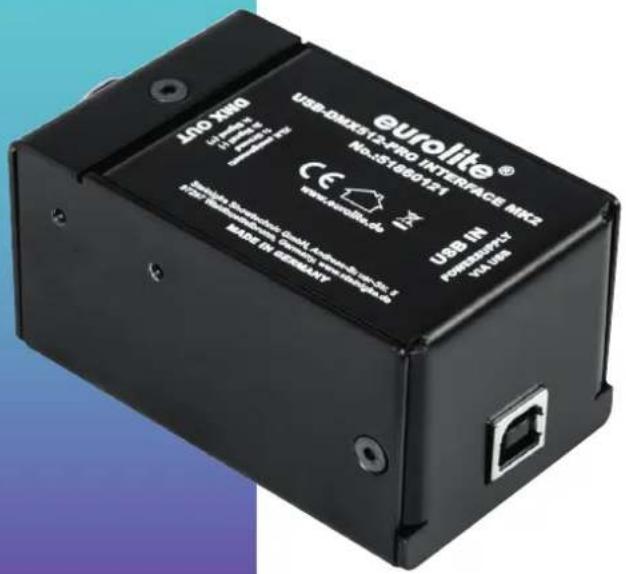

DMX

USB

Made in Germany


Inhalt
Einführung 3
Produktmerkmale 3
Lieferumfang 3
Zubehör 3
Verwendung 4
Installation 4
Anschluss an die DMX-Kette und den Computer......4
Spezifikationen 5
Sicherheitshinweise....6
2 Deutsch
Einführung
Profi-USB-DMX-Interface
Willkommen bei Eurolite! Das USB DMX512 PRO MK2 ist ein leistungsstarkes und zuverlässiges USB-DMX-Interface made in Germany. Mit Ihrem neuen Interface übertragen Sie ganz einfach DMX512-Signale von einem Computer an verschiedene DMX-Geräte in Lichtanlagen. Das Interface unterstützt eine große Auswahl an Softwareprogrammen und ermöglicht die Ausgabe von 512 DMX-Kanälen. Es verfügt über eine 3-polige XLR-Einbaubuchse für den Anschluss an die DMX-Kette und eine USB-2.0-Schnittstelle für den Anschluss an einen Computer.
Produktmerkmale
• Profi-USB-DMX-Interface zur Steuerung von DMX-Geräten mit einem Computer
- Geeignet für eine Vielzahl von DMX-Software-anwendungen
- Voll unterstützt von FreeStyler, DMXControl 3, PC_DIMMER und Lightkey (Mac)
Hinweis: bitte MK2 auswählen!
• Ausgabe von bis zu 512 DMX-Kanälen
• Stabile DMX-Ausgabe dank integriertem Prozessor
• Kompatibel mit Windows, Mac OS X und Linux
• Anschlüsse: 3-pol. XLR-Buchse (Neutrik), USB 2.0/1.1 B
- DMX-Ausgang galvanisch getrennt gegen Spannungsschäden
• Stabiles Metallgehäuse für harten Bühneneinsatz
• Spannungsversorgung über USB
• Inkl. USB-KabelA/B 0,5 m
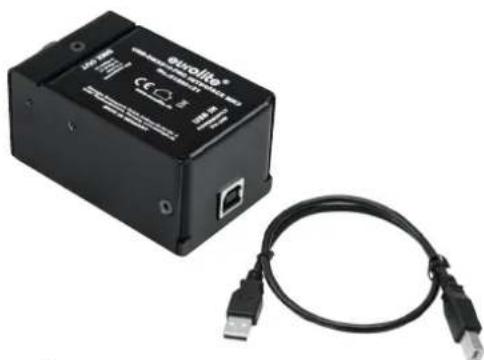
natural_image
Black electronic device labeled 'Ovollite' with USB connectors, connected to a black cable (no visible text or symbols on the device body)Lieferumfang
Nehmen Sie das Produkt und alle Zubehörteile aus der Verpackung. Entfernen Sie alle Verpackungsmaterialien und überprüfen Sie, ob alle Komponenten vollständig und unbeschädigt sind. Im Falle einer unvollständigen oder beschädigten Lieferung wenden Sie sich bitte an Ihren Händler.
• USB DMX512 PRO MK2 Interface
- USB-Kabel
• diese Bedienungsanleitung
Zubehör
• Montagewinkel (No. 70064875)
Verwendung
Installation
Stellen Sie das Gerät auf eine ebene Fläche oder befestigen Sie es mit den optional erhältlichen Montagebügeln.

natural_image
Two black metal bracket components with mounting holes and screws (no text or symbols visible)Anschluss an die DMX-Kette und den Computer
Verbinden Sie Ihre DMX-gesteuerten Geräte mit dem XLR-Anschluss und den USB-Stecker mit einem freien USB-Ports des Computers. Das Interface kann während der Benutzung und ohne Neustarten des Computers von diesem getrennt und an diesen angeschlossen werden (Hot Plugging). Mehrere Interfaces können zur selben Zeit betrieben werden.

flowchart
graph LR
    A["Laptop"] -->|USB| B["Device with indicator light"]
    B -->|DMX| C["Drain lamp unit"]
Starten Sie Ihre Lichtsteuersoftware und konfigurieren Sie sie für den Betrieb mit dem Interface. Bitte achten Sie darauf, das Modell MK2 auszuwählen.
Erstellen Sie Ihre Show. DMX-Daten werden nun über USB zum Interface und danach intern zum XLR-Ausgang für die DMX-Ausgabe an die DMX-Kette geleitet. Die Statusanzeige blinkt grün. Liegen keine Steuersignale vom Computer für mindestens 2 Sekunden an, leuchtet die LED rot.
Spezifikationen
| Spannungsversorgung: | 5 V DC über USB |
| DMX-Ausgabe: | 1 Universum (512 Kanäle) |
| DMX-Anschluss: | 3-pol. XLR-Einbaubuchse |
| USB-Anschluss: | USB 2.0 / USB 1.1 Typ B |
| Ausgabefrequenz: | 44 Hz |
| Maße (LxBxH): | 80 x 42 x 50 mm |
| Gewicht: | 270 g |
| Betriebssystem: | Windows XP, Vista, 7, 10, 11Mac OS X 10.3 oder besserLinux |
Hinweis: Ab Windows 10 und Mac OS X 13 wird das Gerät automatisch vom Computer erkannt. Ältere Betriebssysteme benötigen passende Treiber. Diese erhalten Sie auf der Produktseite under https://www.eurolite.de.
Steckerbelegung DMX-Ausgang

1: Masse
2: Signal (−)
3: Signal (+)
Technische Daten können im Zuge der Weiterentwicklung des Produkts ohne vorherige Ankündigung geändert werden.
Sicherheitshinweise
- Bitte lesen Sie vor der Verwendung des Produkts diese Bedienungsanleitung. Sie enthält wichtige Hinweise für den korrekten Betrieb. Bewahren Sie diese Anleitung für weiteren Gebrauch auf.
- Verwenden Sie das Produkt ausschließlich gemäß den hier gegebenen Vorgaben. Bei Schäden, die durch Nichtbeachten dieser Bedienungsanleitung verursacht werden, erlischt der Garantieanspruch. Für Folgeschäden wird keine Haftung übernommen.
- Bei Sach- oder Personenschäden, die durch unsachgemäße Handhabung oder Nichtbeachten der Sicherheitshinweise verursacht werden, übernehmen wir keine Haftung und es erlischt jeder Garantieanspruch.
- Aus Sicherheitsgründen ist das eigenmächtige Umbauen oder Verändern des Produkts ist nicht gestattet und hat den Verfall der Garantieleistung zur Folge.
- WICHTIG: Dieses Produkt ist nicht für die Benutzung im Freien geeignet! Nur für den Innenbereich! Nicht in der Nähe von Wasser verwenden! Der ideale Temperaturbereich liegt bei -5 bis +45 °C.
- Das Produkt ist kein Spielzeug. Halten Sie es vor Kindern und Haustieren fern. Lassen Sie Verpackungsmaterial nicht achtlos liegen.
- Das Gerät erfüllt allen erforderlichen Richtlinien der EU und ist deshalb mit € gekennzeichnet.

Das Gerät bitte am Ende seiner Nutzungsdauer zur umweltgerechten Entsorgung einem örtlichen Recyclingbetrieb übergeben. Nicht im Hausmüll entsorgen. Für weitere Informationen bitte an den Händler oder die zuständige örtliche Behörde wenden.
Support
Dokumentationen und Support erhalten Sie unter www.eurolite.de. Die neueste Version der Bedienungsanleitung finden Sie im Downloadbereich des Produkts.
Copyright
© 2025 Steinigke Showtechnic GmbH
Alle Rechte vorbehalten. Dieses Dokument darf ohne schriftliche Genehmigung des Copyrightinhabers weder ganz noch teilweise reproduziert werden.
Haftungsausschluss
Der Inhalt dieses Dokuments kann ohne vorherige Ankündigung modifiziert werden, wenn Änderungen in Methodik, Design oder Herstellung dies erforderlich machen. Eurolite übernimmt keinerlei Haftung für Fehler oder Schäden, die durch den Gebrauch dieses Dokuments entstehen.
Marken
Alle in diesem Dokument erwähnten Produktnamen und Marken gehören den jeweiligen Eigentümern. Sie sind nicht mit Eurolite verbunden.
Table of contents
Introduction......8
Product features 8
Package contents 8
Accessory 8
Operation....9
Installation 9
Connect to the DMX512 network and the computer.....9
Specifications 10
Safety warnings....11
Introduction
Pro USB DMX interface
Welcome to Eurolite! The USB DMX512 PRO MK2 is a high-performance and reliable USB DMX interface made in Germany. With your new interface you can easily connect your computer to DMX512 lighting networks. The interface supports a broad range of DMX software applications and allows you to control 512 DMX channels. It is provided with a 3-pin XLR jack for connecting the DMX network and a USB 2.0 port for connecting a computer.
Product features
• Pro USB DMX interface for controlling DMX devices with a computer
• Supports various DMX software applications
- Fully supported by FreeStyler, DMXControl 3, PC_DIMMER and Lightkey (Mac)
Note: Please select MK2!
• Output of 512 DMX channels
• Integrated CPU for steady DMX output
• Compatible with Windows, Mac OS X, Linux
- Connections: 3-pin XLR jack (Neutrik), USB 2.0/1.1 B
• DMX output galvanically isolated
• Rugged metal body for use on stage
- Powered via USB
• Including USB A/B cable 0.5m

natural_image
Black electronic device labeled 'ouolite' with USB connectors, connected to a black cable (no visible text or symbols on the device body)Package contents
Remove the product and all the accessories from the packaging. Remove the packaging material and check that all components are complete and undamaged. If you find anything missing or damaged, please contact your dealer.
• USB DMX512 PRO MK2 interface
- USB cable
• these instructions
Accessory
• Mounting brackets (No. 70064875)
Operation
Installation
Setup the device on a plane surface or fasten it with the optional mounting brackets.

natural_image
Two black metal bracket components with mounting holes and screw fasteners (no text or symbols visible)Connect to the DMX512 network and the computer
Connect the XLR jack to the DMX input of the first DMX-controlled device in the chain and the USB jack to a free USB port on your computer. The interface can be connected to and disconnected from the computer during operation and without a reboot (hot plugging). Multiple units can be used at the same time

flowchart
graph LR
    A["Laptop"] -->|USB| B["Device with LED indicator"]
    B -->|DMX| C["Display with 50+ LEDs"]
Start your lighting control software and configure it for use with the interface. Please make sure to select model MK2.
Create your show. DMX Data is now sent to the interface via USB where it is internally distributed to the XLR output for DMX output to the DMX network. The status indicator starts flashing green. A constant red light shows that no data from the computer is present.
Specifications
Power supply: 5 V DC via USB
DMX output: 1 universe (512 channels)
DMX connector: 3-pin XLR mounting socket
USB port: USB 2.0 / USB 1.1, type B
Output frequency: 44 Hz
Dimensions (LxWxH): 80 x 42 x 50 mm
Weight: 270 g
Operating system: Windows XP, Vista, 7, 10, 11
Mac OS X 10.3 or better
Linux
Note: As of Windows 10 and Mac OS X 13, the device is automatically recognized by the computer. Older operating systems require driver software. The driver is available from the product page at https://www.eurolite.de.
DMX connector pinout

1: Ground
2: Signal (−)
3: Signal (+)
Specifications are subject to change without notice due to product improvements.
Safety warnings
- Please read these operating instructions carefully before using the product. They contain important information for the correct use of your product. Please keep them for future reference.
- Only use the product according to the instructions given herein. Damages due to failure to follow these operating instructions will void the warranty! We do not assume any liability for any resulting damage.
- We do not assume any liability for material and personal damage caused by improper use or non-compliance with the safety instructions. In such cases, the warranty/guarantee will be null and void.
- Unauthorized rebuilds or modifications of the product are not permitted for reasons of safety and render the warranty invalid.
- IMPORTANT: This product is not an outdoor product! Only for indoor use! Do not use this device near water. The recommended temperature range is -5 to +45 °C.
- This product is not a toy. Keep it out of the reach of children and pets. Do not leave packaging material lying around carelessly.
- This unit corresponds to all required directives of the EU and is therefore marked with C€.
If the unit is to be put out of operation definitively, take it to a local recycling plant for a disposal which is not harmful to the environment. Do not dispose of as municipal waste. Contact your retailer or local authorities for more information.
Support
For product updates, documentation, and support please visit www.eurolite.de. You can find the latest version of this user guide in the product's download section.
Copyright
© 2025 Steinigke Showtechnic GmbH
All rights reserved. No part of this document may be reproduced in any form without the written permission of the copyright owner.
Disclaimer
The contents of this document are subject to revision without notice due to continued progress in methodology, design, and manufacturing. Eurolite shall have no liability for any error or damage of any kind resulting from the use of this document.
Trademarks
All product names and trademarks mentioned herein are the property of their respective owners. They are not connected to Eurolite in any way.
eurolite®
www.eurolite.de
Eurolite is a brand of Steinigke Showtechnic GmbH, Andreas-Bauer-Str. 5, 97297 Waldbüttelbrunn Germany www.steinigke.de/support, info@steinigke.de D102980 Version 1.1 Publ. 2025
CE

- eurolite®
- USB DMX512 PRO
- Inhalt
- Einführung
- Profi-USB-DMX-Interface
- Produktmerkmale
- Lieferumfang
- Zubehör
- Verwendung
- Installation
- Anschluss an die DMX-Kette und den Computer
- Spezifikationen
- Sicherheitshinweise
- Support
- Copyright
- Haftungsausschluss
- Marken
- Table of contents
- Introduction
- Pro USB DMX interface
- Product features
- Package contents
- Accessory
- Operation
- Connect to the DMX512 network and the computer
- Specifications
- Safety warnings
- Disclaimer
- Trademarks
Marque : Eurolite
Modèle : USB DMX512 PRO
Catégorie : Contrôleur DMX