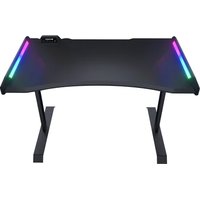
MARS 120 - Bureau Cougar - Notice d'utilisation et mode d'emploi gratuit
Retrouvez gratuitement la notice de l'appareil MARS 120 Cougar au format PDF.


| Type de produit | Bureau |
| Marque | Cougar |
| Modèle | MARS 120 |
| Dimensions (L x P x H) | 120 x 60 x 75 cm |
| Poids | 25 kg |
| Matériau principal | Panneau de particules |
| Finition | Mélaminé noir |
| Charge maximale recommandée | 50 kg |
| Nombre de pieds | 4 |
| Type de montage | À assembler |
| Outils nécessaires | Tournevis, clé Allen (fournis) |
| Fonctions principales | Surface de travail, rangement |
| Entretien et nettoyage | Chiffon doux légèrement humide, éviter solvants |
| Sécurité | Fixation murale recommandée pour stabilité |
| Pièces détachées | Pieds de rechange disponibles |
| Réparabilité | Remplacement des pieds possible |
| Informations générales | Garantie 2 ans |
FOIRE AUX QUESTIONS - MARS 120 Cougar
Questions des utilisateurs sur MARS 120 Cougar
0 question sur cet appareil. Repondez a celles que vous connaissez ou posez la votre.
Poser une nouvelle question sur cet appareil
Téléchargez la notice de votre Bureau au format PDF gratuitement ! Retrouvez votre notice MARS 120 - Cougar et reprennez votre appareil électronique en main. Sur cette page sont publiés tous les documents nécessaires à l'utilisation de votre appareil MARS 120 de la marque Cougar.
MODE D'EMPLOI MARS 120 Cougar

COUGAR MARS 120 gaming desk provides ergonomic design with dazzling RGB lighting effects for enhancing your superior gaming experiences. It's how we make your gaming dreams come true and present a unique gaming desk for you!
ENGLISH
- Ergonomic curved edges design and rounded corners
• Dual side wing: RGB backlight effects
- Support for 5V RGB motherboard connections (ASUS, ASRock, Gigabyte or MSI).
• USB pass-through x2 & Audio Jacks.
• Carbon fiber texture design.
• High-strength welded steel frame for maximum stability
ESPAÑOL
- DesignDiseño ergonómico de bordes curvos y esquinas redondeadas.
- Wing Ala lateral doble: RGB efectos de retroiluminación.
- Soporte para conexiones de placa madre de 5V RGB (ASUS, ASRock, Gigabyte o MSI).
- USB pass-through x2 y conectores de audio.
- DesignDiseño de textura de fibra de carbono.
- Frame Bastidor de acero soldado de alta resistencia para una máxima estabilidad.
ITALIANO
- Design ergonomico dei bordi curvi e angoli arrotondati
• Ala laterale donnia: RGB effetti di retroilluminazione.
• Supporte per connessioni della achede modo RCR 5V (ASUS, ASRock, Cirabuto e MSI)
- Supporto per commissions della scheda madre RGB 5V (ASOS, ASRock, Gigabyte 6 MSI), - USB pass-through x2 e prese audio
• Design delle trama in fibra di carboni
- Design della trama in libra di carbonio; - Telzia in gariniia caldata ad alte assisto
- Telato in acciaio saldato ad alta resistenza per la massima stabilita.
PORTUGUÉS
- Edges Design de bordas curvas ergonómicas e cantos arredondados.
- SideA asa lateral dupla: RGB efeitos de luz de fundo.
- Suporte para conexões de placa-mãe de 5V RGB (ASUS, ASRock, Gigabyte ou MSI)
- USB pass-through x2 a tomadas de áudio
- USB pass-through X2 e tornadas de általó. - DesignDesign de texture de fibra de carbene
- DesignDesign de textura de flora de carbono.
- Estrutura de aço soldada de alta resistencia para máxima estabilidade.
中文
- 更舒适的人体工学造型桌面设计
- 可调模式RGB侧翼红热设
- 与调压式HGB调用方法设计 - 支持主机FDBR红的四步功能(ASUF, ASPack, Cinekutyra 或 MCI)
- 支持主机板RGB灯效同步功能 桌面具有USB/A群接口设计
● 桑团具有USB/Audio接口设计
- 类碳纤维表面防刮处理
- 高强度与高耐用度钢制桌脚设计
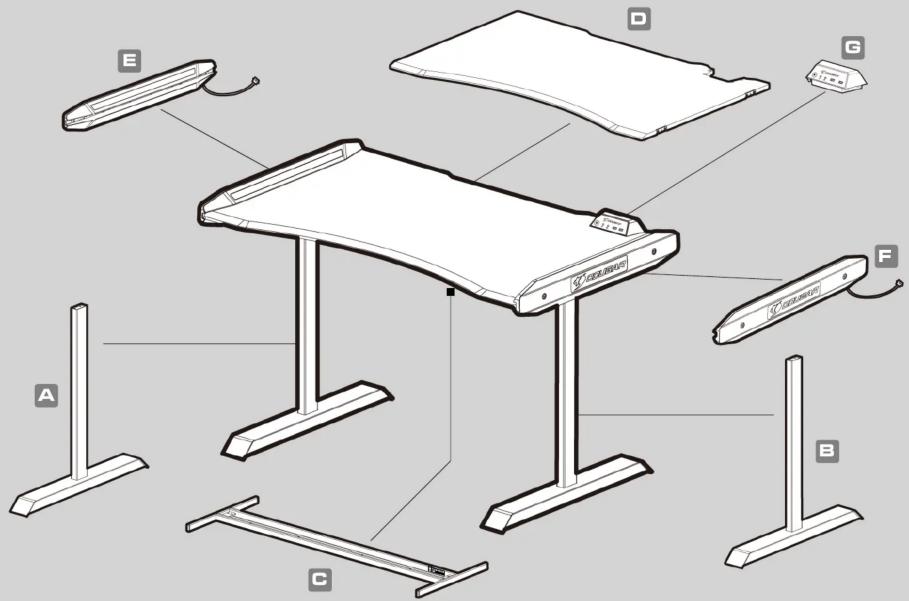
ASSEMBLY DRAWING
SPECIFICATIONS
| Product Name COUGAR MARS 120 Gaming Desk | |
| Model No. | CGR-MARS 120 |
| I/O Panel | US8 3.0 x 1 / US8 2.0 x 1 / Audio Jacks x 2 / RGB button |
| Desk Dimension | 125 (W) x 74 (D) mm / 49.2 (W) x 29.1 (D) inch |
| Desk Height | 81 (H) cm / 31.9 (H) inch |
ДАТА ИЗГОТОВЛЕНИЯ ПРОДУКЦИИ
| год и месяц изготовления продукции указаны в серийном номере продукта.(существует 2 способа опередление продукции изготовления, обла способа описаны ниже) | |||||||||||||||
| A | После SIN: первые две цифры означают год, вторые две – месяц изготовления.Например, SIN: H1702000001 означает, что товарь был произведен в феврале 2017 года. | ||||||||||||||
| B | После SIN: если указаны буквы, то две буквы представляют цифры из таблицы ниже,и значают год, последующие две цифры – месяц изготовления.Например, SIN: DAG02REV1000001 означает, что товар был произведен в феврале 2017 года. | ||||||||||||||
GLOBAL WARRANTY POLICY
| WARRANTY SERIES OF COUGAR GAMING DEVICESProduct : COUGAR MARS 120Warranty : 1 YearThis warranty gives you specific legal rights. You may also have other rights granted under local law. These rights may vary. |
БЪЛГАРИЯ
• Подробни инструкции за употреба изтеглете от: https://cougargaming.com/bg
ACCESSORY KIT
| 1 | x8 | |
| 2 | x12 | |
| 3 | x4 | |
| 4 | x1 |
| 5 | x4 | |
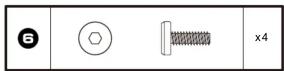
| 6 | x4 | |
| 7 | x1 | |
| 8 | x1 | |
| 9 | x4 | |
| 10 | x1 |
1

natural_image
Two identical structural supports labeled A and B, each with a base and support points (no text or symbols beyond labels)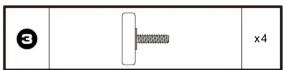
2


3

4

natural_image
Technical line drawing of a table with a curved panel and two metal supports (no text or symbols)4675

natural_image
Technical line drawing of a table with support legs and vertical supports (no text or symbols)
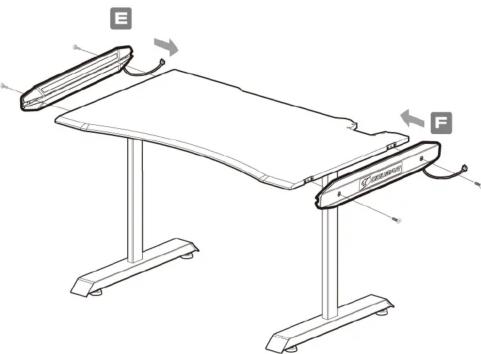


Make sure the 12 screws are positioned and then lock solidly truly.

flowchart
graph TD
    A["COUGAR"] --> B["Spk connector"]
    A --> C["Mic connector"]
    A --> D["Controller connector"]
    A --> E["Left wing RGB connector"]
    A --> F["MC"]
    A --> G["GPK"]
    A --> H["Power Supply"]
    A --> I["Right wing RGB connector"]
    A --> J["USB 3.0"]
    A --> K["USB 2.0"]

Controller Function
HOW TO SWITCH BETWEEN RGB CONTROL MODES
Press and hold the RGB button for three seconds inth Motherboard Driver RGB Control mode, and the RGB button's LED will be turn off.
If you need to return to defalt mode, just press the RGB button for one second.

flowchart
graph TD
    A["Press and hold the RGB button for three seconds"] --> B["Default: Control by RGB button"]
    B --> C["Motherboard Driver RGB Control"]
    C --> D["Press the RGB button for one second"]
Default: RGB Button Switch Mode


RGB button Audio Jacks USB 2.0 USB 3.0
Connecting Controller to PC
STEP .1
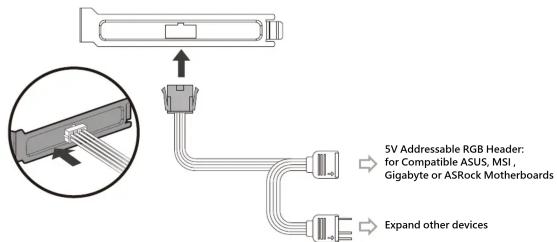
STEP .2

STEP .3

| 7 | x1 | |
| 8 | x1 |
DISTRIBUTOR
COUGAR COUGAR COUGAR COUGAR COUGAR COUGAR COUGAR COUGAR COU OUGAR COUGAR COUGAR COUGAR COUGAR COUGAR COUGAR COUGAR COUGAR COU OUGAR COUGAR COUGAR COUGAR COUGAR COUGAR COUGAR COUGAR COUGAR COU OUGAR COUGAR COUGAR COUGAR COUGAR COUGAR COUGAR COUGAR COUGAR COU OUGAR COUGAR COUGAR COU COUGAR COUGAR COUGAR COUGAR COU OUGAR COUGAR COUGAR COUGAR COUGAR COUGAR COUGAR COUGAR COUGAR COU OUGAR COUGAR COUGAR COUGAR COUGAR COUGAR COUGAR COUGAR COUGAR COU OUGAR COUGAR COUGAR COUGAR COUGAR COUGAR COUGA COUGAR COUGAR COU
WARRANTY AGREEMENT
- If the product has defects in material or manufacture, COUGAR will provide product repair and replacement service within the warranty period.
• Our warranty service is based on the date of th
CONDITIONS WHERE FREE MAINTENANCE IS NOT PROVIDED
• Any fault or damage caused by natural disasters (including storm, fire, flood, thunder, earthquake, etc).
- Any fault or damage caused by accidental factors and man-made reasons (including hit, scrape, crash, moving, compression, stain, corrosion, riot, misuse, malicious damage, etc).
• Use in an improper operating environment (including high temperature, high humidity, water inflow, etc)
• Inability to provide the product warranty card, purchase receipt or invoice to prove that within the warranty period and the shipping date of the product is out of warranty.
• The warranty card has been altered or its number is hard to identify.
• The warranty period has expired
• Any fault or damage caused by non-compliance with regulations stated on the user manual or improper,
• Any fault or damage caused by use of parts not certified by COUGAR original manufacturer.
• The problem is caused by improper repair or adjustment by the buyer or any manufacturer without
authorization from COUGAR
• The product is not acquired from an authorized distributor of the company or is acquired from illicit sources.
• Paper carton, instruction and other accessories are not warranted.
DISCLAIMERS
• COUGAR products should not be used as critical components in life support devices.
• COUGAR is not liable for any damage of life and limb or damage or loss of property caused by or during
COUGAR products'
• COUGAR's warranty liability is limited to repair or replacement. The decision on whether to repair
COUGAR's warranty liability is limited to rep or replace belongs exclusively to COUGAR.
• COUGAR is, to the extent not prohibited by law, not liable for any damages; expenses; lost data
revenues, savings or profits; or any incidental or consequential damages happened while the use
LEGAL NOTICES
This manual was created by Compucase Enterprise and may not be completely or partially
copied, passed on, distributed or stored without written consent by Compucase Enterprise. COUGAR® is a registered brand of Compucase Enterprise Other product and company names
COGDAK® is a registered brand of compacase Enterprise Other product and company that mentioned in this documentation may be brands or trademarks of their respective owners.
Compucase Enterprise reserves the right to make changes concerning the contents of the
manual and the technical data of the product without previous announcement.
MANUFACTURER CONTACT
Compucase Enterprise Co., Ltd.
No. 225, Lane 54, An Ho Road Sec. 2 Tainan, Taiwan, R.O.C
Tel:+886-6-356-0606
Service email: https://
Service email: https://cougargaining.com/support/contract/aplosure; Compucase Enterprise Co Ltd. All rights reserved. Made in China
WARNING
•Please wear protective gloves when assembling the Desk. It is your own responsibility to use
appropriate protection to prevent any physical damage.
- Do not use abrasive products or scrub energetically when cleaning. Please suck to gentle products suitable for delicate materials.
*All parts should be checked monthly to confirm their integrity and to make sure that the screws are not less
•If any part of the product is or appears to be damaged, missing or loose, please contact the local
distributor and do not use the product. WARNING

REAL GEAR FOR REAL GAMERS
www.cougargaming.com
facebook.com/cougargaming
the youtube.com/user/COUGARGGLOBAL


Marque : Cougar
Modèle : MARS 120
Catégorie : Bureau