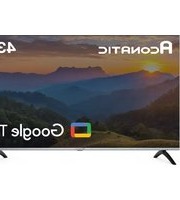
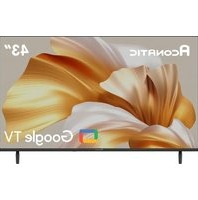
43HS800AN - Téléviseur Aconatic - Notice d'utilisation et mode d'emploi gratuit
Retrouvez gratuitement la notice de l'appareil 43HS800AN Aconatic au format PDF.


| Type de produit | Téléviseur |
| Marque | Aconatic |
| Modèle | 43HS800AN |
| Taille de l'écran | 43 pouces (109 cm de diagonale) |
| Résolution | Full HD (1920 x 1080 pixels) |
| Technologie d'affichage | LED |
| Dimensions avec pied | Environ 96,3 x 56,2 x 20,1 cm (L x H x P) |
| Dimensions sans pied | Environ 96,3 x 55,8 x 7,0 cm (L x H x P) |
| Poids avec pied | Environ 7,5 kg |
| Poids sans pied | Environ 7,2 kg |
| Alimentation | 220-240 V, 50/60 Hz |
| Consommation électrique (usage) | 75 W |
| Consommation électrique (veille) | Moins de 0,5 W |
| Connecteurs | 2 x HDMI, 1 x USB, 1 x entrée antenne, 1 x sortie audio (jack 3,5 mm) |
| Fonctions principales | Réglages d'image et son, minuterie d'arrêt, contrôle parental, verrouillage des touches |
| Entretien et nettoyage | Nettoyer avec un chiffon doux et sec. Éviter les solvants ou produits abrasifs. Débrancher avant nettoyage. |
| Sécurité | Utiliser un support stable. Ne pas obstruer les orifices de ventilation. Éviter l'exposition à l'humidité. |
| Pièces détachées et réparabilité | Indice de réparabilité estimé à 7/10. Pièces disponibles (alimentation, carte mère, écran) auprès du fabricant. |
FOIRE AUX QUESTIONS - 43HS800AN Aconatic
Questions des utilisateurs sur 43HS800AN Aconatic
0 question sur cet appareil. Repondez a celles que vous connaissez ou posez la votre.
Poser une nouvelle question sur cet appareil
Téléchargez la notice de votre Téléviseur au format PDF gratuitement ! Retrouvez votre notice 43HS800AN - Aconatic et reprennez votre appareil électronique en main. Sur cette page sont publiés tous les documents nécessaires à l'utilisation de votre appareil 43HS800AN de la marque Aconatic.
MODE D'EMPLOI 43HS800AN Aconatic
Aconatic
คุ้มือการใช้งาน
LED TV
32HS1000AN
43HS1000AN
43HS800AN
คำแนะนำ
กรุณาศึกษาคู่มืออย่างละเอียด ก่อนทำการติดตั้งและใช้งานโทรศัสน์ เก็บคู่มือนี้ไว้ใช้อ้างอิง
การติดตั้งก่อนใช้งาน
หมายเหตุ:
1)รูปภาพในศุ่มือนีใช้เพื่ออ้างอิงเท่านั้น
2)หลักเสี่ยงการกดหน้าจอเพื่อป้องกันหน้าจอเสียหาย
3) จำเป็นต้องใช้ 2 คนขึ้นไปในการคิดตั้งที่วีขนาดใหญ่อย่างปลอดภัย เพื่อบ้องกันการเสียหายหรือการบาดเจ็บ
การ创业板รจุภัณฑ์และการติดตั้ง

เปิดกล่องบรรจุภัณฑ์
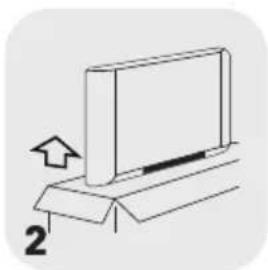
นําที่วีออกจากบรรจุภัณฑ์

ติดตั้งชาตั้งที่วี

เชื่อมต่อกับปลักเพื่อใช้งาน
อุปกรณ์เสริม

ถ่านแบตเตอรี่ 2 ก้อน

รีโมตคอนโทรล
สายปลักไฟ AC
คู่มือการใช้งาน

ใบรับประกัน

สกรูสำหรับชาตั้ง 2 ชิ้น

ชาตั้ง 2 ชิ้น
การติดตั้งชาตั้งที่วี
ขั้นตอนที่ 1 : นําที่วืออกมาและวางอย่างระมัดระวัง (คว่าหน้าจอลง) ลงบนโต๊ะที่มั่นคงและเรียบด้วยผ้าหรือเบาะรอง
ขั้นตอนที่ 2 : ยีตรานชาตั้งเข้ากับที่วีโดยขันสกรูยีดที่ให้มาในกล่อง ชาที่วีอาจแตกต่างกันไปขึ้นอยู่กับภูมิภาคหรือรุ่นที่ผลิต


คำเตือนและข้อควรระวัง
อ่านคำแนะนำเหล่านี้ – ควรอ่านคำแนะนำด้านความปลอดภัยและการใช้งานทั้งหมดก่อนใช้งานผลิตภัณฑ์นี้
คำแนะนำด้านความปลอดภัยที่สำคัญ
- ควรอ่านคําแนะนําต้านความปลอดภัยและการใช้งานทั้งหมดก่อนใช้งานผลิตภัณฑ์นี้
- ควรเก็บคําแนะนําด้านความปลอดภัยและการใช้งานไว้เพื่อใช้ในการอ้างอิงในอนาคต
- ควรปฏิบัติตามคําเตือนทั้งหมดบนเครื่องและในคู่มือการใช้งาน
- ควรปฏิบัติตามคำแนะนำการใช้งานทุกครั้งที่มีการใช้งาน
- ห้ามใช้ผลิตภัณฑ์นี้ใกล้แหล่งน้ำหรือแหล่งความชั้น เช่น ในห้องใต้นที่เปียกหรือใกล้สระว่ายน้ำ เป็นต้น
- ทำความสะอาดผลิตภัณฑ์ด้วยผ้าแแท้งเท่านั้น
- ห้ามบิดกั้นช่องระบายอากาศ ควรติดตั้งตามคำแนะนําของผู้ผลิต
- ห้ามติดตั้งใกล้แหล่งความร้อน เช่น หม้อน้ำ เครื่องทำความร้อน เตา หรืออุปกรณ์อื่น ๆ (รวมถึงเครื่องขยายเสียง) ที่ผลิตความร้อน
- อย่าละเลยด้านความปลอดภัยของปลักที่มีข้าวหรือปลักที่มีสายดิน ปลักที่มีข้าวจะมี 2 ชา โดยชาฝั่งหนึ่งจะกว้างกว่าอีกฝั่ง ส่วนปลักที่มีสายดินจะมี 2 ชา และชาต่อสายดินมีเว็เพื่อความปลอดภัย หากปลักที่เห็นไม่พอดีกับเต้ารับ ควรปรึกษาช่างที่ชํานาญเพื่อเปลี่ยนเต้ารับ
- หลักเลี่ยงไม่ให้สายไฟลูกเหยียบหรือลูกหนึ่บ โดยเฉพาะที่ปลัก เต้ารับไฟฟ้า และจุดที่สายไฟออกจากเครื่อง ใช้เฉพาะอุปกรณ์เสริมที่ผู้ผลิตกําหนดเท่านั้น
- ใช้ตัวยืด/อุปกรณ์เสริมเฉพาะที่ผู้ผลิตกำหนดเท่านั้น
ใช้รถเข็น ชาตั้ง ชาตั้งกล้อง ขายีด หรือโต๊ะที่ผู้ผลิตกำหนด หรือจำหน่ายพร้อมกับอุปกรณ์เท่านั้น เมื่อใช้รถเข็นหรือขั้นวาง ควรใช้ความระมัดระวังในการเคลื่อนย้ายรถเข็นหรืออุปกรณ์ร่วมกัน เพื่อหลีกเลี่ยงการบาดเจ็บ
- ตอดปลักรระหว่างที่มีพายุผนฟ้าคะนองหรือเมื่อไม่ได้ใช้งานเป็นเวลานาน
- แจ้งช่างผู้ชํานาญให้เข้าไปรับบริการ เมื่ออุปกรณ์ได้รับความเสียหาย เช่น สายไฟหรือปลั้งซ่ํารุด ของเหลวหกหรือมีวัตถุดกลางใบในอุปกรณ์อุปกรณ์โต้นฝนหรือความซึ้น ไม่สามารถทำงานได้ตามปกติ หรือตกหล่น
- ข้อควรระวัง: คําแนะนําในการซ่อมบํารุงนี้มีไว้สําหรับช่างที่ผ่านการรับรองเท่านั้น เพื่อลดความเสี่ยงจากไฟฟ้าชื่อต อย่าซ่อมนอกเหนือจากที่ระบุไว้ในคู่มือการใช้งาน เว้นแต่คุณจะผ่านการรับรอง
- ห้ามติดตั้งอุปกรณ์น้ําในพื้นที่จำกัดหรือพื้นที่ที่มีอาคาร เช่น ขั้นหนังสือ หรือสิ่งที่คล้ายกัน และควรจัดให้มีการระบายอากาศที่ดีในพื้นที่เปิดโล่ง ไม่ควร ก็ตขวางการระบายอากาศ โดยบิดช่องระบายอากาศด้วยสิ่งของต่างๆ เช่น หนังสือพิมพ์ ผ้าญโต๊ะ ผ้าม่าน เป็นต้น
- โปรดดูข้อมูลเกี่ยวกับไฟฟ้าและความปลอดภัยบนกล่องต้านหลังก่อนการติดตั้งหรือใช้งานอุปกรณ์
- เพื่อลดความเสี่ยงต่อการเกิดไฟใหม่หรือไฟฟ้าชื่อต อย่าให้อุบกรณ์นี้แดนฝนหรือความชั้น
- ไม่ควรให้เครื่องสัมผัสกับน้ำหยดหรือกระเซ็น และไม่ควรวางวัตถุที่บรรจุของเหลว เช่น แจกัน ไว้บนเครื่อง

- สําหรับขั่วต่อที่มีสัญลักษณ์ “ 4 ” อาจมีขนาดใหญ่พอที่จะทำให้เกิดความเสียงต่อการเกิดไฟฟ้าชื่อด การเดินสายภายนอกที่เชื่อมต่อกับขั้วต่อต้องติดตั้งโดยผู้ที่มีความชํานาญหรือใช้สายไฟสําเร็จรูบ
- เพื่อป้องกันการบาดเจ็บ ให้เช้าตั้ง ด้วยีตติดผนังเพื่อติดตั้งอุปกรณ์นับนโตะ หรือผนังอย่างแน่นหนาตามคําแนะนําในการติดตั้ง
- อันตรายจากการระเบิดหากเปลี่ยนแบตเตอร์ไม่ถูกต้อง จะต้องเปลี่ยนเฉพาะชนิดเดียวกันหรือเทียบเท่าเท่านั้น
- แบตเตอรี่ (แบตเตอรี่หรือชุดแบตเตอรี่) ไม่ควรสัมผัสกับความร้อนที่มากเกินไป เช่น แสงแตกไฟ หรือลิ่งที่คล้ายคลึงกัน
- ระดับเสียงที่มากเกินไปจากหูฟังอาจทำให้สูญเสียการได้อิน การฟังเพลงด้วยระดับเสียงที่สูงเป็นเวลานานอาจสงผลเสียต่อการได้อิน เพื่อลดความเสียงของการเกิดความเสียหายต่อการได้อิน ควรลดระดับเสียงให้อยู่ในระดับที่ปลอดภัย และลดระยะเวลาในการฟังด้วยระดับเสียงที่สูง
- ตัวเชื่อมต่ออุปกรณ์ใช้เป็นอุปกรณ์ตัดการเชื่อมต่อ ดังนั้นอุปกรณ์ตัดการเชื่อมต่ojจะต้องสามารถใช้งานได้ทันที
- เมื่อไม่ได้ใช้งานและอยู่ระหว่างการเคลื่อนย้าย โปรดตูแลสายไฟ เช่น รัดสายไฟด้วยสายรัดหรือวัสดุอื่นๆ ที่คล้ายกัน สายไฟจะต้องไม่มีขอบคม หรือวัสดุอื่นๆที่อาจทำให้สายไฟกลอกได้ เมื่อใช้งานอักษรัง โปรดตรวจสอบว่าสายไฟไม่ได้รับความเสียหาย หากพบความเสียหายใดๆ โปรดติดต่อ ช่างเพื่อเปลี่ยนสายไฟ
- ควรใสใจด้านสิ่งแวดล้อมในการกำจัดแบตเตอรี่
- ห้าまวางแหล่งกำหนดเปลวไฟ เช่น เทียนที่จุดไฟไรับนครื่อง เพื่อป้องกันไม่ให้ไฟลุกลาม ควรวางเทียนหรือเปลวไฟอื่นๆ ให้น่างจากเครื่องตลอดเวลา
- หากอุปกรณ์มีสัญลักษณ์ □ ในฉลากแสดงระดับและสายไฟมี 2 ชา แสดงว่าอุปกรณ์ดังกล่าวเป็นอุปกรณ์ไฟฟ้าประเภท Class II หรือฉนวนสองขั้น ได้รับการออกแบบมาในลักษณะที่ไม่จำเป็นต้องต่อสายดินเพื่อความปลอดภัย (สำหรับอุปกรณ์ไฟฟ้าประเภท Class II เท่านั้น)
- คําเตือนสำหรับเครื่องมือที่ใช้แบตเตอรี่แบบเหรียญหรือกระดุม (คําแนะนําด้านล่างนี้ใช้เฉพาะกับเครื่องมือที่ใช้แบตเตอรี่แบบเหรียญหรือกระดุมที่ผู้ใช้สามารถเปลี่ยนเองได้)
คำเตือน
ห้ามกลืนแบตเตอรี่เข้าไปอาจเกิดอันตรายจากการถูกสารเคมี Neาไหม (รีโมตคอนโทรที่มาพร้อมกับผลิตภัณฑ์) ผลิตภัณฑ์นี้มีแบตเตอรี่แบบเหรียญหรือแบบกระดุมหากกลืนแบตเตอรี่แบบเหรียญหรือแบบกระดุมเข้าไป อาจเท่าให้เกิดการใหม่ภายในร่างกายอย่างรุนแรงในเวลาเพียง 2 ชั่วโมง และอาจถึงแก่ ชีวิตได้ ใช้แบตเตอรี่ที่มีสภาพใหม่และใช้ให้ห่างจากเด็ก หากซ่องใส่แบตเตอรี่ปิดไม่สนิท ให้หยุดใช้ผลิตภัณฑ์ และเก็บให้พันจากมือเด็ก หากคุณคิดว่าแบตเตอรี่อาจถูกกลืนเข้าไปหรือใส่ไว้ในส่วนใดส่วนหนึ่งของร่างกาย ให้รับไปพบแพทย์ทันที
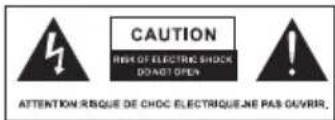
ลัญลักษณ์สายฟ้าที่มีหัวลูกศรภายในสามเหลี่ยมด้านเท่า มีจุดประสงค์เพื่อเตือนผู้ใช้ถึงการมืออยู่ของแรงดันไฟฟ้า อันตรายที่ไม่มีฉวนห้มอยู่กายในตัวเครื่องของผลิตภัณฑ์ซึ่งอาจมีขนาดใหญ่เพียงพอที่จะก่อให้เกิดความเสี่ยง ต่อการเกิดไฟฟ้าชื่อตได้
เพื่อลดความเสี่ยงจากไฟฟ้าข้อต ห้ามลอด事先ครอบ (หรือด้านหลัง) ออก ไม่มีขึ้นส่วนโตที่ผู้ใช้สามารถซ่อมบ่ารุงเองได้ภายในเครื่อง โปรดขอคําแนะนําจากช่างบริการที่มีความเชี่ยวชาญ
เครื่องหมายตกใจภายในสามเหลี่ยมด้านเท่ามีจุดประสงค์เพื่อเตือนผู้ใช้ถึงการมีอยู่ของคําแนะนําการใช้งานและการบํารุงรักษาที่สำคัญในเอกสาร ที่แนบมากับเครื่อง
- สัญลักษณ์ที่แสดงถึงความปลอดภัยในคู่มือเล่มนี้ มีตังนี้
| ~ | หมายถึงไฟฟ้ากระแสสลับ (AC) | ➊ | หมายถึง การสแตนด์บาย |
| --- | หมายถึงไฟฟ้ากระแสตรง (DC) | │ | หมายถึง เปิดเครื่อง |
| หมายถึง อุปกรณ์ Class II | Ş | หมายถึง แรงดันไฟฟ้าที่เป็นอันตราย |
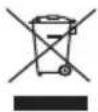
เพื่อการกําจัดผลิตภัณฑ์นี้อย่างถูกต้อง เครื่องหมายนี้ระบุว่าไม่ควรหั้งผลิตภัณฑ์นี้ร่วมกับขยะในครัวเรือนอื่นๆ ที่ว่ทั้งสหภาพยุโรป เพื่อป้องกันอันตราย ที่อาจเกิดขึ้นต่อสิ่งแวดล้อมหรือสุขภาพของมนุษย์จากการกําจัดขยะที่ไม่ได้รับการควบคุม โปรดรีไซเคิลอย่างมีความรับผิดชอบเพื่อส่งเสริมการน้ำ ทรัพยากรวัสดุกลับมาใช้ใหม่อย่างยั่งยืน หากต้องการส่งคืนอุปกรณ์ที่ใช้แล้ว โปรดใช้ระบบส่งคืนและรวบรวม หรือติดต่อผู้ค้าปลิก ที่ชื่อผลิตภัณฑ์มา ผู้ค้าปลีกสามารถนําผลิตภัณฑ์นี้ไปรีไซเคิลอย่างปลอดภัยต่อสิ่งแวดล้อม
การจัดวางตำแหน่งที่วี
- ควรติดตั้งจบบนพื้นผิวมั่นคง เช่น โต๊ะหรือโต๊ะทำงาน เพื่อการระบายอากาศ ควรเว้นพื้นที่ว่างรอบ ๆ จอย่างน้อย 10 ชม. เพื่อป้องกันความผิดพลาด และสถานการณ์ที่ไม่ปลอดภัย โปรดอย่างวางสิ่งของใดๆ บนจอ
- การติดตั้งส่วนหลังของกล่องเข้ากับผนัง (สำหรับบางประเทศเท่านั้น)
- ค่าเตือน: อันตรายจากการทรงตัว

โทรศัศน์อาจตกลงมา ทำให้เกิดการบาดเจ็บสาหัสหรือเสียชีวิตได้ อาการบาดเจ็บต่างๆ โดยเฉพาะในเต็ก สามารถหลิกเสี่ยงได้ด้วยการป้องกันง่ายๆ เช่น:
_ควรใช้ดู้หรือขาดั้งหรือวิธีการติดตั้งที่ผู้ผลิตที่วีแนะนำเสมอ
- ควรใช้เฟอร์นิเจอร์ที่สามารถรองรับที่วีได้อย่างปลอดภัยเท่านั้น
- ควรแน่ใจเสมอว่าที่วีไม่ได้ยื่นเกินขอบเฟอร์นิเจอร์ที่รองรับ
- ควรให้ความรู้แก่เต็กๆ เที่ยวกับอันตรายจากการปืนชั้นไปบนเพอร์นิเจอร์เพื่อเอื้อมถึงที่วีหรือระบบควบคุมอยู่เสมอ
- ควรเดินสายไฟและสายเคบิลที่เชื่อมต่อกับที่วีเสมอเพื่อไม่ให้เกิดการสะดุด ดึง หรือคว้าสายไฟ
- ห้ามวางที่วีในดำแหน่งที่ไม่มั่นคง
- ห้ามวางที่วีบนเพอร์นิเจอร์สูง (เช่น ดู้หรือขั้นหนังสือ) โดยไม่ได้ยืดทั้งเพอร์นิเจอร์และที่วีไว้กับสิ่งรองรับที่เหมาะสม
- ห้าวางที่วับนผ้าหรือวัสดุอื่นๆ ที่อาจอยู่ระหว่างที่วักับเพอร์นิเจอร์ที่รองรับ
- ห้ามวางสิ่งของที่อาจทำให้เต็กปืนขึ้นไป เช่น ของเล่นและวีโมตคอนโทรล บนที่วีหรือบนเฟอร์นิเจอร์ที่วางที่วีไว้
หากต้องการเก็บรักษาและย้ายที่วีเครื่องเติม ควรพิจารณาสิ่งเตี้ยวกันกับข้างต้น
การติดตั้งที่วีบนผนัง
- สามารถใช้ชาแขวนติดผนังกับที่วีของคุณได้ กรุณาปรึกษากับตัวแทนจำหน่ายในพื้นที่ของคุณเพื่อชื่อชาแขวนติดผนังที่แน่นํา ควรติดตั้งชาแขวนติดผนังที่ด้านหลังของที่วีอย่างระมัตระวัง ติดตั้งชาแขวนติดผนังบนผนังทับ โดยตั้งฉากกับพื้น หากคุณจะติดตั้งกับวัสดุก่อสร้างอื่นๆ โปรดติดต่อเจ้าหน้าที่ที่มีความเชี่ยวชาญเพื่อติดตั้งชาแขวนติดผนัง คําแน่นําโดยละเอียด จะมาพร้อมกับชาแขวนติดผนัง โปรดใช้ชาแขวนติดผนังในกรณีที่อุปกรณ์ยืดกับผนังอย่างแน่นหนาและมีพื้นที่เพียงพอสำหรับเชื่อมต่อกับอุปกรณ์ภายนอก
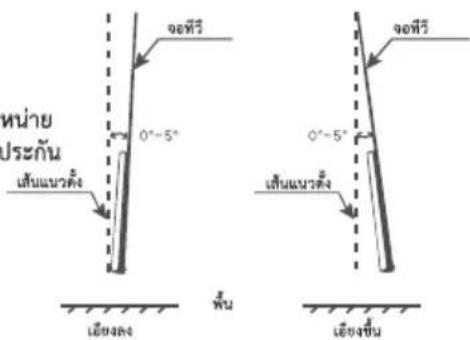
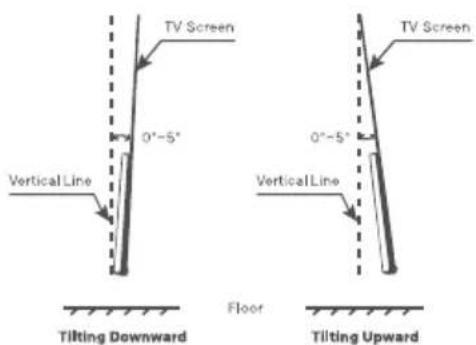
- เพื่อป้องกันความเสียหายต่อผลิตภัณฑ์หรือการบาดเจ็บต่อตัวผู้ใช้โปรด ตรวจสอบให้แน่ใจว่าหน้าจอทีวีตั้งตรงหรือเอียงขึ้นหรือลงในมุม 0 องศา \~ 5 องศา ในขณะติดตั้งที่วับนผนัง
- ในกรณีที่มุมเอียงลงเกินกว่า 0 องศา \~ 5 องศา โปรดซื้ออุปกรณ์เสริมจากตัวแทนจำหน่าย ในพื้นที่เพื่อติดตั้งและใช้งานได้อย่างปลอดภัย มิฉะนั้น จะไม่ครอบคลุมภายใต้การรับประกัน และผู้ใช้จะต้องรับผิดชอบต่อผลที่ตามมา

- ถอดปลักไฟออกก่อนเคลื่อนย้ายหรือติดตั้งที่วี มิฉะนั้นอาจเกิดไฟฟ้าซื้อตได้
- ถอดชาตั้งออกก่อนติดตั้งที่วีบนตัวยืดติดผนัง โดยติดชาตั้งในทางตรงข้ามกัน
- หากคุณติดตั้งที่วีบนเพดานหรือผนังเอียง ที่วีอาจตลงมาและได้รับบาดเจ็บสาหัสได้ ให้ใช้ตัวย์ติดผนังที่ได้รับอนุญาตและติดต่อตัวแทนจำหน่ายในพื้นที่หรือเจ้าหน้าที่ที่เชี่ยวชาญ มิฉะนั้น ที่วีจะไม่ได้รับการคุ้มครองภายใต้การรับประกัน
- อย่าขันสกรูแน่นเกินไป เพราะอาจทำให้ที่วีเสียหายและการรับประกันเป็นโมมะ
- เพื่อป้องกันการบาดเจ็บ อุปกรณ์นี้จะต้องติดตั้งกับพื้นหรือผนังอย่างแน่นหนาตามคำแนะนําในการติดตั้ง
- ใช้สกรูและตัวยืดติดผนังที่ตรงตามข้อกําหนดต่อไปนี้ ความเสียหายหรือการบาดเจ็บใดๆ อันเกิดจากการใช้งานผิดวิธีหรือการใช้อุปกรณ์เสริมที่ไม่เหมาะสมจะไม่ครอบคลุมอยู่ในการรับประกัน


| ขนาดรุ่นสินค้า | 43" | ขนาดรุ่นสินค้า | 32" | ||||||
| บน | ล่าง | บน | ล่าง | ||||||
| สรุ | เส้นฝ่านศูนย์กลาง(มม.) "E" | M6 | M6 | สรุ | เส้นฝ่านศูนย์กลาง(มม.) "E" | M4 | M4 | ||
| ความลึก(มม.) | มากสุด | 24 | 24 | ความลึก(มม.) | มากสุด | 17 | 17 | ||
| "D" | ตําดุด | 22 | 22 | "D" | ตําดุด | 15 | 15 | ||
| จํานวน | 2 | 2 | จํานวน | 2 | 2 | ||||
| A*B*C | 200*200*200 | A*B*C | 100*100*100 | ||||||
ข้อควรระวังในการใช้รีโมตคอนโทรล
- ใช้ริเมตคอนโทรลโดยชี้ไปที่เซ็นเซอร์รีโมด อาจมีสิ่งก็ตขวางระหว่างรีโมตคอนโทรลและเซ็นเซอร์รีโมตซึ่งอาจารบกวนการทำงานของรีโมตคอนโทรลได้
- ห้ามทำให้รีโมตคอนโทรลได้รับแรงสั่นเกินไป นอกจากนี้ ห้ามให้ของเหลวกระเด่นไปที่รีโมตคอนโทรล และห้ามวางรีโมตคอนโทรลในบริเวณที่มีความชื่นสูง
- ห้ามวลงรีโมตคอนโทรลไว้กลางแตด เพาะอาจทำให้ตัวเครื่องเสียรูปเนื่องจากความร้อน
- หากเซ็นเซอร์โมตคอนโทรลอยูในที่ที่มีแสงแตกสองถึงโดยตรงหรือแสงจ้า รีโมตคอนโทรจะไม่ทำงาน หากเป็นเซ่นนั้น โปรดปรับแสงสว่างหรือดำเนําหน่งของที่วี หรือใช้งานรีโมตคอนโทรลให้ใกล้กับเซ็นเซอร์โมตคอนโทรลมากขึ้น
ข้อควรระวังในการใช้งานแบตเตอรี่
การใช้แบตเตอร์อย่างไม่ถูกต้องอาจทำให้เกิดการรั่วไหลได้ ดังนั้นโปรดปฏิบัติตามวิธีต่อไปนี้และใช้ด้วยความระมัดระวัง
- โปรดสังเกตขั้วแบตเตอรี่เพื่อหลีกเสี่ยงการลัดวงจร
- เมื่อแรงค้นไฟของแบตเตอร์ไม่เพียงพอซึ่งส่งผลต่อระยะการใช้งาน คุณควรเปลี่ยนแบตเตอร์ใหม่
- ถอดแบตเตอรี่ออกจากรีโมตคอนโทรลหากคุณไม่ได้ต้องการใช้งานเป็นเวลานาน
- ห้ามใช้แบตเตอรี่ต่างชนิดกัน (เช่น แบตเตอรี่แมงกานีสและแบตเตอรี่อัลคาไลน์) ร่วมกัน
- ห้ามใส่แบตเตอรี่ลงในกองไฟ และอย่าชาร์จหรือทำลายแบตเตอรี่
- โปรดหั้งแบตเตอรี่โดยปฏิบัติตามข้อบังคับเกี่ยวกับการอนุรักษ์สิ่งแวดล้อมที่เกี่ยวข้อง
- คําเตือน: แบตเตอรี่ (ชุดแบตเตอรี่หรือแบตเตอรี่ที่ติดตั้ง) ไม่ควรสัมผัสกับความร้อนที่มากเกินไป เช่น แสงแตกไฟ หรือสิ่งที่คล้ายคลึงกัน
- ค่าเดือน: ไม่ควรให้แบตเตอรี่สัมผัสกับแรงต้นอากาศด่ำมากเกินไป เพราะอาจทำให้เกิดการระเบิดหรือเกิดการรั่วไหลของของเหลวหรือกําซที่ติดไฟได้
การเชื่อมต่อกับอุปกรณ์
หมายเหตุ:
1)รูปภาพในศูมิอนี้ใช้เพื่ออ้างอิงเท่านั้น
2) ประเภทและช่องเชื่อมต่ออาจแตกต่างกันไป ขึ้นอยู่กับภูมิภาคหรือรุ่น
3) อุปกรณ์ภายนอกและสายเคเบิลที่แสดงในภาพไม่ได้มาพร้อมกับที่วี
4) เพื่อหลีกลี่ยงความเสียหายของผลิตภัณฑ์หรือการบาดเจ็บส่วนบุคคล โปรดตรวจสอบให้แน่ใจว่าคุณได้ถอดสายไฟที่วืออกก่อนเชื่อมต่ออุปกรณ์ ภายนอก
• AV IN
รับสัญญาณเสียงและวิตีโอจากอุปกรณ์ AV ภายนอก

- ANTENNA IN
เชื่อมต่อสายสัญญาณเพื่อรับสัญญาณจากเสาอากาศ สายเคเบิล หรืองานดาวเทียม

• USB
เซื่อมต่ออุปกรณ์จัดเก็บข้อมูล USB

• HDMI
รับสัญญาณอินพุต HDMI จากอุปกรณ์ HDMI ภายนอก

• LAN
พอร์ตเครือข่ายแบบมีสาย
![graph LR A["LAN"] --> B["Switch"] B --> C["Router"] C --> D["Radio"]](/content/2026/06/1387105/images/d9c565e97ad769c6e97d25eb95661c9c7f59240cf37c193de04ea9015ce653c0.jpg)
• HEADPHONE (○)
ส่งเสียงที่วืออกใบยังหูฟังที่เชื่อมต่อ ลําโพงจะถูกปิดเสียงเมื่อเสียบหูฟัง

• DIGITAL AUDIO OUT
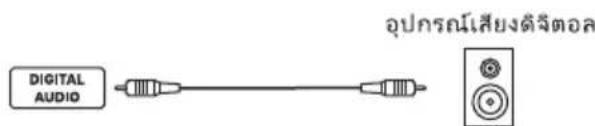
ใช้สายโคแอกเซียลเพื่อส่งสัญญาณเสียงจากที่วีของคุณไปยัง เครื่องรับสัญญาณเสียงติจิทัลที่เข้ากันได้
รีโมตคอนโทรล
หมายเหตุ:
1) รูปภาพในคู่มิอนี้ใช้เพื่ออ้างอิงเท่านั้น
2) ประเภทและช่องเชื่อมต่ออาจแตกต่างกันไป ขึ้นอยู่กับภูมิภาคหรือรุ่น
3) หากต้องการเปิดหรือปิดฟึงก์ขันการบูดต่วน โปรดเลือก < MENU … (ตั้งค่า) → การตั้งค่าทั่วไป → ตัวเลือกขั้นสูง → บูดต่วน → เปิด/ปิด >
4) เนื่องจากการอัพเกรดหรืออัปเตตชอฟต์แวร์ ฟิงก์ขันของรีโมตคอนโทรลอาจมีการเปลี่ยนแปลงโดยไม่ต้องแจ้งให้ทราบล่วงหน้า
โปรดตรวจสอบที่วีของคุณ
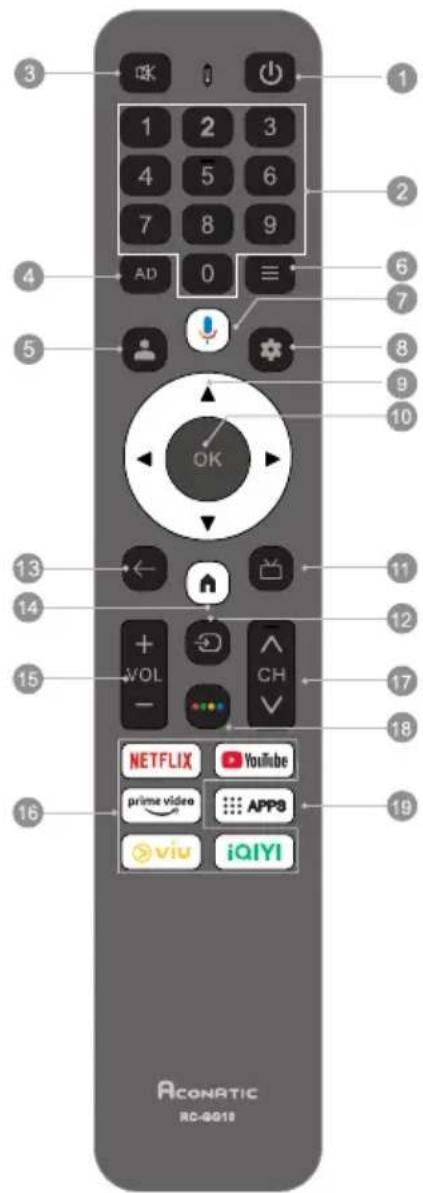
- ปุ่มเปิด/บิด(⏻): เปิดที่วีหรือเข้าสูโหมดแสดงนต์บาย
- ปุ่มหมายเลข(0-9): เลือกช่องที่วีหรือป้อนหมายเลข
- ปุ่มปิด/เปิดเสียง(ตร์): ปิดเสียงหรือเปิดเสียง
- ปุ่มฟังก์ชั่นคําบรรยายเสียง(AD): เปิดหรือปิดฟังก์ชันคําบรรยายเสียง
- บุ่มโปรแกรม์( ): เข้าสู่ระบบด้วยบัญชี Google เพื่อเลือกรับสิ่งบันเทิงที่คุณชื่นชอบ
- ปุ่มเมนู(≡): ในโหมดที่วี กตหนึ่งครั้งเพื่อเข้าถึงเมนูการดังค่าต่วน และกดปุ่มนี้ค้างไว้เพื่อเปิดแป้นพิมพ์เสริมอน ชั่งรวมถึงปุ่มตัวเลข ปุ่มสี และอื่นๆ
- บนหน้าจอหลัก กดบุ่มนี้เพื่อเปิดรายการแหล่งข้อมูลและรายการการเข้าใช้งานต่วน
-
Inรายการช่องให้กดปุมนี้เพื่อแก้ไขรายการที่เลือก
-
ปุ่มฟังก์ชันเสียง( ): เริ่มใช้งานฟังก์ชันเสียง
- กตหนึ่งครั้งเพื่อใช้งาน voice assistant
- กตค้างเพื่อรับคําสั่งเสียง หลังจากพูดปล่อยปุ่มไมโครโพนเพื่อใช้งานฟังก์ชันเสียง
-
ปุ่มแตชบอร์ต (★):เข้าถึงหน้าแตชบอร์ตของ Google TV
-
ปุ่มขึ้น/ลง/ซ้าย/ขวา: ไปที่เมนูเพื่อเลือกเนื้อหาที่คุณต้องการ
- กดปุ่ม ช้าย/ขวา เพื่อเปลี่ยนช่อง
-
ปุ่มตกลง: ยืนยัน ป้อนหรือดำเนินการรายการที่เลือกหรือเข้าถึงรายการปุ่มต่วน
-
ปุ่มรายการออกอากาศ: เข้าสู่ผังรายการโทรศัศน์ในโหมดที่วีติจิทัล
-
ปุ่มเมนูสัญญาณชาเข้า (→) - แสดงเมนูสัญญาณชาเข้า
-
ปุ่มย้อนกลับ (←) - ย้อนกลับไปยังเมนู
-
ปุ่มหน้าจอหลัก ( ) - เข้าสู่หน้าจอหลัก
-
ปุ่มเพิ่ม/ลดเสียง (VOL +/-) - เพิ่ม/ลดระดับเสียง
-
ปุ่มแอพพลิเคชั่น: เข้าถึงแอพพลิเคชั่นเฉพาะได้อย่างรวดเร็วและโดยตรง
-
ปุ่มเลือกช่องขึ้น/ลง:เปลี่ยนช่อง
-
ปุ่มสีต่างๆ - ย้อนกลับไปช่องก่อนหน้า
-
ปุ่มAPPS: เข้าถึงแอพพลิเคชั้นอื่นๆ
การใช้งานเบื้องต้น
หมายเหตุ:
1) รูปภาพในศูมือนีใช้เพื่ออ้างอิงเท่านั้น
2) นอกจากโหมด TV/HDMI/AV/USB บุ่มควบคุมที่วีจะใช้เพื่อเปิดหรือบิดที่วีเป็นหลัก
3) เนื่องจากการอัพเกรดหรืออปเตตซอฟต์แวร์ ฟังก์ชันปุ่มควบคุมที่วีอาจมีการเปลี่ยนแปลงโดยไม่ต้องแจ้งให้ทราบล่วงหน้าโปรดตรวจสอบที่ที่วีของคุณ
ปุ่มควบคุมที่วี
■เปิดเครื่องหรือ Holmesตสแดนด์บาย:
กดบุ่มควบคุมที่วีเพื่อเปิดที่วี
■ ในสถานะการทํางาน:
กดปุ่มควบคุมที่วี 1 ครั้งเพื่อเปิดเครื่อง
กดปุ่มควบคุมที่วีค้างไว้เพื่อเปลี่ยนที่วีให้อยู่ในโหมดสตันต์บาย

หมายเหตุ:รูปภาพในคู่มือนี้ใช้เพื่ออ้างอิงเท่านั้น
LICENSE

Google TV
Google TV is the name of this device's software experience and a trademark of Google LLC. Google, YouTube, and Google Cast and other related marks are trademarks of Google LLC.
HDMI TM
The terms HDMI, HDMI High-Definition Multimedia Interface, HDMI trade dress and the HDMI Logos are trademarks or registered trademarks of HDMI Licensing Administrator, Inc.
Dolby AUDIO
Manufactured under license from Dolby Laboratories. Dolby, Dolby Audio, and the double-D symbol are trademarks of Dolby Laboratories Licensing Corporation.
การแก้ไขปัญหาเบื้องต้น
ก่อนที่จะโทรศียกช่างบริการ โปรดตรวจสอบหัวข้อต่อไปนี้เพื่อดูสาเหตุที่เป็นไปได้ของอาการและวิธีแก้ไข
ปัญหาทั่วไป / วิธีแก้ไข
- รีโมตคอนโทรลไม่ทำงาน
เปลี่ยนแบตเตอรี่
ตรวจสอบว่าแบตเตอรี่ติดตั้งถูกต้องหรือไม่
ตรวจสอบว่าได้เชื่อมต่อแหล่งจ่ายไฟหลักหรือไม่
ตรวจสอบว่ามีวัตถุด ศักดขวางอยู่ระหว่างเซ็นเซอร์และรีโมตคอนโทรลหรือไม่ - คุณภาพสัญญาณไม่ตี
โดยหัวไปเกิดจากสัญญาณรบกวนจากอุปกรณ์อิเล็กทรอนิกส์หรือ
แหล่งกำเนิดสัญญาณรบกวนวิทยุ
ภาพและเสียง/วิธีแก้ไข
- ไม่มีภาพ ไม่มีเสียง
ตรวจสอบแหล่งสัญญาณ
เสียบอุปกรณ์ไฟฟ้าอื่นเข้ากับเต้าเสียบเพื่อตรวจสอบว่าทำงานหรือเปิดอยู่หรือไม่
ตรวจสอบว่าปลักไฟต่อกับเต้าเสียบถูกต้องหรือไม่
- ไม่มีเสียง ภาพปกติ
หากไม่มีเสียง ให้ยกเลิกปิดเสียงหรือเพิ่มระดับเสียง
เปิดเมนูเสียงและปรับ "สมตุล"
- ภาพผิดปกติ
หากภาพไม่มีสีหรือคุณภาพไม่ตี
1.ปรับตัวเลือกสีในการตั้งค่าเมนูรูปภาพ
2.วางหวังไม่ระยะห่างจากอุปกรณ์อเล็กทรอนิกสื่อนๆ
3.ลองเปลี่ยนช่องเป็นช่องอื่น
สัญญาณทีวีไม่ตี
- ตรวจสอบสายสัญญาณและปรับแต่งเส아อากาศ
2.ปรับแต่งช่องสัญญาณให้ละเอียด
3.ลองเปลี่ยนช่องเป็นช่องอื่น
เครื่องเล่นมัลติมีเตีย/วิธีแก้ไข
วิพล์นี้ไม่ถูกต้อง /'เสียงไม่รองรับ ปรากฏขึ้น หรือเสียงปกติแต่ภาพไม่ปกติ หรือวิตโอปกติแต่เสียงผิดปกติ ไฟล์อาจเสียหาย ตรวจสอบว่าสามารถเล่นไฟล์บนพีซีได้หรือไม่ ตรวจสอบว่ารองรับตัวแปลงสัญญาณวัติโอและเสียงหรือไม่
เครือข่าย/วิธีแก้ไข
เครือข่ายล้มเหลว ตรวจสอบว่าเราเตอร์ทํางานหรือไม่ ตรวจสอบให้แน่ใจว่าพีวีเซื่อมต่อกับเราเตอร์แล้ว
เบราว์เซอร์/วิธีแก้ไข
ไม่สามารถแสดงหน้าเว็บได้สมบูรณ์
ส่วนขยายของบุคคลที่สามารถทางส่วนของเว็บเพจปัจจุบันอาจไม่ได้รับการสนับสนุน และโปรดปิดเว็บเพจปัจจุบัน
เบราว์เซอร์ลูกบังคับให้ปิดลง
หน้าเว็บปัจจุบันอาจมีเนื้อหากากเกินไปซึ่งทำให้น่วยความจำไม่เพียงพอและเบราว์เซอร์ถูกปิดลง
ข้อมูลทางเทคนิค
หมายเหตุ:ข้อมูลจำเพาะอาจแตกต่างกันไปขึ้นอยู่กับภูมิภาคหรือรุ่น
แรงดันใช้งาน:
100-240V\~50/60Hz.
ขนาดโดยไม่รวมชาตั้ง (กว้างXสูงXลึก):
32":718×423×61 mm.
43":955×557×72 มม.
น้ำหนักสุทธิไม่รวมชาตั้ง:
32": 2.9 nn.
43": 4.8 nn.
อินพุตเส아อากาศ RF:
75 โอห์ม
ภาษาของ OSD:
หลายตัวเลือก
ระบบ:
DTV : DVB-C/T/T2
ATV : PAL/ SECAM/NTSC/BG/DK/I/M/NICAM/A
ความครอบคลุมของช่อง:
DVB-T/T2:45\~860 meningเสิรตซ์
950\~2150เมกระเชิรตซ์
DVB-C : 44 \~ 862 meningเชิรตซ์
ATV : 48.25 \~ 863.25 เมษายน
Environment:
อุณหภูมิในการทำงาน : 5 \~ 40°C
ความชื่นในการทำงาน :20\~80%
อุณหภูมิในการจัดเก็บ : -15 \~ 45°C
ความชื่นในการจัดเก็บ : 10 \~ 90%, ไม่มีการควบแน่น
หมายเหตุ:
1)รูปภาพในคู่มิอนี้ใช้เพื่ออ้างอิงเท่านั้น
2) เนื่องจากการอัพเกรดหรืออับเดตซอฟต์แวร์ ฟังก์ชันปุ่มควบคุมที่วีอาจมีการเปลี่ยนแปลงโดยไม่ต้องแจ้งให้ทราบล่วงหน้า โปรดตรวจสอบที่วีของคุณ
3) ในสภาพแวดล้อมที่แห้งเนื่องจากไฟฟ้าสถิตย์ ผลิตภัณฑ์อาจารีสตาร์ทและกลับสู่อินเทอร์เฟซหลัก อินเทอร์เฟซเครื่องเล่น USB หรือแหล่งที่มาเติม ซึ่งถือเป็นเรื่องปกติและโปรดใช้งานที่วีต่อไปตามที่คุณต้องการ
Aconatic
User Manual
LED TV
32HS1000AN
43HS1000AN
43HS800AN
Suggestion
Please read the manual carefully before installing and using the television.
Please keep this manual for reference.
PREPARATION
Note:
1). The pictures are only for reference.
2). Avoid pressing the screen to prevent screen damage.
3). Two or more persons are required for safe handling of a large TV to prevent any damages or injuries.
Unpacking and Installation

Open the package.

Take out the TV.

Install the TV stands.
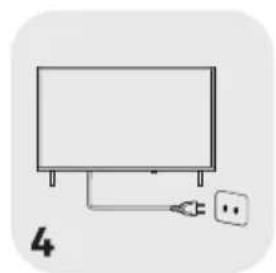
Connect the power cord.
Standard Accessories

Batteries /2

Remote Control

Power Cord

Quick Start Guide

Warranty Card
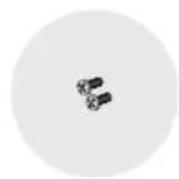
Stand Screws /2

Stand Bases /2
Stand Installation
Step 1: Take out the TV and carefully put it (screen downward) on a stable and flat table with a soft cloth or cushion on it.
Step 2: Fix the stand bases to the TV by fastening the matching stand screws provided in the box. The bases may vary depending on the region or model.
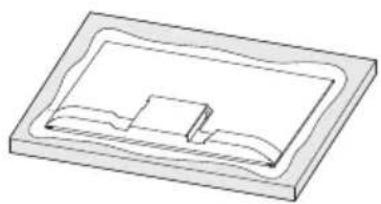

WARNING AND PRECAUTION
Read all of the instructions before operating the set. Keep these instructions well for later use.
Important Safety Instructions
- Read these instructions – All the safety and operating instructions should be read before this product is operated.
- Keep these instructions – The safety and operating instructions should be retained for future reference.
- Heed all warnings – All warnings on the appliance and in the operating instructions should be adhered to.
- Follow all instructions – All operating and use instructions should be followed.
- Do not use this apparatus near water – The appliance should not be used near water or moisture – for example, in a wet basement or near a swimming pool, and the like.
- Clean only with dry cloth.
- Do not block any ventilation openings. Install in accordance with the manufacturer's instructions.
- Do not install near any heat sources such as direct sunlight, radiators, heat registers, stoves, or other apparatus (including amplifiers) that produce heat.
- Do not defeat the safety purpose of the polarized or grounding plug. A polarized plug has two blades with one wider than the other. A grounding plug has two blades and a third grounding prong. The wide blade or the third prong is provided for your safety. If the provided plug does not fit into your outlet, consult an electrician for replacement of the obsolete outlet.
- Protect the power cord from being walked on or pinched particularly at the plugs, convenience receptacles, and at the point where they exit from the apparatus.
- Only use attachments/accessories specified by the manufacturer.
• Use only with the cart, stand, tripod, bracket, or table specified by the manufacturer, or sold with the apparatus. When a cart or rack is used, use caution when moving the cart/apparatus combination to avoid injury from tip-over.
- Unplug the apparatus during lightning storms or when unused for long periods of time.
- Refer all servicing to qualified personnel. Servicing is required when the apparatus has been damaged in any way, such as power supply cord or plug is damaged, liquid has been spilled or objects have fallen into the apparatus, the apparatus has been exposed to rain or moisture, does not operate normally, or has been dropped.
- CAUTION: These servicing instructions are for use by qualified service personnel only. To reduce the risk of electric shock, do not perform any servicing other than that contained in the operating instructions unless you are qualified to do so.
- Do not install this equipment in a confined or building-in space such as a book case or similar unit, and remain a well ventilation conditions at open site. The ventilation should not be impeded by covering the ventilation openings with items such as newspaper, table-cloths, curtains etc.
- Please refer the information on rear enclosure for electrical and safety information before installing or operating the apparatus.
- To reduce the risk of fire or electric shock, do not expose this apparatus to rain or moisture.
- The apparatus shall not be exposed to dripping or splashing and that no objects filled with liquids, such as vases, shall be placed on the apparatus. Do not use the set near dust place.
- For the terminals marked with symbol of "4" may be of sufficient magnitude to constitute a risk of electric shock. The external wiring connected to the terminals requires installation by an instructed person or the use of ready-made leads or cords.
- To prevent injury, use the stand/wall-mount bracket to securely install this apparatus on the table/wall in accordance with the installation instructions.
- Danger of explosion if battery is incorrectly replaced. Replace only with the same or equivalent type.
- The battery (battery or batteries or battery pack) shall not be exposed to excessive heat such as sunshine, fire or the like.
- Excessive sound pressure from earphones and headphones can cause hearing loss. Listening to music at high volume levels and for extended durations can damage one's hearing. In order to reduce the risk of damage to hearing, one should lower the volume to a safe, comfortable level, and reduce the amount of time listening at high levels.
- The appliance coupler is used as disconnect device, the disconnect device shall remain readily operable.
- When not in use and during movement, please take care of the power cord set, e.g. tie up the power cord set with cable tie or something like that. It shall be free from sharp edges and the like that can cause abrasion of the power cord set. When put into use again, please make sure the power cord set being not damaged, If any damages found, please look for the service person to replace the power cord set specified by the manufacturer or have the same characteristics as the original one.
- Attention should be drawn to environmental aspects of battery disposal.
- No naked flame sources, such as lighted candles, should be placed on the apparatus. To prevent the spread of fire, keep candles or other open flames away from the apparatus at all times.
- If the apparatus have the symbol ☐ in its rating label and the power cord has two pins, it means that the equipment is a Class II or double insulated electrical appliance. It has been designed in such a way that it does not require a safety connection to electrical earth.(Only for Class II appliance)
- Warning for Apparatus containing COIN / BUTTON CELL BATTERIES (Below instruction only used for the apparatus containing a user-replaceable coin/button cell battery) WARNING:
Do not ingest the battery, Chemical Burn Hazard (The remote control supplied with) this product contains a coin/button cell battery. If the coin/button cell battery is swallowed, it can cause severe internal burns in just 2 hours and can lead to death. Keep new and used batteries away from children. If the battery compartment does not close securely, stop using the product and keep it away from children. If you think batteries might have been swallowed or placed inside any part of the body, seek immediate medical attention.

This lightning flash with arrowhead symbol within an equilateral triangle is intended to alert the user to the presence of non-insulated "dangerous voltage" within the product's enclosure that may be of sufficient magnitude to constitute a risk of electric shock.
To reduce the risk of electric shock. Do not remove cover (or back). No user serviceable parts inside. Refer to qualified service personnel.
The exclamation point within an equilateral triangle is intended to alert the user to the presence of important operating and maintenance instructions in the literature accompanying the appliance.
- The following information are recommended to be included as far as applicable where applicable:
| ~ Refer to alternating current(AC). | ∅ Refer to stand-by or power on. |
| ... Refer to direct current(DC). | I Refer to power on. |
| ☐ Refer to ClassII equipment. | ∅ Refer to dangerous voltage. |
WEEE Directive

Correct Disposal of this product. This marking indicates that this product should not be disposed with other household wastes throughout the EU. To prevent possible harm to the environment or human health from uncontrolled waste disposal, recycle it responsibly to promote the sustainable reuse of material resources. To return your used
device, please use the return and collection systems or contact the retailer where the product was purchased. They can take this product for environmental safe recycling.
Positioning the TV
- Install Display on solid horizontal surface such as a table or desk. For ventilation, leave a space of at least 10cm free all around the set. To prevent any fault and unsafe situations, please do not place any objects on top of the set.
• Fix the rear of enclosure to wall(only for some countries)
• Warning: Stability Hazard

Note: The picture is only for reference.
A television set may fall, causing serious personal injury or death. Many injuries, particularly to children, can be avoided by taking simple precautions such as:
- ALWAYS use cabinets or stands or mounting methods recommended by the manufacturer of the television set.
- ALWAYS use furniture that can safely support the television set.
- ALWAYS ensure the television set is not overhanging the edge of the supporting furniture.
- ALWAYS educate children about the dangers of climbing on furniture to reach the television set or its controls.
- ALWAYS route cords and cables connected to your television so they cannot be tripped over, pulled or grabbed.
- NEVER place a television set in an unstable location.
- NEVER place the television set on tall furniture (for example, cupboards or bookcases) without anchoring both the furniture and the television set to a suitable support.
- NEVER place the television set on cloth or other materials that may be located between the television set and supporting furniture.
- NEVER place items that might tempt children to climb, such as toys and remote controls, on the top of the television or furniture on which the television is placed.
If the existing television set is being retained and relocated, the same considerations as above should be applied.
Mounting on a Wall
- An optional wall mount can be used with your television. Consult with your local dealer to purchase the recommended wall mount bracket. Carefully attach the wall mount bracket at the rear of the TV. Install the wall mount bracket on a solid wall perpendicular to the floor. If you are attaching the TV to other building materials, please contact qualified personnel to install the wall mount. Detailed instructions will be included with the wall mount. Please use a wall mount bracket where the device is adequately secured to the wall with enough space to allow connectivity to external devices.
- To prevent product damages or personal injuries, please make sure that the TV screen is kept upright, or tilted upward or downward within the angle range of 0° 5° while mounting the TV onto the wall.
- In case of exceeding the above angle range (0°\~5°) of tilting downward, please purchase the auxiliary accessories from the local dealer to mount the TV for safe installation and usage. Otherwise, it will not be covered by the warranty and the user should be liable for all consequences and responsibilities.

- Disconnect the power before moving or installing the TV. Otherwise electric shock may occur.
- Remove the stand before installing the TV on a wall mount by performing the stand attachment in reverse.
- If you install the TV on a ceiling or slanted wall, it may fall and result in severe injury. Use an authorized wall mount and contact the local dealer or qualified personnel. Otherwise it is not covered by the warranty.
- Do not over tighten the screws as this may cause damage to the TV and void your warranty.
- To prevent injury, this apparatus must be securely attached to the floor/wall in accordance with the installation instructions.
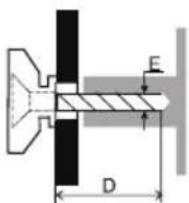
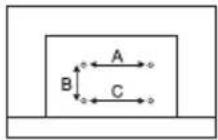
- Use the screws and wall mounts that meet the following specifications. Any damages or injuries by misuse or using an improper accessory are not covered by the warranty.
| Model Size | 43" | Model Size | 32" | ||||||
| Top | Down | Top | Down | ||||||
| Screw | Diameter(mm) "E" | M6 | M6 | Screw | Diameter(mm) "E" | M4 | M4 | ||
| Depth(mm) | Max | 24 | 24 | Depth(mm) | Max | 17 | 17 | ||
| "D" | Min | 22 | 22 | "D" | Min | 15 | 15 | ||
| Quantity | 2 | 2 | Quantity | 2 | 2 | ||||
| A*B*C | 200*200*200 | A*B*C | 100*100*100 | ||||||
Precautions For Using Remote Control
- Use the remote control by pointing it towards the remote sensor. The items between the remote control and the remote sensor will interfere the normal operation.
- Do not make remote control vibrate violently. Also, do not splash liquid on the remote control, also do not put the remote control in high humidity place.
- Do not place remote control under direct sunlight which will cause deformation of the unit by heat.
- When the remote sensor is under direct sunlight or strong lighting, the remote control will not work. If so please change the lighting or TV's position, or operate the remote control closer to the remote sensor.
Precautions For Using Battery
Improper using of the battery will cause leakage. So please do as the following methods and use carefully.
- Please note the batteries' polarities, to avoid short circuit.
- When the battery's voltage is insufficient which affect the use range, you should replace new battery.
- Remove the batteries from the remote control unit if you do not intend to use it for a long time.
- Do not use different types of batteries (for example, Manganese and Alkaline batteries) together.
- Do not put the battery into fire, and charge or decompose the battery.
- Please dispose of batteries in compliance with relevant environmental protection regulations.
- WARNING: The batteries (battery pack or batteries installed) shall not be exposed to excessive heat such as sunshine, fire or the like.
- WARNING: A battery should not be exposed to extremely low air pressure that may result in an explosion or the leakage of flammable liquid or gas.
TERMINAL CONNECTION
Note:
1). The pictures are only for reference.
2). Terminal quantities and names may vary depending on the region or model.
3). External equipments and cables shown herein are not supplied with the TV.
4). To avoid product damage or personal injury, please make sure that you have disconnected the TV power cord before connecting the external devices.
• AV IN
Receive analog audio and video signals from external AV devices.

• ANTENNA IN
Connect a coaxial cable to receive signals from the antenna or cable.

• USB
Connect a USB storage device.

• HDMI
Receive digital audio and video signals from external HDMI devices.

• LAN
Wired network port.

• HEADPHONE (○)
Output the TV sound to the connected headphone. Speakers will be muted when headphone is plugged in.

• DIGITAL AUDIO OUT
Use a coaxial cable to output your TV's audio signal to a compatible digital audio receiver.

REMOTE CONTROL
Note:
1). The picture is only for reference.
2). The image, buttons and functions of remote control may vary depending on the region, model or source.
3). To turn on or turn off the function of fast boot, please select


- ACONATIC
- การติดตั้งก่อนใช้งาน
- หมายเหตุ
- คำเตือนและข้อควรระวัง
- คำเตือน
- การจัดวางตำแหน่งที่วี
- การติดตั้งที่วีบนผนัง
- ข้อควรระวังในการใช้รีโมตคอนโทรล
- ข้อควรระวังในการใช้งานแบตเตอรี่
- การเชื่อมต่อกับอุปกรณ์
- AV IN
- ANTENNA IN
- USB
- HDMI
- LAN
- HEADPHONE (○)
- DIGITAL AUDIO OUT
- รีโมตคอนโทรล
- การใช้งานเบื้องต้น
- ปุ่มควบคุมที่วี
- LICENSE
- การแก้ไขปัญหาเบื้องต้น
- ปัญหาทั่วไป / วิธีแก้ไข
- ภาพและเสียง/วิธีแก้ไข
- สัญญาณทีวีไม่ตี
- เครื่องเล่นมัลติมีเตีย/วิธีแก้ไข
- เครือข่าย/วิธีแก้ไข
- เบราว์เซอร์/วิธีแก้ไข
- ข้อมูลทางเทคนิค
- USER MANUAL
- LED TV
- PREPARATION
- NOTE
- UNPACKING AND INSTALLATION
- STANDARD ACCESSORIES
- STAND INSTALLATION
- WARNING AND PRECAUTION
- IMPORTANT SAFETY INSTRUCTIONS
- WEEE DIRECTIVE
- POSITIONING THE TV
- MOUNTING ON A WALL
- PRECAUTIONS FOR USING REMOTE CONTROL
- PRECAUTIONS FOR USING BATTERY
- TERMINAL CONNECTION
- REMOTE CONTROL
- BASIC OPERATION
- TV CONTROL BUTTON
- IN FASTBOOT MODE OR STANDBY MODE
- IN WORKING STATUS
- TROUBLE SHOOTING
- GENERAL PROBLEM / SOLUTION
- REMOTE CONTROL DOES NOT WORK
- POOR SIGNAL
- PICTURE & SOUND / SOLUTION
- NO PICTURE, NO SOUND
- NO SOUND, PICTURE OK
- ABNORMAL PICTURE
- MULTIMEDIA PLAYER / SOLUTION
- THIS FILE IS INVALID' /'UNSUPPORTED AUDIO' APPEARS, OR AUDIO IS NORMAL BUT VIDEO IS ABNORMAL, OR VIDEO IS NORMAL BUT AUDIO IS ABNORMAL
- NETWORK / SOLUTION
- NETWORK FAILURE
- BROWSER / SOLUTION
- WEB PAGE CAN NOT BE DISPLAYED COMPLETELY
- BROWSER IS FORCED TO BE SHUT DOWN
- SPECIFICATION
- WORKING VOLTAGE
- NET WEIGHT WITHOUT STAND
- RF AERIAL INPUT
- LANGUAGE OF OSD
- SYSTEM
- CHANNEL COVERAGE
- ENVIRONMENT
Marque : Aconatic
Modèle : 43HS800AN
Catégorie : Téléviseur