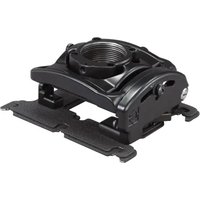
RPMC266 - Accessoire de projecteur Chief - Notice d'utilisation et mode d'emploi gratuit
Retrouvez gratuitement la notice de l'appareil RPMC266 Chief au format PDF.


| Type de produit | Support de projecteur |
| Marque | Chief |
| Modèle | RPMC266 |
| Compatibilité | Projecteurs jusqu'à 22,7 kg (50 lb) |
| Matériau | Acier à haute résistance |
| Couleur | Noir |
| Dimensions (L x l x H) | 50,8 x 25,4 x 10,2 cm |
| Poids net | 2,7 kg |
| Charge maximale | 22,7 kg |
| Rotation (pan) | 360° |
| Inclinaison (tilt) | ±15° |
| Nivellement (roll) | ±3° |
| Distance au plafond | 10 à 45 cm |
| Type de fixation | Plaque de montage universelle |
| Installation | Fixation au plafond, vis incluses |
| Entretien | Nettoyer avec un chiffon sec, ne pas utiliser de solvants |
| Sécurité | Testé selon les normes UL |
| Garantie | 5 ans |
FOIRE AUX QUESTIONS - RPMC266 Chief
Questions des utilisateurs sur RPMC266 Chief
0 question sur cet appareil. Repondez a celles que vous connaissez ou posez la votre.
Poser une nouvelle question sur cet appareil
Téléchargez la notice de votre Accessoire de projecteur au format PDF gratuitement ! Retrouvez votre notice RPMC266 - Chief et reprennez votre appareil électronique en main. Sur cette page sont publiés tous les documents nécessaires à l'utilisation de votre appareil RPMC266 de la marque Chief.
MODE D'EMPLOI RPMC266 Chief
INSTALLATION INSTRUCTIONS
SSB-266, SSM-266, SLB-266 and SLM-266 Interface Brackets
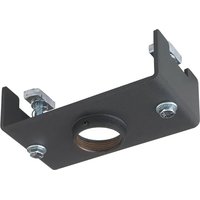
SSB-266, SSM-266, SLB-266 and SLM-266 Interface Brackets are designed for use with Chief® Series Projector Mounts. See the specific installation instructions provided with the mount for additional installation information.
Unpack carton and verify kit contents. If any listed parts are missing, immediately contact a Chief Customer Service representative.

WARNING: IMPROPER INSTALLATION CAN LEAD TO EQUIPMENT FALLING CAUSING SERIOUS PERSONAL INJURY AND DAMAGE TO EQUIPMENT! DO NOT substitute hardware. Use only hardware supplied by manufacturer!
(1) Interface Bracket (4) Screw, Phillips Flat Head, Machine, M4 x 20mm
(4) 10-24 Thumb Nuts ** (4) Spacer, 1/2 x .194 x 1/2
(1) All-Points Security Kit (1) 5/32" Security Hex Key

Note: SSB-style interface bracket connections are circled.

Note: SSM-style interface bracket connections are circled.
**Only used when installing SLB/SSB interface brackets.
NOTE: Specific to SSB-style and SSM-style interface bracket installation: All appropriate screws come pre-installed in the circled locations above. DO NOT attempt to substitute and USE ONLY this pre-installed hardware for SSB-style and SSM-style interface bracket installation.
Installation Instructions

WARNING: OVER TIGHTENING OF SCREWS CAN DAMAGE PARTS AND CAN LEAD TO SERIOUS PERSONAL INJURY AND DAMAGE TO EQUIPMENT! DO NOT over tighten screws when installing interface brackets.
NOTE: Step 1 is only required when installing an SLB/SSB interface bracket. If an SLM/SSM bracket is being installed, proceed to step 2.
- Screw thumb screws onto 10-24 x 5/8" Phillips pan head screws. DO NOT fully tighten thumb screws at this time.
- Turn projector upside down on a flat surface.
- Place four spacers over threaded inserts in bottom of projector.
- Place the interface bracket onto the spacers on bottom of the projector, aligning the mounting holes in the bracket with spacers and threaded inserts in bottom of projector and ensuring that triangle in bracket points towards front of projector.
- Position M4 x 20mm mounting screws into the four spacers and threaded inserts. Tighten all fasteners at this time, securing the bracket to the projector.
NOTE: Security screws can be substituted when mounting Interface bracket to projector by using the parts and installation instructions in the All-Points Security Kit.

Milestone AV Technologies, and its affiliated corporations and subsidiaries (collectively, "Milestone"), intend to make this manual accurate and complete. However, Milestone makes no claim that the information contained herein covers all details, conditions or variations, nor does it provide for every possible contingency in connection with the installation or use of this product. The information contained in this document is subject to change without notice or obligation of any kind. Milestone makes no representation of warranty, expressed or implied, regarding the information contained herein. Milestone assumes no responsibility for accuracy, completeness or sufficiency of the information contained in this document.

CHIEF®
Our Mounts. Your Vision.
Chief Manufacturing, a products division of Milestone AV Technologies
8401 Eagle Creek Parkway, Savage, MN 55378
• P: 800.582.6480 / 952.894.6280 • F:877.894.6918 / 952.894.6918
8802-002064 Rev00
©2010 Milestone AV Technologies,
a Duchossois Group Company
09/10
Marque : Chief
Modèle : RPMC266
Catégorie : Accessoire de projecteur