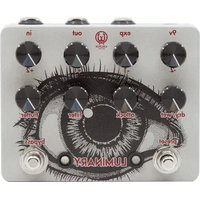
Luminary - Pédale d'effet pour guitare Walrus Audio - Notice d'utilisation et mode d'emploi gratuit
Retrouvez gratuitement la notice de l'appareil Luminary Walrus Audio au format PDF.


| Type de produit | Pédale d’octave numérique |
| Dimensions | 12,7 x 6,6 x 3,8 cm |
| Poids | 300 g |
| Alimentation | 9 V DC centre négatif, 100 mA |
| Fonctions principales | Génération d’octaves supérieures et inférieures, mélange, filtre passe-bas, modes polyphonique et monophonique (glide) |
| Entretien et nettoyage | Essuyer avec un chiffon sec et doux |
| Sécurité | Utiliser une alimentation adaptée, éviter l’humidité et les températures extrêmes |
| Pièces détachées et réparabilité | Consultez un technicien agréé pour toute réparation |
| Informations générales | Pédale d’effet pour guitare ou basse, bypass true, construction robuste |
FOIRE AUX QUESTIONS - Luminary Walrus Audio
Questions des utilisateurs sur Luminary Walrus Audio
0 question sur cet appareil. Repondez a celles que vous connaissez ou posez la votre.
Poser une nouvelle question sur cet appareil
Téléchargez la notice de votre Pédale d'effet pour guitare au format PDF gratuitement ! Retrouvez votre notice Luminary - Walrus Audio et reprennez votre appareil électronique en main. Sur cette page sont publiés tous les documents nécessaires à l'utilisation de votre appareil Luminary de la marque Walrus Audio.
MODE D'EMPLOI Luminary Walrus Audio

WALRUS®
AUDIO
LUMINARY V2
QUAD OCTAVE GENERATOR
The Luminary is a powerful polyphonic quad octave generator with many useful features for creating inspiring symphonic goodness. With the ability to dial in any combination of four separate octaves including -2, -1, +1, +2, you are able to craft many different complex sounds and textures.
The Luminary V2 now features:
- Refined octave volume knobs
- Lengthened attack time
- Revised envelope low-pass filter
- Tremolo effect on flutter knob
- Added Smart Momentary Bypassing
The Luminary has three on board presets available for saving your go-to sounds, as well as live mode. This means you can have up to four unique sounds available at any moment. Get epic steel-like sounds with the modulation parameters unengaged. You'll find more experimental options with the filter control or tremolo with the flutter knob. Couple the Luminary with an expression pedal to expand its creativity even more.
INPUTS AND OUTPUTS
Power – 9-volt DC, Center Negative, 250ma minimum.
In - 1/4 inch cable to instrument. Out - 1/4 inch cable to amplifier.
Exp - TRS 1/4 " jack for connecting an expression pedal.
CONTROLS -2, -1, +1, +2
The four knobs across the top of the pedal control the level of each octave. For example, turn up the +2 knob to hear only +2 octave, the -1 knob to hear only -1 octave, or any combination of the four knobs to mix the desired amount of each octave.
DRY/WET
The Dry/Wet knob changes the ratio of dry to wet signal sent to the output. At minimum, you will hear no effect. Set it to noon for equal parts dry and wet. Set it to maximum for 100% wet – only the octave signal will be heard. Explore the ground between minimum and noon for keeping the octave signal lower than unity gain.
ATTACK
The Attack knob controls how fast the octaves bloom in after your initial attack. At lower settings, the octaves will be right on top of your playing. The higher you set the Attack knob, the longer it will take for the octaves to swell in after your initial attack.
FILTER
The Filter knob controls the cutoff of an envelope low-pass filter on the octave signals. Set this control lower for clear, punchy octaves and higher for a more dramatic low-pass envelope effect.
FLUTTER
The Flutter knob enables a tremolo effect that is applied to the octaves. At zero, the tremolo effect is off. Increasing this knob turns the tremolo effect on and controls the rate of the effect.

PRESET LED
Indicates what preset you are using (red, green, or blue), if you are in live mode (LED off), or if you have modified a preset (LED blinking the color of the preset that has been modified).
BYPASS LED
Illuminates when in effect mode.
PRESET SWITCH
The Luminary has the ability to store three unique presets, as well as operate in live mode. The three presets are indicated by a red, green, or blue color on the preset LED. Live mode is indicated by the preset LED being off. Press this switch to scroll through the three available presets as well as live mode.
To save a preset, first scroll to the color you would like to save a preset to. Next, set all knobs to the desired settings. Finally hold down the preset switch until the flashing LED turns solid. Those settings are now saved to the color you started with.
Live mode reads the current position of all 8 knobs. Once you have saved three presets, you can set the knobs to a 4th setting and access that sound by scrolling to live mode (preset LED off) with the preset switch. This essentially gives you four presets that can be recalled with the press of a button.
BYPASS SWITCH - Press switch to turn on (effect mode) and again to turn off (bypass mode). When the switch is in off position, press and hold to temporarily activate the effect. Releasing the switch turns the effect off.

WALRUS®
AUDIO
LUMINARY V2
QUAD OCTAVE GENERATOR
EXPRESSION PEDAL
EXPRESSION PEDAL
1/4 inch TRS jack for connecting a standard expression pedal. The Luminary has five internal dip switches that let you divert control of certain knobs to an expression pedal. Each dip switch corresponds with a specific knob, or combination of knobs. You can turn on any combination of dip switches you like. The knobs associated with each dip switch are listed below
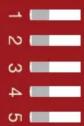
Switch 1: -1 and +1 Octave Volume
Switch 2: +1 Octave Volume
Switch 3: Attack Control
Switch 4: Flutter Control
Switch 5: Dry/Wet Control
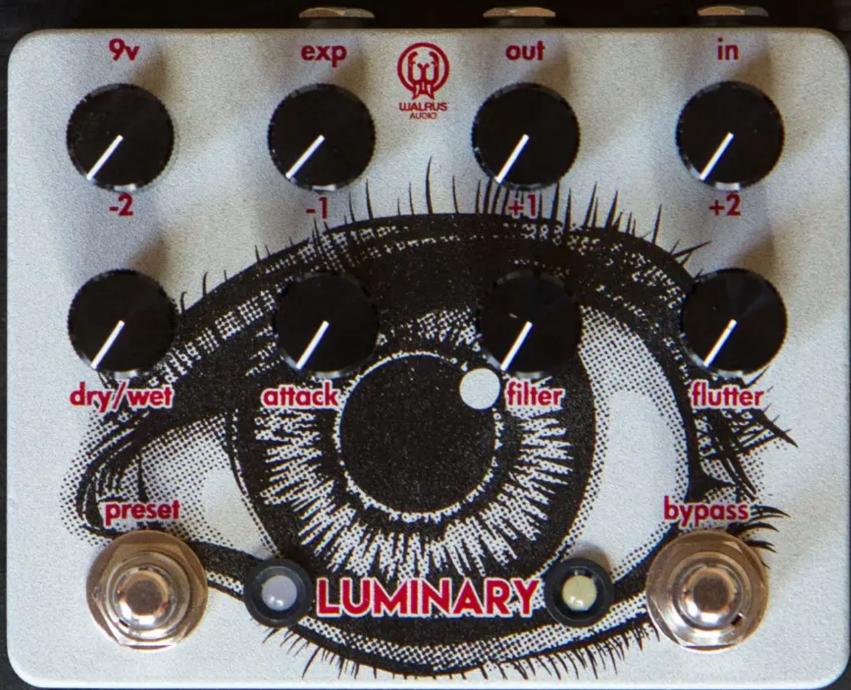

Dip switch for expression options
To use the expression pedal, first unplug the Luminary from power. Remove the four back plate screws. Use a pen or small screwdriver to switch the dip switches corresponding to the knobs you would like the expression pedal to control. Replace the back plate and four screws. With the power still disconnected, plug in the expression pedal, and then plug in the power cord. You now have control via the expression pedal of the knobs corresponding to the dip switches you turned on. The expression pedal will control the selected knobs regardless of which preset you are using. Never plug or unplug the expression pedal with the power connected.


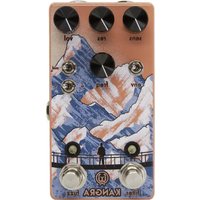

Marque : Walrus Audio
Modèle : Luminary
Catégorie : Pédale d'effet pour guitare