
SC-610 - Instrument de musique TOA - Notice d'utilisation et mode d'emploi gratuit
Retrouvez gratuitement la notice de l'appareil SC-610 TOA au format PDF.


| Type de produit | Instrument de musique électronique |
| Marque | TOA |
| Modèle | SC-610 |
| Dimensions (L x H x P) | Environ 400 x 100 x 300 mm |
| Poids | Environ 3,5 kg |
| Alimentation | Adaptateur secteur 12V DC (inclus) |
| Consommation électrique | 15 W maximum |
| Fonctions principales | Génération de sons, séquençage, effets intégrés |
| Polyphonie | 64 voix |
| Nombre de touches | 61 touches sensibles à la vélocité |
| Connectique | Sortie audio jack 6,35 mm, MIDI In/Out/Thru, USB-MIDI |
| Haut-parleurs intégrés | 2 x 10 W |
| Mémoire interne | 128 presets d'usine, 64 presets utilisateur |
| Entretien et nettoyage | Utiliser un chiffon doux et sec. Éviter les solvants. |
| Sécurité | Ne pas exposer à l'humidité, température modérée. |
| Pièces détachées et réparabilité | Contacter le service après-vente agréé TOA. |
| Accessoires inclus | Adaptateur secteur, manuel d'utilisation, câble MIDI |
| Couleur | Noir |
| Garantie | 2 ans |
FOIRE AUX QUESTIONS - SC-610 TOA
Questions des utilisateurs sur SC-610 TOA
0 question sur cet appareil. Repondez a celles que vous connaissez ou posez la votre.
Poser une nouvelle question sur cet appareil
Téléchargez la notice de votre Instrument de musique au format PDF gratuitement ! Retrouvez votre notice SC-610 - TOA et reprennez votre appareil électronique en main. Sur cette page sont publiés tous les documents nécessaires à l'utilisation de votre appareil SC-610 de la marque TOA.
MODE D'EMPLOI SC-610 TOA
1. SAFETY PRECAUTIONS
- Before installation or use, be sure to carefully read all the instructions in this section for correct and safe operation.
- Be sure to follow all the precautionary instructions in this section, which contain important warnings and/or cautions regarding safety.
• After reading, keep this manual handy for future reference.
Safety Symbol and Message Conventions
Safety symbols and messages described below are used in this manual to prevent bodily injury and property damage which could result from mishandling. Before operating your product, read this manual first and understand the safety symbols and messages so you are thoroughly aware of the potential safety hazards.

WARNING
Indicates a potentially hazardous situation which, if mishandled, could result in death or serious personal injury.

CAUTION
Indicates a potentially hazardous situation which, if mishandled, could result in moderate or minor personal injury, and/or property damage.

WARNING
- Use only the specified amplifier output voltage and impedance, as exceeding the specified limits could result in fire or other failures (high-impedance version).
- To avoid accidental air explosions, do not use the unit around gasoline, thinner or other combustibles.
- Install the unit only in a location that can structurally support the weight of the unit and the mounting bracket. Doing otherwise may result in the unit falling down and causing personal injury and/or property damage.
- Protect the unit from exposure in snowy areas, as the weight of snow build-up could cause the speaker to fall, resulting in personal injury.
- Do not use other methods than specified to mount the bracket. Extreme force is applied to the unit and the unit could fall off, possibly resulting in personal injuries.
- Attach the safety wire to the unit when mounting in locations high above the ground. Failure to do so could result in personal injury if the speaker should later fall for any reason.
- Use nuts and bolts that are appropriate for the ceiling's or wall's structure and composition. Failure to do so may cause the speaker to fall, resulting in material damage and possible personal injury.
- Tighten each nut and bolt securely. Ensure that the bracket has no loose joints after installation to prevent accidents that could result in personal injury.
- Avoid mounting the unit in locations exposed to constant vibration. The mounting bracket can be damaged by excessive vibration, potentially causing the speaker to fall, which could result in personal injury.

CAUTION
- To avoid electric shocks, be sure to switch off the amplifier power when connecting the speaker.
- Avoid installing the unit in humid or dusty locations, or in locations exposed to heaters, solvents, acid, alkali, smoke, steam or direct sunlight (except outdoor-use versions), as excessive exposure to these factors could result in speaker failure, fire or electric shock.
- Do not operate the unit for an extended period of time with the sound distorting. This is an indication of a malfunction, which in turn can cause heat to generate and result in a fire.
- Do not stand or sit on, nor hang down from the unit as this may cause it to fall down or drop, resulting in personal injury and/or property damage.
- Have the unit periodically checked by the shop from where it was purchased. Also, when mounting the unit on a vehicle, be sure to check both the speaker and its mounts before moving. Failure to do so could result in the speaker falling off due to damage or corrosion to the speaker or its mounts, and possible personal injury.
2. HOW TO USE
2.1. Handling Precautions
- When installing the speaker, be sure the drain hole is positioned facing the ground (SC-610, SC-615, and SC-630 series). Without the drain hole positioned correctly, rain could flood the speaker, causing it to fail.
- Be sure to note the following polarities when multiple speakers are used in the same location. Incorrect connections could result in no bass output or decreased volume.
Black speaker cable: Positive (+), White speaker cable: Negative (−) or COM
[Front view]

Connect the cables to other cables of the same colors in parallel connections, and to cables of different colors in series connections.
- To avoid amplifier failure, do not simultaneously connect both low- and high-impedance speakers to the amplifier. Ensure that only one type is connected.
Notes: (1) "Low-impedance" refers to speakers having no built-in matching transformer.
(2) "High-impedance" refers to speakers having a built-in matching transformer.
- Ensure only the specified line voltage (amplifier output voltage) is used for the high-impedance speakers. The line voltage is indicated on the name plate as either [25/70 V LINE] or [70/100 V LINE]. If an unspecified line voltage is connected, fire or equipment failure could result.
2.2. Connections
2.2.1. Low-impedance speakers
When using two or more speakers, all connected speakers must have identical impedance and input ratings.
(1) The total speaker impedance must be equal to the amplifier output impedance. If the total speaker impedance is less than the amplifier's output impedance, the speakers or amplifier could fail.
(2) When parallel-connecting all speakers, the total rated input of all the speakers must be greater than the amplifier output.
Note: It is highly recommended that solid wire speaker cable with diameter of over 2 mm or strand wire of over 3.5 mm ^2 be used to minimize transmission loss. When there are long distances between amplifier and speaker (30 – 50 m), connect an optional matching transformer to convert the speakers to high-impedance operation.
2.2.2. High-impedance speakers
The total rated input of all connected speakers must be equal to or smaller than the amplifier output. If the total speaker input rating is greater than the amplifier output, the amplifier could fail. Connect all speakers in parallel.
2.3. Impedance Selection
Select the desired impedance by inserting a screwdriver into the impedance selector switch slot and turning the switch. The OFF position disconnects the speaker from the amplifier and no sound is output.
Notes: (1) Speakers are factory-preset for the highest rated input of two line voltages (i.e. 100 V line in the case of the 70/100 V line version).
(2) The speaker's rated input and impedance are indicated on the name plate.
Speakers are designed to select either of the two line voltages (rated amplifier output voltage). Check to confirm the line voltage to use, and select the line voltage impedance specified on the name plate.
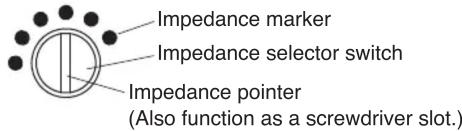

WARNING
Do not use the impedance selector switch position marked as [-], because this position could result in amplifier or speaker failure, or fire.
2.4. Assembling the Speaker
Speakers are packed in their cartons divided into the following three parts: Bell, Center and Bracket. Assemble these components as shown in the figure using four assembly screws attached to the "Center."
Applicable Speaker :
TC-615 / 615M / 630 / 630M / 631 / 631M
TH-650 / 660

Traceability Information for Europe
| Manufacturer: TOA Corporation7-2-1, Minatojima-Nakamachi, Chuo-ku, Kobe, Hyogo, Japan | Authorized representative: TOA Electronics Europe GmbHSuederstrasse 282, 20537 Hamburg, Germany |
URL: http://www.toa.jp/
Marque : TOA
Modèle : SC-610
Catégorie : Instrument de musique