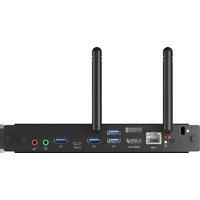
OPC51204 - Ordinateur IIYAMA - Notice d'utilisation et mode d'emploi gratuit
Retrouvez gratuitement la notice de l'appareil OPC51204 IIYAMA au format PDF.


| Type de produit | Moniteur LCD |
| Taille de l'écran | 24 pouces |
| Résolution | 1920 x 1080 (Full HD) |
| Taux de rafraîchissement | 75 Hz |
| Luminosité | 250 cd/m² |
| Rapport de contraste | 1000:1 |
| Temps de réponse | 5 ms |
| Angle de vision | 178° / 178° |
| Connectivité | HDMI, VGA, DisplayPort |
| Dimensions (avec pied) | 540 x 400 x 200 mm |
| Poids | 4,5 kg |
| Alimentation | 100-240 V, 50/60 Hz, 30 W |
| Fonctions principales | Écran Full HD, filtre de lumière bleue, mode sans scintillement |
| Entretien et nettoyage | Nettoyer avec un chiffon doux et sec. Ne pas utiliser de produits chimiques. |
| Sécurité | Utiliser sur une surface stable. Ne pas exposer à l'eau ou à une humidité excessive. |
| Pièces détachées | Câble d'alimentation, câble HDMI, pied |
| Réparabilité | Indice de réparabilité non communiqué |
FOIRE AUX QUESTIONS - OPC51204 IIYAMA
Questions des utilisateurs sur OPC51204 IIYAMA
0 question sur cet appareil. Repondez a celles que vous connaissez ou posez la votre.
Poser une nouvelle question sur cet appareil
Téléchargez la notice de votre Ordinateur au format PDF gratuitement ! Retrouvez votre notice OPC51204 - IIYAMA et reprennez votre appareil électronique en main. Sur cette page sont publiés tous les documents nécessaires à l'utilisation de votre appareil OPC51204 de la marque IIYAMA.
MODE D'EMPLOI OPC51204 IIYAMA
RF&POWER
| Function Frequency | Maximum Output Power (EIRP) | |
| WiFi | 2412-2472 MHz 19.32 dBm | |
| 5150-5250 MHz 20.72 dBm | ||
| 5250-5350 MHz 20.81 dBm | ||
| 5470-5725 MHz 21.00 dBm | ||
| 5725-5850MHz 13.96 dBm | ||
| Bluetooth 2402-2480 MHz 8.96 dBm | ||
Here, IIYAMA Corporation declares that the Slot PC complies with Directive 2014/53/EU Radio Equipment Directive, 2011/65/EU RoHS Directive, Radio Equipment Regulation 2017 and The Restriction of the Use of Certain Hazardous Substances in Electrical and Electronic Equipment Regulations 2012.
The full text of the EU and UK declaration of the conformity is available at the following internet address: https://iiyama.com
Please refer to https://iiyama.com to download the User manual and driver.
SAFETY WARNING
■ Before using and operating this device, please read thoroughly and comply with the following precautions in order to prevent accidents or mal-operations.
■ Do not charge or use the device in dusty or wet conditions, to prevent internal circuit failure.
- Keep the device away from heat sources such as an electric heater.
■ This device and its parts may contain some small components, so keep the product out of reach of children to prevent accidents.
■ This device is not water-resistant, please keep it dry.
■ The normal working temperature for the product is 0°C\~45°C, and the normal working humidity is 10%\~95%.
■ Please contact professional service personnel for maintenance services.
■ Do not insert any sharp or pointed object into the device.
■ Prevent the device from falls and collisions with other objects, which may cause damages.
■ There are heating hole on back cover, do not spray water to it or use damp cloth for cleaning;
■ Please call professional personnel for maintenance service.
STATEMENT
The image shown in this manual is indicative only. If there is inconsistency between the image and the actual product, the actual product shall govern.

User Manual
Slot PC
OPC51204
(OPC51204xx series)


We recommend recycling of used product. Please contact your dealer or iiyama service center. Recycle information is obtained via the Internet, using the address:
https://iiyama.com
You can access the Web page of different countries from there.
xx: RAM and SSD size control code
M239B21
CHECKING THE CONTENTS OF THE PACKAGE
■ Slot PC x 1
■ Installation manual x 1 (this document)

INSTALLATION PROCEDURE
NOTE
■ Before mounting and using the Monitor, please follow the steps below to install the Slot PC. The installation should be performed by at least two adult persons to avoid danger and injuries.
■ Please make sure the power cable of the Monitor is disconnected before installation.
■ Do not plug or unplug the Slot PC while the monitor is powered on. Slot PC may be broken.
■ When using for the first time, if the screen is blurred, flickering, no signal, etc. after booting, Slot PC may not be installed correctly; please check the installation status or reinstall it.
-
Insert Slot PC into the panel slot
-
Press the power button to turn it on and operate like a regular computer

Please ensure the Slot PC is inserted correctly by making sure the Caution-Label(yellow) and the fan are facing outwards.
OPS PC MODULE SPECIFICATION
| Product Specification | |
| Type Slot PC | |
| CPU | 12th Generation Intel® CoreTM i5-12450H |
| RAM DDR4 3200MHz | 8GB, Max. 32GB |
| SSD PCIe 256GB, Max. 1T | |
| Graphics | Integrated Intel® UHD Graphics for 12th Gen |
| Sound Card Integrated HS-100B | |
| Ethernet Card | Integrated 10M/100M/1000MAdaption RTL8111H |
| Wi-Fi | Intel AX200 + BT5.2Support 802.11a/b/g/n/ac/ax (Wifi 6)Speed: 2.4Gbps |
| Bluetooth 5.2 | |
| Operating system Windows 11 IoT Enterprise 64Bit | |
| Security Device Support | TPM2.0 |
| I/O Port | |
| Antenna 2 | |
| USB3.2 Gen 1 (5Gbps, DC5V, 900mA) 4 | |
| USB3.2 Gen2 10Gbps Type-C(DC5V, 900mA) (Not Support DP ALT mode) | 1 |
| HDMI2.0 OUT(Max resolution 3840 x 2160 60Hz) | 1 |
| DP1.4 OUT(Max resolution 3840 x 2160 60Hz) | 1 |
| MIC IN 1 | |
| Audio OUT 1 | |
| RJ45 | 1 |
| SSD LED (Running : Green LED blinking) | 1 |
| I/O Port | ||
| POWER LED (Power on : Red LED) | 1 | |
| 80 PIN | Support | |
| Kensington Lock | 1 | |
| Power Button | 1 | |
| System recovery Button | 1 | |
| Power | ||
| Power Requirements | 12-19Vdc, 8A | |
| Max Power | 80.7W | |
| Standby Power | 2.9W | |
| Physical Specification | ||
| Dimension | 180.0 × 119.0 × 30.0 mm( L × W × H) | |
| Dimension(package) | 267.0 × 192.0 × 72.0 mm( L × W × H) | |
| Net Weight | 0.60kg | |
| Gross Weight | 0.97kg | |
| Environmental Condition | ||
| Operation Temperature | 0°C to 45°C | |
| Operation Humidity | 10% to 95% RH (non condensing) | |
| Storage Temperature | -10°C to 50°C | |
| Storage Humidity | 10% to 95% RH (non condensing) | |
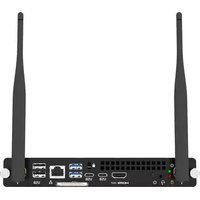
Marque : IIYAMA
Modèle : OPC51204
Catégorie : Ordinateur