ETP-01 - Extendeur Ethernet PoE Lorex - Notice d'utilisation et mode d'emploi gratuit
Retrouvez gratuitement la notice de l'appareil ETP-01 Lorex au format PDF.


| Type de produit | Caméra de surveillance |
| Marque | Lorex |
| Modèle | ETP-01 |
| Dimensions (approx.) | 10 x 5 x 5 cm |
| Poids | 150 g |
| Alimentation | 12 V DC, adaptateur secteur inclus |
| Consommation électrique | 5 W max |
| Résolution vidéo | 1080p Full HD |
| Angle de vision | 120° |
| Vision nocturne | Oui, LED infrarouge jusqu'à 10 m |
| Détection de mouvement | Oui, avec alertes push |
| Connectivité | Wi-Fi 2,4 GHz, application mobile |
| Stockage | Micro SD jusqu'à 128 Go (non inclus) |
| Audio | Microphone et haut-parleur intégrés |
| Installation | Intérieur ou extérieur (IP65) |
| Entretien et nettoyage | Nettoyer avec un chiffon doux et sec |
| Sécurité | Ne pas exposer à des températures extrêmes |
| Pièces détachées et réparabilité | Aucune pièce détachée disponible, contacter le SAV |
| Informations générales | Garantie 2 ans, fabriqué en Chine |
FOIRE AUX QUESTIONS - ETP-01 Lorex
Questions des utilisateurs sur ETP-01 Lorex
0 question sur cet appareil. Repondez a celles que vous connaissez ou posez la votre.
Poser une nouvelle question sur cet appareil
Téléchargez la notice de votre Extendeur Ethernet PoE au format PDF gratuitement ! Retrouvez votre notice ETP-01 - Lorex et reprennez votre appareil électronique en main. Sur cette page sont publiés tous les documents nécessaires à l'utilisation de votre appareil ETP-01 de la marque Lorex.
MODE D'EMPLOI ETP-01 Lorex
Quick Start Guide
ETP-01T / ETP-01R
Please read carefully the instruction manual before use. Contents of this manual are subject to change without prior notice for reasons such as functionality enhancements.
Rev.4.0
Package

natural_image
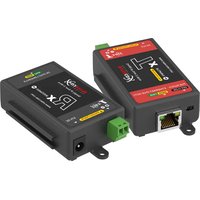
Technical line drawing of two rectangular electronic components with mounting holes (no text or symbols)ETP-01T (Transmitter) ETP-01R (Receiver)

Quick Start Guide
Hardware Overview
Right
Left

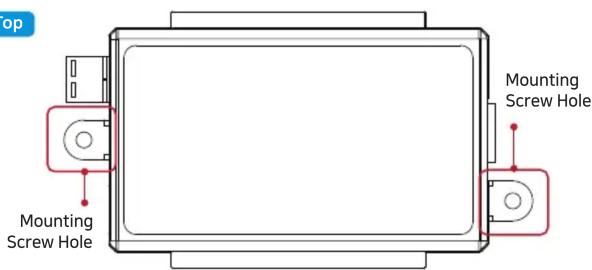
Top
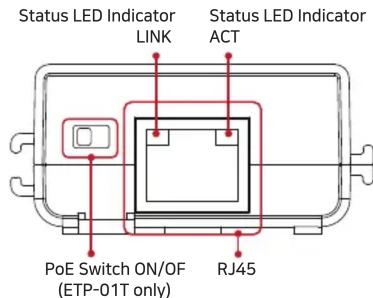
LED Indicators
| Indicator Color Function | ||
| LINK | Ethernet Data Act | |
| ACT | Ethernet Connect Act | |
ETP-01 Series are High-Speed, long distance Ethernet & PoE extender that makes possible to transmit the Ethernet signal and PoE up to 300m through single pair of twisted wires.
It is cost-effective and time saving solution to migrate existing analog system to IP based system since ETP-01 series support easy installation utilizing the existing UTP bundle cables or any single twisted pair cables.
With long distance transmission feature, the device makes to overcome 100 meters distance limitation easily and reduces the construction cost significantly compared with fiber optic configuration.
Overview
- Long reach Ethernet & PoE extension over existing 2-Wire twisted cable
- Data + Power over twisted cable
- Data and PoE distance up to 300 m
- 100Mpbs Full Duplex
- PoE, PoE+, Extra PoE (Max. 60W PoE output, ETP-01T model only with DC Power adapter)
- LED Indication (Data, Power)
- Plug & Play
- Surge Protection
- Support PoE, PoE+ Input (25.5W) from PoE Switch / PoE NVR (ETP-01R model only)
- Slim design
Features
- Connect Ethernet cable (Cat5e or better) from PoE Switch/NVR to ETP-01R. Check LEDs on ETP-01R.

- Connect single twisted pair cable to ETP-01R. Connect single twisted pair cable from ETP-01R to ETP-01T.

- Connect Ethernet cable (Cat5e or better) from ETP-01T to IP Camera. Check LEDs on ETP-01T.
→ Set ETP-01T, PoE Switch ON to supply direct power to IP camera. Set ETP-01T, PoE Switch OFF to connect PC or network switch devices.

Applications
[Simply IP and PoE over 2-Wire]

flowchart
graph LR
    A["PoE Camera"] --> B["ETP-01T"]
    B --> C["2-Wire Twisted Cable"]
    C --> D["ETP-01R"]
    D --> E["PoE NVR"]
    style A fill:#f9f,stroke:#333
    style B fill:#ccf,stroke:#333
    style C fill:#cfc,stroke:#333
    style D fill:#fcc,stroke:#333
    style E fill:#cff,stroke:#333
[High Power over 2-Wire]

flowchart
graph LR
    A["PoE Camera"] --> B["ETP-01T"]
    B --> C["2-Wire Twisted Cable"]
    C --> D["57V DC/1.2A Power Supply (Sold Separately)"]
    D --> E["ETP-01R"]
    E --> F["NVR"]
    F --> G["Computer"]
    style A fill:#f9f,stroke:#333
    style B fill:#ccf,stroke:#333
    style C fill:#cfc,stroke:#333
    style D fill:#fcc,stroke:#333
    style E fill:#cff,stroke:#333
    style F fill:#ffc,stroke:#333
    style G fill:#cfc,stroke:#333
[Extra PoE (60W) over 2-Wire]

flowchart
graph LR
    A["PoE Camera"] --> B["ETP-01T"]
    B --> C["57V DC/1.2A Power Supply (Sold Separately)"]
    C --> D["2-Wire Twisted Cable"]
    D --> E["ETP-01R"]
    E --> F["PoE NVR"]
    F --> G["Computer"]
    B --> H["EoC"]
    H --> D
Specification
| Model ETP-01T ETP-01R | |||
| Interface | 2-Wire | 1 x 2-Pin Terminal Block-Ethernet over 2-Wire cable | |
| Ethernet 1 | x RJ45 - 100 Base-T | ||
| Transmission Rate | 100Mbps Full Duplex(100Mbps between Intercoax devices) | ||
| Transmission Distance | Ethernet Up to 300m (1 Pair of Cat.5e) | ||
| PoE (PoC) Up to 300m (1 Pair of Cat.5e / 7W Camera) | |||
| LED Indication | Ethernet 1 | x Link (Yellow) / 1 x ACT (Green) | |
| Power | Input T-Linx or DC48V~57V | PoE Switch or DC48V~57V | |
| PoE Output | IEEE802.3af (PoE), IEEE802.3at (PoE+), Extra PoE up to 60W with 57V Power Adaptor | PoE Not Supported PoC Only | |
| Mechanical | Dimension 93(L) x 51(W) x 24(H)mm | ||
| Weight 52 g | |||
| Environment | Operating Temp | -20 ~ 60°C | |
| Storage Temp | -30 ~ 80°C | ||
| Relative Humidity | 10% ~ 90% | ||
| Compliance | Certification FCC, CE, KC, RoHS | ||
| Surge Protection | IEC 61000-4-5 4kV(1.2 / 50us), 2kA(8 / 20us) | ||
| Optional Accessories 57VDC / 1.2A External Power Supply | |||
Caution
- Please install the device following the installation guide.
- Do not touch the device and cable with wet hands.
- Keep away from moisture and shock.
- Do not install near any heat sources such as radiators, heat registers, stoves or other apparatus that produce heat.
- Indoor use only. (Use waterproof junction box when it is used in outdoor)
- Do not use for other purposes.
- Do not disassemble or modify this device.
- Do not put any sticker or paint on it.
- If this device is defective or malfunctioning, please unplug the power source immediately and contact dealer or service center.
- Please use the rated power supply for the product.
- Connect DC power to this device first and then to AC outlet when using DC power supply.
Warranty
- This device has passed the quality control and product inspection.
- Please install and use according to the installation guide.
- The warranty period for this product is 24 months from the date of purchase.
- If this device is defective or malfunctioning, please unplug the power adapter immediately and contact dealer or service center.
- Any damages or breakage from user's abuse, accident, modification or natural disasters will not be covered manufacturer's warranty.


Intercoax Co., Ltd.
Please visit below website for more detailed information.
Web: http://www.intercoax.com Tel: +82.31.365.3133\~4
E-mail: info@intercoax.com Fax: +82. 31. 365. 3135
This device complies with part 15 of the fcc rules. Operation is subject to the following two conditions :
(1) This device may not cause harmful interference, and
(2) This device must accept any interference received including interference that may cause undesired operation
Marque : Lorex
Modèle : ETP-01
Catégorie : Extendeur Ethernet PoE