IGP-0310 - Commutateur Equip - Notice d'utilisation et mode d'emploi gratuit
Retrouvez gratuitement la notice de l'appareil IGP-0310 Equip au format PDF.


| Type de produit | Commutateur réseau non administrable |
| Marque | Equip |
| Modèle | IGP-0310 |
| Nombre de ports | 8 ports RJ45 10/100/1000 Mbps |
| Vitesse de commutation | Capacité de commutation 16 Gbps |
| Dimensions (L x P x H) | 200 x 120 x 30 mm |
| Poids | 0,5 kg |
| Alimentation | Adaptateur secteur externe 12V / 1A |
| Consommation électrique | 6 W maximum |
| Fonctions principales | Commutation Gigabit, détection automatique MDI/MDIX, contrôle de flux IEEE 802.3x, support Jumbo Frame |
| Indicateurs LED | Alimentation, liaison/activité par port |
| Température de fonctionnement | 0°C à 40°C |
| Humidité de fonctionnement | 10% à 90% HR (sans condensation) |
| Matériau du boîtier | Métal |
| Montage | Montage mural ou sur étagère |
| Entretien et nettoyage | Débrancher l'appareil et nettoyer avec un chiffon doux et sec. Ne pas utiliser de produits chimiques. |
| Sécurité | Ne pas exposer à l'humidité, aux liquides ou à des températures extrêmes. Utiliser l'adaptateur fourni. |
| Pièces détachées et réparabilité | Adaptateur secteur disponible en pièce détachée. Pas de composants réparables par l'utilisateur. |
| Informations générales | Garantie 2 ans. Conforme aux normes CE, RoHS. |
FOIRE AUX QUESTIONS - IGP-0310 Equip
Questions des utilisateurs sur IGP-0310 Equip
0 question sur cet appareil. Repondez a celles que vous connaissez ou posez la votre.
Poser une nouvelle question sur cet appareil
Téléchargez la notice de votre Commutateur au format PDF gratuitement ! Retrouvez votre notice IGP-0310 - Equip et reprennez votre appareil électronique en main. Sur cette page sont publiés tous les documents nécessaires à l'utilisation de votre appareil IGP-0310 de la marque Equip.
MODE D'EMPLOI IGP-0310 Equip
levelone
IGP-0310
Industrial Gigabit Media Converter Manual
Package Contents
- IGP-0310
- User Manual
CE Marking Warning
CE marking is a certification mark that indicates conformity with health, safety, and environmental protection standards for products sold within the European Economic Area (EEA). The CE marking is also found on products sold outside the EEA that have been manufactured to EEA standards. This makes the CE marking recognizable worldwide even to people who are not familiar with the European Economic Area.
WEEE
WEEE is waste electrical and electronic equipment. It is end-of-life electrical and electronic equipment and covers virtually everything with a plug or battery.... The EC introduced the WEEE Directive in 2002 to address the environmental impacts of unwanted electrical and electronic equipment at end-of-life disposal.
FCC Certifications
This Equipment has been tested and found to comply with the limits for a Class B digital device, pursuant to part 15 of the FCC Rules. These limits are designed to provide reasonable protection against harmful interference when the equipment is operated in a commercial environment. This equipment generates, uses, and can radiate radio frequency energy and, if not installed and used in accordance with the instruction manual, may cause harmful interference to radio communications. Operation of this equipment in a residential area is likely to cause harmful interference in which case the user will be required to correct the interference at his own expense.
This device complies with Part 15 of the FCC Rules. Operation is subject to the following two conditions: (1) this device may not cause harmful interference, and (2) this device must accept any interference received; including interference that may cause undesired operation.

Overview
IGP-0310 full gigabit industrial PoE switch that supports up to 1*10/100/1000M 30W PD, 1*10/100/1000M 30W PSE
downlink ports, 1*1000M SFP port. 2*10/100/1000M ports support PoE+, conforming to IEEE 802.3af/at standard.
It has the characteristics of reliable work, strong and durable, high performance and so on. It can be used in security network video monitoring system, network engineering and other occasions.
Supports relay alarm for power off, network broken, PoE off;
6KV surge protection, 6KV contact/8KV air ESD protection;
Supports desktop installation, which is reliable and durable, and can be used in security network video monitoring, network engineering and other occasions.
Picture
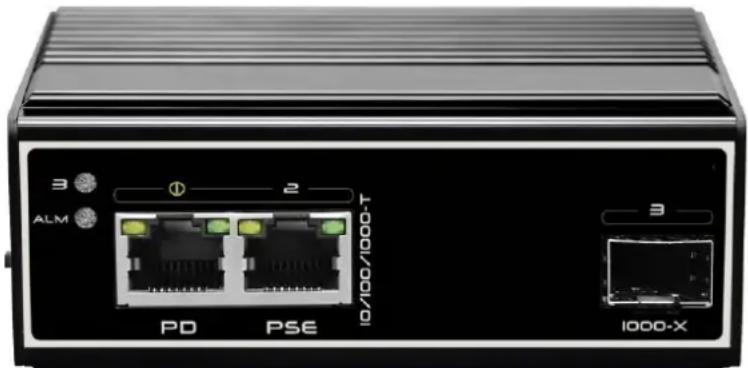
natural_image
Front view of a black network device with two Ethernet ports (PD and PSE) and two labeled connectors (ALM, 10/100/1000-T), no readable text beyond labels.Features
With 1*10/100/1000M 30W PD, 1*10/100/1000M 30W PSE downlink ports, 1*1000M SFP port;
Supports relay alarm for power off, network broken, PoE off;
✿ 6KV surge protection, 6KV contact/8KV air ESD protection;
Supports desktop installation, which is reliable and durable, and can be used in security network video monitoring, network engineering and other occasions.
Supports working temperature -40°C\~75°C.
◆ Specifications
| Parameter | Specifications |
| Power supply | Powered by PoE Ethernet port |
| Consumption | Self consumption<5W |
| Downlink ports | Ports 1: 10/100/1000Base-T 30W PD ;Ports 2: 10/100/1000Base-T 30W PSE ; |
| Uplink ports | Port 3: 1000Base-X SFP |
| Relay alarm | Relay alarm for power off, network broken, PoE off; |
| Cable and distance | Use cat5e/6,100m max |
| Standard | IEEE802.3, IEEE802.3u, IEEE802.3z |
| Switch fabric | 6 Gbps |
| Though put | 4.46 Mpps |
| Buffer | 1M |
| MAC address table | 8K |
| Indicator | Uplink3: Green LEDs indicate Link/ActDownlink 1~2: On RJ45 green LEDs indicate Link/ActYellow LEDs indicate PoE |
| Protection | Surge: 6KV, standard: IEC61000-4-5ESD: 6KV: contact / 8KV: air, standard:IEC61000-4-2 |
| Working temperature | -40°C~75°C |
| Storage temperature | -40°C~85°C |
| Humidity | 0~95%(No condensation) |
| Dimension(L×W×H) | 101 mm×65 mm×36mm |
| Material | Aluminium alloy |
| Colour | Black |
| Net-weight | 300g |
◆ Panel diagram
Front panel

- Left panel

Attention 1: This product must be well grounded against lightning, please use better than 20# cable to connect the grounding terminal and ground.
◆ Application
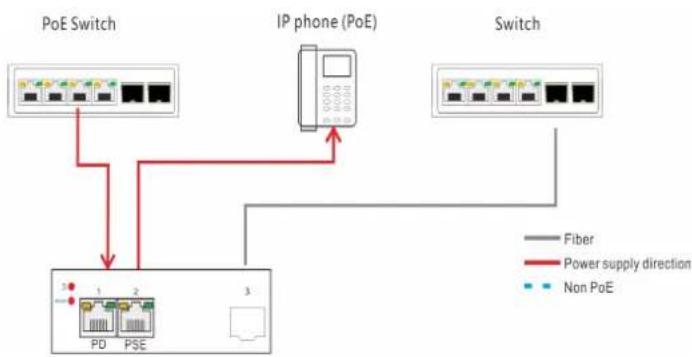
flowchart
graph TD
    A["PoE Switch"] --> B["IP phone (PoE)"]
    B --> C["Switch"]
    D["1"] --> E["PD"]
    F["2"] --> G["PSE"]
    H["3"] --> I["Non PoE"]
    J["Fiber"] --> B
    K["Power supply direction"] --> B
Dimensions

Order information
| Model | Description |
| IGP-0310 | With 1*10/100/1000M 30W PD, 1*10/100/1000M 30W PSE downlink ports, 1*1000M SFP port; Supports relay alarm function for power off, network broken and PoE off. |



Marque : Equip
Modèle : IGP-0310
Catégorie : Commutateur