
DHI-ARB1606 - Recepteur Dahua Technology - Notice d'utilisation et mode d'emploi gratuit
Retrouvez gratuitement la notice de l'appareil DHI-ARB1606 Dahua Technology au format PDF.


| Type de produit | Récepteur de signaux sans fil |
| Marque | Dahua Technology |
| Modèle | DHI-ARB1606 |
| Dimensions | 150 x 100 x 30 mm |
| Poids | 200 g |
| Alimentation | 12 V CC (adaptateur secteur fourni) |
| Fréquence de fonctionnement | 433 MHz |
| Nombre de zones | 16 |
| Portée maximale | 100 m en champ libre |
| Fonctions principales | Réception de signaux de détecteurs sans fil, sortie relais, supervision de zone, indication LED |
| Type de montage | Mural (support inclus) |
| Température de fonctionnement | -10 °C à 50 °C |
| Humidité relative | Jusqu'à 85 % (sans condensation) |
| Entretien et nettoyage | Nettoyer avec un chiffon doux et sec. Ne pas utiliser de produits chimiques. |
| Sécurité | Utilisation en intérieur uniquement. Respecter les normes électriques locales. |
| Pièces détachées et réparabilité | Adaptateur secteur, antenne, supports de montage. Réparation par un professionnel recommandée. |
| Informations générales | Récepteur pour système d'alarme sans fil Dahua. Compatible avec les détecteurs de la série DHI-ARB. |
FOIRE AUX QUESTIONS - DHI-ARB1606 Dahua Technology
Questions des utilisateurs sur DHI-ARB1606 Dahua Technology
0 question sur cet appareil. Repondez a celles que vous connaissez ou posez la votre.
Poser une nouvelle question sur cet appareil
Téléchargez la notice de votre Recepteur au format PDF gratuitement ! Retrouvez votre notice DHI-ARB1606 - Dahua Technology et reprennez votre appareil électronique en main. Sur cette page sont publiés tous les documents nécessaires à l'utilisation de votre appareil DHI-ARB1606 de la marque Dahua Technology.
MODE D'EMPLOI DHI-ARB1606 Dahua Technology
Alarm Box User's Manual
Thank you for using our alarm box. Before the operation, please read this user's manual carefully.
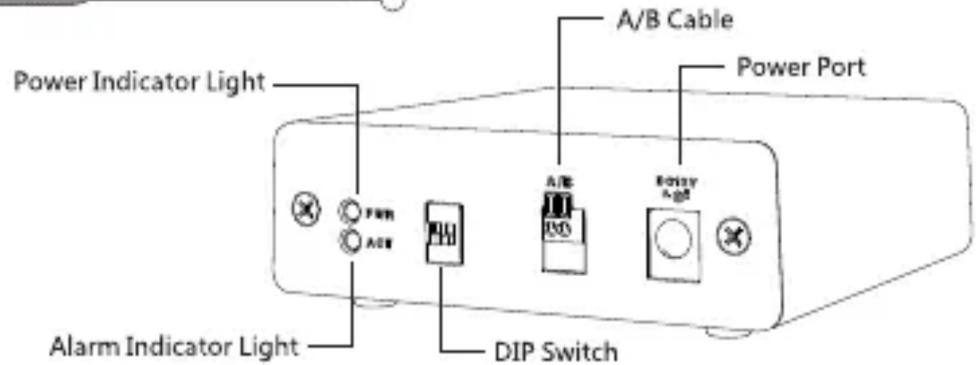
01 Sketch Map
02 Port Definition

| Icon | Note |
| G | GND |
| +12V | Rated power output. Current :500mA |
| CTRL 12V | Control the power output of the 6th channel.Current: 500mA.When there is an alarm output, close power output.When cancel the alarm output, open power output. |
| NO5 C5 NC5 | One group of NO/NC on-off output |
| NO 1 C1,NO 2 C2,NO 3 C3,NO 4 C4 | Four groups of NO activation output (on-off button) |
| A 1~A 16 | Corresponding to alarm input ALARM 1~ALARM 16.The alarm input becomes valid in low voltage. |
03 Operations
Connection
Step 1 Set alarm box address (Set the corresponding address according to DIP settings. Please refer to the table listed below.) The communication error occurs if the setting address already exists.
| Address | 1 | 2 |
| 0 | OFF | OFF |
| 1 | ON | OFF |
| 2 | OFF | ON |
| 3 | ON | ON |
Step 2 Boot up DVR and connect the alarm box to the RS485 port.
Note
The communication error occurs if the A/B cable connection is wrong.
Step 3 Set alarm box properties.
Step 4 The alarm box address shall the same with the DIP address settings. Connect the alarm box power cable.
The device power connection is OK if the alarm box red light is on.
Note
Use the 1 to 2 power cable included in the accessories bag to connect alarm box to the DVR to provide power.
Communication
The green light becomes on within 3 minutes after connecting the alarm box to the power. It flashes in each second if the communication is OK
Alarm Input
Enable alarm function.
- When the device type is NO, short-circuit the alarm input with the GND, it can trigger the corresponding alarm actions.
- When the device type is NC, it can auto trigger the corresponding event actions.
Alarm Output
It is the same as the local alarm.
Marque : Dahua Technology
Modèle : DHI-ARB1606
Catégorie : Recepteur