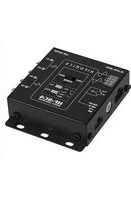
HF-SC4 - Convertisseur audio/vidéo Hifonics - Notice d'utilisation et mode d'emploi gratuit
Retrouvez gratuitement la notice de l'appareil HF-SC4 Hifonics au format PDF.


| Type de produit | Convertisseur audio/vidéo |
| Marque | Hifonics |
| Modèle | HF-SC4 |
| Dimensions (L x l x H) | 105 x 65 x 28 mm |
| Poids | 160 g |
| Alimentation | USB 5V / 500 mA (câble fourni) |
| Entrées vidéo | Composite RCA (CVBS) |
| Sortie vidéo | HDMI 1080p |
| Entrées audio | RCA stéréo (L/R) |
| Sortie audio | HDMI intégrée |
| Fonctions principales | Conversion analogique vers numérique, mise à l'échelle 720p/1080p |
| Température de fonctionnement | 0 °C à 40 °C |
| Entretien et nettoyage | Nettoyer avec un chiffon doux et sec. Ne pas utiliser de solvants. |
| Sécurité | Ne pas exposer à l'humidité ou à des températures extrêmes. Débrancher en cas d'orage. |
| Pièces détachées et réparabilité | Aucune pièce détachée disponible. Appareil non réparable par l'utilisateur. |
| Garantie | 2 ans |
| Contenu de la boîte | Convertisseur, câble USB, câble RCA, manuel d'utilisation |
FOIRE AUX QUESTIONS - HF-SC4 Hifonics
Questions des utilisateurs sur HF-SC4 Hifonics
0 question sur cet appareil. Repondez a celles que vous connaissez ou posez la votre.
Poser une nouvelle question sur cet appareil
Téléchargez la notice de votre Convertisseur audio/vidéo au format PDF gratuitement ! Retrouvez votre notice HF-SC4 - Hifonics et reprennez votre appareil électronique en main. Sur cette page sont publiés tous les documents nécessaires à l'utilisation de votre appareil HF-SC4 de la marque Hifonics.
MODE D'EMPLOI HF-SC4 Hifonics
HIFONICS
HF-SC4
4-KANAL SIGNAL KONVERTER
BESTIMMUNGSGEMÄSSER GEBRAUCH
Dieses Gerät ist nur für den Gebrauch in Fahrzeugen mit +12V Stromversorgung und negativer Masse geeignet. Das Gerät dient dazu, die Hochpegelsignale der Lautsprecherausgänge eines Steuergeräts/Autoradios in Vorverstärkersignale (Niederpegelsignale) zu konvertieren, damit diese an weiteren Audiogeräten wie Verstärkern oder Prozessoren benutzt werden können.
INSTALLATIONSHINWEISE
Klemmen Sie sicherheitshalber vor Installation des Geräts den Massepol Ihr Fahrzeugbatterie ab, um Kurzschlüsse und Stromschläge zu vermeiden. Achten Sie darauf, dass das Gerät sicher befestigt wird und bei der Montage keine wichtigen Komponenten des Fahrzeugs beschädigt werden.

Bitte achten Sie beim Anschliessen stets auf die korrekte Polarität aller Anschlüsse!
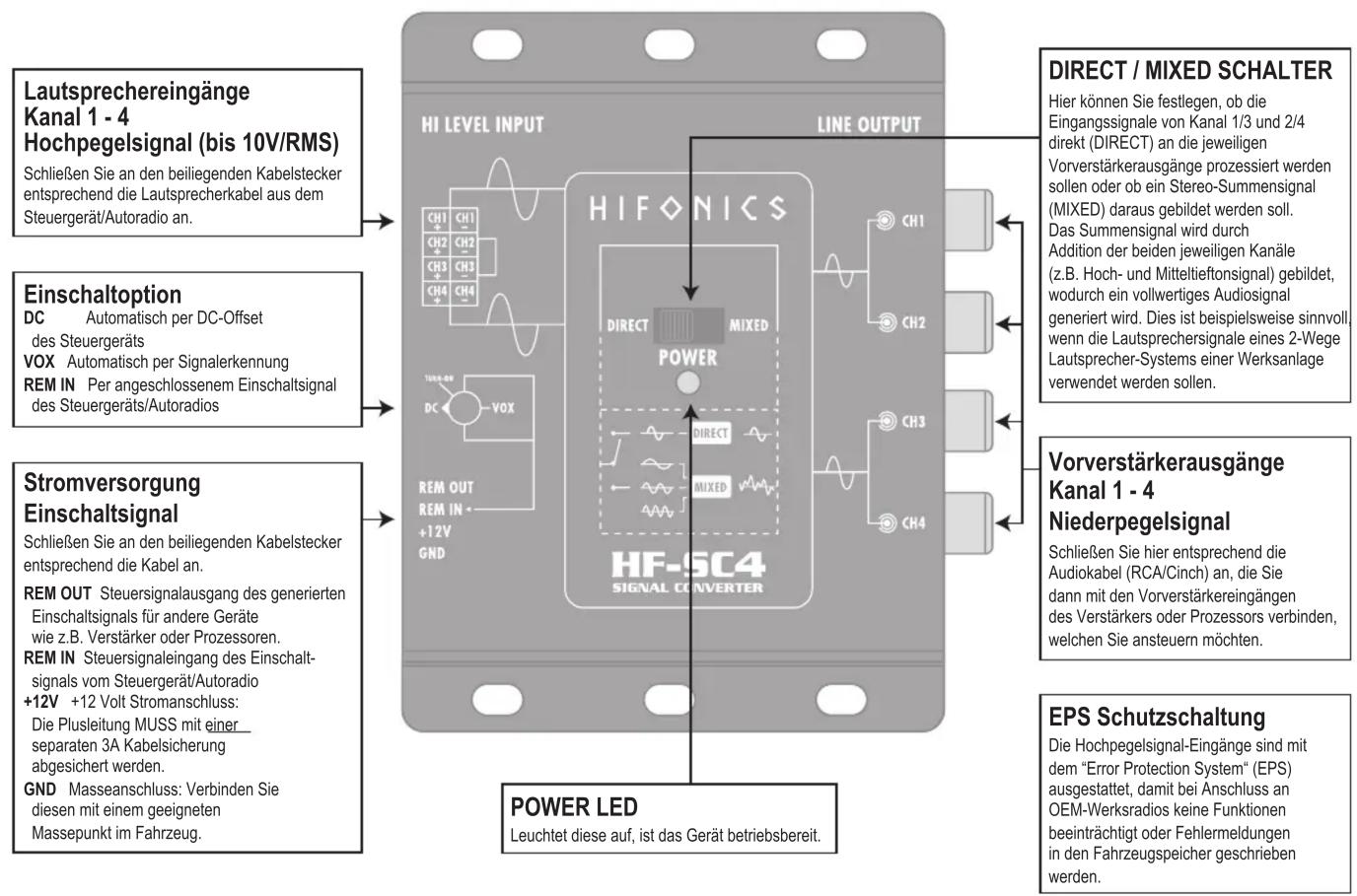
flowchart
graph TD
    A["Lautsprechereingänge Kanal 1 - 4 Hochpegelsignal (bis 10V/RMS)"]
    B["Einschaltoption"]
    C["Stromversorgung Einschaltsignal"]
    D["POWER LED"]
    E["DIRECT / MIXED SCHALTER"]
    F["Vorverstärkerausgänge Kanal 1 - 4 Niederpegelsignal"]
    G["EPS Schutzschaltung"]

    subgraph A
        H["HI LEVEL INPUT"]
        I["LINE OUTPUT"]
        J["HIFONICS"]
        K["POWER"]
        L["HF-SC4 SIGNAL CONVERTER"]
    end

    subgraph B
        M["DC Automatisch per DC-Offset des Steuergeräts"]
        N["VOX Automatisch per Signalerkennung"]
        O["REM IN Per angeschlossenem Einschaltsignal des Steuergeräts/Autoradios"]
    end

    subgraph C
        P["Rem OUT Steuersignalausgang des generierten Einschaltsignals für andere Geräte wie z.B. Verstärker oder Prozessoren."]
        Q["REM IN Steuersignaleingang des Einschaltsignals vom Steuergerät/Autoradio +12V +12 Volt Stromanschluss: Die Plusleitung MUSS mit einer separaten 3A Kabelsicherung abgesichert werden."]
        R["GND Masseanschluss: Verbinden Sie diesen mit einem geeigneten Massepunkt im Fahrzeug."]
    end

    subgraph D
        S["POWER LED"]
        T["LEuchtet diese auf, ist das Gerät betriebsbereit."]
    end

    subgraph F
        U["Schließen Sie hier entsprechend die Audiokabel (RCA/Cinch) an, die Sie dann mit den Vorverstärkereingängen des Verstärkers oder Prozessors verbinden, welchen Sie ansteuern möchten."]
    end
STECKBRÜCKE FÜR „SCHWEBENDE“ MASSE
Sollten unerwartet Störgeräusche von der Lichtmaschine zu hören sein, können Sie die angeschlossene Masse des Fahrzeugs vom Vorverstärkersignal trennen. Klemmen Sie dafür zuerst den Kabelstecker der Stromversorgung am Gerät ab und öffnen dann vorsichtig das Gehäuse mittels geeignetem Werkzeug.
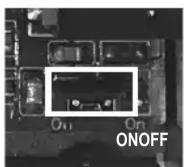
Im Geräteinnern befindet sich eine kleine Steckbrücke rechts unten. Ziehen mit einer Zange vorsichtig die Steckbrücke heraus und stecken sie auf die Position OFF ein. Dadurch wird eine schwebende Masse (Floating Ground) erzeugt.
Bauen Sie danach das Gehäuse wieder zusammen und schließen das Gerät zum Betrieb wieder an.
HIFONICS
HF-SC4
4-CHANNEL SIGNAL CONVERTER
INTENDED USE
This device is only suitable for use in vehicles with +12V power supply and negative ground. The device is used to convert the high-level signals from the loudspeaker outputs of a head unit / car radio into preamplifier signals (low-level signals) so that these can be used on other audio devices such as amplifiers or processors.
INSTALLATION INSTRUCTIONS
To be on the safe side, disconnect the ground terminal of your vehicle battery before installing the device in order to avoid short circuits and electric shocks. Make sure that the device is securely attached and that no important components of the vehicle are damaged during installation.

When connecting, please ensure that all connections have the correct polarity!

flowchart
graph TD
    A["Speaker Inputs\nChannel 1/4\nHigh Level Signal (until 10V/RMS)\nConnect the loudspeaker cable from the head unit / car radio to the enclosed cable connector."] --> B["HI LEVEL INPUT"]
    C["Turn-On Options\nDC Automatically via the DC offset of the head unit / car radio\nVOX Automatically via signal detection\nREM IN Via the connected turn-on signal of the head unit / car radio"] --> D["TUR-ON\nDC VOX"]
    E["Power Supply\nTurn-on Signal\nConnect the cables accordingly to the enclosed cable connector.\nREM OUT Turn-on signal output of the generated turn-on signal for other devices such as amps or processors.\nREM IN Turn-on signal of the head unit / car radio +12V +12 volt power connection:\nThe positive +12 V cable MUST be secured with a separate 3A cable fuse.\nGND Ground connection:\nConnect this to a suitable ground point in the vehicle."] --> F["POWER LED\nIf this lights up, the device is ready for use."]
    G["LINE OUTPUT"] --> H["HIFONICS"]
    H --> I["DIRECT MIXED POWER"]
    I --> J["CH1 CH2 CH3 CH4"]
    K["PRE-amplifier Outputs\nChannel 1 - 4 Low Level Signal\nConnect here the audio cables (RCA) accordingly, which you then connect to the preamplifier inputs of the amplifier or processor that you want to control."] --> L["CH1 CH2 CH3 CH4"]
    M["EPS Protection Circuit\nThe high level signal inputs are equipped with the "Error Protection System" (EPS) so that no functions are impaired or error messages are written to the vehicle memory when connected to OEM factory radios."] --> N["CH1 CH2 CH3 CH4"]
    O["DIRECT / MIXED SWITCH"] --> P["Here you can specify whether the input signals from channels 1/3 and 2/4 should be processed directly (DIRECT) to the respective preamp outputs or whether a stereo composite signal (MIXED) is to be formed from it. The sum signal is through Addition of the two respective channels (e.g. high and mid-bass signal), which generates a full-fledged audio signal. This is useful, for example, if the loudspeaker signals of a 2-way loudspeaker system in a factory system are to be used."] --> Q["CH1 CH2 CH3 CH4"]
JUMPER FOR FLOATING GROUND
If you unexpectedly hear interference from the alternator, you can disconnect the connected ground of the vehicle from the pre-amplifier signal. To do this, first disconnect the power supply cable plug from the device and then carefully open the housing using a suitable tool.
There is a small jumper inside the device at the bottom right. Carefully pull out the jumper with a pair of pliers and insert it in the OFF position. This creates a floating ground.
Then reassemble the housing and reconnect the device for operation.

Marque : Hifonics
Modèle : HF-SC4
Catégorie : Convertisseur audio/vidéo