
HTL1505 - Barre de son PHILIPS - Notice d'utilisation et mode d'emploi gratuit
Retrouvez gratuitement la notice de l'appareil HTL1505 PHILIPS au format PDF.


| Marque | Philips |
| Modèle | HTL1505 |
| Type de produit | Barre de son |
| Dimensions (L x H x P) | 650 x 75 x 100 mm |
| Poids | 2,2 kg |
| Alimentation | 100-240 V ~ 50/60 Hz |
| Consommation électrique | 30 W |
| Puissance de sortie totale | 60 W RMS |
| Nombre de canaux | 2.1 |
| Connectivité | Bluetooth, HDMI ARC, entrée optique, entrée AUX |
| Entrée USB | Oui (pour lecture de fichiers MP3) |
| Formats audio supportés | MP3, WMA, AAC |
| Fonctions principales | Amplification du son TV, mode nuit, égaliseur pré-réglé |
| Accessoires inclus | Télécommande, câble d'alimentation, câble audio 3,5 mm, câble optique, manuel d'utilisation |
| Température de fonctionnement | 0 °C à 40 °C |
| Humidité de fonctionnement | 20 % à 80 % (sans condensation) |
| Entretien et nettoyage | Débranchez l'appareil avant nettoyage. Utilisez un chiffon doux et sec. N'utilisez pas de produits abrasifs ou liquides. |
| Sécurité | Ne pas exposer à l'eau, à la chaleur excessive ou aux chocs. Utiliser dans un endroit bien ventilé. |
| Pièces détachées et réparabilité | Les pièces de rechange (télécommande, adaptateur secteur) sont disponibles via le service client Philips. Le produit n'est pas conçu pour une réparation par l'utilisateur. |
| Informations générales | Utilisation en intérieur uniquement. Classe de protection II. Marquage CE. |
FOIRE AUX QUESTIONS - HTL1505 PHILIPS
Questions des utilisateurs sur HTL1505 PHILIPS
0 question sur cet appareil. Repondez a celles que vous connaissez ou posez la votre.
Poser une nouvelle question sur cet appareil
Téléchargez la notice de votre Barre de son au format PDF gratuitement ! Retrouvez votre notice HTL1505 - PHILIPS et reprennez votre appareil électronique en main. Sur cette page sont publiés tous les documents nécessaires à l'utilisation de votre appareil HTL1505 de la marque PHILIPS.
MODE D'EMPLOI HTL1505 PHILIPS
PHILIPS
1000 series
Soundbar Speaker
HTLI505
User manual

natural_image
Close-up of a dark textured cylindrical object with no visible text or symbolsContents
1 Important 2
Help and support 2
Safety 2
Care for your product 3
Care of the environment 3
Compliance 4
2 Your SoundBar 4
Main unit 4
Remote control 5
Connectors 6
3 Connect 6
Placement 6
Connect the SoundBar 7
Connect audio from TV and other devices 8
4 Use your SoundBar 9
Adjust the volume 9
MP3 player 9
Play audio through Bluetooth 10
Auto standby 10
Apply factory settings 10
Update software 10
5 Wall mount 11
6 Product specifications 11
7 Troubleshooting 12
1 Important
Read and understand all instructions before you use your product. If damage is caused by failure to follow instructions, the warranty does not apply.
Help and support
For extensive online support, visit www.philips.com/support to:
- download the user manual and the quick start guide
• watch video tutorials (available only for selected models)
• find answers to frequently answered questions (FAQs) - email us a question
• chat with our support representative.
Follow the instructions on the website to select your language, and then enter your product model number.
Alternatively, you can contact Consumer Care in your country. Before you contact, note down the model number and serial number of your product. You can find this information on the back or bottom of your product.
Important safety instructions
• Read these instructions.
- Keep these instructions.
• Heed all warnings.
• Follow all instructions.
• Do not use this apparatus near water.
• Clean only with dry cloth.
- Do not block any ventilation openings. Install in accordance with the manufacturer's instructions.
- Do not install near any heat sources such as radiators, heat registers, stoves, or other apparatus (including amplifiers) that
produce heat.
• Do not defeat the safety

purpose of the polarized or grounding-type plug.
A polarized plug has two blades with one wider than the other. A grounding type plug has two blades and a third grounding prong. The wide blade or the third prong are provided for your safety. If the provided plug does not fit into your outlet, consult an electrician for replacement of the obsolete outlet.
- Protect the power cord from being walked on or pinched, particularly at plugs, convenience receptacles, and the point where they exit from the apparatus.
• Only use attachments/accessories specified by the manufacturer:
• Use only with the cart, stand, tripod, bracket or table specified by the manufacturer or sold with the apparatus.

When a cart is used, use caution when moving the cart/apparatus combination to avoid injury from tip-over.
• Unplug this apparatus during lightning storm or when unused for long periods of time.
• Refer all servicing to qualified service personnel. Servicing is required when the apparatus has been damaged in any way, such as power-supply cord or plug is damaged, liquid has been spilled or objects have fallen into the apparatus, the apparatus has been exposed to rain or moisture, does not operate normally, or has been dropped.
- Battery usage CAUTION - To prevent battery leakage which may result in bodily injury, property damage, or damage to the unit:
• Install all batteries correctly, + and - as marked on the unit.
- Do not mix batteries (old and new or carbon and alkaline, etc.).
- Remove batteries when the unit is not used for a long time.
- The batteries shall not be exposed to excessive heat such as sunshine, fire or the like.
- Perchlorate Material - special handling may apply. See www.dtsc.ca.gov/hazardouswaste/perchlorate.
- The product/remote control may contain a coin/button type battery, which can be swallowed. Keep the battery out of reach of children at all times! If swallowed, the battery can cause serious injury or death. Severe internal burns can occur within two hours of ingestion.
• If you suspect that a battery has been swallowed or placed inside any part of the body, seek immediate medical attention. - When you change the batteries, always keep all new and used batteries out of reach of children. Ensure that the battery compartment is completely secure after you replace the battery.
• If the battery compartment cannot be completely secured, discontinue use of the product. Keep out of reach of children and contact the manufacturer.
• Apparatus shall not be exposed to dripping or splashing. - Do not place any sources of danger on the apparatus (for example, liquid filled objects, lighted candles).
- This apparatus may contain lead and mercury. Dispose according to local, State or Federal laws. For disposal or recycling information, please contact your local authorities. For additional assistance on recycling options, please contact www.mygreenelectronics.com or www.eiae.org or www.recycle.philips.com.
• Where the MAINS plug or an appliance coupler is used as the disconnect device, the disconnect device shall remain readily operable. - Do not place this apparatus on the furniture that is capable of being tilted by a child and an adult leaning, pulling, standing or climbing on it. A falling apparatus can cause serious injury or even death.
• This apparatus should not be placed in a built-in installation such as a bookcase or
rack unless proper ventilation is provided. Make sure to leave a space of 7.8 inches (20cm) or more around this apparatus.
Class II equipment symbol

This symbol indicates that the unit has a double insulation system.
Know these safety symbols

This 'bolt of lightning' indicates uninsulated material within your unit may cause an electrical shock. For the safety of everyone in your
household, please do not remove product covering.

The 'exclamation point' calls attention to features for which you should read the enclosed literature closely to prevent operating and
maintenance problems.
WARNING: To reduce the risk of fire or electric shock, this apparatus should not be exposed to rain or moisture and objects filled with liquids, such as vases, should not be placed on this apparatus.
CAUTION: To prevent electric shock, match wide blade of plug to wide slot, fully insert.
Care for your product
Use only microfiber cloth to clean the product.
Care of the environment
Disposal of your old product and battery

2 Your SoundBar
Your product is designed and manufactured with high quality materials and components, which can be recycled and reused.

This symbol on a product means that the product is covered by European Directive 2012/19/EU.

This symbol means that the product contains batteries covered by European Directive 2013/56/EU which cannot be disposed of with normal household waste.
Inform yourself about the local separate collection system for electrical and electronic products and batteries. Follow local rules and never dispose of the product and batteries with normal household waste. Correct disposal of old products and batteries helps prevent negative consequences for the environment and human health.
Removing the disposable batteries
To remove the disposable batteries, see battery installation section.
Compliance
This product complies with the radio interference requirements of the European Community.
Hereby, MMD Hong Kong Holding Limited declares that this product is in compliance with the essential requirements and other relevant provisions of Directive 2014/53/EU. You can find the Declaration of Conformity on www.p4c.philips.com.
Congratulations on your purchase, and welcome to Philips! To fully benefit from the support that Philips offers, register your SoundBar at www.philips.com/welcome.
Main unit
This section includes an overview of the main unit.

①
Switch the soundbar on or to standby.
② (SOURCE)
Select an input source for the soundbar.
③ Volume+/-
Increase or decrease volume.
④ Soundbar's LED indicator
• Light up red when the soundbar is in standby.
• Light up green when you switch to line in input source (3.5mm stereo audio cable).
• Light up blue when you switch to Bluetoothmode and Bluetooth devices are paired.
• Light up yellow when you switch to optical input source.
- Blink red when you increase or decrease volume, solid red when you maximize or minimize volume.
- Blink red at a low rate when you mute the soundbar.
Remote control
This section includes an overview of the remote control.

① ⏻ (Standby-On)
Switch the SoundBar on or to standby.
② LINE
Switch to LINE IN mode.
③
Switch to Bluetooth mode.
④ +/- (Volume)
• Increase or decrease volume.
⑤ Play buttons / Bluetooth PAIRING
- ▶II: Play, pause or resume play in Bluetooth mode (only for AVRCP supported Bluetooth devices).
- ◄/▶: Skip to the previous or next track in Bluetooth mode (only for AVRCP-supported Bluetooth devices).
- ▶II (Long Press): Disconnect the currently connected Bluetooth device and start a new pairing
⑥ SOUND
Choose Music, Movie or News mode.
⑦ OPT
Switch your audio source to the optical connection.
⑧
Mute or restore volume.
Connectors
This section includes an overview of the connectors available on your SoundBar

① SERVICE
For software upgrade.
② LINE IN
Line input from, for example, an MP3 player (3.5mm stereo).
③ OPTICAL
Connect to an optical audio output on the TV or a digital device.
④ DC IN
Connect the soundbar to the power supply.
3 Connect
This section helps you connect your SoundBar to a TV and other devices.
For information about the basic connections of your SoundBar and accessories, see the quick start guide.

Note
- For identification and supply ratings, refer to the type plate at the back or bottom of the product.
• Before you make or change any connections, make sure that all devices are disconnected from the power outlet.
Placement
Place your SoundBar as shown below.

natural_image
Line drawing of a double-panel air conditioner unit with a sofa and ceiling, showing airflow direction (no text or symbols)Connect the SoundBar

Connect audio from TV and other devices
Option 1: Connect audio through a digital optical cable
Best quality audio

1 Using an optical cable, connect the OPTICAL connector on your SoundBar to the OPTICAL OUT connector on the TV or other device.
• The digital optical connector might be labeled SPDIF or SPDIF OUT.
Option 2: Connect audio through a 3.5mm stereo audio cable
Basic quality audio
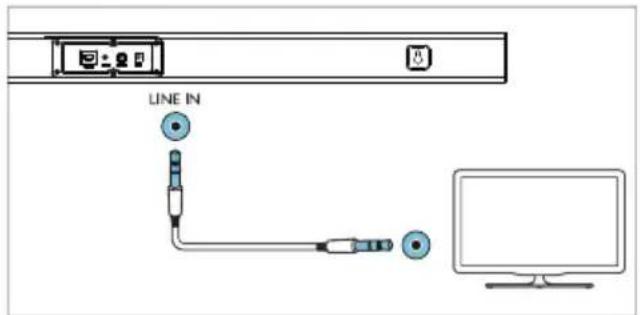

1 Using a 3.5mm stereo audio cable, connect the LINE IN connector on your SoundBar to the LINE connector on the TV or other device.
4 Use your SoundBar
This section helps you use the SoundBar to play audio from connected devices.
Before you start
• Make the necessary connections described in the Quick Start Guide or download the User Manual from www.philips.com/support.
- Switch the SoundBar to the correct source for other devices.
Adjust the volume
1 Press +/- (Volume) to increase or decrease a volume level.
• To mute sound, press 📄.
• To restore the sound, press ✗ again or press +/- (Volume).
Volume indicator
- When you press the volume+ to increase the volume, the SoundBar's indicator will blink red, and the volume will return to the normal state after it reaches the maximum with the SoundBar's indicator showing solid red for 2 seconds.
- When you press the volume- to decrease the volume, the SoundBar's indicator will blink red, and the volume will return to the normal state after it reaches the minimum with the SoundBar's indicator showing solid red for 2 seconds.
MP3 player
Connect your MP3 player to play your audio files or music.
What you need
• An MP3 player.
• A 3.5mm stereo audio cable.
1 Using the 3.5mm stereo audio cable, connect the MP3 player to the AUDIO IN connector on your SoundBar.
2 Press AUDIO IN on the remote control.
3 Press the buttons on the MP3 player to select and play audio files or music.
Play audio through Bluetooth
Through Bluetooth, connect the SoundBar with your Bluetooth device (such as an iPad, iPhone, iPod touch, Android phone, or laptop), and then you can listen to the audio files stored on the device through your SoundBar speakers.
What you need
• A Bluetooth device which supports Bluetooth profile A2DP and AVRCP, and with Bluetooth version 4.2 or above.
• The operational range between the SoundBar and a Bluetooth device is approximately 4 meters (13 feet).
1 Press ⚙ on the remote control to switch the SoundBar to Bluetooth mode. → The soundbar's indicator blinks blue.
2 On the Bluetooth device, switch on Bluetooth, search for and select Philips HTL1508 to start connection (see the user manual of the Bluetooth device on how to enable Bluetooth). → During connection, the soundbar's indicator blinks blue.
3 Wait until the soundbar's indicator becomes solid blue. → If the connection fails, the indicator blinks continually at a lower rate.
4 Select and play audio files or music on your Bluetooth device. • During play, if a call is coming, music play is paused. • If your Bluetooth device supports AVRCP profile, on the remote control you can press ◀/▶ to skip to a track, or press ▶II to pause/resume play.
5 To exit Bluetooth, select other source. - When your switch back to Bluetooth mode, Bluetooth connection remains active.

Note
- The music streaming may be interrupted by obstacles between the device and SoundBar, such as wall, metallic casing that covers the device, or other devices nearby that operate in the same frequency.
- If you want to connect your SoundBar with another Bluetooth device, press and hold ▶II on the remote control to disconnect the currently connected Bluetooth device.
Auto standby
When playing media from a connected device, this product automatically switches to standby after 15 minutes of button inactivity and no audio play from a connected device.
Apply factory settings
You can reset your SoundBar to the default setting mode.
1 In LINE mode, long press the power key of the remote control for 5 seconds. → The factory settings is restored.
Update software
To continually improve the product, software upgrade may be offered. Visit www.philips.com/support to check if the latest software version is available.
5 Wall mount

Note
- Improper wall mounting may result in accident, injury or damage. If you have any query, contact Consumer Care in your country.
- Before wall mounting, make sure the wall can support the weight of your SoundBar:
Screw length/diameter
Depending on the type of wall mounting your SoundBar, make sure that you use screws of a suitable length and diameter.

See the illustration in the quick start guide on how to wall mount the SoundBar.
1) Drill two holes on the wall.
2) Secure the dowels and screws in the holes.
3) Hang the SoundBar on the fastening screws.
6 Product specifications

Note
- Specifications and design are subject to change without notice.
Amplifier
• RMS total output power:
70W RMS (+/- 0.5 dB, 10% THD)
• Frequency response: 50 Hz-15 kHz / ±3 dB
• Signal-to-noise ratio:
65 dB (CCIR) / (A-weighted)
• Total Harmonic Distortion: <1%
• Input sensitivity:
• LINE IN: 450mV +/-50mV
Audio
• S/PDIF Digital audio input:
• Optical:TOSLINK
• Sampling frequency:
• MP3: 8 kHz, 11 kHz, 12 kHz, 16 kHz, 22 kHz, 24 kHz, 32 kHz, 44.1 kHz, 48 kHz
- Constant bit rate:
• MP3: 8 kbps-320 kbps
Bluetooth
• Bluetooth profiles: A2DP, AVRCP
- Bluetooth version: 5.0
• Frequency band/Output power: 2402 - 2480 MHz / ≤ 20 dBm
Main unit
Soundbar
• Power supply: 100-240 V\~, 50/60 Hz
• Power consumption: 15V/1.6A
• Standby power consumption: ≤0.5W
• Dimensions (W × H × D): 960 × 67.8 × 85.5 mm
• Weight: XX kg
• Built-in speakers: 2 × full range (52 mm/2", 4 ohm)
Remote control batteries
• 1 × AAA-R03-1.5 V
Standby information
- When the product remains inactive for 15 minutes, it automatically switches to standby or networked standby.
- When the product (soundbar) remains standby information, the power consumption in standby is less than 2W.
• To deactivate Bluetooth connection, press and hold the Bluetooth button on the remote control.
• To activate Bluetooth connection, enable Bluetooth connection on your Bluetooth device.
7 Troubleshooting

Warning
- Risk of electric shock. Never remove the casing of the product.
To keep the warranty valid, never try to repair the product yourself.
If you have problems using this product, check the following points before you request service. If you still have a problem, get support at www.philips.com/support.
Main unit
The buttons on the SoundBar do not work.
- Disconnect the SoundBar from the power supply for a few minutes, then reconnect.
Sound
No sound from SoundBar speakers.
- Connect the audio cable from your SoundBar to your TV or other devices.
- Reset your SoundBar to its factory settings.
- On the remote control, select the correct audio input.
• Make sure that the SoundBar is not muted.
Distorted sound or echo.
• If you play audio from the TV through the SoundBar, make sure that the TV is muted.
Bluetooth
A device cannot connect with the SoundBar.
• The device does not support the compatible profiles required for the SoundBar.
• You have not enabled the Bluetooth function of the device. See the user manual of the device on how to enable the function.
• The device is not correctly connected. Connect the device correctly. (see 'Play audio through Bluetooth' on page 10)
- The SoundBar is already connected with another Bluetooth device. Disconnect the connected device, then try again.
Quality of audio play from a connected Bluetooth device is poor.
- The Bluetooth reception is poor. Move the device closer to the SoundBar, or remove any obstacle between the device and the SoundBar.
The connected Bluetooth device connects and disconnects constantly.
- The Bluetooth reception is poor. Move the device closer to the SoundBar, or remove any obstacle between the device and the SoundBar.
• Turn off Wi-Fi function on the Bluetooth device to avoid interference. - For some Bluetooth, the Bluetooth connection can be deactivated automatically to save power. This does not indicate any malfunction of the SoundBar.


Bluetooth®
The Bluetooth ^® word mark and logos are registered trademarks owned by Bluetooth SIG, Inc.
Specifications are subject to change without notice.
Philips and Philips Shield Emblem are registered trademarks of Koninklijke Philips N.V. and are used under license. This product has been manufactured by and is sold under the responsibility of MMD Hong Kong Holding Limited, or one of its affiliates, and MMD Hong Kong Holding Limited, is the warrantor in relation to this product.
- User manual
- Contents
- Important
- Help and support
- Important safety instructions
- Class II equipment symbol
- Know these safety symbols
- Care for your product
- Care of the environment
- Your SoundBar
- Removing the disposable batteries
- Compliance
- Main unit
- Remote control
- Connectors
- Connect
- Note
- Placement
- Connect the SoundBar
- Connect audio from TV and other devices
- Option 2: Connect audio through a 3.5mm stereo audio cable
- Use your SoundBar
- Before you start
- Adjust the volume
- Volume indicator
- MP3 player
- What you need
- Play audio through Bluetooth
- Auto standby
- Apply factory settings
- Update software
- Wall mount
- Screw length/diameter
- Product specifications
- Amplifier
- Audio
- Bluetooth
- Soundbar
- Remote control batteries
- Standby information
- Troubleshooting
- Warning
- The buttons on the SoundBar do not work.
- Sound
- No sound from SoundBar speakers.
- Distorted sound or echo.
- A device cannot connect with the SoundBar.
- Quality of audio play from a connected Bluetooth device is poor.
- The connected Bluetooth device connects and disconnects constantly.
- Bluetooth®
Marque : PHILIPS
Modèle : HTL1505
Catégorie : Barre de son