EB-10 - Système Hi-Fi Walrus Audio - Notice d'utilisation et mode d'emploi gratuit
Retrouvez gratuitement la notice de l'appareil EB-10 Walrus Audio au format PDF.


| Type de produit | Système Hi-Fi compact |
| Marque | Walrus Audio |
| Modèle | EB-10 |
| Dimensions (L x P x H) | 30 x 25 x 10 cm |
| Poids | 2.5 kg |
| Alimentation | Secteur 230 V / 50 Hz |
| Puissance de sortie | 2 x 50 W RMS |
| Entrées | Auxiliaire (3.5 mm), Bluetooth, USB |
| Sorties | Haut-parleurs (bornes), casque (3.5 mm) |
| Fonctions principales | Amplification, lecteur CD, radio FM/AM, streaming Bluetooth |
| Entretien et nettoyage | Nettoyer avec un chiffon sec et doux. Eviter l'humidité et les solvants. |
| Sécurité | Ne pas ouvrir l'appareil. Débrancher avant nettoyage. Tenir hors de portée des enfants. |
| Pièces détachées et réparabilité | Indice de réparabilité estimé 8/10. Pièces disponibles via le service après-vente. |
| Informations générales | Utilisation en intérieur uniquement. Fonctionne à température ambiante. |
FOIRE AUX QUESTIONS - EB-10 Walrus Audio
Questions des utilisateurs sur EB-10 Walrus Audio
0 question sur cet appareil. Repondez a celles que vous connaissez ou posez la votre.
Poser une nouvelle question sur cet appareil
Téléchargez la notice de votre Système Hi-Fi au format PDF gratuitement ! Retrouvez votre notice EB-10 - Walrus Audio et reprennez votre appareil électronique en main. Sur cette page sont publiés tous les documents nécessaires à l'utilisation de votre appareil EB-10 de la marque Walrus Audio.
MODE D'EMPLOI EB-10 Walrus Audio


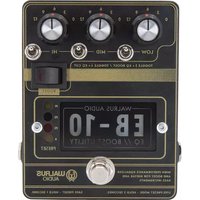
WALRUS AUDIO EB-10 EQ // BOOST UTILITY
A tone tweakers delight, the EB-10 works as a preamp. EQ and boost to meticulously craft your guitar's sound allowing for studio-grade electric guitar tone in a live setting. Each rotary knob offers up to 12dB of boost OR cut of Low Mid. and High frequencies, based on where you have the toggle switches set. When the Boost switch is engaged, add a 10dB MOSFET boost for some great extra punch.
CONTROL BREAKDOWN
EB-10 EQ - The EQ section of the EB-10 offers a wide range of adjustability. Each rotary knob has four positions of cut and boost available. Whether you are cutting or boosting is determined by the direction of the associated toggle switch. This makes for a total of 9 positions for each EQ band. The positions were carefully tuned to effect your signal in 3dB increments offering accurate control over how you filter your signal.
- LOW BAND - The low band of the EB-10 is controlled by the "LOW" knob and toggle. To shape the low frequency content of your signal, first chose cut or boost with the "LOW" toggle switch - up is boost, down is cut. Then, turn the knob to the desired amount of cut or boost. Boosting lows can help add body to thinner pickups like single coils. Cutting lows can bring clarity to muddier pickups like some humbuckers.
- MID BAND - The mid band of the EB-10 is fully parametric. It's controlled by the "MID" knob and toggle, as well as three internal trim pots. The knob and toggle give you control over the amount of boost and cut of mid frequency content, and the internal trim pots let you adjust the center frequency and bandwidth of the filter. To shape the mid frequency content of your signal, first chose cut or boost with the "MID" toggle switch - up is boost, down is cut. Then, turn the knob to the desired amount of cut or boost. Cutting mids can create a more "hiff" sound, while boosting
mids can really push frequencies that make parts punch through a mix. The pedal ships with the trim pots set to a center frequency of 800Hz with a Q of around 1.5. See the "Trim Pot" section for instructions on how to adjust them.
HIGH BAND - The high band of the EB-10 is controlled by the "HI" knob and toggle. To shape the high frequency content of your signal, first chose cut or boost with the "HI" toggle switch - up is boost, down is cut. Then, turn the knob to the desired amount of cut or boost. Boosting highs can add sparkle to darker guitars, and cutting highs will tame harsher pickups.
BOOST SWITCH - The Boost switch engages a 10db MOSFET boost. When it is on, the LED on the switch and the "B" LED will light up. The boost can be really helpful when switching between high and low output guitars without having to do much adjustment to your rig. It is also great for pushing solos to the front of the mix and adding a touch of color to your tone.
OPERATING MODES – The EB-10 offers two operating modes. 'Live' and 'Preset'. In live mode, the pedal responds to current position of all the knobs and switches. Dial in a specific sound and turn the pedal on and off with the Bypass switch. In preset mode, the pedal offers preset slots to store three unique sounds. When in preset mode, the pedal is locked on and the user can scroll through the presets by clicking the Bypass switch. The pedal will boot up in the last known operating mode and if that is preset mode, it loads preset 1 by default.
TRIM POT ADJUSTMENT
Remove the backplate to reveal pots for fine tuning the mid band
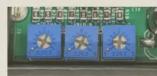

Pots 1 & 2 set the center frequency of the mid band and MUST be set to the same position. Pot 3 sets the bandwidth, or Q of the mid band filter.


Marque : Walrus Audio
Modèle : EB-10
Catégorie : Système Hi-Fi