
Amp-Up PA-25W - Recepteur Hamilton Buhl - Notice d'utilisation et mode d'emploi gratuit
Retrouvez gratuitement la notice de l'appareil Amp-Up PA-25W Hamilton Buhl au format PDF.


| Type de produit | Récepteur amplifié portable |
| Marque | Hamilton Buhl |
| Modèle | Amp-Up PA-25W |
| Dimensions (L x H x P) | 25,4 x 15,2 x 10,2 cm |
| Poids | 1,8 kg |
| Alimentation | Batterie rechargeable lithium-ion intégrée (7,4 V, 2200 mAh) |
| Autonomie | Jusqu'à 6 heures à volume modéré |
| Puissance de sortie | 25 W RMS |
| Haut-parleur | 1 x 8" woofer + tweeter à compression |
| Entrées audio | 1 x microphone (XLR/Jack combo), 1 x ligne (Jack 3,5 mm), 1 x Bluetooth |
| Sorties audio | 1 x ligne (Jack 3,5 mm), 1 x casque (Jack 3,5 mm) |
| Connectivité sans fil | Bluetooth 5.0 |
| Récepteur FM | Oui, avec antenne intégrée |
| Portée Bluetooth | Jusqu'à 30 mètres en champ libre |
| Entretien | Nettoyer avec un chiffon doux et sec. Ne pas utiliser de produits abrasifs. |
| Sécurité | Ne pas exposer à l'humidité ou aux températures extrêmes. |
| Pièces détachées | Batterie, antenne, câble d'alimentation, câble audio |
| Réparabilité | Indice de réparabilité : 6.5/10 (pièces disponibles auprès du fabricant) |
| Accessoires inclus | Chargeur secteur, câble audio 3,5 mm, antenne FM, microphone filaire |
FOIRE AUX QUESTIONS - Amp-Up PA-25W Hamilton Buhl
Questions des utilisateurs sur Amp-Up PA-25W Hamilton Buhl
0 question sur cet appareil. Repondez a celles que vous connaissez ou posez la votre.
Poser une nouvelle question sur cet appareil
Téléchargez la notice de votre Recepteur au format PDF gratuitement ! Retrouvez votre notice Amp-Up PA-25W - Hamilton Buhl et reprennez votre appareil électronique en main. Sur cette page sont publiés tous les documents nécessaires à l'utilisation de votre appareil Amp-Up PA-25W de la marque Hamilton Buhl.
MODE D'EMPLOI Amp-Up PA-25W Hamilton Buhl
Recording Voice Files
Note: These functions apply only to recorded voice files (not
music times)
- Insert a wired microphone (not included with PA-25W).
- Insert a USB flash drive or TF card and short-press the "●"
key to activate recording; the display will indicate the time - Short-press the "●" key again to stop recording. The unit
will automatically play the latest To Play a Voice/Music Recording
Insert a USB flash drive or TF card with a recorded music file and long-press "●" to play. Long-press again, and the amp w play the recorded voice file.
To Delete a Recording:
When playing a recording, first short-press "■" to pause (LCD displays "PAUSE"), then long-press "●"(LCD displays dEL" indicating the recording has been deleted).

short press Using Bluetooth™
-
Turn on the amplifier and press the "M" key to switch to Bluetooth™ mode. A voice will prompt "Bluetooth mode - waiting for connection" and the LCD will display "bt".
-
From your mobile settings, turn on the Bluetooth™ function. Then, search for PA-25 (wired version) or PA-25W (wireless version) and connect. Bluetooth™ pairing is complete when you hear the voice prompt, "Bluetooth™ is connected."
Note: Keep the amplifier near your Bluetooth-enabled device to maintain a connection.
UHF Wireless Microphone (PA-25W only)
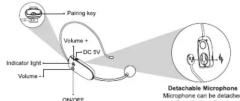
The wireless microphone is pre-paired with the device. However, if the microphone has no sound or is disconnected, you may need to manually pair it.
Pairing UHF Manually
- Turn on the amplifier and switch to UHF mode. The LCD screen will display "UHF".
- Long-press the "M" key for 5 seconds. The "UHF" display will flash and a voice prompt will say, "UHF is waiting for connection".
- Turn on the wireless microphone and long-press the "♥" icon for 5 seconds. "UHF" will stop flashing, and a voice prompt will say, "UHF is connected".

Step3 Long press " 🔊" key for 5 seconds.


How to Charge the UHF Wireless Microphone
When the microphone's blue light flashes, the battery is low. Turn the unit off and charge using a Micro USB with DC 5V 500mA+ adapter. A red indicator light will appear when charging and will turn off when the mic is fully charged.
Note:
- Normal charge time is 3-5 hours. Unplug the charger as soon as the unit is fully charged.
- Fully charge before first use of the microphone to ensure best results.
• Turn off the UHF wireless microphone when not in use.
Volume Control
- Adjust device volume by rotating the volume knob on the device. For PA-25W, you can also adjust the volume by pressing "+" or "-" on the wireless microphone.
Troubleshooting
• Power has been turned on, but the amplifier has no sound
1. If the LCD is not lit, the unit may need charging.
2. Turn up the volume on both the unit and the microphone (PA-25W only).
- The amplifier has no sound when using the wireless microphone (PA-25W only):
- Confirm both device and microphone are powered on
- Confirm the proper pairing. Pair again if necessary.
- The amplifier has feedback:
- Make sure the microphone is not too close to the amplifier
- You may need to turn volume down to avoid feedback
Product Registration Instructions
To register your product please visit: www.HamiltonBuhl.com
-
Click on Customer Care
-
Click on the Product Registration Icon
- Fill out all fields marked with * to register
Warranty:
Warranty begins the date item ships from our warehouse. All products have a one year warranty from original date of shipment, unless otherwise noted.

80 Little Falls Road, Fairfield, NJ 07004 1-800-631-0868 • www.HamiltonBuhl.com

Personal Voice Amplifier
PA-25 (Wired Version) PA-25W (Wireless Version)
Instruction Manual

HB Hamilton Buhl Never-Ending Learning Innovation
Please read these instructions carefully before use. Note: Before turning on the amplifier, ensure that the MIC is not pointed at the amplifier to eliminate feedback noise. We recommend fully charging this device and the wireless microphone (PA-25W only) before using the first time.
features 25W peak output covers large areas Bluetooth™ 5.0+EDR Built-in Lithium-Ion 7V 2000mAh battery with excellent sound quality Supports AUX-IN, TF card and USB flash drive Supports recording to USB with wired microphone UHF wireless technology microphone provides long distance, clear sound (for PA-25W only)
Specifications
| Max output power 25W Frequency response 90Hz-18KHz | |
| Output impedance 4Ω | Operating temp. -14°F-113°F |
| Charging voltage DC 5V 2A+ Operating time 10-12 hours | |
| Operating time 8-10 hrs. Charging time 3-5 hours | |
Functions


PBove/Volume: Rotate/Neppower/koblotor "ON" too turn on the device. Rotate to "V+" to increase volume or rotate to "V-" to decrease volume (or until turned off).
2. Modde:
ShcribprelebethM"N/Eykleydelesalbletfollowlifyingimpodes: LIHF (for PA-75W only). Bluetooth. ALIX-IN or USB/TE card
3. PlayPause(NWA(dotUFF)SBdcrpress to play/shdcrpress again to pause. Long-press for single song loops; the LCD displays "ONE". Long-press again for all songs to loop; the LCD will display "ALL" (in USB/TF card mode only). Short-press the PlayPause again to exit loop.
4. Previous (N/A) doi:UBR0100001.S/brd@pressstopplayprevious. Long-press for fast rewind (for USB/TF only).
- Next (N/A for UHF/AUX-IN): Short-press to go to next track. Long-press to fast forward (for USB/TF only).
- Recording: Voice records through wired microphone only (PA-25 and PA-25W). For PA-25W, wired microphone is not included.
- Echo: Rotate this knob to get an echo effect (only for microphone function)
- LCD: The LCD displays the mode status, play time, power icon, TF card or USB flash drive icon
- TF Card Slot: Insert the TF card into this slot to play audio. It is compatible with most brands and has a 32GB maximum capacity. If the file is too large, it will not play.
- USB Charging Port: Insert a USB flash drive to play audio. It is compatible with most brands and has a 32GB maximum capacity. If the file is too large, it will not play.
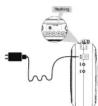
- DC Charging Port: Connect the DC charging cable to the DC 5V 1A+ adapter and plug it into an outlet. Unplug the charger as soon as it's fully charged.
- AUX-IN Input: When switching to AUX-IN mode, the screen will display "LINE". Then, play audio files via 3.5mm audio cable (included) and connect to a computer, mobile phone or MP3/MP4 player.
- 3.5mm MIC Jack: While in any mode, insert the wired microphone (included with PA-25) into the MIC jack to amplify your voice. To avoid feedback, do not point the mic directly at the speaker.
- Waistband Hook: Connect the included strap to the waistband hook
Playing from TF Card/USB Flash Drive
Insert the TF card/USB flash drive. Audio will play automatically. Press the "M" key to switch from another mode to TF card/USB mode to play audio files.
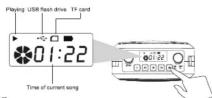
loop
When playing audio on TF card/USB flash drive, long-press "▶" key for 3 seconds to switch to single song repeat. The screen will display "ONE". Press it again to switch back to all repeat and the display will read "ALL".
Note: The default on powering up is all repeat.

How to Charge the Device
When the battery icon flashes, the unit needs recharging. Charge using the DC 5V 1A+ output adapter. The icon will flash during charging and will stop flashing when fully charged. Note: We recommend fully charging this device before using the first time
Wired Microphone (PA-25 only)
Insert the 3.5mm microphone plug into the MIC Port on the amplifier.

- RECORDING VOICE FILES
- WILL AUTOMATICALLY PLAY THE LATEST TO PLAY A VOICE/MUSIC RECORDING
- TO DELETE A RECORDING
- SHORT PRESS USING BLUETOOTH™
- PAIRING UHF MANUALLY
- HOW TO CHARGE THE UHF WIRELESS MICROPHONE
- NOTE
- VOLUME CONTROL
- TROUBLESHOOTING
- PRODUCT REGISTRATION INSTRUCTIONS
- WARRANTY
- PERSONAL VOICE AMPLIFIER
- MODDE
- PLAYING FROM TF CARD/USB FLASH DRIVE
- LOOP
- HOW TO CHARGE THE DEVICE
- WIRED MICROPHONE (PA-25 ONLY)
Marque : Hamilton Buhl
Modèle : Amp-Up PA-25W
Catégorie : Recepteur