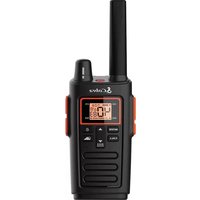
RX380 - Radio COBRA - Notice d'utilisation et mode d'emploi gratuit
Retrouvez gratuitement la notice de l'appareil RX380 COBRA au format PDF.


| Type de produit | Radio AM/FM portable |
| Marque | Cobra |
| Modèle | RX380 |
| Dimensions | 15 x 10 x 5 cm |
| Poids | 300 g |
| Alimentation | 4 piles AA (LR6) ou adaptateur secteur 6V CC (non inclus) |
| Gamme de fréquences AM | 530 - 1710 kHz |
| Gamme de fréquences FM | 88 - 108 MHz |
| Fonctions principales | Commutateur AM/FM, réglage du volume, syntonisation, prise écouteurs 3,5 mm, indicateur de mise sous tension |
| Puissance de sortie audio | 500 mW (estimation) |
| Autonomie avec piles alcalines | Environ 30 heures |
| Antenne | Antenne télescopique pour FM, antenne ferrite intégrée pour AM |
| Entretien et nettoyage | Essuyer avec un chiffon doux et sec. Ne pas utiliser de produits abrasifs. |
| Sécurité | Ne pas exposer à l'humidité ou à des températures extrêmes. Ne pas ouvrir le boîtier. |
| Garantie | 1 an |
FOIRE AUX QUESTIONS - RX380 COBRA
Questions des utilisateurs sur RX380 COBRA
0 question sur cet appareil. Repondez a celles que vous connaissez ou posez la votre.
Poser une nouvelle question sur cet appareil
Téléchargez la notice de votre Radio au format PDF gratuitement ! Retrouvez votre notice RX380 - COBRA et reprennez votre appareil électronique en main. Sur cette page sont publiés tous les documents nécessaires à l'utilisation de votre appareil RX380 de la marque COBRA.
MODE D'EMPLOI RX380 COBRA

1.2.1.3.4.5.6.7.8.9.10.11.12.13.14.15.16.17.18.19.20.21.22.23.24.25.26.27.28.29.30.31.32.33.34.35.36.37.38.39.40.41.42.43.44.45.46.47.48.49.50.51.52.53.54.55.56.57.58.59.60.61.62.63.64.65.66.67.68.69.70.71.72.73.74.75.76.77.78.79.80.81.82.83.84.85.86.87.88.89.90.91.92.93.94.95.96.97.98.99.100

Operation
Using Your Radio
USB Charging Link To charge batteries in radio:
- Check to see that the batteries have been inserted
properly.
109
广力云
side of the radio.
-
Plug the cable into USB-compatible power port.
-
The radio will display flashing battery icon while
charging.
Only use the supplied rechargeable batteries and desktop charger (not
included) for recharging your Cobra microTALK ® radio.
Please charge new batteries for 14 hours for first time of use
Note: Cobra recommends your radio is turned off while being charged.

Quick Start
- Turn ON/OFF/Volume Knob clockwise to turn the radio on and
counter clockwise to turn the radio off.
- Select
-
-
-
广力云智慧零售收银系统
-
-
-
广力云智慧零售收银系统
Before operating the radio, please read all safety and operating instructions. Save all instructions in a safe place
operating instructions: save all instructions in a care place for future reference.
(1) 2017年1月1日至2018年1月1日
WARNING: Important Safety Instructions
■ Environmental impact survey instructions
- Only accessories included in this package or specified by the manufacturer should be
used with the radio. The SV micro-USB charging input is compatible with most high
quality micros-Use chargers that fully confirm to the Use standards,
- Do not use cleaners or solvents to clean the exterior of the radio. Use only a damp of
by Comt.
-
Do not expose this product to splashing or dripping water.
-
Do not attempt to service the receiver yourself. Removing the cover will void the property. Choose or modifications not properly approved by Cohen may void the
Warranty. Changes of modifications for expiratory approved by Coars may void the user's authority granted by the FCG to operate this device and should not be made.
-
Do not open the wall adaptor into the power outlet if the outlet is wet
-
DO NOT plug the wall adaptor into the power button. If the button is met.
-
Do not use any adjustable serial ports have a demand return, if a demand return
-
Do not use any portable radio that has a damaged antenna, if a damaged antenna comes into contact with your skin, a minor burn can result:
(
The Ground Truth image displays a single, solid horizontal line. According to Rule 2 (UNDERSCORE & LINE RULES), this is a stylistic or background line, not a placeholder underscore. Therefore, the OCR result must ignore it and output nothing or only meaningful text. The provided OCR content is "____", which consists of four underscores. This is an incorrect interpretation of the line as a fill-in-the-blank placeholder, violating the rule that stylistic lines must be ignored. The OCR has hallucinated underscores where none should exist based on the GT's visual context. Hence, the OCR result is inconsistent with the Ground Truth.
WARNING: Important Safety Instructions for Battery
Read All Instructions
- Do not incinerate the battery even if it is severely damaged or is completely worn out.
- Do not discard battery in a fire. The battery can explode in a fire.
- Do not replace battery in any area labeled "Hazardous Atmosphere". Any sparks create
in a potentially explosive atmosphere can cause an explosion or fire.
- Do not disazzeemble, crush, puncture, shred, or otherwise attempt to change the form of your battery.
- Do not dry a wet or damo batteries with an appliance or heat source, such as a hair dry
We don't buy a finl. long, buty with an appboard of our source, such as a fair body, microwave oven.
- Do not attempt to charge alkaline batteries.
- Do not mix old and new batteries.
- Do not mix alkaline, standard (carbon-xinc), or rechargeable (Ni-Cd, Ni-MH, etc.) better
(1) 2017年,公司与上海浦东发展银行股份有限公司签订了《关于使用部分闲置募集资金进行现金管理的协议》。
Recycle Battery
Local, state or federal laws may prohibit disposal of batteries in ordinary trash. Consult y level waste difficulty for information recording available recycling and/or disposal option
local waste authority for information regarding immature recycling and/or disposal option
[Non-Text]
[Non-Text]
[Non-Text]
[Non-Text]
[Non-Text]
Theorem 1.2. (A) Let G be a finite field and let G be the set of all elements of . Then
Turning your Radio On and Off
Turn ON/OFF Knob clockwise to turn the radio on and counterclockwise to
the radio off.
- In the ON position, the radio chirps and briefly show all future issues availability on the RF
(1) at feature icons available on the radio,
- The display screen then shows the current channel, code and all features that are enabled.
Code and all features that are enabled.
B. 1
Battery Low
Battery Low When battery power is low, the final bar in the Battery
Low icon will blink and an audible tone will sound twice
before the radio shuts off. Your batteries should be recharged. It normally takes about 14 hours to fully ch
recharged. It normally takes about 14 hours to delay only batteries.
(二) 2017年
The radio will display flashing battery icon
while charging if the radio is on.
。
Auto Battery Save
Battery Save Mode If there are no transmissions within 10 seconds, the ra
will automatically switch to Battery Save mode and th
POWER SAVER Power Saver icon will flash in the display. This will not
affect the radio's ability to receive incoming
transmissions.
Communicating with Another Person
SIL & V. 1, 2, 3
- Press and hold the Talk button.
-
With the microphone about 10 inches (5 cm) from
-
With the microphone about two inches (3 inch) from your mouth, speak in a normal voice
-
Release the Talk button when you are finished talki
and listen for a response.
You cannot receive incoming calls while pressing the
Talk button.
Both radios must be tuned to the same
channel/privacy code to communicate.
4
[Non-Text]
[Non-Text]
[Non-Text]
[Non-Text]
[Non-Text]
[Non-Text]
5
[Non-Text]
[Non-Text]
[Non-Text]
[Non-Text]
[Non-Text]
[Non-Text]
[Non-Text]
[Non-Text]
[Non-Text]
[Non-Text]
[Non-Text]
[Non-Text]
[Non-Text]
[Non-Text]
[Non-Text]
[Non-Text]
[Non-Text]
[Non-Text]
[Non-Text]
[Non-Text]
[Non-Text]
[Non-Text]
[Non-Text]
[Non-Text]
[Non-Text]
[Non-Text]
[Non-Text]
[Non-Text]
[Non-Text]
[Non-Text]
[Non-Text]
[Non-Text]
[Non-Text]
[Non-Text]
[Non-Text]
[Non-Text]
[Non-Text]
[Non-Text]
[Non-Text]
[Non-Text]
[Non-Text]
[Non-Text]
[Non-Text]
[Non-Text]
[Non-Text]
[Non-Text]
[Non-Text]
[Non-Text]
[Non-Text]
[Non-Text]
[Non-Text]
[Non-Text]
[Non-Text]
[Non-Text]
[Non-Text]
[Non-Text]
[Non-Text]
[Non-Text]
[Non-Text]
[Non-Text]
[Non-Text]
[Non-Text]
[Non-Text]
[Non-Text]
[Non-Text]
[Non-Text]
[Non-Text]
[Non-Text]
[Non-Text]
[Non-Text]
[Non-Text]
[Non-Text]
[Non-Text]
[Non-Text]
[Non-Text]
[Non-Text]
[Non-Text]
[Non-Text]
[Non-Text]
[Non-Text]
[Non-Text]
[Non-Text]
[Non-Text]
[Non-Text]
[Non-Text]
se e
sd df or rms. our E.
A-1
→ UH
% ↓ → d argt
→ e do d ↑
→ ng
)
5
[Non-Text]
[Non-Text]
[Non-Text]
[Non-Text]
[Non-Text]
[Non-Text]
[Non-Text]
[Non-Text]
[Non-Text]
[Non-Text]
[Non-Text]
[Non-Text]
[Non-Text]
[Non-Text]
[Non-Text]
[Non-Text]
[Non-Text]
[Non-Text]
[Non-Text]
[Non-Text]
[Non-Text]
[Non-Text]
[Non-Text]
[Non-Text]
[Non-Text]
[Non-Text]
[Non-Text]
[Non-Text]
[Non-Text]
[Non-Text]
[Non-Text]
[Non-Text]
[Non-Text]
[Non-Text]
[Non-Text]
[Non-Text]
[Non-Text]
[Non-Text]
[Non-Text]
[Non-Text]
[Non-Text]
[Non-Text]
[Non-Text]
[Non-Text]
[Non-Text]
[Non-Text]
[Non-Text]
[Non-Text]
[Non-Text]
[Non-Text]
[Non-Text]
[Non-Text]
[Non-Text]
[Non-Text]
[Non-Text]
[Non-Text]
[Non-Text]
[Non-Text]
[Non-Text]
[Non-Text]
[Non-Text]
[Non-Text]
[Non-Text]
[Non-Text]
-
∴ m = 3/11
∴ m = 3/11
oe
∴ m = 3/11
t
-
∴ m = 3/11
∴ m = 3/11
∴ m = 3/11
∴ m = 3/11
∴ m = 3/11
∴ m = 3/11
∴ m = 3/11
C
[Non-Text]
[Non-Text]
[Non-Text]
[Non-Text]
of
0
of
[Non-Text]
er of
[Non-Text]
[Non-Text]
inst
The image is too blurry to recognize any text content.
[Non-Text]
on
1.
[Non-Text]
[Non-Text]
[Non-Text]
1
A·1
[Non-Text]
广力云智慧零售收银系统
um
附件1
3
。
-
广力云
[Non-Text]
。
-

Operation
Function

Function
Function

ated Transp

our microTAL K 9

en you speak. Yo

voice and avoid t

To turn V02 1. Pass the

- Press the indicator

setting is

- Press the

- Choose o

a. Press

b. Press

and re

c. Do not

F new b
[Non-Text]

[Non-Text]
7.10

Operation

al Specif

y Allocation

In the 10-12

ed. 16P 40 Changy in MHz

Input Item / Code No

[Unreadable]

C

5 High At

5 High

5 High AM

5 High AM

5 High AM

5 High AM

5 High AN

5 Low AM

5 Low All

5 Low No

5 Low A

5 Low AP

5 Low AM

5 Low AM

2 Low At

3 High A

J High AR

J High AR

High

0 High AM

0 High A

广力云智慧零售收银系统

[Non-Text]

[Non-Text]

[Non-Text]

[Non-Text]

[Non-Text]

[Non-Text]

[Non-Text]

[Non-Text]

[Non-Text]

[Non-Text]

[Non-Text]

[Non-Text]

[Non-Text]

[Non-Text]

[Non-Text]

[Non-Text]

[Non-Text]

[Non-Text]

[Non-Text]

[Non-Text]

[Non-Text]

[Non-Text]

[Non-Text]

[Non-Text]

[Non-Text]

[Non-Text]

[Non-Text]

[Non-Text]

[Non-Text]

[Non-Text]

[Non-Text]

[Non-Text]

[Non-Text]

[Non-Text]

[Non-Text]

[Non-Text]

[Non-Text]

[Non-Text]

[Non-Text]

[Non-Text]

[Non-Text]

[Non-Text]

[Non-Text]

[Non-Text]

[Non-Text]

[Non-Text]

[Non-Text]

[Non-Text]

[Non-Text]

[Non-Text]

[Non-Text]

[Non-Text]

[Non-Text]

[Non-Text]

[Non-Text]

[Non-Text]

[Non-Text]

[Non-Text]

[Non-Text]

[Non-Text]

[Non-Text]

[Non-Text]

[Non-Text]

[Non-Text]

[Non-Text]

[Non-Text]

[Non-Text]

[Non-Text]
[Non-Text]
[Non-Text]
[Non-Text]
[Non-Text]

[Non-Text]

[Non-Text]
[Non-Text]
[Non-Text]

[Non-Text]
[Non-Text]
[Non-Text]

[Non-Text]
[Non-Text]
[Non-Text]

[Non-Text]
[Non-Text]
[Non-Text]
[Non-Text]
[Non-Text]

[Non-Text]

[Non-Text]

[Non-Text]

[Non-Text]

[Non-Text]

[Non-Text]

[Non-Text]

[Non-Text]

[Non-Text]

[Non-Text]

[Non-Text]

[Non-Text]

[Non-Text]

[Non-Text]

[Non-Text]

[Non-Text]


Marque : COBRA
Modèle : RX380
Catégorie : Radio