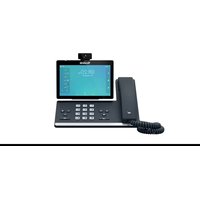
SIP-T58A - Téléphone Yealink - Notice d'utilisation et mode d'emploi gratuit
Retrouvez gratuitement la notice de l'appareil SIP-T58A Yealink au format PDF.


| Type de produit | Téléphone IP Android |
| Marque | Yealink |
| Modèle | SIP-T58A |
| Écran | Écran tactile couleur 7 pouces (1280x720) |
| Dimensions (avec socle) | 266 x 226 x 175 mm |
| Poids net | 1,46 kg |
| Alimentation | PoE (802.3af) ou adaptateur secteur 5V / 2A |
| Consommation électrique | 6,5 W (veille), 9,5 W (actif) |
| Fonctions principales | Appels VoIP, vidéo, messagerie, annuaire, conférence, application Android, Wi-Fi intégré, Bluetooth |
| Connectivité | 2 ports RJ45 (10/100/1000), USB 2.0, microSD, Wi-Fi 802.11b/g/n, Bluetooth 4.0 |
| Installation | Auto-provisioning via DHCP et serveur FTP/TFTP/HTTP/HTTPS |
| Entretien et nettoyage | Nettoyer avec un chiffon doux et sec. Éviter les produits abrasifs et liquides. |
| Sécurité | Chiffrement TLS, SRTP, 802.1X, VPN (OpenVPN, L2TP) |
| Pièces détachées et réparabilité | Écran tactile, batterie (optionnelle), socle, combiné, câbles disponibles auprès du fabricant |
| Informations générales | Système d'exploitation Android 9.0, mise à jour firmware via réseau |
FOIRE AUX QUESTIONS - SIP-T58A Yealink
Questions des utilisateurs sur SIP-T58A Yealink
0 question sur cet appareil. Repondez a celles que vous connaissez ou posez la votre.
Poser une nouvelle question sur cet appareil
Téléchargez la notice de votre Téléphone au format PDF gratuitement ! Retrouvez votre notice SIP-T58A - Yealink et reprennez votre appareil électronique en main. Sur cette page sont publiés tous les documents nécessaires à l'utilisation de votre appareil SIP-T58A de la marque Yealink.
MODE D'EMPLOI SIP-T58A Yealink
Easy Audio and Visual Communication
The Yealink SIP-T58A with Camera is a simple-to-use smart business phone that provides an enriched HD audio and video calling experience for business professionals. This smart business phone enables productivity-enhancing visual communication with the ease of a standard phone. Based on Android 5.1.1 operating system, the SIP-T58A with Camera features a seven-inch adjustable multi-point touch screen, a removable two-megapixel HD camera CAM50, integrated Wi-Fi and Bluetooth 4.2, and it is coupled with a built-in web browser, calendar, recorder and more, which also support the installation of third-party applications for business customization. Thanks to the DECT technology, if you want to expand your horizons for busy environments, or, share one phone system with your small team by adding multiple handsets, simply turn your phone to the corded-cordless phone, and it will repay you up to 4 DECT handsets in total to meet your daily demands. The Yealink SIP-T58A with Camera Smart Business Phone strikes an exquisite balance between simplicity and sophistication, offering an all-in-one communications solution for today's busy executives, managers and teleworkers.

7-inch Multi-touch Screen

Corded-Cordless Phone

Content Sharing

Yealink's SDK


HD AudioAndroid OS

HD Video

Opus Codec

Built-in Wi-Fi

Built-in Bluetooth

USB 2.0

DoorPhone Features

Key Features and Benefits
HD Audio and HD Video
The Yealink SIP-T58A with Camera includes the latest version of Yealink Optimal HD Voice technologies, including the Yealink Noise Proof Technology and now supports the Opus codec, which helps maximize the acoustic performance of the phone's handset, headset and especially the speakerphone. And its hearing aid compatible (HAC) handset helps the person who is with hearing loss to hear the voice more clearly. The dynamic, removable two-megapixel HD camera CAM50 is specially designed for remarkable real-time face-to-face conversations. Moreover, you can use the T58A with Camera IP phone with Yealink VC Desktop together to share content from your laptop.
A Better User Experience with Android Operating System
Based on Android 5.1.1, the Yealink SIP-T58A with Camera features a built-in browser, email, calendar and more. Administrators can easily install additional Android applications to improve collaboration and productivity. Meanwhile, the Open Yealink's SDK (Software Development Kit) allows the phone deeply integrate with 3rd -party applications, providing richer phone features and giving a better user experience.
Richer Interface for Easy Customization
The Yealink SIP-T58A with Camera features Bluetooth 4.2 for pairing with headsets and mobile phones. It also includes dual-port Gigabit Ethernet with PoE as well as built-in Wi-Fi. The USB 2.0 port allows for media and storage via a USB flash drive and a direct wired/wireless USB headset connection. The SIP-T58A with Camera can also be paired with up to 3 Yealink color-screen expansion modules.
Efficient Provisioning and Management
The Yealink SIP-T58A with Camera supports Yealink's efficient Auto-Provisioning mechanism, including phone deployment and application installation. Administrators can take advantage of centralized deployment, management, updating and uninstalling to ensure application standardization.
- 7 inch (1024 x 600) capacitive adjustable touch screen
- 720p30 HD video
- Runs Android 5.1.1
• Yealink Noise Proof Technology
• Yealink's SDK (Software Development Kit) - DoorPhone Features
(Preview, One-button Open, Monitoring)
• Built-in Bluetooth 4.2 for headsets and pairing mobile devices
• Built-in 2.4G/5G Wi-Fi (802.11a/b/g/n/ac) - USB 2.0 port (2.0 compliant) for USB headset, media and storage applications
- Opus Codec support
- Up to 16 VoIP accounts
- Up to 3-party video conferencing
- Up to 10-party video/audio mixed conferencing (up to 2 video calls)
- Wall mountable
• Color-screen Expansion Module support - Only the firmware version 58.83.0.15 or later are
Audio Features
• HD voice: HD handset, HD speaker
• Hearing aid compatible (HAC) handset
• Acoustic Shield, Noise Proof
- Smart Noise Filtering
- Audio codec: Opus, G.722, PCMU (G.711A), PCMA (G.711μ), G.729, G.729A, G.729B, G.729AB, G.726, G.723.1, iLBC
• DTMF: In-band, Out-of-band (RFC 2833) and SIP INFO
• Full-duplex hands-free speakerphone with AEC
• VAD, CNG, AEC, PLC, AJB, AGC
Video Features
• 720p@30fps HD video call
• Video codec: H.264 High Profile, H.264, VP8
• Video quality: 720P (1280x720)-30fps ( ≥ 512 kbps)
- Yealink CAM50 camera:
- 2 mega-pixel
- Plug and play
- Adjustable
- With privacy shutter and LED indicator
- Vertical tilt angle adjustable: 50°
• Field of view (FOV): 70.2°
• Self view (local video preview)
Display and Indicator
- LCD screen:
- 7" 1024 x 600 capacitive adjustable touch screen
- Vertical tilt angle adjustable: 48°
- 5 points multi-touch surface
- Screensaver and Wallpaper
• LED for call and message waiting indication - Intuitive user interface with icons and soft keys
• Multilingual user interface - Caller ID with name, number and photo
Android bundled Applications
- FileManager/Email/Calendar/Camera/Gallery/Recorder/Calculator/Browser/Message
• Third party Android application support
Phone Features
- Yealink's SDK (Software Development Kit)
• 16 VoIP accounts - Call hold, call forward, call waiting, call transfer
• One-touch speed dial, hotline, mute, DND - Group listening, emergency call
• Redial, call return, auto answer - Direct IP call without SIP proxy
- Ring tone select/import/delete
- Set date time manually or automatically
• Dial plan, action URL/URI
• RTCP-XR (RFC3611), VQ-RTCPXR (RFC6035)
• 3-party video conferencing - 10-party audio/video mixed conferencing (up to two video calls)
• Data import/export via Bluetooth, email, etc. - DoorPhone features: Preview, One-button Open, Monitoring
• Content sharing (via Yealink VCD) - USB/Bluetooth connectivity to Yealink CP900/CP700 speakerphone, USB connectivity to Yealink UH36 headset:
- Basic functions: Answer / end, call mute
- Enhanced function: audio optimization, redial, call hold, volume synchronization, multiple calls control
• Analog PSTN calls via CPN10
• Wireless Access Point (AP mode)
Corded-Cordless Phone (via DECT Dongle DD10K)
- Up to 4 DECT cordless handsets
- Up to 4 concurrent calls
• Support Yealink W52H/W53H/W56H/DD Phone/CP930W - Slave Handset for Master Deskset
IP-PBX Features
- Busy Lamp Field (BLF), Bridged Line Appearance (BLA)
- Anonymous call, anonymous call rejection
- Remote office, hot desking, intercom, paging
- Call completion
- Message Waiting Indicator (MWI)
• Voice mail, call park, call pickup - Music on hold
- Call recording
Directory
- Local phonebook up to 1000 entries
- Black list
- XML/LDAP remote phonebook
- Google contacts
- Smart dialing
• Phonebook search/import/export - Call history: dialed/received/missed/forwarded
Feature keys
• 27 one-touch DSS keys
- 7 feature keys: hold, transfer, message, headset, mute, redial, speakerphone
• Volume control keys
- Illuminated mute/headset/hands-free speakerphone key
Interface
• Dual-port Gigabit Ethernet
• Power over Ethernet (IEEE 802.3af), class 3
• Built-in dual band Wi-Fi:
- Network standard: IEEE802.11a/b/g/n/ac
- Transmission rate: Up to 433Mbps (dynamic)
- Frequency range: 2.4GHz/5.0GHz
• Built-in Bluetooth 4.2 for - Bluetooth headsets
- Pairing mobile devices
- Simultaneous connection of one headset and one mobile phone
- 1 x USB 2.0 port (on the top of the phone) for:
- Yealink CAM50 camera
- 1 x USB 2.0 port (on the rear of the phone) for:
- USB flash drive
- Wired/wireless USB headset
- Color-screen expansion modules
- Wireless Headset Adapter EHS40
- 1 x Security lock port
• 1 x RJ9 (4P4C) handset port
• 1 x RJ9 (4P4C) headset port
• Supports up to 3 color-screen expansion modules
Management
- Configuration: browser/phone/auto provision
• Auto provision via FTP/TFTP/HTTP/HTTPS
• Auto provision with PnP, Zero-sp-touch, TR-069
• Phone lock for personal privacy protection - Reset to factory, reboot
• Package tracing export, system log
- Only the administrator can install/uninstall apps via autop
- Setup Assistant wizard
Network and Security
- IPv4/IPv6
• SIP v1 (RFC2543), v2 (RFC3261)
- Call server redundancy supported
• NAT traversal: STUN mode
- Proxy mode and peer-to-peer SIP link mode
• IP assignment: static/DHCP
- HTTP/HTTPS web server
• Time and date synchronization using SNTP
• UDP/TCP/DNS-SRV (RFC 3263)
• QoS: 802.1p/Q tagging (VLAN), Layer 3 ToS DSCP
- SRTP
• Transport Layer Security (TLS 1.3)
- HTTPS certificate manager
• AES encryption for configuration file (AES256)
- Adb encryption authenticated
- Digest authentication using MD5/MD5-sess
- OpenVPN, IEEE802.1X, L2TP VPN
- WPA2/WPA3
- Secure boot
• GARP (Generic Attribute Registration Protocol)
Other Physical Features
• Color: Classic Grey
• Wall mountable (optional)
• External Yealink AC adapter (optional):
AC 100\~240V input and DC 5V/2A output
• USB output currency: 5V = 500mA
• Power consumption (PSU): 1.9W-5.7W
• Power consumption (PoE): 2.6W-7.4W
• Dimension (W*D*H*T):
259.4mm*220mm*239mm*42.6mm
- Operating humidity: 10\~95%
- Operating temperature: 0\~40°C (+32\~104°F)
Package Features
- Package content:
- Yealink SIP-T58A with Camera IP phone
- Handset with handset cord
- Ethernet Cable
- Stand
- Yealink CAM50 camera
- Quick Start Guide
- Power Adapter (Optional)
- Qty/CTN: 5 PCS
• N.W/CTN: 9.45 kg
• G.W/CTN: 10.55 kg - Giftbox size: 324 mm*293 mm*128 mm
- Carton Meas: 680 mm*303 mm*332 mm
Compliance


REACH
ISO 9001

broadsoft

metaswitch
![graph TD PC["PC"] -->|USB| Internet["Internet"] Internet -->|USB| PC PC -->|DC5V| DC5V["DC5V"] Internet -->|DC5V| DC5V DC5V -->|Wireless Cable| Headset["Headset"] Headset -->|USB| Device["Device"] Device -->|USB| Cable["Wireless Cable"] Cable -->|USB| Headset Headset -->|USB| Device](/content/2026/06/1362390/images/8a9e0afb7bc1441f8f1560bfaf09c20dc189abe1427832cde222615cbd202bb9.jpg)
USB 2.0
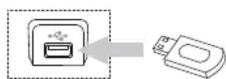
USB Flash Drive
About Yealink
Yealink (Stock Code: 300628) is a global brand that specializes in video conferencing, voice communications and collaboration solutions with best-in-class quality, innovative technology and user-friendly experience. As one of the best providers in more than 140 countries and regions, Yealink ranks No.1 in the global market share of SIP phone shipments (Global IP Desktop Phone Growth Excellence Leadership Award Report, Frost & Sullivan, 2019).
Copyright
Copyright © 2021 YEALINK(XIAMEN) NETWORK TECHNOLOGY CO., LTD.
All rights reserved. No parts of this publication may be reproduced or transmitted in any form or by any means, electronic or mechanical, photocopying, recording, or otherwise, for any purpose, without the express written permission of Yealink(Xiamen) Network Technology CO., LTD.
Technical Support
Visit Yealink WIKI (http://support.yealink.com/) for firmware downloads, product documents, FAQ, and more. For better service, we sincerely recommend you to use Yealink Ticketing system (https://ticket.yealink.com) to submit all your technical issues.

YEALINK(XIAMEN) NETWORK TECHNOLOGY CO., LTD.
Web: www.yealink.com
Addr: No.1 Ling-Xia North Road, High Tech Park,
Huli District, Xiamen, Fujian, P.R.C
Copyright©2021 Yealink Inc. All rights reserved.
- EASY AUDIO AND VISUAL COMMUNICATION
- KEY FEATURES AND BENEFITS
- HD AUDIO AND HD VIDEO
- A BETTER USER EXPERIENCE WITH ANDROID OPERATING SYSTEM
- RICHER INTERFACE FOR EASY CUSTOMIZATION
- EFFICIENT PROVISIONING AND MANAGEMENT
- AUDIO FEATURES
- VIDEO FEATURES
- DISPLAY AND INDICATOR
- ANDROID BUNDLED APPLICATIONS
- PHONE FEATURES
- CORDED-CORDLESS PHONE (VIA DECT DONGLE DD10K)
- IP-PBX FEATURES
- DIRECTORY
- FEATURE KEYS
- INTERFACE
- MANAGEMENT
- NETWORK AND SECURITY
- OTHER PHYSICAL FEATURES
- PACKAGE FEATURES
- ABOUT YEALINK
- COPYRIGHT
- TECHNICAL SUPPORT
Marque : Yealink
Modèle : SIP-T58A
Catégorie : Téléphone