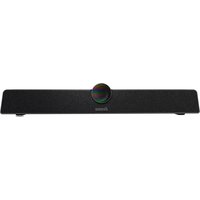
UC CAM120ULB-1 - Système de vidéoconférence IIYAMA - Notice d'utilisation et mode d'emploi gratuit
Retrouvez gratuitement la notice de l'appareil UC CAM120ULB-1 IIYAMA au format PDF.


| Type de produit | Système de vidéoconférence (caméra USB) |
| Marque | Iiyama |
| Modèle | UC CAM120ULB-1 |
| Résolution maximale | 3840 x 2160 (4K UHD) à 30 ips |
| Champ de vision | 120° (diagonale) |
| Autofocus | Oui, mise au point automatique |
| Microphone intégré | Oui, double microphone avec réduction de bruit |
| Connexion | USB 3.0 Type-C (compatible USB 2.0) |
| Compatibilité | Windows, macOS, Chrome OS, Android (via OTG) |
| Dimensions (L x l x H) | 120 x 70 x 60 mm |
| Poids | 200 g |
| Alimentation | Par port USB (5V/500mA) |
| Support de montage | Clip pour écran ou trépied (pas inclus) |
| Fonctions principales | Vidéoconférence, streaming, enregistrement, plug-and-play |
| Entretien et nettoyage | Nettoyer la lentille avec un chiffon microfibre sec, éviter les solvants |
| Sécurité | Ne pas exposer à l'humidité, à des températures extrêmes ou à la lumière directe du soleil |
| Pièces détachées et réparabilité | Appareil non démontable ; contacter le SAV Iiyama en cas de panne |
FOIRE AUX QUESTIONS - UC CAM120ULB-1 IIYAMA
Questions des utilisateurs sur UC CAM120ULB-1 IIYAMA
0 question sur cet appareil. Repondez a celles que vous connaissez ou posez la votre.
Poser une nouvelle question sur cet appareil
Téléchargez la notice de votre Système de vidéoconférence au format PDF gratuitement ! Retrouvez votre notice UC CAM120ULB-1 - IIYAMA et reprennez votre appareil électronique en main. Sur cette page sont publiés tous les documents nécessaires à l'utilisation de votre appareil UC CAM120ULB-1 de la marque IIYAMA.
MODE D'EMPLOI UC CAM120ULB-1 IIYAMA
iiyama
Integrated video conference terminal User Manual UC CAM120ULB-1

All pictures in this manual are for reference only, please refer to the actual product.
• Safety Warning and Precautions
Before using and operating this device, please read thoroughly and comply with the following precautions in order to prevent accidents or abnormal operation.
1) Operating Environment
★ DO NOT place the product in dusty and humid environments in case of internal short circuit.
★ DO NOT place the product near heating devices(such as electrical heater).
★ Operating temperature is 0-40°C, operating humidity is 10%-90%RH. Please use the product accordingly.
2) Children Safety
The product and accessories may contain some small parts. Please keep them from children to avoid accidental swallowing or danger.
3) Power Supply
Please use the standard power adapter.
4) Keep Dry
The product is NOT waterproof. Please keep it dry.
5) Maintenance
★ Please contact technical support for maintenance services.
★ DO NOT insert any sharp or pointed object into the device.
★ Prevent the device from falls and collisions with other objects, which may cause damages.
- Statement
1) Intellectual property right statement:
The patents cover the hardware design and software of this product. Anyone reproduces the product or the contents of this instruction without prior written permission from the Company shall be liable to legal prosecutions.
2) The description, illustrations, etc. in this document may subject to change per the latest product specification and performance.
3) The product images are for illustrative purposes only and may slightly differ in appearance, colour, size, etc. from the actual product.
4) The Company reserves the rights to improve and change the appearance and design of the product without notice.
CE MARKING DECLARATION OF CONFORMITY
This Integrated video conference terminal complies with the requirements of the EC/EU Directive 2014/30/EU "EMC Directive", 2014/35/EU "Low Voltage Directive" and 2011/65/EU "RoHS Directive". The electro-magnetic susceptibility has been chosen at a level that gives correct operation in residential areas, business and light industrial premises and small-scale enterprises, inside as well as
outside of the buildings. All places of operation are characterized by their connection to the public low voltage power supply system.
IIYAMA CORPORATION:
Wijkermeerstraat 8, 2131 HA Hoofddorp, The Netherlands Model No.: UC CAM120ULB-1

We recommend recycling of used product. Please contact your dealer or iiyama service center. Recycle information is obtained via the Internet, using the
Address: http://www.iiyama.com You can access the Web page of different countries from th
1. Product Function
Please familiarize yourself with the interface and buttons of the device before using this device.

a. Key Lock
b. ○: Mute button.
Press to turn on or off the microphone.
c. AUX IN/OUT: Use for support Mic-in and Line-out functions for external device.
d. 2.0: Can be connected to a computer
through a USB Type-A to Type-C data cable, providing the computer with camera, microphone and speaker
e. DC in: Used for 12V power input power supply
f. Camera: High-performance camera
g. Hanging components
2. Mounting
1) Placed directly on the desktop.
2) Wall-mounted: Fix the bracket onto the Wall with screws, then place the Integrated video conference terminal onto the bracket.

Note: The connection of different samples may slightly differ. Please refer to the actual product.
- Accessories Introduction
Please check the following items in the product box.
| Wall Mount Bracket × 2 | Peeping cover × 1 |
| User Manual × 1 | Remote control × 1 |
| Screw for Wall Mount Bracket × 4(Spare × 1) | Battery (CR2032) × 1 |
| Anchors for Wall Mount Bracket × 4(Spare × 1) | USB cable × 1 |
| Screw for fix Conference terminal to Wall Mount Bracket × 1 | Interchangeable AC Adapter × 1 + Plug × 5 |
- Remote Control

a. 🚫 : Mute Button, press to turn on or off the microphone.
b. ^ : Press to enable/disable the auto framing function
(After pressing the button, the camera screen will display the status, " 🔊" means open, " 🔊" means off.)
c. ◯ : Direction Button. After zoom+/-, press the direction buttons to move the camera.
d. OK : Confirm Button.
Camera image initialization function: Press to restore the camera image to its original state.
e. 🍷 : Answer the communication.
f. : Hang up communication.
g. : Volume Button, press to adjust the system volume.
h. ☑ : Digital Zooming, press to digitally zoom the camera. (Available only when auto framing is disabled). After zooming in, the direction button can move the picture.
i. Presets:
1) When the camera is turned on, can set and switch the presets in settings. (Available only when auto framing is disabled).
2) Press and hold the number button "1/2" for 2 seconds to save the current view as a preset.
3) Each preset contains zooming level, viewing angle information. Up to two presets are supported.
4) Press 1/2 to switch amongst the presets.
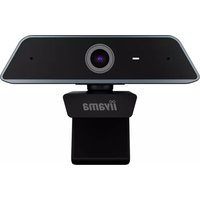
- iiyama
- Integrated video conference terminal User Manual UC CAM120ULB-1
- • Safety Warning and Precautions
- 1) Operating Environment
- 2) Children Safety
- 3) Power Supply
- 4) Keep Dry
- 5) Maintenance
- - Statement
- 1) Intellectual property right statement:
- CE MARKING DECLARATION OF CONFORMITY
- IIYAMA CORPORATION:
- Product Function
- Mounting
- - Accessories Introduction
Marque : IIYAMA
Modèle : UC CAM120ULB-1
Catégorie : Système de vidéoconférence