
RSW2i WL - Lampe torche Nitecore - Notice d'utilisation et mode d'emploi gratuit
Retrouvez gratuitement la notice de l'appareil RSW2i WL Nitecore au format PDF.


| Type de produit | Lampe torche tactique rechargeable |
| Marque | Nitecore |
| Modèle | RSW2i WL |
| Source lumineuse | LED haute puissance |
| Flux lumineux maximal | 1800 lumens |
| Portée maximale | 220 mètres |
| Intensité lumineuse maximale | 12 100 cd |
| Modes d'éclairage | Turbo, élevé, moyen, faible, stroboscope, SOS |
| Alimentation | Batterie lithium-ion rechargeable intégrée 3,6 V 5000 mAh |
| Autonomie maximale | 300 heures (mode faible) |
| Temps de charge | Environ 4 heures |
| Indice de protection | IP68 (étanche jusqu'à 2 mètres) |
| Résistance aux chocs | 2 mètres |
| Matériau du boîtier | Aluminium aéronautique anodisé |
| Dimensions | 163 mm (longueur) x 25,4 mm (diamètre) x 40 mm (tête) |
| Poids | 152 g (avec batterie) |
| Chargeur inclus | Câble USB-C |
| Entretien et nettoyage | Nettoyer avec un chiffon doux, éviter les solvants ; lubrifier les filetages avec un silicone spécial |
| Sécurité | Protection contre l'inversion de polarité, gestion thermique intégrée |
| Pièces détachées et réparabilité | Contactez le service après-vente Nitecore pour les réparations |
| Garantie | 2 ans |
FOIRE AUX QUESTIONS - RSW2i WL Nitecore
Questions des utilisateurs sur RSW2i WL Nitecore
0 question sur cet appareil. Repondez a celles que vous connaissez ou posez la votre.
Poser une nouvelle question sur cet appareil
Téléchargez la notice de votre Lampe torche au format PDF gratuitement ! Retrouvez votre notice RSW2i WL - Nitecore et reprennez votre appareil électronique en main. Sur cette page sont publiés tous les documents nécessaires à l'utilisation de votre appareil RSW2i WL de la marque Nitecore.
MODE D'EMPLOI RSW2i WL Nitecore
RSW2i WL User Manual
NITECORE®
KEEP INNOVATING
The RSW2i WL Wireless Remote Switch is for wireless control of NITECORE i Series flashlights.
Specifications
Compatible With: P10i, P10iX, P20i, P20i UV, P20iX, P30i, P35i Package Contents:
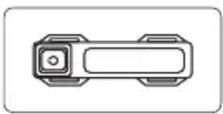
Wireless Remote SwitchWireless Tailcap

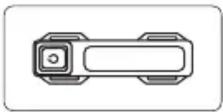
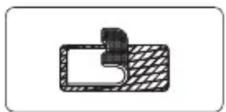
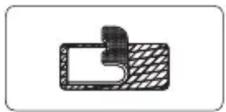
Hook-and-loop Straps x 2Hook-and-loop
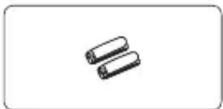
Picatinny Rail Mounts x 2 (optional)

Operation Instructions
Connect / Disconnect the Wireless Remote Switch
(The pairing between the Wireless Tailcap and the Wireless Remote Switch is preset in the factory.)
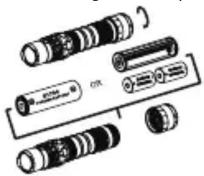
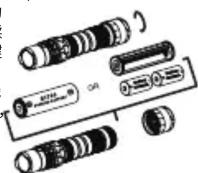
As illustrated, unscrew the original tailcap of the flashlight and replace it with the Wireless Tailcap. After inserting the battery
and tightening the Wireless Tailcap, half press the Wireless Tailcap 3 times, the indicator on the tailcap will fade in and out, informing the user that the Wireless Remote Switch has been connected with the flashlight. After connecting, half press the Wireless Tailcap 3 times again, the Wireless Remote Switch will be disconnected.
Note:
- The maximum signal range between the Wireless Tailcap and the Wireless Remote Switch is 1m (3.28ft) when there are no obstacles blocking the path.
- The Wireless Remote Switch is powered by 1 x 3V CR1632 button cell battery which enables approx. 4,000 presses. The standby time is approx. 12 months for a new battery. To replace the button cell battery, remove the battery cap of the Wireless Remote Switch with a screwdriver or a key.
- Fully tighten the Wireless Tailcap to the flashlight tube. The flashlight or the Wireless Remote Switch will not work properly otherwise.
Using Wireless Remote Switch
On / Off
On: When the light is off, full press the Button A to turn it on.
Off: When the light is on, full press the Button A or the Button B to turn it off.

Brightness Level Adjustment
When the light is on, half press the Button A to adjust the brightness levels.
Tactical Momentary Illumination
When the light is off, press and hold the Button B to access TURBO Mode. Release to turn it off.
Special Modes
When the light is on, full press and hold the Button A to access STROBE Mode. Release to keep STROBE Mode.
When the light is off, full press and hold the Button A to access STROBE Mode. Release to turn it off.
Note: The Tactical Momentary Illumination and Special Modes are only available for P10i, P20i, P20i UV Tactical Mode, P10iX Tactical Mode, P20iX Tactical Mode
Pairing Instructions
The pairing between the Wireless Tailcap and the Wireless Remote Switch is preset in the factory. Please follow the steps below if you need to re-pair them.
- After inserting the battery and tightening the Wireless Tailcap, half press the Wireless Tailcap 5 times, the indicator on the Wireless Tailcap will flash quickly to indicate the access to the pair pending status.
- After accessing the pair pending status, press both Button A and Button B of the Wireless Remote Switch until the flashlight becomes steadily turned on.
Note:
- After accessing the pair pending status, the flashlight will return to the standby status if it fails to be paired within 5 minutes.
- If the flashlight is turned on after accessing the pair pending status, it will automatically exit the status.
- Make sure the distance between the flashlight and the Wireless Remote Switch is within 1m during the pairing process.
- Replace or recharge the battery when the battery power of the flashlight is low. Changing the battery does not remove the pairing between the flashlight and the Wireless Remote Switch.
WARNING
THIS PRODUCT CONTAINS A BUTTON BATTERY
If swallowed, a lithium button battery can cause severe or fatal injuries within 2 hours.
Keep batteries out of reach of children.
If you think batteries may have been swallowed or placed inside any part of the body, seek immediate medical atten
Warranty Service
All NITECORE® products are warranted for quality. Any DOA / defective product can be exchanged for a replacement through a local distributor/dealer within 15 days of purchase. After that, all defective / malfunctioning NITECORE® products can be repaired free of charge within 12 months from the date of purchase. Beyond 12 months, a limited warranty applies, covering the cost of labor and maintenance, but not the cost of accessories or replacement parts.
The warranty will be nullified if
1. the product(s) is/are broken down, reconstructed and/or modified by unauthorized parties.
2. the product(s) is/are damaged due to improper use. (e.g. reversed polarity installation)
3. the product(s) is/are damaged due to battery leakage. For the latest information on NITECORE® products and services, please contact a local NITECORE® distributor or send an email to service@nitecore.com
※ All images, text and statements specified herein this user manual are for reference purpose only. Should any discrepancy occur between this manual and information specified on www.nitecore.com, Sysmax Innovations Co., Ltd. reserves the rights to interpret and amend the content of this document at any time without prior notice.
SYSMAX Innovations Co., Ltd.
TEL: +86-20-83862000
FAX: +86-20-83882723
E-mail: info@nitecore.com
Web: www.nitecore.com
Address: Unit 6355, 5/F, No. 1021 Gaopu Road, Tianhe District, Guangzhou,
510653, Guangdong, China

Made in China
Thanks for purchasing NITECORE!
RSW13072iWL22

Please find us on facebook : NITECORE Flashlight
RSW2i WL 使用说明书
RSW2i WL 无线战术尾线搭配 NITECORE 奈特科尔 i 系列手电使用,可实现手电无线操作。
参数
适用型号:P10i、P10iX、P20i、P20i UV、P20iX、P30i、P35i 包装清单:
遥控器无线尾盖

遥控器扎带 × 2 遥控器魔术贴

遥控器皮卡汀尼导轨模块 x2 (选配)

操作:
开启 / 关闭连接无线尾线
(无线尾盖与遥控器出厂默认完成配对。)如图所示,拧开电池盖后,更换为无线尾盖,拧紧并接通电源,连续轻按无线尾盖3下,无线尾盖按键指示灯以呼吸灯状态提醒用户目前无线战术尾线处于连接状态。无线状态开启下,连续轻按无线尾盖3下,即关闭无线连接状态。
注:
(1) 在无线尾盖与遥控器之间没有任何遮挡物的情况下,有效控制距离约为 1 米。
(2) 遥控器采用 1 颗 CR1632 纽扣电池供电,可进行约 4000 次按键操作,满电电池待机时间约为 1 年以上。如需更换遥控器电池,请使用螺丝刀或者钥匙等工具,掀开电池盖,取出电池更换即可。
(3) 使用时请拧紧无线尾盖,以防接触不良而无法正常使用。
使用无线遥控
开启 / 关闭
开启:关闭状态下,重按遥控器A按键,即可开启手电筒。
关闭:开启状态下,重按遥控器A按键或B按键,即可关闭手电筒。
亮度调节
开启状态下,轻按遥控器A按键,可切换档位
战术点亮
关闭状态下,长按遥控器 B 按键,手电筒进入极亮档,松手即熄灭。
特殊模式
开启状态下,重长按遥控器 A 按键,手电筒进入 “暴闪”,松手将保持 “暴闪”。 关闭状态下,重长按遥控器 A 按键,手电筒进入 “暴闪”,松手即熄灭。

注:战术点亮功能及特殊模式仅适用于P10i、P20i、P20iUV战术模式、P10iX战术模式、P20iX战术模式。
无线尾盖与遥控器配对:
无线尾盖与遥控器出厂默认完成配对,如需重新配对,可进行以下操作:
- 手电筒装上无线尾盖,手电筒接通电源后,连续轻按无线尾盖5下,无线尾盖按键指示灯快闪进入待配对状态。
- 无线尾盖进入待配对状态后,同时按住遥控器A和B两个按键,直至手电筒长亮完成配对。
注:
(1) 手电筒进入待配对状态后,若超过 5 分钟没有配对成功,将自动返回待机状态。
(2) 手电筒进入待配对状态后,若开启手电,将自动退出待配对状态。
(3) 配对过程中,请保持手电筒与遥控器的距离在 1 米以内。
(4) 当手电筒电量不足时,请及时更换电池,更换电池后无需重新配对。
NITECORE®
奈特科尔
警告
本产品含有纽扣电池
如果吞食,锂纽扣电池会在2小时内造成严重或致命伤害。请把电池放在儿童够不到的地方。
如果疑似纽扣电池被吞咽或进入人体内任何部位,请立即就医。
保固
NITECORE® 产品拥有售后保固服务。在购买本产品的 15 天内,如果有任何质量问题均可向经销商要求免费更换。在购买本产品的 1 年内享受免费保固服务。在超过 1 年免费保固期后,本产品享有终身有限度保固服务,如需要更换重要部件则需收取成本费用。
本保固规则不适用于以下情况:
1.人为破坏,拆解,改装本产品。
2. 错误操作导致产品损坏(如反装电池等)。
3. 电池漏液导致产品损坏。
如对奈特科尔产品有任何疑问,欢迎联系当地的代理商或发邮件4008869828@nitecore.cn
※ 本说明书的所有图片、陈述及文字信息仅供参考,请以官网 www.nitecore.cn 实际信息为准。广州希脉创新科技有限公司拥有对说明书内容的最终解释权和修改权。
广州希脉创新科技有限公司
咨询热线:+86-20-83862000
销售邮箱:info@nitecore.com
网址:www.nitecore.cn
地址:广东省广州市天河区高普路1021号5楼6355号
邮编:510653


RSW13072iWL22

- RSW2i WL User Manual
- NITECORE®
- KEEP INNOVATING
- Specifications
- Operation Instructions
- Connect / Disconnect the Wireless Remote Switch
- Note:
- Using Wireless Remote Switch
- On / Off
- Brightness Level Adjustment
- Tactical Momentary Illumination
- Special Modes
- Pairing Instructions
- WARNING
- THIS PRODUCT CONTAINS A BUTTON BATTERY
- Warranty Service
- SYSMAX Innovations Co., Ltd.
- RSW2i WL 使用说明书
- 参数
- 操作:
- 开启 / 关闭连接无线尾线
- 注:
- 使用无线遥控
- 开启 / 关闭
- 亮度调节
- 战术点亮
- 特殊模式
- 无线尾盖与遥控器配对:
- 奈特科尔
- 警告
- 本产品含有纽扣电池
- 保固
- 广州希脉创新科技有限公司
Marque : Nitecore
Modèle : RSW2i WL
Catégorie : Lampe torche