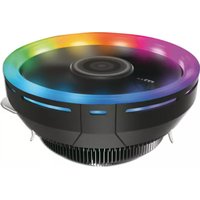
CC-124-ARGB-TB - Ventirad LC-Power - Notice d'utilisation et mode d'emploi gratuit
Retrouvez gratuitement la notice de l'appareil CC-124-ARGB-TB LC-Power au format PDF.


| Type de produit | Ventirad (refroidisseur CPU) |
| Marque | LC-Power |
| Modèle | CC-124-ARGB-TB |
| Dimensions (ventilateur) | 120 x 120 x 25 mm |
| Dimensions totales (radiateur + ventilateur) | 125 x 77 x 155 mm (approx.) |
| Poids | Environ 650 g |
| Matériau du radiateur | Aluminium avec caloducs en cuivre |
| Nombre de caloducs | 4 |
| Ventilateur inclus | 1 x 120 mm ARGB |
| Vitesse du ventilateur | 800 - 1800 tr/min (PWM) |
| Débit d'air maximal | 65 CFM |
| Pression statique | 2,1 mmH2O |
| Niveau sonore | 18 - 32 dB(A) |
| Connecteur ventilateur | 4 broches PWM |
| Éclairage ARGB | Oui, compatible avec les systèmes 5 V 3 broches |
| Compatible sockets Intel | LGA 1700, 1200, 115X, 2011, 2066 |
| Compatible sockets AMD | AM5, AM4, FM2+, FM2, FM1 |
| TDP maximal recommandé | 150 W |
| Pâte thermique | Pré-appliquée |
| Garantie | 2 ans |
| Entretien et nettoyage | Dépoussiérer régulièrement avec un chiffon doux ou air comprimé |
| Sécurité | Ne pas obstruer la circulation d'air, utiliser sur une surface stable |
| Pièces détachées et réparabilité | Ventilateur remplaçable, support de montage disponible |
| Informations générales | Conçu pour les systèmes de jeu et stations de travail |
FOIRE AUX QUESTIONS - CC-124-ARGB-TB LC-Power
Questions des utilisateurs sur CC-124-ARGB-TB LC-Power
0 question sur cet appareil. Repondez a celles que vous connaissez ou posez la votre.
Poser une nouvelle question sur cet appareil
Téléchargez la notice de votre Ventirad au format PDF gratuitement ! Retrouvez votre notice CC-124-ARGB-TB - LC-Power et reprennez votre appareil électronique en main. Sur cette page sont publiés tous les documents nécessaires à l'utilisation de votre appareil CC-124-ARGB-TB de la marque LC-Power.
MODE D'EMPLOI CC-124-ARGB-TB LC-Power
LC-POWER™ LC-CC-124-ARGB-TB
Step 1- Installation
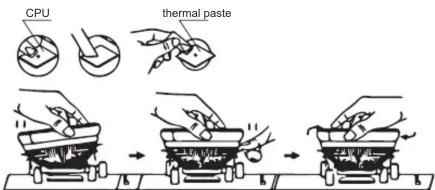
- Remove the transparent sheet from the cooler and the CPU bottom. Now spread some thermal paste evenly on the CPU.
- Clip two sides to each corresponding bracket.
- Connect the cooler fan and the illuminated outer ring to the mainboard.
Intel
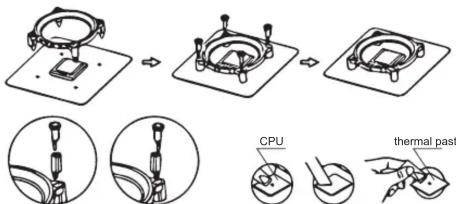
LGA775 LGA115X

AMD
AMD FM1/FM2/AM2/AM2+/AM3/AM3+/AM4
Step 2- Fan and wire connection
- Connect the 4pin PWM connector to the mainboard -> "CPU FAN"
- Connect the 3 pin digital RGB fan cable (B) with the mainboard. Consult your mainboard manual to locate the position of the RGB connector on your mainboard. Colours and modes can be controlled via the mainboard's RGB software (digital RGB/ARGB).
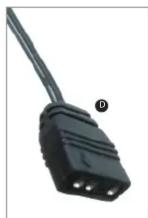
- Some mainboards need the digital RGB adapter cable (D) which must be connected between the 3 pin RGB fan cable (B) and the mainboard itself. So connect the adapter (C) to the 3 pin digital RGB fan cable (B). And now (D) to the mainboard.


LC-POWER™
Silent Power Electronics GmbH,
Formerweg 8, 47877 Willich,
Germany, www.lc-power.com,
Email: support@lc-power.com
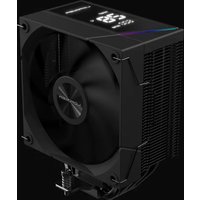
Marque : LC-Power
Modèle : CC-124-ARGB-TB
Catégorie : Ventirad