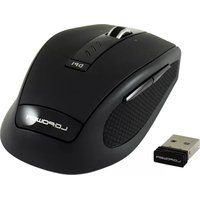
m800BW - Souris LC-Power - Notice d'utilisation et mode d'emploi gratuit
Retrouvez gratuitement la notice de l'appareil m800BW LC-Power au format PDF.


Choisissez votre langue et indiquez votre email : nous vous enverrons une version traduite specifiquement.
| Type de produit | Souris filaire |
| Marque | LC-Power |
| Modèle | m800BW |
| Interface | USB 2.0 |
| Capteur | Optique, 800 DPI |
| Nombre de boutons | 3 (clic gauche, clic droit, molette cliquable) |
| Longueur du câble | 1.5 mètres |
| Dimensions (L × l × H) | 125 × 70 × 40 mm |
| Poids | 100 grammes |
| Alimentation | Via port USB (5 V, 100 mA) |
| Compatibilité | Windows, macOS, Linux (plug & play) |
| Couleur | Noir |
| Matériau | Plastique ABS |
| Fonctions principales | Clic, défilement, pointage |
| Entretien et nettoyage | Nettoyer avec un chiffon doux et sec. Ne pas utiliser de produits chimiques. |
| Sécurité | Ne pas exposer à l'humidité, aux chocs ou aux températures extrêmes. |
| Pièces détachées | Aucune pièce détachable disponible. |
| Réparabilité | Non réparable par l'utilisateur. Contacter le service après-vente. |
| Garantie | 2 ans |
| Contenu de l'emballage | Souris, notice d'utilisation |
FOIRE AUX QUESTIONS - m800BW LC-Power
Comment connecter la souris LC-Power m800BW à mon ordinateur ?
Branchez simplement le câble USB de la souris sur un port USB disponible de votre ordinateur. Le système d'exploitation détectera automatiquement la souris et installera les pilotes nécessaires. Aucune configuration supplémentaire n'est requise.
La souris fonctionne-t-elle sur macOS et Linux ?
Oui, la souris LC-Power m800BW est compatible avec Windows, macOS et Linux. Elle fonctionne en mode plug & play, sans besoin de pilotes spécifiques.
Comment régler la sensibilité (DPI) de la souris ?
Cette souris possède une résolution fixe de 800 DPI. Elle n'intègre pas de bouton de changement de DPI. La sensibilité peut être ajustée via les paramètres de votre système d'exploitation.
La molette de la souris est-elle cliquable ?
Oui, la molette de défilement peut également être utilisée comme un troisième bouton. Un appui sur la molette fonctionne comme un clic central.
Comment nettoyer ma souris LC-Power m800BW ?
Débranchez la souris. Utilisez un chiffon doux et sec pour essuyer la surface extérieure. Pour les zones difficiles, vous pouvez humidifier légèrement le chiffon avec de l'eau. N'utilisez jamais de produits chimiques agressifs.
Que faire si la souris ne fonctionne pas après branchement ?
Vérifiez d'abord que le câble est bien enfoncé dans le port USB. Essayez un autre port USB. Redémarrez votre ordinateur. Si le problème persiste, testez la souris sur un autre appareil. Si elle ne fonctionne toujours pas, contactez le support technique.
La souris est-elle filaire ou sans fil ?
La souris LC-Power m800BW est une souris filaire avec un câble USB d'environ 1,5 mètre.
Quelle est la longueur du câble de la souris ?
Le câble USB mesure environ 1,5 mètre, ce qui offre une liberté de mouvement suffisante pour une utilisation de bureau.
Puis-je utiliser cette souris pour jouer ?
Cette souris est conçue pour une utilisation bureautique et basique. Avec une résolution de 800 DPI et un capteur optique standard, elle ne conviendra pas aux jeux nécessitant une grande précision ou des réglages de sensibilité. Pour le jeu, préférez une souris gaming avec des DPI plus élevés.
Où puis-je télécharger le manuel d'utilisation ?
Le manuel d'utilisation est disponible au format PDF sur notre site notice-facile.com. Vous pouvez le télécharger gratuitement depuis la page produit de la souris LC-Power m800BW.
Questions des utilisateurs sur m800BW LC-Power
0 question sur cet appareil. Repondez a celles que vous connaissez ou posez la votre.
Poser une nouvelle question sur cet appareil
Aucune question pour l'instant. Soyez le premier à en poser une.
Téléchargez la notice de votre Souris au format PDF gratuitement ! Retrouvez votre notice m800BW - LC-Power et reprennez votre appareil électronique en main. Sur cette page sont publiés tous les documents nécessaires à l'utilisation de votre appareil m800BW de la marque LC-Power.
MODE D'EMPLOI m800BW LC-Power


Assistant notice
Powered by Anthropic
En attente de votre message
Informations produit
Marque : LC-Power
Modèle : m800BW
Catégorie : Souris