
Catapult RX4 - Interface audio analogique Radial Engineering - Notice d'utilisation et mode d'emploi gratuit
Retrouvez gratuitement la notice de l'appareil Catapult RX4 Radial Engineering au format PDF.


| Type de produit | Répartiteur audio passif 4 canaux |
| Marque | Radial Engineering |
| Modèle | Catapult RX4 |
| Catégorie | Équipement audio professionnel |
| Nombre de canaux | 4 |
| Type de connecteurs | Entrée XLR femelle, sorties XLR mâles |
| Réponse en fréquence | 20 Hz – 20 kHz |
| Impédance d'entrée | 10 kΩ |
| Impédance de sortie | 600 Ω |
| Atténuation | 0 dB (passif) |
| Alimentation | Aucune (passif) |
| Dimensions (L x l x H) | 12,7 x 10,2 x 4,4 cm |
| Poids | 0,5 kg |
| Matériau du boîtier | Acier |
| Fonctions principales | Distribution du signal audio sans perte, répartition vers plusieurs destinations |
| Entretien et nettoyage | Nettoyer avec un chiffon sec et doux |
| Sécurité | Aucune tension dangereuse, utilisation passive |
| Pièces détachées et réparabilité | Non réparable par l'utilisateur, contacter le service après-vente |
| Informations générales | Garantie limitée de 1 an |
FOIRE AUX QUESTIONS - Catapult RX4 Radial Engineering
Questions des utilisateurs sur Catapult RX4 Radial Engineering
0 question sur cet appareil. Repondez a celles que vous connaissez ou posez la votre.
Poser une nouvelle question sur cet appareil
Téléchargez la notice de votre Interface audio analogique au format PDF gratuitement ! Retrouvez votre notice Catapult RX4 - Radial Engineering et reprennez votre appareil électronique en main. Sur cette page sont publiés tous les documents nécessaires à l'utilisation de votre appareil Catapult RX4 de la marque Radial Engineering.
MODE D'EMPLOI Catapult RX4 Radial Engineering

natural_image
Blue CATAPULT PLC audio recording device with multiple ports and connectors (no visible text or symbols on body)The Catapult RX4 and TX4 act like a typical four-channel analog audio snake; they allow you to send mic or line-level signals from one location to another without signal loss, noise, or interference, and without any digital audio conversion needed. What makes the Catapult system unique is that it utilizes Cat 5 Ethernet cable, which is widely available, lightweight, and economical. Simply connect a shielded Cat 5 cable between any two Catapult modules and they will use the analog conductors in the cable to deliver four balanced audio lines to any destination.
Features
- Three analog stereo inputs for keyboards
• Digital USB connection for laptop soft-synth - Sustain footswitch and switchable effects loop
• Balanced XLR outputs for the PA and monitor outputs for stage
Benefits
- Allows you to easily interface your laptop and soft-synth
- Eliminates the need to carry a large mixer
- Separate control for stage lets you adjust signal as needed
- Transformer isolation eliminates hum and buzz from ground loops
Cool Stuff
• Built-in sustain footswitch eliminates the need to carry one
- Effects loop footswitch lets you activate delay when soloing
- Connect MIDI gear and controllers with your laptop
- Can be used as a high quality 24bit/192kHz recording interface
XLR THRU – Thru output of XLR inputs with optional mic or line-level transformer isolation.
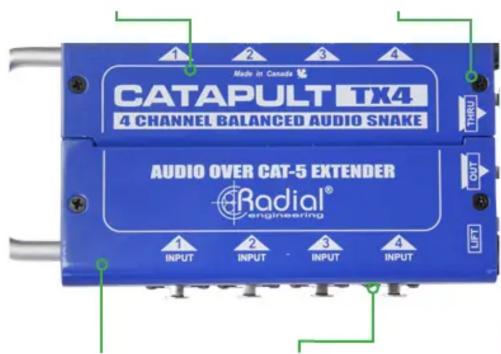
STEEL CHASSIS – 14-gauge steel housing with carrying handle.
XLR INPUTS – Four inputs for connection to balanced mic or line-level analog audio sources.
GROUND LIFT – Lifts the Cat 5 cable ground path to help eliminate ground loop noise.
RJ45 OUTPUT – Standard Ethernet connection for Cat 5 cable used to send audio to the Catapult RX module.

natural_image
Blue industrial electronic device with ports and connectors (no visible text or symbols)RJ45 THRU – Parallel connection from XLR outputs used to feed additional Catapult modules.
Six Models to Choose From:
Catapult modules are available in six configurations, with the option for mic-level or line-level transformers to split & isolate your signals at either the transmit or receive end of the audio snake.
Model: Part No:
TX4 Transmit Module R800 8022 00
RX4 Receive Module R800 8025 00
TX4M (Mic-level transformers) R800 8023 00
RX4M (Mic-level transformers) R800 8026 00
TX4L (Line-level transformers) R800 8024 00
RX4L (Line-level transformers) R800 8027 00

natural_image
Five blue data acquisition devices with ports and connectors, no visible text or labels on the devices themselves.Using the Catapult as a sub snake on stage:
Cleaning up the stage and lowering setup times have become essential components in production. Use the Catapult to create zones on stage for quick deployment.
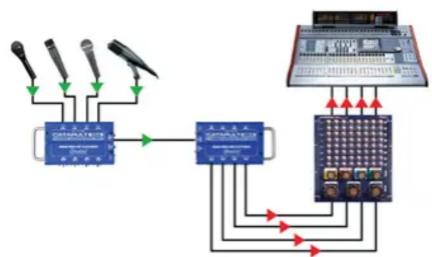
Using the Catapult as a 4-channel mic splitter:
Use the Catapult TX4M to split the mics between the monitor desk and front of house with Eclipse transformer isolation to deliver a noise-free signal, saving hours of tedious trouble shooting.
flowchart
graph TD
    A["Microphones"] --> B["Central Device"]
    C["Microphones"] --> B
    D["Microphones"] --> B
    B --> E["Control Panel"]
    E --> F["Display"]
    style A fill:#f9f,stroke:#333
    style C fill:#f9f,stroke:#333
    style D fill:#f9f,stroke:#333
    style E fill:#ccf,stroke:#333
    style F fill:#ccf,stroke:#333

flowchart
graph TD
    A["Audio System"] -->|Signal| B["Switch"]
    B --> C["Device 1"]
    B --> D["Device 2"]
    C --> E["Output"]
    D --> F["Output"]
    E --> G["Antenna"]
    F --> H["Antenna"]
    G --> I["Radio Station"]
    H --> J["Radio Station"]
    I --> K["Radio Station"]
    J --> L["Radio Station"]
    K --> M["Radio Station"]
    L --> N["Radio Station"]
    M --> O["Radio Station"]
    N --> P["Radio Station"]
    O --> Q["Radio Station"]
    P --> R["Radio Station"]
    Q --> S["Radio Station"]
    R --> T["Radio Station"]
    S --> U["Radio Station"]
    T --> V["Radio Station"]
    U --> W["Radio Station"]
    V --> X["Radio Station"]
    W --> Y["Radio Station"]
    X --> Z["Radio Station"]
    Y --> AA["Radio Station"]
    Z --> AB["Radio Station"]
Marque : Radial Engineering
Modèle : Catapult RX4
Catégorie : Interface audio analogique