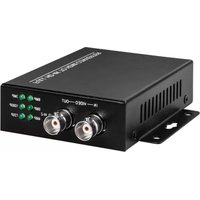
TVAC22400 - Caméra de surveillance ABUS - Notice d'utilisation et mode d'emploi gratuit
Retrouvez gratuitement la notice de l'appareil TVAC22400 ABUS au format PDF.


| Type de produit | Caméra de surveillance |
| Marque | ABUS |
| Modèle | TVAC22400 |
| Résolution | 1920 x 1080 pixels (Full HD) |
| Vision nocturne | Oui, jusqu'à 10 mètres |
| Angle de vue | 90° (diagonale) |
| Type de connexion | Ethernet RJ45 |
| Alimentation | PoE (Power over Ethernet) ou adaptateur secteur 12V DC |
| Consommation électrique | 5 W max |
| Indice de protection | IP67 (extérieur) |
| Dimensions (L x H x P) | 70 x 170 x 60 mm |
| Poids | 350 g |
| Température de fonctionnement | -20°C à +50°C |
| Détection de mouvement | Oui, intégrée |
| Stockage | Carte microSD (max 128 Go) ou enregistrement sur NVR |
| Audio | Microphone intégré, haut-parleur optionnel |
| Compatibilité | ONVIF, navigateur web, application ABUS |
| Montage | Mur ou plafond, kit de fixation inclus |
| Entretien et nettoyage | Essuyer avec un chiffon doux sec ; ne pas utiliser de produits abrasifs |
| Sécurité | Cryptage SSL/TLS, protection par mot de passe |
| Pièces détachées et réparabilité | Non concerné (appareil non réparable par l'utilisateur) |
FOIRE AUX QUESTIONS - TVAC22400 ABUS
Questions des utilisateurs sur TVAC22400 ABUS
0 question sur cet appareil. Repondez a celles que vous connaissez ou posez la votre.
Poser une nouvelle question sur cet appareil
Téléchargez la notice de votre Caméra de surveillance au format PDF gratuitement ! Retrouvez votre notice TVAC22400 - ABUS et reprennez votre appareil électronique en main. Sur cette page sont publiés tous les documents nécessaires à l'utilisation de votre appareil TVAC22400 de la marque ABUS.
MODE D'EMPLOI TVAC22400 ABUS
TVAC22400

D Bedienungsanleitung User manual
Originalbedienungsanleitung in deutscher Sprache. Für künftige Verwendung aufbewahren.
This user manual contains important information for installation and operation. This should be also noted when this product is passed on to a third party. Therefore look after these operating instructions for future reference!
Version 02/2019
CE
D INHALT
Konformitätserklärung.... 3
Merkmale....4
Technische Daten....4
Systembild 5
Anschlüsse 5
Dip-Schalter Funktion – 75 Ω HI-Z Impedanz Schalter....6
Schalterstellung 75 Ω....6
Schalterstellung HI-Z....6
Warnung 6
GB CONTENT
Declaration of conformity 7
Features 8
Specification 8
System overview 9
Connections....9
Dip switch function - 75 Ω HI-Z Impedance switch.... 10
Switch position 75 Ω 10
Switch position HI-Z 10
Warning 10
Konformitätserklärung
Hiermit erklärt ABUS Security-Center, dass das beiliegende Produkt die folgenden Richtlinien, die das Produkt betreffen, erfüllt:
EMV-Richtlinie 2014/30/EU
Nieder-Spannungsrichtlinie 2014/35/EU
RoHS-Richtlinie 2011/65/EU
Die vollständige EU-Konformitätserklärung kann unter folgender Adresse bezogen werden:
ABUS Security-Center GmbH & Co. KG
Linker Kreuthweg 5
86444 Affing
GERMANY
www.abus.com/product/Artikelnummer
(„Artikelnummer“ im Link ist mit der Artikelnummer
des beiliegenden Produktes zu ersetzen)
Merkmale
- Für die Livebildanzeige einer Analog HD Kamera auf einem Monitor
- Für jeden beliebigen Monitor oder TV-Bildschirm mit HDMI
- Ideal geeignet für Verkaufsräume, beispielsweise für Konfrontationsmonitore
- Unterstützt bis 8 MPx TVI, 8 MPx CVI, 5 MPx AHD und CVBS
• Full HD HDMI Ausgang
Technische Daten
| Produkt # | TVAC22400 |
| Abmaße | 110 x 95 x 25 mm |
| Anschlüsse | 1 x Micro USB B für DC, 2 x BNC, 1 x HDMI |
| Ausgang | 1 x HDMI, 1 x BNC (loop out) |
| Gehäusematerial | Aluminium |
| Lieferumfang | 4K Analog HD auf HDMI Konverter, Netzteil |
| Max. Betriebstemperatur | 55 °C |
| Min. Betriebstemperatur | 0 °C |
| Nettogewicht | 0,19 kg |
| Spannungsversorgung | 5 V DC |
| Stromaufnahme | 1000 mA |
| Videoeingang | BNC |
| Videoausgang | Full HD HDMI |
| Videosystem | HD-TVI, HD-CVI, AHD, CVBS |
| HD Kamera-Auflösung | TVI | CVI | AHD |
| 720p | 1280 x 720p25/30/50/60 fps | 1280 x 720p25/30/50/60 fps | 1280 x 720p25/30 fps |
| 1080p | 1920 x 1080p25/30 fps | 1920 x 1080p25/30 fps | 1920 x 1080p25/30 fps |
| 3 MPx | 2048 x 1536p18/25/30 fps | — | 2048 x 1536p18/25/30 fps |
| 4 MPx | 2688 x 1520p15 fps2560 x 1440p15/25/30 fps | 2560 x 1440p25/30 fps | 2560 x 1440p15/25/30 fps |
| 5 MPx | 2592 x 1944P12.5/20 fps | — | 2592 x 1944p12.5/20 fps |
| 4K (8MPx) | 3840 x 216015 fps | 3840 x 216012.5/15 fps | — |
Systembild

flowchart
graph TD
    A["Monitor"] --> B["DVR OUT"]
    B --> C["IN"]
    C --> D["TVI, CVI, AHD or CVBS"]
    D --> E["HDMI Conversion"]
    E --> F["HD-OUT"]
    E --> G["Monitor"]
    style E fill:#f9f,stroke:#333
    style F fill:#ccf,stroke:#333
    style G fill:#cfc,stroke:#333
Anschlüsse

Dip-Schalter Funktion – 75 Ω HI-Z Impedanz Schalter
Schalterstellung 75 Ω
Setzen Sie die Schalterstellung des Impedanz-Schalters auf 75 Ω, wenn am BNC-Eingang eine Kamera angeschlossen ist und der BNC-Ausgang frei bleibt.
Schalterstellung HI-Z
Setzen Sie die Schalterstellung des Impedanz-Schalters auf HI-Z, wenn am BNC-Eingang eine Kamera und am BNC-Ausgang ein Videorekorder oder anderes BNC-Endgerät angeschlossen ist.
Warnung
- Nur für die Verwendung im Innenbereich geeignet
- Öffnen Sie das Gehäuse nicht
- Verwenden Sie das Gerät nicht in direkter Nähe von Flüssigkeiten
- Stecken Sie keine spitzen Gegenstände in die Öffnungen
Declaration of conformity
ABUS Security-Center hereby declares that the enclosed product complies with the requirements of the following directives concerning the product:
EMC Directive (2014/30/EU)
Low Voltage Directive (2014/35/EU)
RoHS Directive (2011/65/EU)
The full EU declaration of conformity can be obtained from the following address: ABUS Security-Center GmbH & Co. KG
Linker Kreuthweg 5
86444 Affing
GERMANY
www.abus.com/product/Itemnumber
('Item number' in the link to be replaced with
the article number of the enclosed product)
Features
- For the live image display of an analog HD camera on a monitor
- For any monitor or TV screen with HDMI
- Ideal for sales rooms, for example for confrontation monitors
• Supports up to 8 MPx TVI, 8 MPx CVI, 5 MPx AHD and CVBS
• Full HD HDMI output
Specification
| Item # | TVAC22400 |
| Dimensions | 110 x 95 x 25 mm |
| Connections | 1 x Micro USB B for DC, 2 x BNC, 1 x HDMI |
| Output | 1 x HDMI, 1 x BNC (loop out) |
| Housing material | Aluminum |
| Scope of delivery | 4K Analog HD to HDMI Converter, power supply |
| Max. operating temperature | 55 °C |
| Min. operating temperature | 0 °C |
| Net weight | 0,19 kg |
| Voltage supply | 5 V DC |
| Power consumption | 1000 mA |
| Video input | BNC |
| Video output | Full HD HDMI |
| Video system | HD-TVI, HD-CVI, AHD, CVBS |
| HD camera resolution | TVI | CVI | AHD |
| 720p | 1280 x 720p25/30/50/60 fps | 1280 x 720p25/30/50/60 fps | 1280 x 720p25/30 fps |
| 1080p | 1920 x 1080p25/30 fps | 1920 x 1080p25/30 fps | 1920 x 1080p25/30 fps |
| 3 MPx | 2048 x 1536p18/25/30 fps | — | 2048 x 1536p18/25/30 fps |
| 4 MPx | 2688 x 1520p15 fps2560 x 1440p15/25/30 fps | 2560 x 1440p25/30 fps | 2560 x 1440p15/25/30 fps |
| 5 MPx | 2592 x 1944P12.5/20 fps | — | 2592 x 1944p12.5/20 fps |
| 4K (8MPx) | 3840 x 216015 fps | 3840 x 216012.5/15 fps | — |
System overview

flowchart
graph TD
    A["Monitor"] --> B["DVR OUT"]
    B --> C["IN"]
    C --> D["TVI, CVI, AHD or CVBS"]
    D --> E["HD-OUT"]
    E --> F["Hdmi Output"]
    F --> G["Monitor"]
    style A fill:#f9f,stroke:#333
    style B fill:#ccf,stroke:#333
    style C fill:#cfc,stroke:#333
    style D fill:#fcc,stroke:#333
    style E fill:#ffc,stroke:#333
    style F fill:#cff,stroke:#333
Connections

Dip switch function - 75 Ω HI-Z Impedance switch
Switch position 75 Ω
Set the switch position of the impedance switch to 75 Ω, if the BNC input is connected to a camera and the BNC output stays free.
Switch position HI-Z
Set the switch position of the impedance switch to HI-Z, if the BNC input is connected to a camera and the BNC output is connected to a video recorder or a different BNC terminal device.
Warning
- For indoor use only
- Do NOT open the casing
- Do NOT use near water
- Do NOT insert sharp objects
(D) Impressum
Diese Bedienungsanleitung ist eine Publikation der ABUS Security-Center GmbH & Co. KG, Linker Kreuthweg 5, 86444 Affing. Alle Rechte einschließlich Übersetzung vorbehalten.
Reproduktionen jeder Art, z.B. Fotokopie, Mikroverfilmung, oder die Erfassung in elektronischen Datenverarbeitungsanlagen, bedürfen der schriftlichen Genehmigung des Herausgebers.
Nachdruck, auch auszugsweise, verboten.
Diese Bedienungsanleitung entspricht dem technischen Stand bei Drucklegung.
Anderung in Technik und Ausstattung vorbehalten.
GB Imprint
These operating instructions are published by ABUS Security-Center GmbH & Co.KG, Linker Kreuthweg 5, 86444 Affing, Germany. No reproduction (including translation) is permitted in whole or part e.g. photocopy, microfilming or storage in electronic data processing equipment, without the express written consent of the publisher.
The operating instructions reflect the current technical specifications at the time of print.
We reserve the right to change the technical or physical specifications.
© Copyright 02/2019 by ABUS Security-Center
- TVAC22400
- D Bedienungsanleitung User manual
- D INHALT
- GB CONTENT
- Konformitätserklärung
- Merkmale
- Dip-Schalter Funktion – 75 Ω HI-Z Impedanz Schalter
- Schalterstellung 75 Ω
- Schalterstellung HI-Z
- Warnung
- Declaration of conformity
- Features
- System overview
- Connections
- Dip switch function - 75 Ω HI-Z Impedance switch
- Switch position 75 Ω
- Switch position HI-Z
- Warning
- Impressum
- GB Imprint
Marque : ABUS
Modèle : TVAC22400
Catégorie : Caméra de surveillance